Ink AI – Tattoo design maker
- 880.00
- 3.6
- Installs
- 1.00M
- Price
- Free

Screenshots
Analysis by Reviewed
I think the most useful way to approach Ink AI is as a sketching companion, not a substitute for a tattoo artist or a promise that a design is ready to take straight to the chair. A generated image can help me put a vague idea into words and pictures, but it still needs a human eye to judge whether it will work on skin, at the intended size, and over time. That distinction matters: the app can help with exploration, while the final decision deserves more care.
Where a generated idea helps
For example, if I’m considering a small botanical tattoo but can’t settle on the balance between fine lines and a bolder look, I can use a design app to explore directions before asking an artist for advice. I’d save a few options that capture the mood I want, rather than treating one image as a finished instruction. That gives the consultation a clearer starting point and leaves room for the artist to adapt the composition to my body and preferences.
This is also a practical choice for someone who enjoys experimenting but isn’t ready to book a tattoo. The key trade-off is that an attractive screen image may contain details that are too delicate or crowded for the eventual placement. I would treat the output as a conversation aid, check how it reads when reduced to the intended size, and ask a tattoo professional to assess the final version.
Trust, choices, and a sensible workflow
Because tattoo ideas can be personal, I’d be thoughtful about what I choose to enter or share. Before uploading any image or posting a design, I would look at the app’s on-screen choices and privacy information, and avoid including identifying details unless they are genuinely needed. I can’t judge data handling from a design preview alone, so I wouldn’t assume that a feature’s convenience tells me how an image is stored or used.
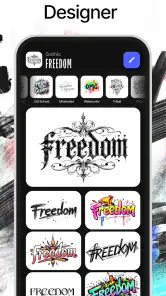
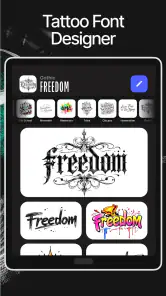
A careful workflow also reduces disappointment: write down the idea in plain language, generate or collect a few alternatives, then compare them for shape and legibility rather than picking only the most dramatic result. If the design includes lettering, I’d check every character and spacing myself before showing it to an artist. A font preview can inspire a direction, but a spelling mistake or awkward line break matters far more once it becomes permanent.
How to judge a design before you get attached
I’d also compare ideas in black and white before getting distracted by color or decorative effects. Strong contrast and a recognizable silhouette are useful tests: if the central shape disappears when I glance at the image quickly, it may be too busy for the location or size I have in mind. This is not a substitute for an artist’s assessment, but it helps me bring a more considered shortlist to the conversation.
Another helpful habit is to separate the concept from the rendering. I might like the way a generated image presents a moon, flower, or animal, while wanting the artist to redraw it in a different line weight or simplify the surrounding details. I’d note what I actually want to preserve—such as the pose, mood, or overall outline—so the reference is a starting point rather than an instruction to copy every mark.
More From Our News Desk

Weather by Xiaomi Review: Clear at a Glance, Less Clear Up Close

X Under Pressure: Can It Recover When Posting Goes Wrong?

Clash of Clans Is Won Between the Battles

Android Auto Makes the Case for Quieter Car Software

MobiOffice: Transforming Mobile Productivity with Seamless Integration

EA SPORTS FC™ Mobile Soccer: Redefining Mobile Sports Gaming
Who benefits most from an AI starting point
The app makes the most sense to me for people who have a theme but not yet a visual plan. A first-time tattoo client may know they want something connected to a memory, hobby, or place, but struggle to explain the idea. Exploring images can turn that vague feeling into a few concrete choices to discuss with an artist. It can also suit someone who already has tattoos and wants to test a new direction before booking a consultation.
By contrast, I wouldn’t choose an AI design tool if I already have a precise drawing, need exact technical control, or want the work to be made entirely by a particular tattoo artist. In those cases, direct collaboration or a drawing app may be a better fit. The useful question is not whether a generated result looks impressive on a phone, but whether it helps me communicate what I want more clearly.
Have you ever found yourself scrolling through endless images of tattoos online, only to feel more confused about what you really want? That’s where Ink AI – Tattoo Design Maker steps in, acting almost like your personal tattoo artist, right in your pocket. Let’s dive into what makes this app a must-have for anyone considering a new tattoo.
Unleashing Creativity with Ink AI
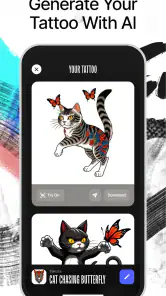
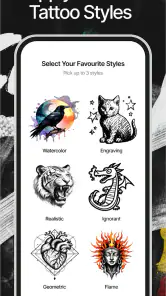
Ink AI – Tattoo Design Maker is not just another tattoo app; it’s a game-changer. The app uses advanced artificial intelligence to help you design custom tattoos that are unique and personal. You start by selecting from a vast library of tattoo styles and designs, and then the fun begins. The AI allows you to tweak and modify these designs to fit your personal style, making sure your tattoo is one-of-a-kind.
Easy to Use Interface
Let’s talk about ease of use. The interface is super intuitive, which means you don’t have to be a tech wizard to navigate it. As soon as you open the app, you're greeted with a sleek design that guides you seamlessly through the tattoo creation process. Whether you're a seasoned tattoo enthusiast or a first-timer, the app is designed to be inclusive for all.
Features that Stand Out
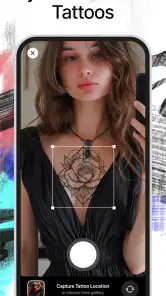
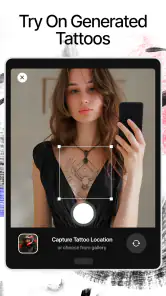
One of the standout features of this app is the ability to visualize your tattoo on your skin before committing. You can use your phone's camera to try on tattoos virtually. It’s like having a fitting room for your ink! This feature is particularly helpful if you're indecisive or just want to see how a design might look in a specific spot.
Additionally, the app offers a social platform where you can share your designs and get feedback from a community of tattoo lovers. This not only helps in refining your designs but also provides inspiration from others who are on the same journey.
AI-Powered Personalization
The AI-powered personalization is what really sets this app apart. It learns from your preferences, suggesting designs based on your previous choices. It's like having a personal tattoo artist who knows exactly what you like. Plus, with regular updates, the app keeps introducing new styles and trends, ensuring that your tattoo ideas are always fresh and innovative.
Choosing it for the right reason
Ink AI is a free Art & Design app from RefaceEuropeUAB, with an average rating of 3.6 from around 15,000 ratings and more than one million installs. Its Everyone age rating makes it accessible to a broad audience, though anyone planning a tattoo should remember that an app’s age label is not advice about whether a particular design is suitable. The app was released on February 6, 2024, and version 1.3.10 lists Android 7.0 as the minimum operating system.
I’d choose it over a general image search when I want to shape a specific concept, and over a basic drawing app when I want an AI-assisted starting point rather than a blank canvas. Those alternatives can be better if I need precise control, established artist references, or a fully hand-built sketch. Ink AI’s strongest role is helping me explore possibilities quickly, not deciding which one should become permanent.
Costs and commitment
The app is free to start, with in-app purchases ranging from $3.99 to $42.99 per item. I’d first work out what I can do without paying, then check the purchase screen carefully before choosing anything; the range makes it worth understanding the specific offer rather than assuming every tool is included. If I only want to test a couple of ideas, I would avoid paying until I know the available workflow suits me.
For an everyday use case, imagine having a tattoo consultation later in the week and only a loose idea today: a small symbol that mixes a plant and a personal motif. I’d use the app to compare a few visual directions, save the most readable versions, and bring those references to the artist. I would not rely on a virtual placement preview as proof that the design will fit perfectly; body contours, scale, and the artist’s technique all affect the real result.
Making the preview useful, not misleading
A camera preview can answer a limited but useful question: does the general placement look appealing to me at a glance? I would not use it to settle exact dimensions or assume that a design follows the skin naturally. Phone angles, lighting, and the way a person holds their arm can all change how an overlay appears. To get more value, I’d take the preview as a quick prompt, then describe the placement in person and ask the artist to assess it on my actual body.
I’d also keep a small reference set rather than showing an artist a long stream of unrelated options. Three contrasting directions can communicate more than a folder of near-duplicates: one for shape, one for style, and one for the feeling I want the tattoo to convey. That makes it easier to explain which parts matter and which are flexible, without expecting a generated picture to solve every design decision.
Sharing and personal boundaries
Community feedback can be useful for reactions to a concept, but popularity is not the same as sound tattoo advice. I’d ask people whether the image reads clearly or what mood it gives them, rather than treating likes as a vote on what should go on my skin. I would also think carefully before sharing anything that reveals a personal story I would rather keep private. A design can be meaningful without its background being public.
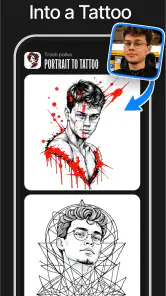
For anything involving a face, name, or other identifying element, I’d be especially deliberate about what I submit and where I choose to share it. The app’s visible options and privacy information are the sensible places to check before using personal material. That cautious approach is not a claim that the app handles images in a particular way; it is simply a good boundary when using any creative service with personal content.
Final Thoughts
In a world where tattoos are a significant form of self-expression, Ink AI – Tattoo Design Maker offers a unique tool to bring your ideas to life. It combines technology with creativity, making the tattoo design process not only easier but also more enjoyable. Whether you're planning your first tattoo or adding to your collection, this app could be the perfect companion. So, why not give it a try and see your tattoo ideas come to life?
My cautious recommendation is to use it for brainstorming, then let a qualified tattoo artist refine any design you’re seriously considering. I’d skip it if I want guaranteed professional artwork, detailed control over every line, or reassurance about image handling without first reviewing the app’s visible choices and privacy information. For curious first-timers and people who need a visual prompt, it can make the early planning stage more concrete; the permanent decision, though, should remain yours and your artist’s.
Ink AI – Tattoo design maker Frequently Asked Questions
Who develops Ink AI – Tattoo Design Maker, and is it a widely used app?
Ink AI – Tattoo Design Maker is an Art & Design app developed by RefaceEuropeUAB. It has been installed over one million times and has an average rating of 3.6 from around 15,000 ratings, giving new users a sense of its reach and reception. Those figures are only one part of the picture, so it is still worth considering whether its tattoo-focused tools match what you want to create.
When was Ink AI – Tattoo Design Maker released, and what version is available?
Ink AI – Tattoo Design Maker was released on February 6, 2024, and its current version is 1.3.10. Knowing the version can be useful when comparing the app with information on your device’s app store or checking whether you are looking at the current release. Once installed, review the app’s available tools to see how they fit your tattoo-design workflow.
Does Ink AI – Tattoo Design Maker cost anything to download or use?
Ink AI – Tattoo Design Maker is free to download, so you can try the app without paying upfront. It also offers in-app purchases, with items ranging from $3.99 to $42.99, so some options may require payment. Check the purchase details shown in the app before choosing one, and consider whether its available tools fit your needs before spending.
What is Ink AI – Tattoo Design Maker?
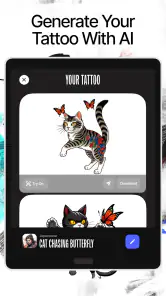
Ink AI – Tattoo Design Maker is an innovative app designed for anyone interested in creating unique tattoo designs. Leveraging advanced AI technology, it allows users to generate custom tattoo art based on their preferences and inspirations. Whether you're a professional tattoo artist or a tattoo enthusiast, this app provides an intuitive platform for exploring and designing creative tattoo ideas. Its store summary also highlights tattoo design creation, tattoo font design, and stencil making, giving users several tattoo-focused ideas to explore.
How does the AI feature work in Ink AI – Tattoo Design Maker?
The AI feature in Ink AI – Tattoo Design Maker utilizes machine learning algorithms to analyze and interpret user inputs, such as style preferences, themes, and inspirations. By processing this data, the AI generates a variety of tattoo design options that align with the user's vision. This feature enhances creativity by offering unique design suggestions that may not have been considered otherwise. Treat the generated concepts as a starting point and review them carefully to make sure a design matches the details you have in mind.
Pros
- User-friendly interface for easy navigation.
- Wide variety of tattoo styles to choose from.
- Customization options for personal touch.
- High-quality designs for realistic previews.
- Regular updates with new design trends.
Cons
- Limited free features in the app.
- Requires stable internet for design download.
- Some designs locked behind paywall.
- Occasional app crashes reported by users.
- Ads can be intrusive during design sessions.
- Category
- Art & Design
- Version
- 1.3.10











