

Indiana Farm Bureau
- 34.00
- 3.1
- Installs
- 10.00K
- Price
- Free

Screenshots
Analysis by Reviewed
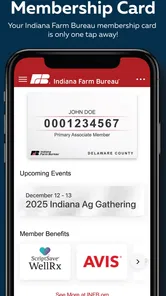
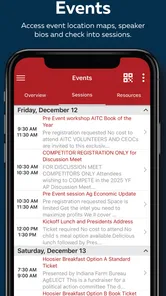
I approached Indiana Farm Bureau as a practical events app rather than as a general-purpose tool. Its role is fairly focused: it represents Indiana Farm Bureau on a mobile device and gives members or interested users a more direct way to stay connected with the organization’s activities. That narrow purpose is important, because it tells you immediately who is likely to benefit and who may find it unnecessary.
In my experience, the app makes the most sense when several people in a household have different schedules but share an interest in Indiana Farm Bureau events. One person might check it while planning the week, then pass along the relevant details to a partner, parent, or older child. It is not something I would install simply to fill a phone with another news feed. I would install it when the organization’s events and updates are personally relevant.
How Indiana Farm Bureau fits into everyday household planning
The strongest use case is simple coordination. Imagine a household where one adult is involved with Indiana Farm Bureau, another manages the family calendar, and a teenager occasionally needs to know where an activity is taking place. Instead of relying on a message that may be buried later, the person responsible for checking organization-related information can use the app as the starting point, then share the useful details through the household’s normal communication method.
That workflow has an important limitation: the app should not be treated as a replacement for a shared calendar, messaging service, or full event-planning platform. Its value is in helping you find or follow Indiana Farm Bureau-related information; the actual division of responsibilities still happens elsewhere. I found that distinction helpful because it prevents unrealistic expectations. The app can support coordination, but it does not turn a family’s phones into one synchronized planning system.
For a shared-device household, I would keep the app on the phone used by the person who normally handles organization-related information. If several people use the same device, it is worth agreeing on who checks it and when. That small habit avoids the common problem of everyone assuming somebody else has already looked at an event detail.
There is also a useful privacy boundary here. A household can use one person’s access to review relevant information without giving every family member control over the account or device. I would not pass a logged-in phone around casually if it contains personal account information. A better routine is to show the specific event or update needed, then return the device to its owner.
What the setup tells you about the app
The application comes from IN Farm Bureau and is listed as a free app for the Events category. That makes the first decision easy: there is no purchase barrier to testing it, so a member or interested household can install it and decide whether it fits their routine. The content rating is Everyone, which makes it suitable for general household consideration, although that label should not be confused with a promise that every event is designed for children.
More From Our News Desk

 Gmail
GmailGmail in a Busy Inbox: Who Benefits Most?
From first account to crowded workday, Gmail earns its place through dependable search and flexible sorting—but its best fit depends on how much inbox maintenance you can tolerate.

 Prime Video
Switching to Prime Video: What Changes in Your Viewing Routine
Prime Video can make a compelling second home for streaming, but switching means learning a different catalog, rental layer, and route from browsing to playback.

 Universal TV Remote Control
Universal TV Remote Control Works Best as a Reliable Backup
A phone remote earns its place through quick setup and reliable habits. Here is how to get more from Universal TV Remote Control—and where its limits show.

 Weather - By Xiaomi
Weather by Xiaomi Review: Clear at a Glance, Less Clear Up Close
Xiaomi’s weather app makes everyday forecasts quick to scan, but its calm surface can leave useful details and recovery paths harder to find than they should be.

 X
XX Under Pressure: Can It Recover When Posting Goes Wrong?
A resilience-focused review of X, examining setup, mistaken posts, interruptions, weak connections, and the gaps that matter when recovery needs to be dependable.

 Clash of Clans
Clash of Clans Is Won Between the Battles
Its raids are quick; its community is a long-term project of coordination, teaching, rivalry, and shared responsibility—with all the friction that entails.
Latest News



I would still begin with one clear question: who is the intended user in this home? If the answer is a member who wants organization-specific event access, the installation has a logical purpose. If the answer is a child looking for a broad entertainment app, this is the wrong choice. Its identity is tied to Indiana Farm Bureau, not to games, social discovery, or a universal local-events directory.
Account boundaries deserve attention during setup. If the app asks you to sign in or presents member-oriented areas, use the details of the person whose relationship with Indiana Farm Bureau is being represented. Do not create a confusing shared arrangement where several people use one person’s credentials without understanding who is responsible for the account. Even in a family, separating personal access from shared household planning is cleaner.
On Android, the listed minimum operating system is version 7.0, so the app is aimed at devices that are not limited to the newest phones. That can be useful in a household with an older spare device. At the same time, an older operating system does not guarantee an identical experience across every phone. Screen size, system condition, and the way the device is maintained can still affect comfort and reliability.
The current version is 3.10, while the app’s release date is November 15, 2017. I read that combination as a sign of an established product rather than a brand-new experiment. It also means I would keep expectations grounded: the app may be useful for its specific purpose, but I would not assume it offers the depth, polish, or broad integrations of a modern all-in-one planning platform.
Coordinating without turning the app into the family calendar
The most practical approach is to use the app as an information checkpoint. Before a busy week, the household member connected with Indiana Farm Bureau can review the relevant material, identify anything that affects travel or availability, and then add those commitments to the family’s existing calendar. This two-step method is less glamorous than automatic synchronization, but it is easier to understand and less likely to create confusion about who owns the schedule.
A useful habit is to record the information that matters immediately after checking it. If an event affects more than one person, add the date, location, and responsible attendee to the household calendar or send a short message. I would not rely on memory after closing the app. The app may help you discover or review an event, but the family still needs a visible place where commitments are tracked.
This is also where the app compares differently with usual alternatives. A general calendar is better for shared reminders, recurring appointments, school activities, and household chores. A broad local-events app may offer more variety if you are searching for entertainment or community activities beyond Indiana Farm Bureau. A messaging app is faster for confirming plans with relatives. Indiana Farm Bureau only wins when the information you need is specifically connected to the organization.
That specialization can actually be an advantage. A general events service may overwhelm you with unrelated listings, while this app keeps the context closer to the organization it represents. For someone who already has a reason to follow Indiana Farm Bureau, that focused path can be more useful than browsing a large catalog of events that do not apply.
My practical tip is to decide in advance what counts as “actionable.” For one household, that may be an event requiring travel. For another, it may be a meeting or activity that one person needs to mention to the rest of the family. Defining that boundary prevents constant checking and keeps the app from becoming another source of digital noise.
Age, trust, and shared access
The Everyone rating makes the app approachable for a mixed-age household, but I would still keep the account holder in charge. A child may be able to look at general information with a parent, yet that does not mean the child should manage membership-related access or make decisions on behalf of an adult. The sensible boundary is supervision based on responsibility, not simply on whether the app can be viewed by younger users.
I also would not assume that a family member understands the difference between public event information and personal account information. If an older child or another relative helps coordinate plans, show them only what they need. This is especially important on a shared phone, where an open session can be mistaken for a communal account that everyone is free to use.
Trust works both ways. The person who checks the app should tell the household when information has changed or when an event requires a decision. Other family members should avoid editing or changing anything they do not understand. This simple agreement matters more than installing the app on every device, because duplication can create uncertainty about which person is actually keeping track.
For older adults, the app may be worthwhile if they prefer checking organization-specific information on a phone rather than using a browser or depending on someone else. I would help with the first setup, make sure the app is easy to find, and explain what the app is for in plain language. I would not present it as a complete communication system. A relative may still need to help with transportation, reminders, or follow-up questions outside the app.
For teenagers, the best use is usually supervised awareness rather than independent account management. They can learn what an Indiana Farm Bureau event involves and understand how household commitments are coordinated, while the adult member retains control of personal access. That arrangement respects both usefulness and responsibility without pretending the app includes family-management features.
Where the app feels limited
The clearest weakness is its narrow audience. If you are not connected to Indiana Farm Bureau or do not expect to use information associated with it, the app may have little reason to remain on your phone. A free download is still a cost in storage, attention, and maintenance, so I would remove it if it does not become part of a real routine.
The average rating is 3.1 from around 75 ratings, with 34 written reviews. I would treat that as a reason to test the app personally rather than as a final verdict. A middling score suggests that the experience may not satisfy everyone, but it does not explain which situations caused frustration. For a focused organization app, relevance matters more than popularity: the right user may find it useful even if a casual visitor does not.
Another limitation is that the app should not be confused with a full event-management service. I would not choose it when my main goal is to invite a large group, collect responses, assign tasks, manage transportation, or maintain a detailed shared itinerary. Those jobs are usually handled more effectively by calendar, messaging, or planning tools designed around collaboration.
I would also avoid making it the only source of information for an important household commitment. Mobile apps can be overlooked, and people can miss updates when they do not check regularly. For anything that affects several people, confirm the details through the household’s established communication method and keep the final plan somewhere everyone can see.
There is a trade-off between focus and flexibility. The organization-specific context is the reason to use this app, but that same focus means it cannot replace a broader community-events service. If you are comparing several local activities across different organizations, a general events platform will probably save time. If your question is specifically about staying connected with Indiana Farm Bureau, the focused option is more logical.
Who should install it, and who should skip it?
I would recommend trying it if you are an Indiana Farm Bureau member, regularly participate in related activities, or help a household member keep track of them. It can serve as a convenient reference point and make it easier to turn organization-specific information into a usable family plan. The free price also makes experimentation straightforward.
I would skip it if you are looking for entertainment, a general calendar, a social network, or a directory covering every event in your area. Those needs call for different tools. I would also skip it if nobody in your household has a practical reason to follow Indiana Farm Bureau. Installing an app simply because it is available rarely leads to lasting value.
For someone deciding between this app and a browser, I would choose based on frequency. Occasional visitors may be perfectly happy using a browser and sharing information manually. Regular users may appreciate having an app icon ready on the phone, especially when one household member routinely checks organization-related information. The app’s advantage is convenience within its own narrow context, not a claim to replace every alternative.
If you are deciding whether to place it on a shared tablet, I would do so only when that tablet has a clear household role. A kitchen or family-room device can work as a reference point, but it should have an agreed owner and a simple rule about account access. Otherwise, a personal phone is safer and less confusing because responsibility is obvious.
My household verdict
Indiana Farm Bureau is a focused Events app from IN Farm Bureau, and I think its success depends almost entirely on relevance. It is not trying to be a universal planning tool. For the right user, that concentration can make it a useful part of staying aware of organization-related activities; for everyone else, it may feel too limited to justify regular use.
I like the idea of using it as the first step in a household workflow: the connected member checks the app, identifies what matters, and then places the final commitment in the family’s normal calendar or conversation. That approach respects account boundaries, avoids pretending the app provides family controls, and gives each person a clear responsibility.
The app has reached over 10 thousand installs, so it has found an audience beyond a handful of early testers. Still, I would judge it by your own routine rather than by that reach or by the average score. The important question is whether it helps your household access Indiana Farm Bureau information more comfortably than the alternatives you already use.
My recommendation is cautious but positive for members and involved families: install it, explore its event-related usefulness, and give it a defined place in your planning process. Keep a separate calendar for shared commitments, keep personal access with the appropriate adult, and do not expect the app to coordinate the entire household by itself. Its real value is focused access, not all-purpose family management.
Indiana Farm Bureau Frequently Asked Questions
What kind of app is Indiana Farm Bureau, and who publishes it?
Indiana Farm Bureau is an events-focused app published by IN Farm Bureau, and its store summary identifies it as the organization’s official app. It is intended as a mobile companion for people interested in Indiana Farm Bureau, especially members looking for organization-related information and services. The app is free to download and is rated for everyone, making it suitable for a broad audience.
What is the Indiana Farm Bureau app used for?
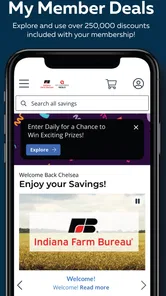
The Indiana Farm Bureau app is designed to give members convenient access to organization-related information and services from a mobile device. Depending on your membership and location, you may be able to view news and updates, find local events, access member resources, review benefits, and connect with Indiana Farm Bureau programs. It is primarily a companion tool for members rather than a general farming simulator or agricultural marketplace.
Do I need to be an Indiana Farm Bureau member to use the app?
Some features may be available to anyone who downloads the app, such as general news, public information, or event details. However, member-only tools, personalized account information, benefits, and certain services may require valid Indiana Farm Bureau credentials. If you are not a member, the app can still help you learn about the organization, but you may need to join or contact Indiana Farm Bureau to unlock the complete experience.
How do I sign in or access my Indiana Farm Bureau account?
After installing the app, look for the sign-in or member-access option and enter the credentials associated with your Indiana Farm Bureau account. New users may need to register through the organization’s official website or complete an enrollment process before signing in. If your password does not work, use the available recovery option or contact Indiana Farm Bureau support instead of repeatedly attempting uncertain login details.
Can the app help me find Indiana Farm Bureau offices, agents, or events?
The app may provide tools for locating Indiana Farm Bureau offices, agents, local activities, educational opportunities, or member events, although the exact information shown can depend on the current version and your region. These features are useful when you need contact details or want to stay informed about nearby programs. It is still wise to confirm schedules and availability before traveling to an event or office.
Pros
- Useful member resources and agricultural updates in one place.
- Quick access to insurance and Farm Bureau service information.
- Simple design makes key sections easy to find.
- Helpful for staying informed about local farming events.
- Convenient mobile access for Indiana Farm Bureau members.
Cons
- Some features may require an active Farm Bureau membership.
- Content can feel limited for users outside Indiana agriculture.
- Insurance details may redirect users to external pages.
- Updates and event information may not appear frequently.
- App usefulness depends on the services available in your county.











