

ImOn Whole Home Wi-Fi
- 32.00
- 4.2
- Installs
- 10.00K
- Price
- Free

Screenshots
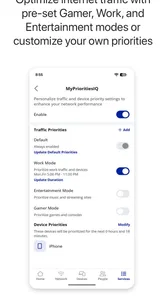
Analysis by Reviewed
Home Wi-Fi is easy to ignore when everything works, but it becomes the first thing I investigate when a video call freezes, a smart device drops offline, or a family member complains that the connection feels slow. ImOn Whole Home Wi-Fi is designed for that exact relationship with the network: it gives ImOn customers a mobile way to monitor and control their home Wi-Fi rather than treating the router as a box that disappears into a cupboard.
I reviewed it as a practical House & Home app, not as a speed-test toy or a general internet utility. That distinction matters. Its value depends on how much control your ImOn home setup exposes through the app and how often you want to check or adjust that environment from a phone. If your main goal is to compare broadband providers or diagnose every possible networking problem, this is not the right kind of tool. If you want a simpler view of your household connection, it makes considerably more sense.
How the app fits into everyday network life
The most important thing to understand is that this is a network-dependent experience. The app is useful because it connects you with your home Wi-Fi arrangement, so its central tasks naturally rely on communication between the phone, the service and the equipment installed at home. That makes the app feel less like a standalone utility and more like a remote control for part of the household.
In a normal morning, I would not open it just to admire a dashboard. I would use it when something needs attention: checking the state of the home network before an important call, looking for a simple way to manage access, or reviewing the connection after someone says that a room has become unreliable. The benefit is not constant entertainment; it is reducing the number of times I need to guess whether the problem is the phone, the router, the room or the wider service.
That network relationship also creates the app’s first limitation. A mobile interface cannot repair every cause of poor connectivity. A damaged cable, an outage outside the home, interference from nearby networks or a failing device may still require support or a different diagnostic method. I appreciate the app most when I treat it as a control and visibility layer, not as a promise that every connection problem can be solved with a tap.
What monitoring changes in a busy household
Monitoring is especially useful when several people share one connection. A household network is rarely used by one device at a time: phones move between rooms, televisions stream, laptops handle work, and connected home products quietly depend on the same service. Without a central view, troubleshooting often becomes a conversation based on impressions. One person says the internet is down, another says it works fine, and nobody knows whether the issue is local or limited to one device.
The app gives that conversation a more practical starting point. I can first inspect the home network through the phone, then decide whether the next step is moving closer to the Wi-Fi equipment, reconnecting a device, waiting for the service to recover or contacting ImOn. That sequence sounds simple, but it prevents a common waste of time: repeatedly restarting unrelated devices before checking the network itself.
More From Our News Desk

 Gmail
GmailGmail in a Busy Inbox: Who Benefits Most?
From first account to crowded workday, Gmail earns its place through dependable search and flexible sorting—but its best fit depends on how much inbox maintenance you can tolerate.

 Prime Video
Switching to Prime Video: What Changes in Your Viewing Routine
Prime Video can make a compelling second home for streaming, but switching means learning a different catalog, rental layer, and route from browsing to playback.

 Universal TV Remote Control
Universal TV Remote Control Works Best as a Reliable Backup
A phone remote earns its place through quick setup and reliable habits. Here is how to get more from Universal TV Remote Control—and where its limits show.

 Weather - By Xiaomi
Weather by Xiaomi Review: Clear at a Glance, Less Clear Up Close
Xiaomi’s weather app makes everyday forecasts quick to scan, but its calm surface can leave useful details and recovery paths harder to find than they should be.

 X
XX Under Pressure: Can It Recover When Posting Goes Wrong?
A resilience-focused review of X, examining setup, mistaken posts, interruptions, weak connections, and the gaps that matter when recovery needs to be dependable.

 Clash of Clans
Clash of Clans Is Won Between the Battles
Its raids are quick; its community is a long-term project of coordination, teaching, rivalry, and shared responsibility—with all the friction that entails.
Latest News



There is also a useful distinction between monitoring and control. Seeing that the network is present does not automatically explain why a particular bedroom has a weak experience. Likewise, changing a setting does not guarantee that an older phone, television or smart appliance will behave better. I would make one change at a time and then test the device that originally caused the complaint. That creates a clearer cause-and-effect trail than changing several things together.
Using it from a phone rather than standing beside the router
The mobile format is the app’s strongest practical idea. If I have to walk to the router every time I want to check something, the task becomes easy to postpone. A phone lets me investigate while I am already in the room where the problem occurs. That is valuable because Wi-Fi quality is partly about location: a connection that seems fine beside the equipment may feel very different at the far end of the home.
A realistic example is a remote-work afternoon. My laptop is connected, but a meeting becomes unstable in a back room. Instead of immediately blaming the laptop, I can use the app to check the home network while staying near that workspace. If the network appears normal, I can focus on the room, the laptop or the meeting service. If the wider network looks abnormal, I have a better reason to wait, reposition equipment or ask ImOn for help. The app does not remove the investigation, but it makes the first decision less random.
The same approach helps when guests arrive. Rather than handing out technical instructions or searching for router details, I can use the phone as the starting point for managing the home Wi-Fi environment. I would still keep expectations realistic: the app is tied to the ImOn setup, so it is most useful to the account holder or household member who manages that service, not to every visitor who connects temporarily.
When the connection fails and recovery is not immediate
Failure is where I judge a network app most harshly. A polished interface is not enough if it leaves me unsure what to do after the connection disappears. With this app, the first practical step is to separate a phone problem from a home-network problem. If the phone itself has no usable internet path, some remote actions may be delayed or unavailable, while the local Wi-Fi equipment may still be operating. That is why I would check the phone’s connection and, when possible, another household device before drawing a conclusion.
Recovery should be deliberate rather than frantic. I would avoid repeatedly tapping controls, changing multiple settings and restarting everything at once. A better workflow is to note what failed, check the network state in the app, allow a short moment for changes to take effect, and then test the original device again. If the issue affects the whole household or continues after basic checks, the sensible next step is ImOn support rather than treating the app as a replacement for technical assistance.
This is one of the trade-offs of a connected management app: it can make recovery clearer when the service is reachable, but it cannot be independent of the network it manages. I would not choose it on the assumption that it provides a universal emergency channel during every outage. Its role is strongest before a failure becomes severe, when I can still inspect the setup and make informed adjustments.
There is a psychological advantage here too. When a family member reports “the Wi-Fi is broken,” I can use the app to turn that vague complaint into a more specific question. Is the home network visible? Is the issue isolated to one location? Did the problem begin after a device moved rooms? Those questions do not solve every fault, but they reduce unnecessary resets and make a support conversation more useful.
Mobile use, privacy-minded habits and household boundaries
Because the app places network management on a phone, I would think about who should use it and when. The account holder may want quick access, while other household members may only need the Wi-Fi itself. Keeping management with one or two trusted people is a sensible habit, particularly in a shared home where an accidental change could interrupt someone else’s work or entertainment.
I also prefer checking only when there is a reason. A network-management app can become distracting if I constantly refresh it looking for a perfect status. The better use is event-driven: open it when a device has trouble, when the household schedule changes, or when I need to verify that a previous adjustment had the intended effect. That keeps the phone from becoming another source of unnecessary alerts or worry.
For data-conscious users, the important point is that the app’s usefulness is tied to communication with the home Wi-Fi service. I would avoid assuming that every screen or action works without a connection. If I am away from home, I would use the app only when I genuinely need to manage or inspect the home setup, rather than expecting it to behave like a self-contained offline reference. That is a practical expectation, not a criticism: remote control has to communicate with something.
On a limited mobile plan, I would also prefer using the app while connected to a trusted Wi-Fi network whenever that is convenient, especially for repeated checks. The app is not something I would open continuously in the background without a clear purpose. This habit is less about the app consuming a known amount of data and more about avoiding needless network activity from any connected management tool.
Where it stands beside usual alternatives
The usual alternative is often the router’s own web interface. That route can expose technical information and settings, but it may feel intimidating on a phone, require remembering an address or password, and force me to stand near the equipment while I investigate. ImOn Whole Home Wi-Fi is more approachable for everyday household management because its purpose is presented through a mobile experience connected to the ImOn service.
Another alternative is calling support immediately. Support is still the better choice for outages, account issues and faults that need provider-side action. The app earns its place before that call by helping me describe the situation more accurately. I can avoid saying only “the internet is bad” and instead explain whether the issue seems limited to one device or affects the home network more broadly.
General networking apps are useful for people who want broad diagnostics, signal experiments or tools that work across different providers. I would choose one of those when I need independent testing or when my internet service is not ImOn. The focused nature of this app is both its strength and its boundary: it is more relevant to an ImOn household than a generic tool, but less useful outside that environment.
There is also a difference between this app and simply changing Wi-Fi settings through a phone’s operating system. The phone settings can forget a network, reconnect or show basic connection information, but they do not represent the home network as a household system. This app is aimed at the service and equipment side, which is why it can be more useful when the problem is bigger than one handset.
Who will get the most from it
I think the app is a good fit for ImOn customers who want a less technical way to stay involved with their home Wi-Fi. It suits people who manage a shared connection, work from home, look after connected household devices or simply want a first check before contacting support. It is also a reasonable choice for someone who dislikes navigating a traditional router interface and prefers handling basic network tasks from a familiar mobile device.
The app is less compelling for someone who does not use ImOn home service, has no need to manage a household network, or wants advanced independent diagnostics. A networking enthusiast may find a provider-focused app too narrow compared with dedicated tools. Someone who expects guaranteed recovery during a complete service outage may also be disappointed, because the app’s usefulness depends on the communication path and the equipment behind it.
Compatibility is worth checking before installing. The current release is version 26.2.1 and requires at least iOS or Android 10, so older phones below that system level are not suitable. The app is free and rated for Everyone, which makes it easy to consider for a household, but “free” should not be confused with independent internet service: the app manages the ImOn home Wi-Fi experience rather than replacing the connection itself.
What its adoption says, and what I noticed about maturity
The application was released on August 30, 2022, and it has reached over ten thousand installs. Its average rating is 4.2 from around eighty-six ratings, with roughly thirty-two written reviews. I read those figures as signs of a useful but fairly focused household tool rather than a mass-market app that everyone needs. The rating is encouraging, while the relatively modest volume means I would not treat it as a universal verdict for every phone model or home setup.
It comes from ImOn Communications, LLC, which is important context. This is not an independent router brand trying to support every provider; it is part of the ImOn customer experience. That focus can make the app more coherent for the intended audience, but it also means my recommendation is conditional. I would first ask whether the person already relies on ImOn home Wi-Fi. If the answer is no, the app’s central purpose does not match their situation.
One of the less obvious benefits of that focus is accountability. When a network issue crosses from home equipment into the provider’s service, a provider-linked app gives me a more logical place to begin than a random third-party utility. The less obvious drawback is dependence on the provider’s ecosystem. I would not expect the same value after switching services, and I would avoid building my entire troubleshooting routine around a tool that only makes sense within one network relationship.
My practical routine for getting value from it
I would set it up before a problem occurs, not during a stressful outage. After installation, I would become familiar with the main monitoring and control areas while the home connection is working normally. That gives me a baseline: I know what the ordinary network state looks like and where to look when a device later becomes unreliable.
When trouble appears, I would follow a short sequence:
Check whether the problem affects one device, one room or several parts of the home.
Open the app and inspect the home Wi-Fi state before changing anything.
Make one relevant adjustment rather than several unrelated changes.
Wait briefly, then test the device and location that originally failed.
If the issue remains broad or returns quickly, contact ImOn with the observations already gathered.
That workflow is more valuable than repeatedly opening the app without a question in mind. It also protects against a common mistake: assuming that a control shown in a mobile interface is automatically the correct fix. I use the app to narrow the problem, not to experiment blindly with the household connection.
I would also keep a simple mental distinction between coverage and service quality. If the app shows the network is operating but a particular room remains troublesome, the next investigation should focus on placement, obstacles, the device itself or the local radio environment. If many devices fail together, the provider or central equipment becomes more likely. The app helps me organize that reasoning, but it does not turn every Wi-Fi symptom into a single diagnosis.
My connectivity verdict
After using it as a home-management tool, I see ImOn Whole Home Wi-Fi as a focused companion for people already inside the ImOn ecosystem. Its best moments are ordinary ones: checking the network from the room where a problem occurs, making household Wi-Fi management less intimidating, and gathering useful context before deciding whether support is needed.
I would recommend it to an ImOn customer who wants convenient mobile oversight and does not need a laboratory of advanced networking tools. I would not recommend choosing it as a general-purpose Wi-Fi analyzer, an alternative to broadband support or a guaranteed solution for a complete outage. Those expectations go beyond its natural role.
The final trade-off is straightforward. You gain a more accessible connection to your home Wi-Fi, but that convenience depends on the ImOn service, compatible equipment and a working communication path. For the right household, that is a fair exchange. The app is most useful when it turns network uncertainty into a calm first check, helping me decide what to do next instead of promising that every failure can be fixed from a phone.
For that reason, I would keep it installed if I managed an ImOn home network, particularly in a busy household where connection problems affect work, entertainment and smart devices at the same time. It is not flashy, and it should not be judged as though it were. Its value is practical: fewer guesses, a clearer starting point and more convenient control over the Wi-Fi environment I already depend on.
ImOn Whole Home Wi-Fi Frequently Asked Questions
Is ImOn Whole Home Wi-Fi free to download?
ImOn Whole Home Wi-Fi is free to download, so you can install it without paying for the app itself. You will still need an eligible ImOn internet account and compatible service to use its network controls. The app is in the House & Home category and is published by ImOn Communications, LLC.
What devices and software versions can run ImOn Whole Home Wi-Fi?
The app is available for Android and iOS, and the Android version requires Android 10 or later. Before downloading, check that your device meets the operating system requirement and has enough available storage for installation. Keeping your phone’s software current can also help with compatibility and security when using account and network management features.
What is ImOn Whole Home Wi-Fi?
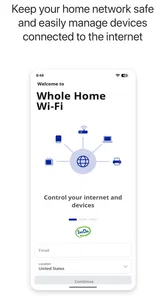
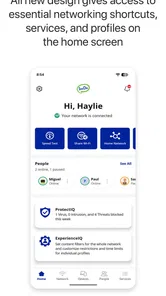
ImOn Whole Home Wi-Fi is a companion app for managing a compatible ImOn home internet and Wi-Fi service. After signing in, users can typically view their network, manage connected devices, create guest access, adjust parental controls, and troubleshoot common connection issues. Available features may depend on your ImOn plan, router, and installed equipment.
Can I use ImOn Whole Home Wi-Fi without an ImOn internet account?
No. The app is designed for ImOn customers using compatible ImOn internet equipment or a supported managed Wi-Fi service. You will generally need valid account credentials and an active service connection to access network controls. If the app does not recognize your login or equipment, contact ImOn support to confirm that your plan and gateway are eligible.
What can I manage through the ImOn Whole Home Wi-Fi app?
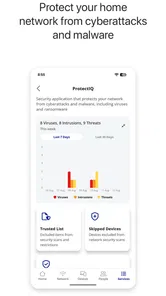
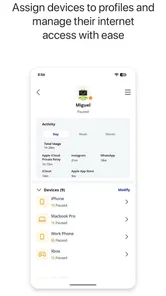
The exact controls can vary by equipment, but the app is intended to provide convenient management of your home network. Depending on your setup, you may be able to see connected devices, rename them, pause or resume internet access, configure guest Wi-Fi, review network information, and use parental-control features. Some advanced settings may remain available only through customer support or another router interface.
Pros
- Simple setup through the companion mobile app
- Helps eliminate weak Wi‑Fi spots across larger homes
- Provides one network name for seamless room-to-room roaming
- Useful parental controls and device management options
- Can make troubleshooting easier with connection diagnostics
Cons
- Requires compatible ImOn service and equipment
- Advanced settings may be limited for experienced users
- Performance depends on node placement and home layout
- Some features may require an active subscription or rental plan
- App usefulness is reduced when the internet connection is offline







