

Illinois Tollway
- 3.20K
- 4.1
- Installs
- 1.00M
- Price
- Free
Screenshots
Analysis by Reviewed
Have you ever been stuck in traffic on a road trip, wishing there was a smoother way to travel? Well, if you're cruising through Illinois, the Illinois Tollway app might just become your best travel buddy. Let me take you through my experience with this handy app that promises to make your tollway commute as seamless as possible.
Who Gets the Most Use From a Tollway-Specific App?
I’d put regular Illinois tollway drivers at the top of the list. If your work commute or weekly errands often include these roads, having a dedicated place to handle toll-related tasks can be more convenient than searching for the right service each time. It is also useful for out-of-state visitors who have already driven on a toll road and need to sort out an unpaid toll afterward.
For a one-time visitor, the decision is less automatic. The app is free, but installing it and becoming familiar with an account-based process still takes attention. If you are making one short trip and already have a straightforward way to pay, a separate app may add little value. I’d consider how likely I am to use Illinois toll roads again, and whether I want a record of payments, before making it part of my travel routine.
A Better Routine Before and After a Drive
My most useful tip is to split the task into two quiet moments: check what I need before setting off, then review payment activity after I have parked. That approach avoids trying to remember details while driving and makes it easier to spot an account or plate mistake while there is time to address it. I would not wait until I am approaching a toll point to install the app, create an account, or troubleshoot a sign-in problem.
For example, imagine visiting family in Illinois and taking a tollway route that was not part of the original plan. I’d focus on driving safely, note the trip when stopped, and deal with the toll account later. If another person is in the car, they may be able to help with a phone task, but I would still avoid distracting the driver. This is a small workflow choice, yet it makes a payment app much more useful in real travel conditions.
The account history can also serve as a practical check after several drives. Rather than relying on memory, I can look back at the recorded activity when reviewing travel expenses or confirming that I handled a toll. That is especially handy for people who drive for work or share a vehicle, though I would not assume the app’s record replaces any separate bookkeeping they need to keep.
What It Does Better Than General Travel Apps
General map and navigation apps are designed to help with broad route decisions: where to turn, how to reach a destination, and how to respond to traffic along the way. The Illinois Tollway app has a more specific role. When the task is dealing with an Illinois tollway payment or checking activity tied to that service, a focused tool is a more sensible place to start than a general map.
More From Our News Desk

 Weather - By Xiaomi
Weather by Xiaomi Review: Clear at a Glance, Less Clear Up Close
Xiaomi’s weather app makes everyday forecasts quick to scan, but its calm surface can leave useful details and recovery paths harder to find than they should be.

 X
XX Under Pressure: Can It Recover When Posting Goes Wrong?
A resilience-focused review of X, examining setup, mistaken posts, interruptions, weak connections, and the gaps that matter when recovery needs to be dependable.

 Clash of Clans
Clash of Clans Is Won Between the Battles
Its raids are quick; its community is a long-term project of coordination, teaching, rivalry, and shared responsibility—with all the friction that entails.

 Android Auto
Android Auto Makes the Case for Quieter Car Software
The car interface is no longer judged by how much it can do, but by how quietly it helps. Android Auto shows what drivers now expect—and what still gets in the way.

 MobiOffice: Word, Sheets, PDF
MobiOffice: Transforming Mobile Productivity with Seamless Integration
MobiOffice: Word, Sheets, PDF is redefining mobile productivity with a surprising blend of functionality and innovation.

 EA SPORTS FC Soccer Mobile 26
EA SPORTS FC™ Mobile Soccer: Redefining Mobile Sports Gaming
Dive into EA SPORTS FC™ Mobile Soccer, where immersive gameplay and strategic depth transform mobile sports gaming.
Latest News



That focus is also a limit. I would not use it as my only travel app for a long journey across state lines, because a tollway service is not the same as a full navigation planner. My preferred setup is to use a navigation app for the entire route and keep the tollway app for its service-specific tasks. Someone who wants one app to plan every leg, compare destinations, and manage all travel details may find this one too narrow.
It is also worth distinguishing paying an unpaid toll from managing every possible part of a trip. The app’s central purpose is useful, but I would not assume that installing it automatically settles a toll or that every account issue can be resolved without checking the details. I’d read each confirmation carefully and keep a note of any action that still needs follow-up.
The Illinois Tollway app is free and comes from the Illinois Tollway itself, which gives it a direct connection to the service it supports. It is listed in Travel & Local, is rated for Everyone, and has a 4.1 average from around 29,000 ratings. More than 500,000 installs suggest it is a familiar option for many drivers, though popularity alone does not tell me whether its controls will suit my needs.
What Does the Illinois Tollway App Offer?
First off, the app is designed to provide real-time information on tollway routes, which can be a lifesaver when you're trying to avoid unexpected delays. As soon as I logged in, the interface felt intuitive, showing me a map of Illinois with all the major tollway routes highlighted. It's like having a little GPS buddy that knows all the ins and outs of the state’s road network. But there’s more to it than just maps!
Readability and Navigation
On a quick check before leaving, a map is useful because it gives me a visual starting point instead of making me search through text. I’d treat it as a planning aid, not as a replacement for a navigation app: the map helps me orient myself around Illinois toll roads, while a dedicated navigation tool is better for turn-by-turn directions and choosing a complete route. That distinction matters if I’m crossing the state rather than simply checking tollway information.
The app is free, and it comes from the Illinois Tollway, so its focus is narrower than a general travel app. That can be a strength when I want tollway-specific help, but it also means I wouldn’t expect it to handle every part of a journey. It is rated for Everyone, and its current version is 3.12.0; the developer has released it for Android devices running version 6.0 or later. For iPhone users, I’d check the relevant app store for compatibility before relying on it for a trip.
Real-Time Traffic Updates
One of the standout features for me was the real-time traffic updates. Whether it’s an accident up ahead or just regular congestion, the app keeps you informed. I found this particularly useful during rush hour, as it allowed me to adjust my departure time and avoid sitting bumper-to-bumper. It's like having a traffic helicopter in your pocket!
Motor and Sensory Considerations
For me, the most accessible way to use a road app is to check it while parked, before traffic demands my attention. A map can be easier to scan than a string of road names for some people, but small text, glare, or a busy visual display can still make phone use tiring. I wouldn’t try to read or tap through it while driving; setting up what I need in advance is safer and less stressful.
If someone has limited dexterity, low vision, or finds screen interaction difficult, the practical question is whether their phone’s own display and input settings make the app comfortable to use. I would test the key steps at home rather than assume every control will suit every user. The app’s usefulness should not depend on managing a fiddly screen while on the road.
Easy Toll Payments
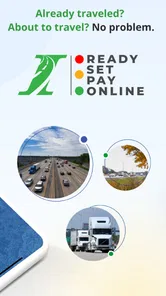
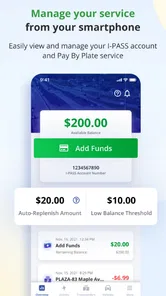
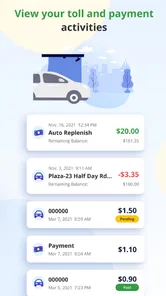
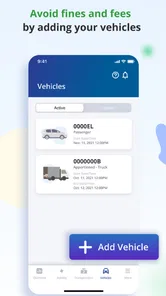
The app also simplifies toll payments, which is a huge plus. No more scrambling for change or waiting in long lines at toll booths. With the app, you can set up an account, link your license plate, and pay your tolls automatically. The process was smooth, and I appreciated the detailed transaction history available at my fingertips. It's one less thing to worry about on the road!
That payment workflow is especially helpful after an unplanned drive: I can make a note of the trip, then check the account history later instead of trying to remember which tolls I passed. I’d still verify the plate and account details carefully before depending on them, since an error there could undermine the convenience. If I only drive Illinois toll roads occasionally, I’d weigh the setup effort against paying individual unpaid tolls; for frequent local trips, having a familiar account process may be worth it.
Situational Access and Trade-Offs
A realistic use case is a visitor who takes an unexpected Illinois tollway exit during a busy day. Once safely parked, they can use the app to deal with unpaid tolls and review the account activity afterward. The key is to separate the urgent driving task from the payment task: I would not stop on a shoulder or handle account setup in moving traffic. If a passenger is available, they can help with the phone, but the driver should keep attention on the road.
Compared with a general map app, this one is more relevant when the question is specifically about Illinois Tollway payments. A broad navigation app may be the better choice for route planning across several states, while the tollway app is the more focused tool for its own service. I’d use them together rather than expect one to replace the other. It is most useful to Illinois residents, regular tollway commuters, and visitors who have incurred an unpaid toll; someone who never uses these roads has little reason to keep it installed.
Roadside Assistance
Ever been stranded on the side of the road with no idea what to do? The Illinois Tollway app has got you covered with its roadside assistance feature. This was a game-changer for me, offering peace of mind knowing that help is just a tap away. Whether it’s a flat tire or engine trouble, the app connects you to the nearest service provider. It’s like having a friend you can call when you’re in a bind.
Remaining Barriers
I’d be cautious about treating any one app as a complete answer to a roadside emergency. If the phone battery is low, reception is poor, or using the screen is uncomfortable, a digital route to help may be harder to use at exactly the wrong moment. I’d keep the phone charged, pull over somewhere safe when possible, and make sure I know how to contact help another way if the app is not practical. That preparation matters more than assuming a tap will always solve the problem.
The same practical caution applies to payments. Before a trip, I’d check that I can sign in and that the account details I plan to use are correct, rather than discovering a problem after driving through a toll. For occasional visitors, that small bit of preparation helps decide whether setting up an account is worthwhile or whether another payment route is simpler for their particular trip.
Inclusive Verdict
Illinois Tollway is a focused travel-and-local app from the Illinois Tollway, rather than an all-purpose road companion. It has a 4.1 average from around 29,000 ratings, and more than 500,000 installs show that it has found a substantial audience. Those figures tell me it is established, but they don’t guarantee that every screen or workflow will suit every person.
For me, the strongest reason to use it is practical: it brings Illinois tollway tasks together in one place, and the payment history can make later checks easier. The main trade-off is that it asks users to interact with an account and a phone, so it is not automatically the easiest option for a one-off driver or someone who struggles with small-screen controls. I’d recommend it to people who regularly travel on Illinois toll roads, while occasional visitors should first consider how often they will need its specific tools.
In conclusion, the Illinois Tollway app is more than just a tool for paying tolls. It’s a comprehensive travel companion that enhances your journey through the state. With its user-friendly interface and practical features, I found it to be an essential download for anyone traveling through Illinois. So next time you hit the road, make sure to have this app on your phone. Trust me, your future self will thank you!
Illinois Tollway Frequently Asked Questions
What does the Illinois Tollway app help me do before or after a trip?
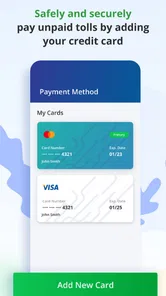
The Illinois Tollway app is a travel and local app from Illinois Tollway, focused on tollway services. Its main purpose is to let drivers safely and securely pay unpaid tolls on the Illinois Tollway. The published app description also presents it as a tool for managing tollway transactions, so it may be useful to keep available when handling toll-related tasks from your phone.
Is the Illinois Tollway app suitable for someone who only occasionally uses Illinois toll roads?
It can still be relevant if you use Illinois toll roads only now and then, especially if you need to deal with an unpaid toll. The app focuses on Illinois Tollway services rather than general travel planning, so its usefulness depends on whether you have toll-related tasks to handle. Drivers who use those roads more often may have more reason to keep it installed for convenient access.
Is the Illinois Tollway app free, and what devices can run it?
The Illinois Tollway app is free to download and is intended for Android and iOS users. For Android, it requires version 6.0 or later, so checking your device’s operating system before installing is a sensible first step. The app is categorized for everyone and focuses on tollway services, making it relevant to drivers who want to manage toll-related tasks from a phone.
Who develops the Illinois Tollway app, and is it widely used?
The app is developed by Illinois Tollway and is listed in the Travel & Local category. It has been installed by more than 500,000 users, with an average rating of 4.1 from around 29,000 ratings. Those figures offer a quick sense of its reach and reception, though individual experiences can differ depending on what features a driver needs and how often they use Illinois toll roads.
What is the Illinois Tollway app and what does it offer?
The Illinois Tollway app is a mobile application designed to help users manage tollway transactions conveniently. It offers features such as account management, real-time traffic updates, tollway maps, and the ability to calculate toll costs. This app is ideal for frequent travelers on Illinois toll roads, providing a streamlined experience to manage your tollway usage effectively.
Pros
- Easy to navigate interface
- Real-time traffic updates
- Quick toll payment options
- Low data usage
- Detailed route information
Cons
- Limited offline functionality
- Occasional app crashes
- High battery consumption
- Requires account login for full access
- Limited customer support











