iHeartRadio for Google TV
- 44.00
- 3.2
- Installs
- 1.00M
- Price
- Free

Screenshots
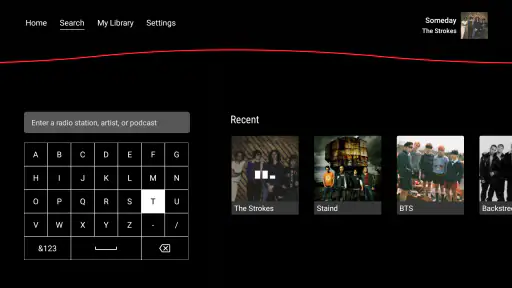
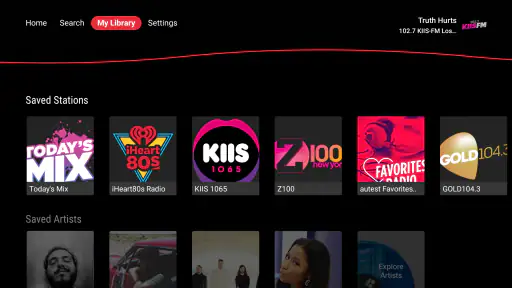
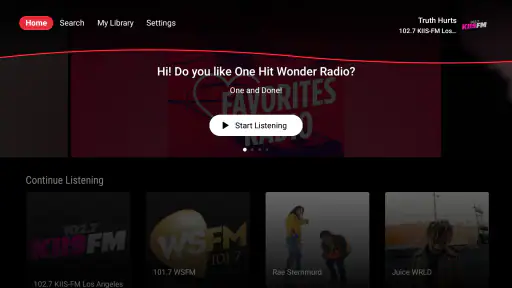


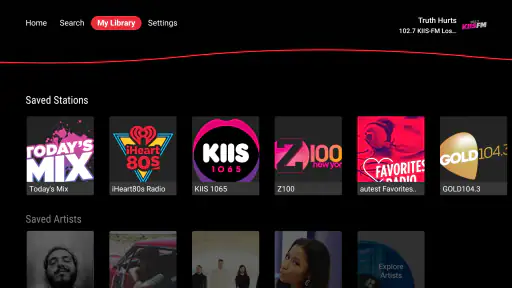
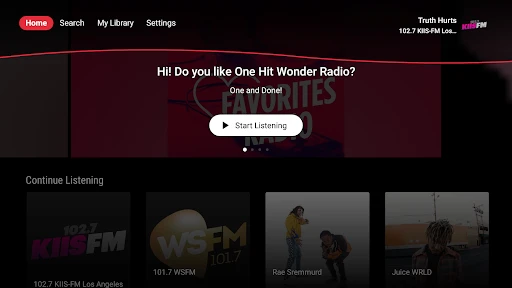
Analysis by Reviewed
The first appeal of iHeartRadio for Google TV is easy to understand: it puts music, radio-style listening and podcasts on the screen you may already have on in the background. I like that as a low-effort way to fill a quiet room without deciding on an album first. The app is free to install, though optional in-app purchases range from $1 to $9.99 per item, so I’d treat it as an easy trial rather than assume every part of the experience has no cost.
What feels useful after the first week
For a household that takes turns choosing what to play, the mix of familiar stations and spoken audio can be more useful than a music-only app. I can picture starting a station while making dinner, then switching to a podcast once everyone has settled in. That kind of casual handoff is where the TV format makes sense: it turns audio into a shared-room habit instead of another pair of headphones and a phone screen.
It is also a practical choice when I want something on but don’t want to keep building a queue. Compared with a service centered on albums and carefully arranged playlists, radio-style discovery asks less of me upfront. The trade-off is control: if I want a specific sequence of tracks or a precise listening library, a dedicated on-demand music service may suit me better.
Small habits that make TV listening easier
I’d set up a few dependable starting points rather than browse from scratch every time: one familiar music direction for everyday background listening, a different mood for guests, and a podcast choice for a quieter stretch. This keeps the remote in my hand for less time and gives the app a clear role in the room. Voice control can help when it works naturally in your setup, but I’d keep the remote nearby rather than make speech the only way to start playback.
A useful trade-off with any TV audio app is that the screen can invite more browsing than listening. If I’m choosing something for a quick chore, I’d pick a station before I start, then let it run instead of turning a ten-minute task into a long search. For focused listening, headphones and a phone may still be the more comfortable option.
Music and More at Your Fingertips
Imagine a world where your favorite radio stations, podcasts, and playlists are just a click away. That’s exactly what iHeartRadio for Google TV offers. Right from the moment you install it, you’re greeted with a clean and user-friendly interface. Browsing through the app is a breeze, thanks to its intuitive design. Whether you're in the mood for the latest hits, classic rock, or even a podcast on your favorite topic, it's all there waiting for you!
Customization and Personalization
One of the features I absolutely love is the level of customization. You can create your own stations based on your favorite songs or artists. It's like having a DJ that knows exactly what you want. The app learns from your listening habits and curates content that suits your taste. It’s quite impressive how well it adapts over time!
More From Our News Desk

Clash of Clans Is Won Between the Battles

Android Auto Makes the Case for Quieter Car Software

MobiOffice: Transforming Mobile Productivity with Seamless Integration

EA SPORTS FC™ Mobile Soccer: Redefining Mobile Sports Gaming

How Microsoft OneDrive Became a Mobile Productivity Giant

How Google Translate Breaks Language Barriers Effortlessly
That personalization is most helpful when I give it a little direction and then judge the results over several listening sessions, rather than expecting every first suggestion to land. I’d use station creation to reduce repeated searching, while keeping a familiar station as a fallback when I want something predictable. If I’m very particular about exact track order, that flexibility may not replace a hand-built playlist.
Seamless Integration with Google TV
Let’s talk about how well it integrates with Google TV. The app feels like an extension of the Google TV ecosystem. It’s smooth, seamless, and doesn’t require any complicated setups. Plus, the fact that you can control it using your Google Assistant makes it even more convenient. Just a simple voice command and your favorite station is playing. It's these small details that enhance the overall user experience.
For a shared TV, ease of starting playback matters more than having a deep control panel. Still, I’d check that the app fits the way people in the home actually use the screen: if the TV is usually off, or if everyone prefers private listening, a phone-based audio app is likely to earn more regular use. Google TV integration is a convenience, not a reason by itself to keep another app installed.
Exploring New Content
If you’re someone who loves discovering new content, you’re in for a treat. The app features a robust selection of podcasts and talk shows across various genres. From comedy to true crime, there’s something for everyone. And with the curated playlists, you can explore music you might not have discovered otherwise. It’s like opening a treasure chest of audio content!
Discovery is also where tastes can diverge. A broad mix is helpful if several people share the room, but it may feel less focused than choosing a podcast app for spoken shows or a dedicated music service for a particular artist. I’d use the range as a way to find something new, then keep only the stations and programs I actually return to. That small bit of curation makes the app feel less like an endless catalogue and more like a useful shortcut.
Who should keep it installed?
I think it makes the most sense for listeners who want a TV to provide easy background audio, enjoy moving between music and spoken programs, and don’t need to control every song. It is less compelling for someone who mainly watches TV for video, expects a tightly managed music library, or dislikes browsing with a remote. The best test is whether it becomes part of a routine—morning coffee, cooking, or winding down—rather than whether the first session feels impressive.
iHeartMedia, Inc. develops this free music-and-audio app, which is rated for Everyone and has been available since June 26, 2014. It has a 3.2 average from 266 ratings and more than 1 million installs, so its reach is clear even if user satisfaction is mixed. Version 4.11.0 supports Android 5.1 and later. I’d take the modest rating as a reason to judge the app on your own TV and listening habits, not as a guarantee that every setup will feel equally smooth.
Keeping the experience fresh
Novelty can fade if I keep opening the app only to scroll through the same broad choices. To avoid that, I’d rotate between a few stations and podcasts, and occasionally use a listening session to find one new option worth saving in my routine. The point is not to keep exploring forever; it is to make starting audio quicker over time. If recommendations stop feeling relevant, switching to a more focused alternative is a sensible choice rather than a failure to use the app correctly.
For a realistic weeknight, I’d start music while preparing dinner, leave it playing while eating, and switch to a podcast later if the room is still in listening mode. That is a modest job, but one a TV can do comfortably when the content is easy to reach. I would not rely on this setup for an exact playlist or uninterrupted private listening; those needs are better served by alternatives built around personal libraries or headphones.
In a world where music streaming services are a dime a dozen, iHeartRadio for Google TV manages to stand out by offering a comprehensive entertainment package that caters to varied tastes. Whether you're a music aficionado, a podcast junkie, or someone who loves catching up on talk shows, there's a little something for everyone. So, if you’re looking to elevate your TV audio experience, give this app a whirl. You might just find your new favorite way to enjoy all things audio!
iHeartRadio for Google TV Frequently Asked Questions
What devices can run iHeartRadio for Google TV?
iHeartRadio for Google TV is intended for Google TV devices, giving you a way to listen through your television rather than relying on a phone or computer. The app requires Android 5.1 or later, so check your device’s software compatibility before downloading. Its content rating is Everyone, making it suitable for a broad audience.
What is iHeartRadio for Google TV?
iHeartRadio for Google TV is a streaming service that allows users to listen to thousands of live radio stations from across the country, create personalized music stations, and access podcasts directly from their Google TV device. It provides a seamless listening experience by integrating various audio content sources and is designed to cater to diverse music and talk interests.
Is iHeartRadio for Google TV free to use?
Yes, iHeartRadio for Google TV offers a free version that provides access to a wide variety of radio stations and music playlists. However, for users seeking an ad-free experience, unlimited skips, and offline listening, there is an option to upgrade to iHeartRadio Plus or All Access, which are premium subscription services. The app is free to download, and in-app purchases are listed at prices ranging from $1.00 to $9.99 per item.
Can I create custom playlists on iHeartRadio for Google TV?
While iHeartRadio for Google TV allows users to create personalized music stations based on their favorite artists or genres, it does not support creating custom playlists in the traditional sense. Instead, users can enjoy a tailored listening experience by selecting preferences, which the app uses to curate music stations.
Does iHeartRadio for Google TV offer podcasts?
Yes, iHeartRadio for Google TV provides access to a wide range of podcasts across different genres, including news, sports, comedy, and entertainment. Users can browse and stream popular podcasts directly from their Google TV, making it a versatile platform for both music and spoken-word content enthusiasts.
Pros
- User-friendly interface with easy navigation.
- Wide selection of live radio stations.
- Customizable playlists and favorites.
- High-quality streaming experience.
- Free version available with decent features.
Cons
- Limited offline listening options.
- Ads in the free version can be intrusive.
- Requires stable internet for optimal use.
- Some features locked behind a paywall.
- Occasional app crashes reported by users.

- Category
- Music & Audio
- Version
- 4.11.0