

iHeart: Music, Radio, Podcasts
- 686.71K
- 4.6
- Installs
- 50.00M
- Price
- Free

Screenshots




Analysis by Reviewed
I judge audio apps not only by what they play, but by how easily I can find something that suits my attention, routine, and listening environment. iHeart brings music, radio, and podcasts together, which is useful when I want to switch between a familiar station and a show without keeping several audio apps in rotation. That breadth is its clearest strength, though it also means the experience may feel busier than a service focused on just one kind of listening.
Making the interface easier to approach
When I’m deciding whether an audio app will work for someone with different visual or cognitive needs, I pay attention to whether its choices feel understandable without a long setup. iHeart puts several listening formats in one place, so a new listener can think in familiar terms—station, music, or podcast—rather than first learning a complicated audio system. I’d still recommend exploring it when you have time, because a broad selection can mean more browsing than a single-purpose app.
A useful first step is to choose one route into the app and make it part of a routine. Someone who wants a predictable start could save a favorite station, while a listener who prefers a defined topic can begin with a podcast. That reduces repeated searching and can make the app easier to revisit, especially for someone who finds open-ended menus tiring. The trade-off is that discovery and choice are central to the experience; listeners who need a very limited set of options may find a simpler radio or podcast app less demanding.
Listening without relying on constant screen use
Audio can help when reading a screen is uncomfortable or when your hands are occupied, but it does not make every task automatically accessible. I’d set up a station or episode before starting an activity that needs my attention, then leave the phone alone as much as possible. This is a safer and calmer workflow for walking, cooking, or commuting than trying to browse while moving. Anyone who uses assistive technology or has a particular access requirement should test the actual controls on their own device rather than assume the same interaction will suit everyone.
There is also a sensory trade-off worth considering. Music can work as a steady background, but radio voices, ads, abrupt changes in content, or a podcast’s subject matter may be harder to tolerate for some listeners. I’d keep a familiar station or a known episode ready for moments when predictability matters, and use discovery when I have more patience for surprises. That approach makes the range of content an advantage without pretending that every listening choice will feel comfortable in every situation.
Where it fits alongside other audio apps
Compared with a music service built around albums, personal playlists, and precise track selection, iHeart’s appeal is more about moving between listening modes and letting stations provide a stream of sound. Compared with a podcast-only app, it offers a broader audio destination, but it may not feel as focused if spoken shows are all you want. I see it as a convenient companion or a flexible starting point, not necessarily a replacement for specialized apps that better match a single, detailed workflow.
That distinction can help answer a practical question: should you install it if you already use another audio service? I would if live radio is part of your day or you often move from music to podcasts and want fewer app switches. I would skip it if your current service already handles your listening habits well and you rarely want radio or station-led discovery. Installing another app only helps when its particular mix solves a real problem.
More From Our News Desk

 Gmail
GmailGmail in a Busy Inbox: Who Benefits Most?
From first account to crowded workday, Gmail earns its place through dependable search and flexible sorting—but its best fit depends on how much inbox maintenance you can tolerate.

 Prime Video
Switching to Prime Video: What Changes in Your Viewing Routine
Prime Video can make a compelling second home for streaming, but switching means learning a different catalog, rental layer, and route from browsing to playback.

 Universal TV Remote Control
Universal TV Remote Control Works Best as a Reliable Backup
A phone remote earns its place through quick setup and reliable habits. Here is how to get more from Universal TV Remote Control—and where its limits show.

 Weather - By Xiaomi
Weather by Xiaomi Review: Clear at a Glance, Less Clear Up Close
Xiaomi’s weather app makes everyday forecasts quick to scan, but its calm surface can leave useful details and recovery paths harder to find than they should be.

 X
XX Under Pressure: Can It Recover When Posting Goes Wrong?
A resilience-focused review of X, examining setup, mistaken posts, interruptions, weak connections, and the gaps that matter when recovery needs to be dependable.

 Clash of Clans
Clash of Clans Is Won Between the Battles
Its raids are quick; its community is a long-term project of coordination, teaching, rivalry, and shared responsibility—with all the friction that entails.
Latest News



Readability, control, and everyday friction
For someone who benefits from a low-effort routine, I’d avoid treating the app like a catalog to explore all at once. Pick a station, try one podcast, and notice whether the paths back to them are easy to remember. This is more useful than judging the whole experience from a quick scroll. It also reveals whether the mix of artwork, labels, and choices is comfortable for the person using it, without assuming that a generally simple layout will be simple for everyone.
Motor needs can change what feels convenient, too. Browsing lots of options may be frustrating if tapping or holding a phone is difficult, so I’d prepare a listening choice before a hands-busy task and avoid making frequent switches. If someone needs large, clearly separated controls or a particular form of voice interaction, the right test is whether the app’s controls work comfortably on their own phone and setup. I wouldn’t choose it solely on the promise of hands-free listening.
A realistic routine and who may prefer another option
Imagine getting ready for work: I might begin with a familiar station while making breakfast, then switch to a podcast for the walk if I want a more focused listen. Saving the station ahead of time removes one small decision from a rushed morning; choosing the episode before leaving avoids browsing outside. For a long trip, I’d check the offline options while connected and make sure the content I want is ready before relying on it. These small habits are more dependable than assuming a connection will be available whenever I need it.
The app is a stronger fit for listeners who enjoy variety, casual discovery, and radio’s sense of immediacy. It is less compelling for someone who wants meticulous control over every track, a carefully maintained music library, or a podcast app organized only around episodes and listening progress. A listener who is sensitive to unexpected audio changes may also prefer a more controlled playlist or a known episode. The right choice depends less on how much content is available and more on how much control and predictability you want.
iHeart is a free music and audio app from iHeartMedia, Inc., with optional in-app purchases priced from $4.99 to $12.99 per item. It has a 4.6 average from around 2.3 million ratings and more than 50 million installs, which indicates broad use but cannot substitute for trying its layout yourself. Its Teen age rating is worth keeping in mind when choosing audio for a younger listener. I’d start with the free experience and decide whether a purchase addresses a specific need rather than treating an upgrade as a necessary first step.
Finding your way around the listening choices
In my experience, the app’s main appeal is having different kinds of audio under one roof. I can start with a genre or mood station, move to live radio, or browse podcasts when I want something with a beginning and an end. That variety makes it easier to match the app to the moment, rather than deciding in advance that I only want music or only want spoken audio.
The developer is iHeartMedia, Inc., and the app sits in the music and audio category. It has a 4.6 average from around 2.3 million ratings, with over 50 million installs. Those figures suggest it has reached a broad audience, but they don’t tell me whether its navigation will suit every listener. If you prefer a very spare interface with one obvious destination, the range of content here may take a little getting used to.
All About the Beats and Beyond
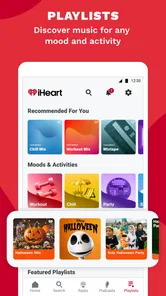
First things first, the music library on iHeart is impressive. You can stream stations curated by genre, artist, or mood. Whether you’re in the mood for some classic rock, today’s top hits, or something more niche like indie or alternative, there's a station for you. The app even throws in a few surprises with personalized recommendations. It's like having a DJ in your pocket, always ready to spin the perfect track for your vibe.
Radio for Days
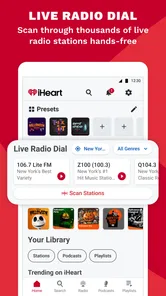
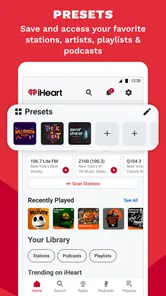
Now, let’s talk radio. I know what you’re thinking: who listens to radio these days? But trust me, with iHeart, the radio is far from dead. The app offers a vast selection of live radio stations, not just local ones but also international. So, whether you’re homesick or just curious about what’s trending across the pond, iHeart has got you covered. The app also lets you save your favorite stations for quick access, a feature I find super handy.
Podcast Paradise
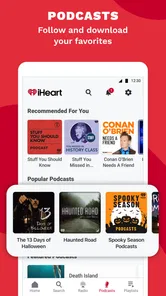
Podcasts are all the rage right now, and iHeart has an impressive lineup. Whether you’re into true crime, self-improvement, or just want a good laugh, there’s a podcast waiting for you. The app makes it easy to dive into new episodes or binge-listen to past ones. Plus, the app’s interface is straightforward, so you won't get lost navigating through episodes.
iHeart even offers exclusive content that you won’t find anywhere else. It’s like having a backstage pass to audio content, and who doesn’t love exclusive access?
Keeping It User-Friendly
One of my favorite things about iHeart is its user-friendly interface. Navigating through the app is a breeze. The design is sleek, intuitive, and doesn’t distract you from the main event – the audio. Plus, it doesn’t hog your phone’s resources, which means you can listen in without worrying about your phone slowing down.
For a practical routine, I’d save a few stations I already know I enjoy, then use mood or genre choices when I want a change without searching for a specific song. That is a helpful distinction from a playlist-first music service: radio-style listening can reduce the work of choosing every track, while a dedicated music app may be a better fit when I want precise control over a particular album or sequence. If I’m sharing a room, I’d also choose spoken content or a familiar station before starting, rather than fiddling with discovery while other people are waiting.
Listening in different situations
The mix works well for a commute, kitchen chores, or a quiet stretch of work when I want sound in the background. A realistic use is starting a station while getting ready, then switching to a podcast for a walk when I’m ready to focus on one topic. For listeners who rely on radio as a familiar daily habit, saved stations make returning to a known voice simpler than searching from scratch. If your main goal is a carefully organized personal music collection, though, a library-focused alternative is likely more comfortable.
Audio-first apps can be convenient when looking at a screen is difficult or undesirable, but listening still asks for attention in other ways. While driving, I would set up the station or episode before moving and avoid browsing while the vehicle is in motion. In a noisy place, radio and spoken-word shows may be harder to follow than music, so headphones or a quieter setting can matter. I also wouldn’t assume every screen or interaction will fit every access need; it is sensible to try the parts you plan to use and see whether the controls feel manageable on your own device.
And let’s not forget about the app’s offline capabilities. You can download music and podcasts to enjoy when you’re off the grid. Perfect for those long flights or road trips where Wi-Fi is just a myth.
Where the convenience has limits
Having several audio formats together is handy, but it can also mean moving between different listening habits inside one app. Live radio is immediate and communal; podcasts are episode-based; music stations are better for keeping a mood going. I find the app most useful when I’m happy to let a station guide the session or when I want a podcast alongside everyday tasks. Someone who wants exact track-by-track selection, a highly curated personal library, or a minimal podcast-only workflow may prefer a more specialized service.
The app is free to start, with in-app purchases ranging from $4.99 to $12.99 per item. It is rated for Teen audiences, so families should consider that age guidance when deciding whether it suits a younger listener. The practical question is whether the free listening experience already covers your routine; I’d explore that first and only consider a purchase if I know which specific limitation I’m trying to solve. That avoids paying simply because an option appears in the app.
Keeping It User-Friendly
One of my favorite things about iHeart is its user-friendly interface. Navigating through the app is a breeze. The design is sleek, intuitive, and doesn’t distract you from the main event – the audio. Plus, it doesn’t hog your phone’s resources, which means you can listen in without worrying about your phone slowing down.
And let’s not forget about the app’s offline capabilities. You can download music and podcasts to enjoy when you’re off the grid. Perfect for those long flights or road trips where Wi-Fi is just a myth.
Final Thoughts
In conclusion, iHeart is a solid choice for anyone who loves audio content. Whether you’re a music junkie, a radio enthusiast, or a podcast aficionado, there’s something here for you. The app’s vast library, user-friendly interface, and offline features make it a must-have in my book.
So, if you haven’t already, give iHeart a whirl. Who knows, it might just become your new favorite audio companion.
Who I’d recommend it to
I’d suggest trying it if you switch between broadcast radio, music discovery, and podcasts and would rather keep those habits together. It is particularly appealing if familiar stations are part of your routine, or if you like having an easy fallback when you don’t want to pick each track yourself. I’d steer someone toward a dedicated music or podcast app instead if fine-grained library organization, deliberate album listening, or a narrowly focused interface matters more than variety.
My practical advice is to test one routine at a time: save a station you already enjoy, try a podcast during a predictable task, and check whether offline listening suits a trip where connectivity may be unreliable. That gives you a useful sense of the app’s fit without turning setup into a project. For me, its best quality is not that it replaces every audio service, but that it makes several familiar ways of listening easy to reach in one place.
iHeart: Music, Radio, Podcasts Frequently Asked Questions
Can I listen to local radio stations with iHeart?
Yes, live radio is one of the main parts of iHeart, alongside music and podcasts. The app is designed for listeners who enjoy radio broadcasts as well as on-demand audio, so it can be a convenient way to explore stations and other audio content in one place. If local radio is your priority, you can browse the available stations and see which ones fit your listening routine.
Does iHeart require an internet connection?
iHeart brings together live radio, music, and podcasts, so an internet connection is generally needed to stream audio. Offline listening is available for music and podcasts with a premium subscription, which can be useful when you expect to be without a connection. If you mainly want to listen while connected, the free version offers access to the app’s core audio categories.
Can I use iHeart without creating an account?
iHeart brings music, live radio, and podcasts together in one app, making it easy to browse different kinds of audio entertainment in one place. Whether you can use particular features without signing in may depend on the feature and how you access the app. If you prefer to keep your listening organized, an account can help make the experience feel more personal.
Is iHeart: Music, Radio, Podcasts suitable for teenagers?
iHeart is rated Teen, so its audio catalog is intended for a teen audience and may include material that is not suitable for every younger listener. The app covers many genres, radio broadcasts, and podcasts, and the content can vary from one program to another. Parents and teens may want to review individual shows and stations together before listening.
What is iHeart: Music, Radio, Podcasts?
iHeart: Music, Radio, Podcasts is a versatile app that offers users access to a vast library of music, live radio stations, and podcasts. It allows users to listen to live radio broadcasts, explore different genres of music, and access popular podcasts all within a single platform. This makes it a one-stop-shop for audio entertainment. It is a Music & Audio app from iHeartMedia, Inc., designed for listeners who want different types of audio in one place.
Pros
- Wide variety of music genres
- Free live radio stations
- Personalized playlists
- Podcasts from top creators
- Easy to use interface
Cons
- Ads in free version
- Limited skips on songs
- Offline mode requires subscription
- Some features region-locked
- Occasional app crashes












