

iExit Interstate Exit Guide
- 469.00
- 3.9
- Installs
- 500.00K
- Price
- Free

Screenshots
Analysis by Reviewed
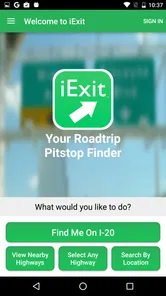
Long interstate drives are easy to underestimate. A route can look simple on a map, yet the practical question is often much narrower: where can I stop soon for fuel, food, a restroom, or a quick break? iExit Interstate Exit Guide is built around that moment. It is a free Travel & Local app from iExit Software that helps me look ahead along an interstate instead of waiting until the next exit appears.
After using it as a driving companion, I see its value less as a complete navigation replacement and more as a planning layer for highway travel. It answers a different question from a normal map app. Google Maps, Apple Maps, or another navigation tool may tell me how to reach a destination; iExit focuses on what is available at upcoming interstate exits. That distinction makes it useful, but it also sets clear limits on when I would choose it.
What the app is really useful for on a long drive
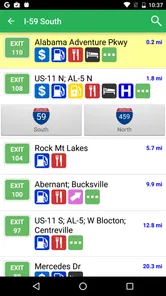
The most helpful part of the experience is the forward-looking view. Instead of searching randomly for a nearby business, I can think in terms of the road ahead: should I stop at this exit, wait for the next one, or hold off until I am closer to a particular service? That is a small change in workflow, but it reduces the last-minute decisions that make highway driving stressful.
A realistic example is a family trip where one passenger needs a restroom and the fuel gauge is getting low. A standard map can find places around the current position, but those results may include businesses away from the interstate or exits that require extra turns. iExit is more focused on the sequence of exits, so I can compare the immediate options without abandoning the route mentally.
I also found the app more useful before a trip than I expected. If I know the interstate portion of a journey will be long, I can use it to decide where a sensible break might happen. That lets me avoid choosing a stop purely because it is the first recognizable sign. For drivers traveling with children, older passengers, pets, or someone managing fatigue, that advance awareness can make the drive feel more controlled.
The app is not trying to be a broad local-discovery service. Its identity is tied to interstates and exit-based decisions. That narrow purpose is its main strength. It does not need to compete with a full map for every kind of trip because it is addressing a specific highway problem: knowing what is coming before I commit to an exit.
A practical workflow that works better than constant searching
I would not keep interacting with the screen while moving. The safer routine is to check the road ahead before departure, during a passenger-assisted stop, or through a vehicle setup that allows voice and hands-free use. I can then choose a rough stopping plan and leave the phone alone while driving. This turns the app from a distraction into a preparation tool.
More From Our News Desk

 Weather - By Xiaomi
Weather by Xiaomi Review: Clear at a Glance, Less Clear Up Close
Xiaomi’s weather app makes everyday forecasts quick to scan, but its calm surface can leave useful details and recovery paths harder to find than they should be.

 X
XX Under Pressure: Can It Recover When Posting Goes Wrong?
A resilience-focused review of X, examining setup, mistaken posts, interruptions, weak connections, and the gaps that matter when recovery needs to be dependable.

 Clash of Clans
Clash of Clans Is Won Between the Battles
Its raids are quick; its community is a long-term project of coordination, teaching, rivalry, and shared responsibility—with all the friction that entails.

 Android Auto
Android Auto Makes the Case for Quieter Car Software
The car interface is no longer judged by how much it can do, but by how quietly it helps. Android Auto shows what drivers now expect—and what still gets in the way.

 MobiOffice: Word, Sheets, PDF
MobiOffice: Transforming Mobile Productivity with Seamless Integration
MobiOffice: Word, Sheets, PDF is redefining mobile productivity with a surprising blend of functionality and innovation.

 EA SPORTS FC Soccer Mobile 26
EA SPORTS FC™ Mobile Soccer: Redefining Mobile Sports Gaming
Dive into EA SPORTS FC™ Mobile Soccer, where immersive gameplay and strategic depth transform mobile sports gaming.
Latest News



One useful habit is to decide what matters most before opening the app. If fuel is urgent, I look for a fuel-oriented stop. If the priority is a meal, I compare food options. If I am simply trying to stretch my legs, I may prefer a convenient exit rather than the most popular business. Having that priority in mind keeps the search from becoming an endless scroll through possibilities.
Another practical tip is to treat exit information as a planning aid rather than a guarantee that every listed option will suit the exact moment. A business can be busy, temporarily unavailable, difficult to enter with a trailer, or less convenient than it appears from a simple listing. I still use common sense, road signs, opening information when visible, and the needs of the people in the car.
Where it fits beside ordinary navigation apps
For door-to-door routing, I would still rely on a conventional navigation app. Those tools are usually better at turn-by-turn directions, traffic-aware rerouting, address searches, and walking directions once I leave the highway. iExit has a narrower advantage: it organizes the interstate journey around upcoming exits and the services associated with them.
That makes the two types of apps complementary rather than interchangeable. I might use my normal navigator to follow the route and consult iExit when I need to make a stopping decision. If I only want to reach a destination as quickly as possible and do not care where I stop, adding another app may feel unnecessary. If I am planning fuel, meals, and breaks on a long interstate stretch, the specialized view becomes more worthwhile.
The same comparison applies to searching directly in a map app. A map search may show more businesses and a wider geographic area, but that wider view can create noise. iExit’s interstate focus can be faster when I want to know which option is close to a particular exit rather than which option exists somewhere nearby. The trade-off is that a general map may offer richer details for an individual business or better coverage away from the highway.
Trust, choices, and the moments when caution matters
I’m careful about what I let a travel app decide for me, especially when a route involves changing conditions or a tight schedule. In this section, I look at how I balance iExit’s practical suggestions with my own checks, so the convenience of planning ahead never turns into misplaced confidence. That distinction matters most when a routine stop becomes a safety decision.
A focused product from an identifiable developer
The app comes from iExit Software and has been available since March 26, 2013. Its long presence gives it a clear identity: this is not a general-purpose social platform or a shopping service that happens to include travel tools. It is a specialized driving utility, and that focus makes the product easier to understand before I decide whether it belongs on my phone.
Its public store profile places it in Travel & Local, lists it as free, and marks it suitable for Everyone. The current version is 5.5.4, with Android support beginning at version 7.0. Those details matter in practical terms. A driver with an older phone should check compatibility before relying on the app for a trip, while a parent can see that the stated age classification is broad rather than restricted to adults.
The app has passed the half-million-install mark and holds an average rating of 3.9 from roughly a thousand ratings, alongside hundreds of written reviews. I read that as evidence of a real user base rather than a tiny experiment, but not as proof that every trip will be smooth. A rating in that range suggests a useful idea with room for uneven experiences, and that matches my view: the concept is practical, while the value depends on the quality and relevance of the information at the time I need it.
What I would check before trusting it on a trip
Travel apps deserve more attention than their simple interfaces might suggest because location can become sensitive the moment a journey is underway. Before using any highway guide, I would open the app’s permission and privacy controls on my device and review what access is requested. I would not assume that a travel purpose automatically justifies every possible permission.
I would also look for visible account controls and any choices presented inside the app or its store page. If an app can be used without an account, that may reduce setup friction, but I would still check the current screens rather than rely on assumptions. If sign-in, personalization, notifications, or location access appears, I want to understand which choices are optional and which are necessary for the feature I am trying to use.
This is especially important because the app’s main context is movement. A location-related decision can reveal where I am traveling, when I am traveling, and which stops I am considering. I do not treat that as a reason to reject iExit automatically; it is a reason to make deliberate choices. I disable access that is not needed, avoid creating an account unless it provides a clear benefit, and review notification settings so the phone is not competing with the road.
Data-sensitive moments during real use
The most sensitive moment is not necessarily opening the app at home. It is using it while the vehicle is moving. A driver who repeatedly checks upcoming exits, changes searches, or studies listings is creating a safety problem even if the app itself is straightforward. My strongest recommendation is to plan while parked or let a passenger handle the search.
There is also a privacy angle to public charging and shared devices. If I use a rental car, a family tablet, or a dashboard system that stores recent activity, I consider whether the device could retain location searches or route context. I clear information when appropriate and avoid leaving a personal account signed in on hardware other people use. Those are simple habits, but they give me more control than treating every travel app as harmless by default.
I would not use the app as the only source for an urgent safety decision. If I am tired, unwell, or dealing with a vehicle problem, the priority is to stop safely and follow road signs or emergency guidance. A directory-style guide can help me plan a break, but it cannot replace judgment about weather, traffic, road closures, vehicle access, or whether an exit is safe to take at that precise moment.
How much control the user keeps
The app’s best form of user agency is practical rather than flashy: I decide what kind of stop I need, how far ahead I want to plan, and whether the information is worth acting on. It does not force me to abandon my main route simply because an option appears. I can compare the road ahead with my own priorities and ignore results that do not fit.
I also appreciate that the app can support a planned stopping rhythm instead of encouraging impulsive detours. Before leaving, I can identify a likely break area and tell the passenger what to watch for. That reduces the temptation to make a sudden lane change after spotting a sign. In this sense, the app is most valuable when it helps me make fewer decisions while driving, not when it gives me more screens to inspect.
Still, user control depends on the surrounding phone settings. I would manage location access, notifications, background behavior, and account choices at the operating-system level as well as inside the app. I would also keep the app updated when practical, because an older build may not behave as reliably with a newer phone or vehicle setup. The displayed version, 5.5.4, gives me a useful reference point when checking whether my installation is current.
Who should use it, and who should skip it
I would recommend iExit to interstate drivers who regularly plan fuel stops, meals, or rest breaks and dislike discovering options only after passing an exit. It is particularly suitable for road trips where the route is already known and the challenge is managing the journey between major destinations. Families and drivers who prefer predictable breaks may get more from it than someone who treats every stop as spontaneous.
I would be more cautious about recommending it to people who rarely drive on interstates. If most journeys happen on local roads, a normal map app is likely to cover the need without adding another tool. I would also skip it as a primary navigation solution for city driving, complex multi-stop errands, walking, cycling, or detailed traffic management. Its focused interstate perspective is not a weakness in itself, but it is the wrong shape for those tasks.
Drivers with limited phone storage or older hardware should consider the Android requirement before installing it. The minimum operating-system level is Android 7.0, so compatibility may be fine for many devices but not every older handset. I would test it before a major trip rather than install it for the first time at the departure point.
My cautious verdict after weighing convenience and trust
I see iExit as a useful specialist rather than an all-in-one travel solution. Its strongest contribution is helping me think one or several exits ahead, which is exactly where ordinary navigation can feel less convenient. The free price lowers the barrier to trying it, and the focused design makes sense for long interstate journeys.
My reservation is that specialized information still needs human verification. I would not blindly follow a listing, assume every option is equally accessible, or let the app distract me from traffic. I would also review permissions, notifications, account choices, and current privacy controls before giving it a regular place in my travel routine. Those checks are not unique to this app, but they matter more when an app is connected to movement and location.
Overall, I would keep it in the travel toolkit for interstate road trips, especially when the passengers and the driver want a planned break strategy. I would pair it with a conventional navigation app, use it before moving or through a passenger, and treat its suggestions as informed options rather than commands. The right reason to install iExit is not to replace navigation; it is to make the next interstate stop less of a guess.
iExit Interstate Exit Guide Frequently Asked Questions
Can I use iExit to plan stops before starting a road trip?
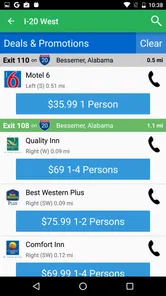
Yes. iExit is useful for looking ahead at services and attractions near interstate exits, which can help you think through possible breaks before setting off. You can review the kinds of places available along your route, such as restaurants, fuel stations, hotels, and rest areas. Since business details can change, it is sensible to recheck important stops as your trip approaches.
Is iExit Interstate Exit Guide suitable for every traveler?
iExit is designed for people traveling on U.S. interstates who want to see what is coming up at nearby exits. It may be less useful for trips that do not involve interstate driving, and it is not a substitute for staying alert or making safe driving decisions. The app is rated for Everyone, and its Travel & Local focus makes its purpose clear before you install it.
What is iExit Interstate Exit Guide used for?
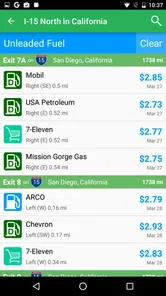
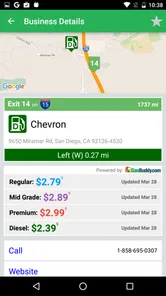
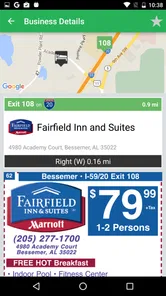
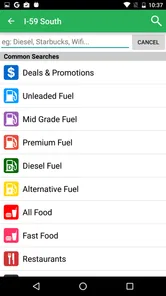
iExit Interstate Exit Guide helps drivers find useful services and attractions near exits along major U.S. interstate highways. After selecting a route or allowing location access, the app can show upcoming exits with categories such as fuel stations, restaurants, hotels, rest areas, shopping, hospitals, and other points of interest. It is especially helpful when planning stops during a road trip.
Does iExit work without an internet connection or mobile data?
The app generally relies on internet access and location services to load current exit information, maps, business details, and route-related data. Coverage may be limited in rural areas or where mobile service is weak, so it is sensible to review your route before leaving and save important information separately. Drivers should not depend on the app as their only navigation or emergency resource.
Which highways and locations does iExit Interstate Exit Guide support?
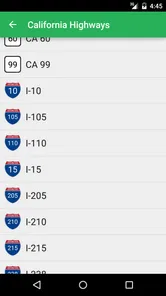
iExit is primarily designed for interstate travel in the United States, with information organized around exits and nearby services. Coverage and the amount of detail can vary by highway, state, and local business availability. Before downloading, travelers should check whether their planned route is included and remember that listings, opening hours, prices, and services may change over time.
Pros
- Finds food
- fuel
- lodging
- and services near upcoming interstate exits.
- Useful filters make it easier to locate specific amenities quickly.
- Exit listings include distance information for better trip planning.
- Works well for road trips
- long-haul driving
- and unfamiliar highways.
- Can help reduce detours by showing services close to the route.
Cons
- Coverage and accuracy may vary by state
- highway
- and local business.
- Some listings may have outdated hours
- prices
- or availability.
- Primarily focused on U.S. interstate travel
- limiting international usefulness.
- Requires location access for the most convenient route-based experience.
- The interface can feel busy when many nearby services appear at once.











