

ID Card, Passport, Driver Lice
- 23.00
- 3.3
- Installs
- 100.00K
- Price
- Free
Screenshots
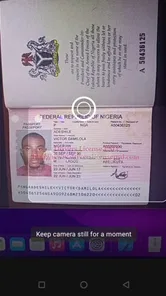
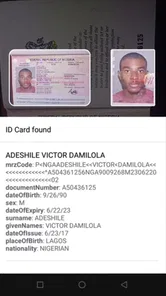
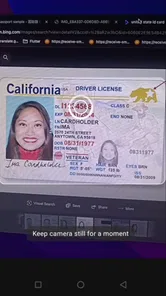
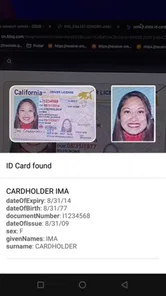
Analysis by Reviewed
I find this app most useful when I treat it as a quick reference for identity documents, not as a replacement for carrying official ID. Its focus is recognizing identity cards, passports, and driver licenses on the device, which makes it a practical option when I want to check or organize a document without sending the task through a separate online service. That distinction matters: a digital copy can help me prepare, but it does not automatically stand in for the physical document when an organization asks to see one.
A sensible routine for working with documents
For a repeatable workflow, I would start with one document, place it flat in good light, and check the result before moving on to the next. A passport page and a driver license have different shapes and visual details, so taking a moment to frame each one carefully is more reliable than rushing through a stack. I would also keep the originals nearby while capturing them, so I can spot a missed edge or an unreadable detail while the document is still at hand.
The app is from FaceOnLive, and its offline, on-device approach is appealing if I want document recognition without making a network connection part of the basic task. That can be especially handy while traveling or in a place with weak reception. It is still worth thinking carefully about where the phone is stored and who can unlock it: keeping sensitive information on a device is convenient, but it makes ordinary phone security habits important.
Small habits that make repeat use easier
I would use consistent names or a predictable order whenever the app lets me organize documents, rather than relying on memory later. Before a trip, for instance, I can check the relevant identity document at home, confirm that the captured image is readable, and then leave the physical passport in its proper safe place. This reduces last-minute searching without encouraging me to travel as if a phone image were guaranteed to be accepted at a border or service counter.
For occasional use, the free price makes trying a focused recognition app a low-commitment choice. The audience rating sits at 3.3 from around 639 ratings, so I would approach it with measured expectations rather than assume every scan will be effortless. It has more than 100,000 installs, is rated for Everyone, and its current version is 1.1; it runs on Android 5.0 or later. Those details make it accessible to many Android users, though they do not tell me how well a particular document, camera, or lighting setup will work.
Where it differs from a camera or scanner
A normal camera app is the simplest alternative if all I need is a photo, while a general scanning app may be better when I want to turn many kinds of paperwork into neat, shareable files. This app’s narrower identity-document focus is the reason to choose it: recognition is the central task, rather than building a broad archive of receipts, forms, and notes. If my goal is simply to store a picture, the camera may involve fewer steps; if I need document recognition offline, this app is more relevant.
I would not assume that a successful recognition result proves a document is valid, current, or accepted for a specific process. When an airline, bank, employer, or government office requires an original, I would follow that requirement and bring the physical ID. The app is a useful companion for preparation and reference, not a way around formal identity checks. That is the most important limit to keep in mind before relying on it.
More From Our News Desk

 Gmail
GmailGmail in a Busy Inbox: Who Benefits Most?
From first account to crowded workday, Gmail earns its place through dependable search and flexible sorting—but its best fit depends on how much inbox maintenance you can tolerate.

 Prime Video
Switching to Prime Video: What Changes in Your Viewing Routine
Prime Video can make a compelling second home for streaming, but switching means learning a different catalog, rental layer, and route from browsing to playback.

 Universal TV Remote Control
Universal TV Remote Control Works Best as a Reliable Backup
A phone remote earns its place through quick setup and reliable habits. Here is how to get more from Universal TV Remote Control—and where its limits show.

 Weather - By Xiaomi
Weather by Xiaomi Review: Clear at a Glance, Less Clear Up Close
Xiaomi’s weather app makes everyday forecasts quick to scan, but its calm surface can leave useful details and recovery paths harder to find than they should be.

 X
XX Under Pressure: Can It Recover When Posting Goes Wrong?
A resilience-focused review of X, examining setup, mistaken posts, interruptions, weak connections, and the gaps that matter when recovery needs to be dependable.

 Clash of Clans
Clash of Clans Is Won Between the Battles
Its raids are quick; its community is a long-term project of coordination, teaching, rivalry, and shared responsibility—with all the friction that entails.
Latest News



Hey there! Today, I’m diving into an app that’s a real lifesaver for anyone tired of carrying around a bulky wallet filled with countless ID cards. Meet ID Card, Passport, Driver License app, a nifty digital wallet that promises to store all your personal identification documents right on your smartphone. Let’s get into the nitty-gritty of what this app is all about!
First Impressions
Upon launching the ID Card, Passport, Driver License app for the first time, I was greeted with a clean and intuitive interface. It’s designed in a way that even the least tech-savvy person could navigate with ease. The registration process is straightforward, asking for basic details to set up your digital ID vault. Within minutes, you’re ready to start uploading your important documents.
Features That Stand Out
This app is packed with features that make managing your IDs a breeze. You can store a wide variety of documents, from your driver’s license and passport to your student ID and even your gym membership card. The app allows you to categorize each document, making it super easy to find what you need without scrolling through a long list.
One feature that I found particularly useful is the ability to scan and upload documents directly from your phone’s camera. This means no more fumbling with scanners or third-party apps. The app also supports cloud backup, ensuring your documents are safe and retrievable even if you lose your phone.
Security and Privacy
In today’s digital age, security and privacy are paramount, and the developers of this app seem to understand that well. It offers robust security features such as fingerprint and facial recognition, providing an extra layer of protection for your sensitive information. Plus, the app is encrypted, so you can rest easy knowing your data is safe from prying eyes.
User Experience
Using the app daily has been a seamless experience. The developers have clearly put a lot of thought into user experience, ensuring that every feature is easy to use and accessible. The app is responsive and doesn’t lag, which is a big plus. Additionally, the customer support is quite responsive, ready to assist at a moment’s notice if you encounter any issues.
Overall, the app is a game-changer for anyone looking to digitize their wallet. It’s convenient, secure, and incredibly user-friendly. Whether you’re a frequent traveler needing quick access to your passport or just someone looking to declutter your wallet, this app has got you covered.
So, if you’re ready to step into the future and leave the clutter behind, give this app a shot. You might just find it becomes one of your most-used apps in no time!
Planning a useful first session
I would start by choosing one document I genuinely need to reference, rather than scanning every card in my wallet at once. That gives me a straightforward way to judge whether the recognition step captures the details I care about and whether I can locate the result again without hunting through menus. If the first attempt misses an edge or reads a line poorly, I can adjust the lighting and angle while the document is still in front of me.
A practical test is to try the same document under two ordinary conditions: a bright, indirect-light surface at home and a less controlled setting where glare or shadows are more likely. The point is not to assume the app will behave identically across phones or documents, but to learn what makes a usable capture with my own camera. I would avoid placing a glossy card directly under a strong lamp; moving the light source slightly can reduce reflections without making the text harder to see.
Settings and document handling deserve a check
Because identity information is more sensitive than a grocery receipt, I would take a moment to review the app’s available settings and the phone’s own lock options before adding anything. I would look for controls related to access, storage, and backup, then decide which conveniences I actually need. I would not assume that an offline workflow means a document is automatically protected from someone who can unlock the phone, or that a backup choice has the same privacy trade-offs as keeping a file only on the device.
There is also a useful distinction between recognizing a document and maintaining a reliable archive. If my purpose is to retrieve a reference quickly, I should capture only what I need and confirm that the result is legible. If I need a dependable record for a formal application, I would follow that organization’s instructions about accepted file types and document handling instead of treating this app as a substitute submission system.
Repeatable habits beat frantic scanning
For people who handle identity documents regularly, the best time to use a recognition app is usually before the moment of pressure. I would prepare at home, inspect the result, and keep a separate reminder of which physical documents must travel with me. For example, before checking in for a trip, I can verify that I know where the passport is and use the phone reference to review its details, rather than discovering at the airport that I have only a digital copy.
A second helpful habit is to keep the phone screen and document clean before scanning. A smudge on the camera lens can soften small lettering, while fingerprints or glare on a card can make a capture harder to assess. If the text looks questionable, I would retake the image instead of trusting a partial result simply because the app returned something. This is a small step, but it reduces the chance that a rushed scan becomes a misleading reference later.
Who benefits most—and who should look elsewhere
I can see this being most useful for someone who wants an on-device way to recognize a few identity documents and values being able to work without relying on a connection. It may suit a traveler preparing a document checklist, a person who needs to refer to an ID while filling out forms, or someone who wants a quick personal reference at home. The key is treating it as preparation and convenience, not proof of identity.
I would look elsewhere if my main need were a polished filing system for every kind of paperwork, a dependable way to share official scans, or a formally accepted digital credential. A general document scanner is a better fit for mixed paperwork and export-focused workflows; the phone’s camera is enough for a plain image; and an authority-issued digital ID is the right option where a recognized credential is required. Those alternatives solve different problems, so the choice depends on whether recognition, archiving, or official acceptance matters most.
What to expect when recognition is imperfect
Identity documents vary in layout, print quality, and condition. A worn card, an unusual design, a reflective surface, or a tightly cropped image can all make recognition less dependable, so I would treat the result as something to inspect rather than a verdict. If a detail matters for a form, I would compare it with the original document instead of copying a doubtful reading and hoping it is right.
That check matters especially when names contain accents, spacing is unusual, or a document uses several lines of small text. A quick visual comparison can catch a transposed character before it travels into a booking form or personal note. The app can reduce manual effort, but it does not remove the need for care when the information will be used in a consequential situation.
A grounded recommendation
My recommendation is to try it if the specific job you want done is recognizing identity documents locally on an Android phone, and if you are comfortable checking the result yourself. Its focused purpose and offline approach give it a practical niche between taking an ordinary photo and using a broad scanning tool. I would keep the physical documents available for any official check and make phone security part of the routine, not an afterthought.
I would not choose it as my only safeguard for travel, account verification, or document preservation. A digital reference can be useful when preparing, but an unavailable phone, a damaged capture, or a rule requiring original ID can quickly make it insufficient. Used with that boundary in mind, it is a handy helper for a narrow task rather than a replacement for the documents themselves.
ID Card, Passport, Driver Lice Frequently Asked Questions
What is the main purpose of the ID Card, Passport, Driver License app?
The ID Card, Passport, Driver License app is designed to securely store and manage digital copies of your essential identification documents such as your ID card, passport, and driver's license. This app offers a convenient way to access and share your IDs digitally while ensuring their safety and privacy through encryption and secure storage methods.
How secure is the ID Card, Passport, Driver License app in protecting my personal information?
Security is a top priority for the ID Card, Passport, Driver License app. It employs advanced encryption technologies to protect your data from unauthorized access. The app also includes features such as biometric authentication, including fingerprint or facial recognition, to ensure that only you can access your stored documents. Regular updates further enhance security measures.
Can I use the digital IDs stored in this app as official identification?
While the ID Card, Passport, Driver License app provides a convenient digital backup of your identification documents, it's important to note that digital copies may not be accepted as official identification everywhere. Users should verify the acceptance of digital IDs in various situations, such as at airports or government offices, to avoid any inconvenience.
Is the app compatible with both Android and iOS devices?
Yes, the ID Card, Passport, Driver License app is designed to be fully compatible with both Android and iOS platforms. Users can download the app from the Google Play Store for Android devices and the Apple App Store for iOS devices. The app ensures a seamless experience across different operating systems, allowing users to manage their digital IDs on any device.
Are there any costs associated with using the ID Card, Passport, Driver License app?
The ID Card, Passport, Driver License app offers a free version with basic features, allowing users to store and manage their IDs without any cost. However, there may be premium features available for purchase, such as additional cloud storage, advanced security options, or multi-device synchronization, which provide enhanced functionality for users who require it.
Pros
- User-friendly interface
- Fast processing time
- Secure data encryption
- Supports multiple ID types
- Offline access available
Cons
- Limited customer support
- Requires frequent updates
- Occasional app crashes
- High battery consumption
- Limited language options










