Icon Changer
- 746.00
- 3.9
- Installs
- 10.00M
- Price
- Free

Screenshots
Analysis by Reviewed
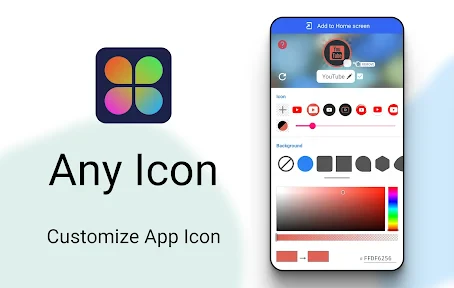
I like changing a phone’s look in small ways rather than rebuilding the whole home screen, and app icons are a good place to start. Icon Changer is aimed at that simple kind of personalization: it gives you a way to make familiar shortcuts feel more like your own. It is free, made by Any Studio, and sits in the personalization category. Its 3.9 average from around 68,000 ratings suggests plenty of people have tried it, though opinions are not universally glowing.
What to expect from an icon makeover
This is best approached as a visual customization tool, not a replacement for your launcher or a complete phone theme. The useful question is whether you want a few key apps to fit a particular style, or whether you expect every icon and screen element to change together. I would start with a small set—perhaps the apps on your first home-screen page—so you can see whether the new look works with your wallpaper and layout before committing to a bigger redesign.
The app has passed 10 million installs and is rated for Everyone. It was released in 2021, and version 1.8.8 is listed for devices running Android 5.0 or later. Those details make it accessible to a broad range of Android users, but the real experience of a changed shortcut can depend on the launcher and the way your phone presents its home screen. It is worth treating the first attempt as a quick test rather than assuming every device will behave identically.
Getting Started with Icon Changer
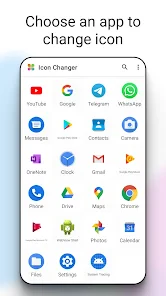
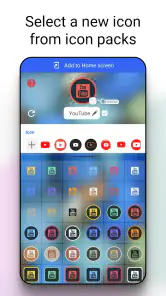
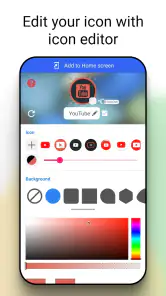
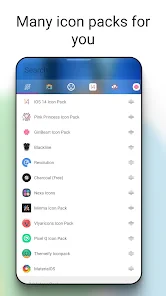
Kicking things off with Icon Changer is as breezy as a Sunday morning. Once you’ve downloaded the app, it rolls out the red carpet with a user-friendly interface that’s a cinch to navigate. You’ll find a plethora of icon packs, each more creative than the last. From minimalistic designs to quirky illustrations, there’s something for everyone. The installation process is straightforward, making it easy for even the least tech-savvy among us to dive in and start customizing.
Make the first change deliberately
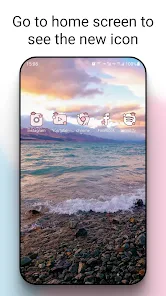
For a reassuring first run, choose one app you recognize immediately and give it a new icon before changing anything else. Then return to the home screen and check that the shortcut is easy to identify and sits comfortably beside the icons you left alone. This tiny trial tells you more than browsing a large collection: you can judge the artwork at its actual size, notice whether its colors clash with your wallpaper, and decide if the extra visual distinction is worth keeping.
A practical use case is separating work and personal routines at a glance. You might give a frequently used calendar or notes shortcut a distinctive look, while leaving less-used apps untouched. That can make a busy home screen feel more intentional without forcing you to relearn where everything is. I would avoid changing several similar-looking icons at once, though; if your new designs are too alike, the screen may look coordinated but become slower to navigate.
The Customization Experience
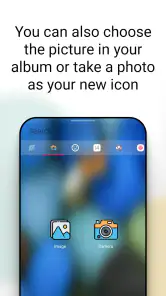
Here’s where Icon Changer truly shines. The app doesn’t just offer you pre-designed options; it lets you unleash your creativity. Want to use a photo from your gallery as an icon? Go for it! The app supports various image formats, so the possibilities are nearly endless. Plus, you can tweak the size and shape of your icons to fit your screen layout perfectly. It’s like having a tiny design studio right in your pocket.
More From Our News Desk

Weather by Xiaomi Review: Clear at a Glance, Less Clear Up Close

X Under Pressure: Can It Recover When Posting Goes Wrong?

Clash of Clans Is Won Between the Battles

Android Auto Makes the Case for Quieter Car Software

MobiOffice: Transforming Mobile Productivity with Seamless Integration

EA SPORTS FC™ Mobile Soccer: Redefining Mobile Sports Gaming
Personal images are most useful when they remain recognizable as tiny squares on a screen. A close-up subject, simple background, and strong contrast usually read more clearly than a full photograph with lots of detail. I would also keep a copy of the original image untouched and try a sample before preparing a whole set; what looks attractive in a gallery can lose its defining detail when reduced to shortcut size.
And if you’re someone who likes to keep things fresh, the app regularly updates its icon packs, ensuring there’s always something new to explore. You can even create themes for different moods or occasions. Halloween? There’s a spooky pack for that. Summer vibes? Think bright and breezy icons that transport you straight to the beach.
Where the workflow can feel different
One point that can confuse first-time users is the difference between changing an app’s icon and changing the app itself. An icon makeover is about how a shortcut appears on the home screen; it does not mean the underlying app has been replaced or redesigned. If an icon seems absent from another screen or still looks familiar elsewhere, check which shortcut you changed before repeating the setup. That distinction helps avoid spending time trying to make a single home-screen edit affect every place an app appears.
Icon Changer is also a different choice from installing a full icon pack through a compatible launcher. A launcher-based pack can be more convenient when you want a broad, consistent sweep across many apps, while this app is appealing when you prefer individual choices or want to experiment with personal images. The trade-off is that a carefully coordinated full pack may look more uniform, whereas one-off edits give you more control but call for a little more taste and patience.
Performance and Usability
Now, let’s talk about performance. Icon Changer is surprisingly light on resources, which means it won’t slow down your phone. It integrates smoothly with your device’s launcher, ensuring that your new icons look and feel like they belong. Plus, the app is free from annoying ads, which is a huge bonus in a world where pop-ups can ruin the user experience.
The developers have done a stellar job at making sure the app is stable and bug-free. Updates are rolled out regularly, ironing out any kinks and adding new features. And if you do run into any issues, their support team is just a message away and super responsive.
A few useful habits for everyday use
For a low-effort routine, I would change icons in small batches and pause to use the phone normally before doing more. That makes it easier to spot a shortcut that is hard to recognize or a design that looks out of place in daylight and dark settings. It also gives you a simple way to undo your own design decisions: if the screen becomes less readable, return to the icons that help you identify apps fastest instead of chasing visual consistency for its own sake.
There is a practical middle ground between one experimental icon and a complete home-screen makeover. I’d group changes by purpose: perhaps make only the shortcuts you use for work visually distinct, then leave entertainment and system tools alone. This keeps the visual cue meaningful. If every shortcut gets a different style, the new look can become visual noise rather than a useful way to spot what you need.
Think about how you use folders, too. If a shortcut is usually tucked away inside a folder, changing its appearance may matter less than updating the apps you reach directly from the home screen. I’d prioritize the icons you identify under time pressure—such as a map or messaging app—over ones you open only occasionally. That small selection makes the customization serve your routine instead of turning into a project that never feels finished.
Who will enjoy it—and who may prefer another route
I’d recommend trying it if you enjoy personalizing a few shortcuts, have a clear visual idea, or want to test a theme without changing the entire phone. It may be especially satisfying for someone who likes making a home screen feel personal but does not want to spend an afternoon configuring a new launcher. If your priority is a uniform redesign across a large number of apps, or you want deeper control over the whole interface, a launcher with built-in icon-pack support is likely the more direct option.
It is also a sensible fit for someone who wants to use a personal image rather than adopt a ready-made pack’s complete style. A family photo, a simple color tile, or a small visual cue can make a shortcut easier for one person to recognize. But if you rely on a highly standardized work phone, share a device, or depend on familiar icons to avoid mistakes, keeping the default appearance may be the better choice. Personalization should reduce friction, not add a visual decoding step.
For a realistic first evening with the app, I’d choose one frequently used shortcut, try a clear design, and then use the phone as usual for a day. If I keep tapping the old location by habit or hesitate because the new artwork is ambiguous, that tells me to adjust or revert it. If I recognize it immediately and enjoy the look, I can repeat the process for a small, related group. That test gives a more useful answer than judging a design only while browsing options.
If the first result does not appear where you expected, first look at the home screen rather than assuming the original app has changed everywhere. If the appearance feels inconsistent, compare the edited shortcut with nearby icons and your wallpaper before making more edits. And if you are unsure whether an image will work, test it on one shortcut; that is the quickest way to judge legibility without turning a small experiment into a full redesign.
A personal touch, with a practical limit
In the grand scheme of app customization, Icon Changer stands out as a useful option for people who want their phone to reflect their personality and style. Whether you’re new to customization or already enjoy arranging a home screen, the appeal is the chance to make selective changes without committing to a whole new interface. It’s fun and free, though its value depends on how much you care about changing shortcuts.
My recommendation comes with one qualification: treat it as a focused way to personalize shortcuts, not as a promise that every part of your phone will take on one matching style. That expectation makes the app easier to judge and helps you choose the right alternative if you want system-wide consistency. For a first-time user, one carefully chosen icon is enough to tell whether this kind of customization suits your habits.
So, if you’re ready to give your smartphone a splash of personality, Icon Changer is worth trying. Start with a shortcut you know well, check that the new design stays readable at a glance, and only then decide whether you want to customize more. The best result is not necessarily a fully redesigned screen; it is one that feels personal while still letting you find the apps you need quickly.
Icon Changer Frequently Asked Questions
Can Icon Changer customize every app on my phone?
Icon Changer is designed to change the appearance of app icons on your home screen by creating shortcuts with custom icons. Whether a shortcut can be made for a particular app may depend on your device and launcher. The original app remains in place, so the change is about how its shortcut looks rather than replacing or modifying the app itself.
Will my custom icons remain after I change phones or reset my home screen?
Icon Changer creates shortcuts on your device’s home screen, so your custom setup is tied to that device and its launcher arrangement. If you move to another phone or reset the home screen, you may need to create the shortcuts again. Keep any images you want to reuse accessible on the device, and consider how you organize your icons before making changes.
Can I undo an icon change or return to the original app icon?
Yes. Because Icon Changer creates a shortcut with a different appearance rather than altering the original application, you can remove the custom shortcut and use the app’s original icon again. This makes experimenting with a new look relatively easy to reverse. Be careful to remove the shortcut rather than uninstalling the underlying app if you want to keep it on your phone.
Do I need to root my Android phone to use Icon Changer?
No. Icon Changer is intended to personalize app icons without rooting your device. It creates shortcuts with custom icons while leaving the original applications intact, so you do not need to modify the operating system to try a different home-screen style. Your phone still needs to meet the app’s Android compatibility requirement to install and use it.
Can I use Icon Changer with a custom launcher?
Icon Changer works by creating home-screen shortcuts, so the way those shortcuts appear can depend on your device’s launcher. If you use a custom launcher, check that it supports adding and displaying shortcuts as expected. The app’s purpose is to give shortcuts a personalized appearance; it does not replace the launcher or change the underlying apps.
Pros
- Highly customizable icons.
- Easy to use interface.
- Supports various icon packs.
- No root required.
- Regular updates.
Cons
- Some features are paid.
- Occasional app crashes.
- Limited free icons.
- Ads in free version.
- Requires Android 8.0+.
- Category
- Personalization
- Version
- 1.8.8











