

WidgetClub:Widget, Theme, Icon
- 229.00
- 4.6
- Installs
- 1.00M
- Price
- Free

Screenshots
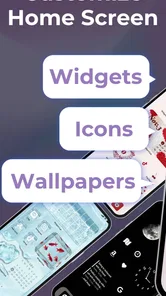

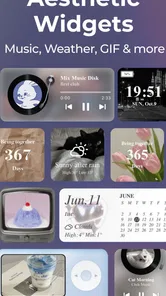
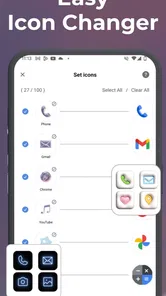
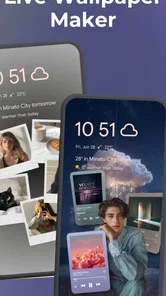
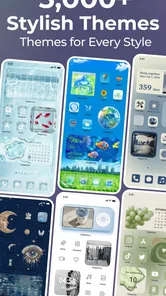
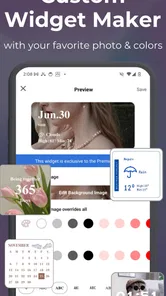
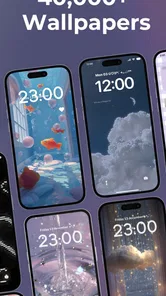
Analysis by Reviewed
When I decide whether to try a home-screen customization app, I look beyond attractive previews: I want to know how much control it gives me, whether the setup feels manageable, and whether I can keep the result useful for everyday tasks. Icon Changer & Widget Themes is aimed at people who enjoy changing the look of their phone without turning the process into a design project. It is a free personalization app from Liume Inc., with a 4.4 average from around 12,000 ratings and over a million installs.
Choose a change that suits your routine
Before downloading a customization app, I’d ask myself what I actually want to change. If I’m bored with the icons and want the whole screen to feel more cohesive, a tool focused on icons, widgets, and themes is a natural place to look. If the only thing bothering me is the wallpaper, changing that alone is less work. And if I want to alter how screens are arranged or how I move between them, the phone’s built-in options or a launcher may be a more direct route.
That distinction matters because visual customization can be enjoyable without solving every home-screen problem. I’d use this app to make the phone feel more personal, rather than expecting it to replace system settings or reshape the way the device works. Knowing that boundary before browsing helps me choose a realistic goal and avoid spending time on changes I didn’t need.
Start with the look you actually want
Before choosing a theme, I’d decide whether I want a coordinated screen or just a few changes. A full visual refresh can feel satisfying, but it may also make familiar apps harder to spot if their new icons look too similar. If speed matters more than a perfectly matched palette, changing only the most-used icons and leaving the rest alone is a sensible compromise.
The same practical thinking applies to widgets. I’d treat them as part of the screen’s layout, not just decoration: a widget that takes up space should earn it by making information or a shortcut easier to reach. That helps avoid a pretty home screen that is awkward to use when I’m trying to open an app quickly.
Customization at Your Fingertips
The magic of Icon Changer & Widget Themes lies in its ability to transform the mundane into the extraordinary. Imagine being able to swap out those boring default app icons for something that truly represents your style. Whether you're into minimalist designs or something more vibrant, this app has got you covered. And it's not just about icons; you can also tweak your widgets to match your aesthetic.
Where the app earns its place
The appealing part for me is having several kinds of visual choices gathered around the same goal: making the home screen feel like mine. Rather than treating an icon change as an isolated novelty, I can think about how icons, a background, and a widget might work together. A coordinated screen can be especially satisfying if I spend a lot of time on my phone and want its first screen to feel calmer or more expressive.
More From Our News Desk

 Gmail
GmailGmail in a Busy Inbox: Who Benefits Most?
From first account to crowded workday, Gmail earns its place through dependable search and flexible sorting—but its best fit depends on how much inbox maintenance you can tolerate.

 Prime Video
Switching to Prime Video: What Changes in Your Viewing Routine
Prime Video can make a compelling second home for streaming, but switching means learning a different catalog, rental layer, and route from browsing to playback.

 Universal TV Remote Control
Universal TV Remote Control Works Best as a Reliable Backup
A phone remote earns its place through quick setup and reliable habits. Here is how to get more from Universal TV Remote Control—and where its limits show.

 Weather - By Xiaomi
Weather by Xiaomi Review: Clear at a Glance, Less Clear Up Close
Xiaomi’s weather app makes everyday forecasts quick to scan, but its calm surface can leave useful details and recovery paths harder to find than they should be.

 X
XX Under Pressure: Can It Recover When Posting Goes Wrong?
A resilience-focused review of X, examining setup, mistaken posts, interruptions, weak connections, and the gaps that matter when recovery needs to be dependable.

 Clash of Clans
Clash of Clans Is Won Between the Battles
Its raids are quick; its community is a long-term project of coordination, teaching, rivalry, and shared responsibility—with all the friction that entails.
Latest News



There’s a useful middle ground between applying a full theme and making every choice from scratch. I can start with a general style, then keep the pieces that suit my habits and skip the ones that don’t. That is more practical than chasing a perfect preview: the home screen is a tool I use repeatedly, so recognition and convenience matter as much as color and mood.
User-Friendly Interface
One of the first things I noticed was how intuitive the app is. Even if you're not particularly tech-savvy, navigating through the various customization options is a breeze. The app’s layout is clean and straightforward, ensuring that you spend more time personalizing and less time figuring out how to do it.
Browse with a plan, not just a mood
When a library offers plenty of visual choices, it is easy to keep browsing long after I’ve found something usable. I’d set a small target before opening it: perhaps choose a look for the main screen, or find a widget that supports one particular routine. That gives me a stopping point and makes it easier to compare options based on how they will look beside my actual apps, rather than judging each preview on its own.
A practical tip is to make one change, then check the screen at the size and in the context where I normally use it. An icon that looks distinctive in a selection view may blend in once it sits among several others. I’d also keep a mental note of the original arrangement before changing a group of icons. That makes it simpler to reverse a choice if I find myself hesitating over an app I used to recognize instantly.
Endless Possibilities
What sets this app apart is the sheer variety it offers. There are so many themes and icon packs to choose from that you'll find yourself spoilt for choice. And the best part? The app frequently updates its library, so there's always something new to try. It feels like having a new phone every time you switch things up!
Another great feature is the ability to mix and match. You're not limited to pre-set themes; you can combine different elements to create something uniquely yours. It’s like having a mini design studio right in your pocket!
Make the home screen work day to day
A useful way to explore the options is to start with one screen and one purpose. For example, I might make a calmer, high-contrast arrangement for work, keeping messaging, calendar, and the tools I reach for most easy to recognize. Later, I could try a more playful look for personal use. Changing a few elements at a time makes it easier to tell whether a theme improves the experience or simply looks appealing in a preview.
Mixing elements can also help when a complete pack does not suit every app I use. I’d pick a consistent visual direction first, then add individual icons or widgets only where they fit. The trade-off is that more freedom asks for more decisions; someone who wants a uniform setup in one tap may prefer a launcher or built-in theme option that applies a single coordinated style.
A realistic trial before committing
Suppose I’m getting ready for a busy week and realize my home screen has become a jumble of apps I rarely open. I could use a restrained theme to make the frequently used icons easier to pick out, then place a useful widget where I can see it without covering the space I rely on. I’d leave the rest of the screen alone for a day or two. If I still find what I need quickly, the change is working; if I keep pausing to identify icons, I’d undo or adjust the choices rather than forcing myself to like the look.
This gradual approach also helps separate a genuine improvement from the novelty of a new design. I don’t need to rebuild the entire phone to test whether the app suits me. A small first pass is enough to show whether I enjoy browsing and tailoring the available styles, and whether the resulting screen remains comfortable during ordinary use.
Where alternatives may be a better fit
This app makes the most sense if browsing visual choices and personalizing icons is the point. If I mainly want to rearrange screens, simplify notifications, or change system-wide behavior, the phone’s built-in controls may be enough. A dedicated launcher can be a better match for someone seeking deeper control over layout and navigation, while a wallpaper-only app is simpler for anyone who just wants a new background without adjusting icons or widgets.
There is also a small practical cost to any home-screen makeover: after changing familiar icons, I may need a little time to rebuild muscle memory. I’d keep essential apps in predictable positions and avoid replacing every icon at once. That makes the change easier to live with and gives me a quick way to judge whether the new look is genuinely helpful.
Think about the switch, not only the preview
Changing a home screen is not a major commitment, but it does ask for a little attention. I’d consider how many icons I’m changing, whether I can still distinguish the apps I open automatically, and whether a widget earns its space after the first day. Those are better tests than whether a theme looks polished in a preview. If I’m likely to become annoyed by having to relearn a screen, I’d make smaller changes or stick with the original icons.
It is also worth deciding how much ongoing tinkering I enjoy. Someone who likes seasonal refreshes may appreciate having visual options to revisit. Someone who wants to set a screen once and never think about it again may find a simpler built-in appearance setting more satisfying. Neither preference is wrong; the important difference is whether the process of choosing and combining styles is part of the fun for you.
Performance and Reliability
Now, I know what you're thinking. All these customizations must slow your phone down, right? Surprisingly, no. The app runs smoothly without any noticeable lag, ensuring that your phone’s performance remains top-notch. Plus, it’s compatible with both Android and iOS, so nobody gets left out of the fun.
One thing to keep in mind is that while the app is free to download, there are some premium features that require a purchase. But honestly, the free version offers plenty to play around with, and the premium perks are just the cherry on top. Optional in-app purchases range from $3.49 to $64.99 per item, so I’d explore the free choices first and only pay if a particular style is worth it to me. The app is rated Teen, and its current version is 3.14.11; it requires Android 11 or later.
What to consider before paying
I’d treat the free starting point as a chance to see whether the app’s style and workflow suit me, not as a promise that every option will be included at no cost. Since purchases vary in price, I would look at the specific item I’m considering and decide whether I’ll use it enough to justify the expense. I wouldn’t pay simply because I’ve already spent time browsing; if the free choices get me close to the look I want, that may be all I need.
The age guidance is another small point for households choosing apps together: this one is marked Teen. For anyone using Android, the stated minimum is Android 11, so checking the device’s software version before installing can prevent an avoidable dead end. Those practical checks are quick, and they help keep the decision focused on whether the customization itself is a good fit.
Final Thoughts
In conclusion, if you're looking to breathe new life into your device, Icon Changer & Widget Themes is definitely worth checking out. It’s like a breath of fresh air, offering endless customization possibilities without compromising on performance. So why not give it a whirl? Your home screen deserves a makeover, and this app might just be the perfect stylist.
I’d recommend it most to anyone who enjoys experimenting with icon styles and widgets and is happy to spend a little time refining a look. If you prefer a clean, functional screen and rarely change its appearance, the extra choices may feel unnecessary. For me, the best approach is to try a modest refresh, live with it through an ordinary day, and keep only the changes that make the phone feel more personal without making it harder to use.
WidgetClub:Widget, Theme, Icon Frequently Asked Questions
Can I preview themes before changing my home screen?
Previewing a theme before applying it can help you decide whether its colors, icons, and widget style work well together. Icon Changer & Widget Themes is designed to let you choose from styles in its library, so explore the available options and consider how they will look alongside your current wallpaper and layout before making changes.
What is Icon Changer & Widget Themes and how does it work?
Icon Changer & Widget Themes is an app designed to personalize your smartphone by allowing you to change app icons and widget themes. It works by letting you customize the appearance of your home screen with different icon styles and widget themes, providing a more personalized and aesthetic look. You simply select the icons or widgets you want to modify, choose a style from the app’s library, and apply your changes, transforming your device's interface easily.
Is Icon Changer & Widget Themes compatible with all devices?
The Icon Changer & Widget Themes app is compatible with most modern Android and iOS devices. However, it's important to check your device's operating system version as some features may require a newer version to function properly. Always ensure your device meets the app’s compatibility requirements before downloading to avoid any functionality issues.
Does using Icon Changer & Widget Themes affect my device's performance?
Using Icon Changer & Widget Themes generally does not significantly affect your device's performance. However, it's crucial to note that excessive customization and the use of high-resolution icons or widgets may cause slight slowdowns on older or lower-end devices. Always monitor your device’s performance and adjust settings within the app to ensure a smooth user experience.
Are there any costs associated with Icon Changer & Widget Themes?
Icon Changer & Widget Themes is free to download, and it also offers in-app purchases for users who want to access paid items. Prices range from $3.49 to $64.99 per item, so check the purchase details before confirming anything. You can explore the app’s customization options and decide whether the available paid content suits your needs.
Pros
- Highly customizable interface.
- Easy to navigate and use.
- Variety of themes available.
- Enhances phone's aesthetic.
- Frequent updates with new features.
Cons
- Some features require payment.
- Occasional app crashes.
- Limited free themes.
- May slow down older devices.
- Ads in free version.











