Icon Changer And Icon Editor
- 30.00
- 3.1
- Installs
- 5.00M
- Price
- Free

Screenshots

Analysis by Reviewed
If you're anything like me, you probably love personalizing your phone to make it truly your own. That's where the Icon Changer And Icon Editor app comes into play. This nifty little tool offers a creative outlet for anyone looking to refresh their device's appearance. Let me take you through my experience with this app, and why I think it might just be a must-have for customization enthusiasts.
The Magic of Customization
The first thing that struck me about Icon Changer And Icon Editor is how user-friendly it is. From the moment you open the app, the interface is intuitive and welcoming. No need to be a tech wizard to start experimenting with your home screen icons!
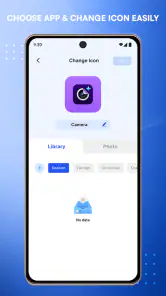
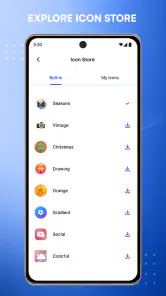
One of the standout features is the vast array of icon packs available. Whether you're into minimalist designs, vibrant color schemes, or even quirky illustrations, there's something for everyone. The app even allows you to import your own images to create truly unique icons. It's like having a mini graphic design studio in your pocket!
Unleash Your Creativity
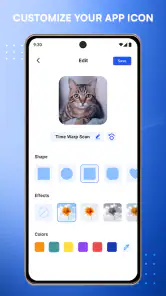
Now, let's talk about the icon editing capabilities. This is where the app truly shines. You can tweak every aspect of an icon—from its shape and color to adding text and overlays. I spent hours playing around with different combinations, and the possibilities seemed endless. Plus, the app allows you to preview how your new icons will look on your home screen before committing to any changes. Talk about handy!
Another cool feature is the ability to change the app names that appear under your icons. This means you can add a personal touch to every aspect of your phone's interface. It's these little details that make the app so appealing to customization nerds like me.
Seamless Integration and Performance
Performance-wise, the app is smooth and responsive. I didn't experience any lag or crashes, which is always a plus in my book. It integrates seamlessly with both Android and iOS systems, ensuring that everyone can join in on the fun.
The app also offers a straightforward way to revert changes if you ever want to switch back to your original icons. This gives you the freedom to experiment without the fear of making permanent alterations.
You May Like

Clash of Clans Is Won Between the Battles

Android Auto Makes the Case for Quieter Car Software

MobiOffice: Transforming Mobile Productivity with Seamless Integration

EA SPORTS FC™ Mobile Soccer: Redefining Mobile Sports Gaming

How Microsoft OneDrive Became a Mobile Productivity Giant

How Google Translate Breaks Language Barriers Effortlessly
Icon Changer And Icon Editor has become a staple on my phone. It's more than just an app; it's a creative playground that allows you to express your personality through your device. So, if you're looking to breathe new life into your phone's interface, give this app a try. You might just find yourself addicted to the art of customization!
Icon Changer And Icon Editor Frequently Asked Questions
What is Icon Changer and Icon Editor, and what does it do?
Icon Changer and Icon Editor is a versatile application designed to customize the appearance of your device's app icons. It allows users to replace default app icons with personalized designs, create unique icon themes, and even use their own images as icons. This app is ideal for those looking to give their device a unique and personalized look.
Is Icon Changer and Icon Editor easy to use for beginners?
Yes, Icon Changer and Icon Editor is designed with user-friendliness in mind, making it accessible to beginners. The app features an intuitive interface where users can easily select an app, choose a new icon from a variety of templates, or upload an image. It also provides step-by-step guidance to ensure a seamless customization experience.
Does using Icon Changer and Icon Editor affect device performance or battery life?
Using Icon Changer and Icon Editor has a minimal impact on device performance and battery life. The app primarily alters the visual appearance of app icons without running background processes. However, frequent changes or the use of high-resolution images may slightly affect performance, but for most users, the effects are negligible.
Can I revert back to the original icons after using Icon Changer and Icon Editor?
Yes, users can easily revert back to the original app icons after using Icon Changer and Icon Editor. The app provides an option to restore default icons, ensuring that users can experiment with different styles without worry. This feature is particularly useful for those who like to frequently update their device's look.
Is Icon Changer and Icon Editor free, or does it require a purchase?
Icon Changer and Icon Editor offers a free version with basic features, allowing users to explore its customization options. For those who seek advanced features and a wider range of templates, a premium version is available for purchase. This tiered approach ensures that users can choose the option that best suits their needs and budget.
Pros
- Custom icons for personalization
- User-friendly interface
- Wide range of icon styles
- Regular updates
- Compatible with major launchers
Cons
- Limited free features
- Some icons require premium
- Occasional ads
- May slow down device
- Not all icons are high quality

- Category
- Personalization
- Version
- 17.21












