

iCoder CPT RVU ICD10 HCPCS NDC
- 6.00
- 4.3
- Installs
- 10.00K
- Price
- Free

Screenshots
Analysis by Reviewed
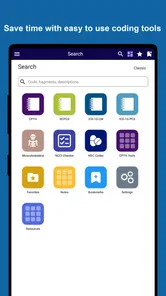
When I first opened iCoder CPT RVU ICD10 HCPCS NDC, I understood its purpose quickly: it is a reference app for people who work with medical coding and related billing information. It brings several code families and fee references into one place instead of making me jump between separate searches. That sounds simple, but it matters when I am checking a code during a busy administrative task and need an answer without opening a full desktop system.
The app is made by StarInix and sits in the medical category. It is free to install, has an Everyone content rating, and supports Android 8.0 or later. Its current version is 2.0.3. The store page shows a 4.3 average from around 40 ratings, with over 10K installs, so it has found a modest but clearly defined audience rather than trying to be a general health app for patients.
I would describe it as a compact coding companion, not a complete practice-management platform. It is most useful when I already know what kind of information I need and want to look it up quickly. It is less suitable if I expect patient records, claims submission, clinical guidance, or a guided course that teaches coding from the beginning.
What the app covers and what to expect
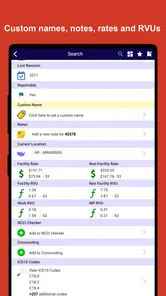
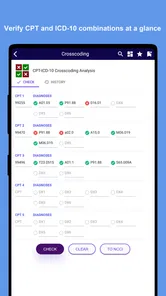
The main appeal is the range of reference areas gathered under one app. The coverage includes CPT-4, RVU, ICD-10-CM, ICD-10-PCS, HCPCS, orthopedic information, laboratory fees, and NDC. Those terms represent different parts of medical coding and reimbursement work, so the app can be useful to a coder, biller, medical office worker, student, or clinician who occasionally needs to verify terminology.
That breadth also creates the first important expectation: this is not one single list with one universal search result. Each code family has its own purpose and conventions. A CPT-4 lookup is not interchangeable with an ICD-10-CM diagnosis lookup, and an NDC reference answers a different question again. I found the app easier to use when I decided what I was verifying before opening a section.
For example, if I am checking a procedure, I would start with CPT-4 or HCPCS rather than searching through diagnosis codes. If I am reviewing a diagnosis description, ICD-10-CM is the logical starting point. ICD-10-PCS belongs to a different type of coding work, while RVU information is more relevant when I am considering relative value rather than simply identifying a diagnosis or procedure.
The most useful habit is to identify the code system first and search second. That small step reduces the chance of finding a plausible-looking entry from the wrong reference area. It is especially important for newcomers, because similar abbreviations can make unrelated code families appear more interchangeable than they really are.
More From Our News Desk

 Gmail
GmailGmail in a Busy Inbox: Who Benefits Most?
From first account to crowded workday, Gmail earns its place through dependable search and flexible sorting—but its best fit depends on how much inbox maintenance you can tolerate.

 Prime Video
Switching to Prime Video: What Changes in Your Viewing Routine
Prime Video can make a compelling second home for streaming, but switching means learning a different catalog, rental layer, and route from browsing to playback.

 Universal TV Remote Control
Universal TV Remote Control Works Best as a Reliable Backup
A phone remote earns its place through quick setup and reliable habits. Here is how to get more from Universal TV Remote Control—and where its limits show.

 Weather - By Xiaomi
Weather by Xiaomi Review: Clear at a Glance, Less Clear Up Close
Xiaomi’s weather app makes everyday forecasts quick to scan, but its calm surface can leave useful details and recovery paths harder to find than they should be.

 X
XX Under Pressure: Can It Recover When Posting Goes Wrong?
A resilience-focused review of X, examining setup, mistaken posts, interruptions, weak connections, and the gaps that matter when recovery needs to be dependable.

 Clash of Clans
Clash of Clans Is Won Between the Battles
Its raids are quick; its community is a long-term project of coordination, teaching, rivalry, and shared responsibility—with all the friction that entails.
Latest News



The inclusion of orthopedic material, lab fees, and NDC makes the app more practical for mixed workflows. A small medical office may deal with procedures, diagnoses, tests, supplies, and medications in the same day. Instead of treating each task as a reason to find a separate app, I can at least begin in the same reference tool.
Still, I would not treat a quick result as the final word in a complicated claim. Coding depends on documentation, payer rules, modifiers, setting, date of service, and other details that a reference entry alone may not settle. I use this kind of app to orient myself and verify terminology, then apply the rules and documentation required for the actual task.
Who will get the most value
The strongest audience is someone who already recognizes medical coding language but wants a portable reference. A billing specialist checking a procedure during a call, a student revising code families, or a clinic worker confirming an item before entering it into another system can all benefit. The app is also a reasonable pocket reference for someone who does not want to keep several separate code apps installed.
It may be less comfortable for a complete beginner who does not yet know the difference between a diagnosis code, a procedure code, a supply code, and a drug identifier. The app can help that person look things up, but it should not replace formal instruction. I would also skip it as a primary tool if my work depends on an integrated claim workflow, patient history, audit trail, or synchronized office database.
Patients should be cautious about interpreting a code as a diagnosis or treatment recommendation. A code reference explains classification language; it does not tell me what a medical result means or whether a treatment is appropriate. That distinction is easy to overlook when a technical description appears next to a familiar medical term.
Starting without getting lost
After installing the app, I would begin with a narrow question rather than browsing every category. Before tapping around, I would write down the item I need to identify: perhaps a procedure name, a diagnosis phrase, a medication package identifier, or a laboratory service. I would also note whether I am looking for a code description, a relative value reference, or a fee-related entry.
This preparation makes the first session much less frustrating. A new user can otherwise open CPT-4, see unfamiliar entries, move to ICD-10-CM, and assume the app is inconsistent when the real problem is choosing the wrong reference family. The app becomes more understandable when I treat each section as a specialized shelf rather than one large search box.
The free installation lowers the barrier to testing it in a real workflow. I would install it on a compatible Android device, open the area that matches my task, and try one known term before relying on it for a larger batch of work. That first small test tells me whether the wording and organization fit my habits.
There are in-app purchases listed from $79.99 to $249.99 per item. Because those are substantial amounts compared with a free installation, I would not make a purchase simply because I want broader access or because I am under time pressure. I would first establish that the relevant reference area is useful to me and understand exactly what the paid item provides before committing.
That is an important practical point for an office. A personal trial and an organizational purchase are different decisions. If several staff members might use the app, I would test the workflow with the person who performs the most coding checks, document what is helpful, and compare the cost with existing references before approving anything.
Finding the first meaningful result
My recommended first task is a single lookup whose answer I already know from a trusted source or current office material. This is safer than beginning with an unfamiliar case. I would choose the correct section, enter the recognizable term or code, and check whether the result is presented in a way I can use.
For a procedure-related question, I would compare the displayed wording with the procedure documentation rather than relying on a matching keyword alone. For a diagnosis question, I would check whether the description reflects the documented condition and level of specificity. For an NDC lookup, I would pay attention to the exact product identity instead of selecting the first result that resembles the medication name.
This approach turns the first session into a controlled test. I am not only asking whether the app returns something; I am checking whether it returns the right kind of information for the task. That distinction is valuable because a fast but poorly matched result can create more work later.
A useful workflow is to keep the app open beside the system where I am entering information, when my device setup allows it. I can use the app for reference and the other system for the actual record or claim task. I would avoid copying a code automatically without reviewing the description, since a nearby code can look correct while representing a different service, diagnosis, or product.
Another practical tip is to record the context of a lookup in my notes when the result affects a recurring task. I might note the code family, the wording I searched, and why the entry matched the documentation. The app itself should not be assumed to be a replacement for the office’s coding notes or compliance process, but it can support a repeatable checking routine.
Where new users commonly become confused
The biggest source of confusion is mixing code families. CPT-4 and HCPCS can both appear in procedure and service discussions, but they are not simply duplicate labels. ICD-10-CM and ICD-10-PCS also serve different purposes. If I search the wrong section, the absence of a result does not necessarily mean the code is invalid; it may mean I am asking the wrong reference system.
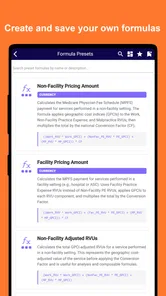
RVU information can cause a different misunderstanding. A relative value is not the same thing as a final payment amount. Reimbursement can depend on many factors outside a quick reference entry. I would use the RVU area to understand relative valuation, not to promise a patient or office an exact payment.
Fee references require similar care. A laboratory fee entry may help me compare or identify a reference value, but it should not automatically be treated as the amount a particular payer will reimburse. Local agreements, payer policies, billing context, and timing can change the practical outcome. The app is helpful as a starting point, not as permission to skip those checks.
NDC searches can also be deceptively simple. A medication name may have multiple presentations or package details, and a near match is not good enough when the identifier is being used for billing or inventory work. I would verify the product details against the package, dispensing record, or another trusted source before entering the result into an official workflow.
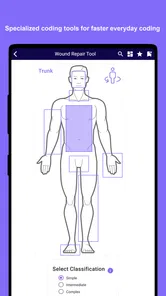
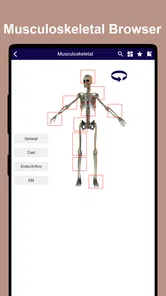
Orthopedic references may be especially useful for a focused practice, but they should not encourage me to assume that every musculoskeletal case fits a familiar pattern. The documented procedure and diagnosis still control the coding decision. The app can shorten the reference step; it cannot supply missing documentation.
How it compares with broader alternatives
Compared with a general web search, the app offers a more focused starting point. A web search can return educational pages, advertisements, outdated explanations, and unrelated results alongside the code I want. A dedicated reference app is more comfortable when I already know the vocabulary and need to move directly to a coding area.
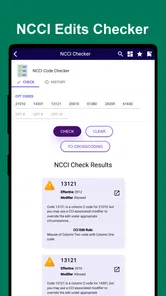
Compared with a full coding platform, however, this app is narrower. A professional system may combine code lookup with payer edits, claim creation, patient records, reporting, updates, and workflow controls. Those tools are better when coding is part of a larger revenue-cycle process. I would choose this app when portability and quick reference matter more than integration.
Printed manuals and official reference materials still have a role, particularly for formal review and policy-sensitive work. A phone is faster for a spontaneous lookup, while a manual may be easier to annotate or consult systematically. I see the app as complementary rather than a universal replacement for authoritative resources.
For students, it may be more convenient than carrying several references, but a textbook or structured course will explain the logic behind the classifications more clearly. For experienced staff, the app can save a few steps during routine checks, but it will not remove the need to stay current with the rules governing their work.
Making it useful in a real workday
Imagine a front-office worker receives a question about a procedure scheduled for the afternoon. Instead of guessing from memory, the worker opens the relevant procedure section, checks the wording, and compares it with the documentation already available. If the question shifts to a diagnosis, the worker changes reference families rather than forcing the first search to fit.
In another situation, a biller may be reviewing a laboratory service and then checking a medication identifier for the same patient encounter. The app’s mixed coverage can reduce the need to change tools, but I would keep each lookup separate and label my notes clearly. Combining results from different sections without recording their purpose is an easy way to create confusion later.
For study, I would use it actively rather than passively. I could select a known code family, search a term, read the result, and then explain in my own words why that family applies. The non-obvious benefit is that this exposes gaps in my vocabulary: if I repeatedly hesitate between CPT-4, HCPCS, and ICD-10-CM, the problem is not the search speed but the classification decision.
For office training, I would give a new employee a few controlled examples and ask them to state the reference family before searching. I would then review the result with them and discuss why a similar-looking entry might be wrong. This uses the app as a teaching aid without pretending that a lookup screen is a complete coding lesson.
I would also avoid treating the app as a patient-facing explanation tool. Technical code descriptions can sound alarming or vague outside their professional context. If a patient asks about a code, I would use the app only to clarify terminology for myself and rely on the responsible clinician or billing office to explain the patient’s actual situation.
Limits worth considering before relying on it
The first limitation is scope. The app gathers many reference categories, but that does not make it an end-to-end medical billing solution. Anyone expecting claim submission, account management, or workflow automation should look for a platform designed around those tasks instead.
The second limitation is the risk of overconfidence. A clean code description can make a decision feel finished, even when documentation or payer rules require more analysis. I would always separate “I found a matching entry” from “this is the correct code for this encounter.” The latter requires professional judgment and context.
The third limitation is cost uncertainty around the in-app purchase range. Since the free install and paid items represent very different commitments, I would inspect the purchase screen carefully and involve the person responsible for software spending. A casual tap is not appropriate when an individual item can cost as much as a substantial professional reference.
The fourth limitation is audience fit. The Everyone rating makes the app broadly accessible, but accessibility does not mean that every reader will understand the material. A person with no coding background may need an external introduction to the terminology, while an experienced coder may need more advanced workflow features than a compact reference app provides.
Finally, I would build a verification habit around important entries. When a lookup affects a claim, compliance review, or medication-related record, I would compare it with the current authoritative material used by my organization. This is not unnecessary caution; it is the sensible trade-off for using a convenient reference tool in a field where small distinctions matter.
My recommendation after using it
I like iCoder CPT RVU ICD10 HCPCS NDC most as a focused second screen for medical coding work. Its value comes from bringing CPT-4, RVU, ICD-10-CM, ICD-10-PCS, HCPCS, orthopedic references, lab fees, and NDC information into one mobile destination. That combination is more useful than a generic medical dictionary when my question is specifically about coding or reimbursement terminology.
I would recommend starting with one familiar lookup, learning which section handles each kind of question, and resisting the temptation to treat every result as a final billing decision. That path gives a first-time user a meaningful result quickly while keeping the app in its proper role.
For a coder, biller, student, or small clinical office that needs portable references, the free entry point makes it worth testing on an Android device running version 8.0 or newer. For a patient, a complete beginner, or a team seeking integrated claims management, another option will probably be a better primary tool.
My final view is positive but measured: this is a practical reference app with a clearly defined audience, not a substitute for official guidance or professional coding judgment. If I need a quick way to move between several medical code families, I would keep it available. If I need a complete billing system, I would look elsewhere and use this only as a supplementary reference.
iCoder CPT RVU ICD10 HCPCS NDC Frequently Asked Questions
Is iCoder CPT RVU ICD10 HCPCS NDC free to download, and are there in-app purchases?
iCoder is a medical reference app from StarInix, and it is free to download. It also offers in-app purchases priced from around $80 to $250 per item, so some features or content may require an additional purchase. Before downloading, consider whether the included reference tools meet your needs and review the purchase details in the app store.
What devices and operating systems can run iCoder?
The app is available for Android devices running version 8.0 or later. Check your device’s operating-system version before downloading to avoid compatibility problems. iCoder is categorized as a medical app and has an Everyone age rating. If you use a device that does not meet the minimum operating-system requirement, you may need to update it or use another compatible device.
What is iCoder CPT RVU ICD10 HCPCS NDC used for?
iCoder CPT RVU ICD10 HCPCS NDC is a medical coding reference tool designed to help healthcare professionals, billers, coders, and students look up commonly used coding systems. It brings together CPT procedure codes, RVU information, ICD-10 diagnosis codes, HCPCS codes, and NDC drug identifiers, making it useful for quick reference when reviewing documentation, preparing claims, or studying coding concepts.
Which coding systems and medical information are included in the app?
The app focuses on several important healthcare coding categories: CPT codes for medical procedures, RVUs for relative valuation information, ICD-10 codes for diagnoses, HCPCS codes for services and supplies, and NDC numbers for medications. Its listed coverage also includes ICD-10-PCS, orthopedics, and lab fees. The exact descriptions, code coverage, update frequency, and available details may vary by app version, so users should confirm important information against current official coding manuals and payer-specific guidance.
Can iCoder replace official coding guidelines or professional advice?
No. iCoder should be treated as a convenient reference resource rather than a replacement for official code books, payer policies, CMS publications, AMA guidance, NDC databases, or advice from a qualified coding specialist. Medical coding rules can depend on documentation, modifiers, billing circumstances, national updates, and payer requirements. Always verify codes and reimbursement-related information before submitting a claim or making a clinical or financial decision.
Pros
- Combines CPT
- RVU
- ICD-10
- HCPCS
- and NDC references in one app.
- Useful for quick code checks during clinical or billing workflows.
- Search tools can reduce time spent browsing large coding manuals.
- Helpful offline reference for users working without reliable internet.
- Relevant to coders
- billers
- clinicians
- and healthcare administration staff.
Cons
- Coding content may require updates as annual code sets and rules change.
- Some entries may need verification against official payer or CMS guidance.
- The interface can feel dense for users unfamiliar with medical terminology.
- Advanced billing scenarios may require resources beyond the app’s references.
- Availability and features may vary between Android and iOS versions.











