

Icelandair
- 146.00
- 4.2
- Installs
- 500.00K
- Price
- Free

Screenshots

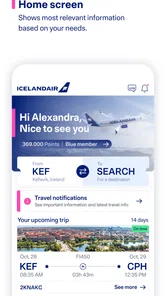
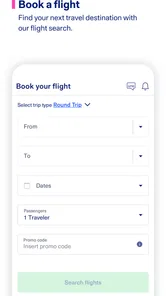
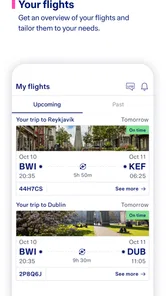
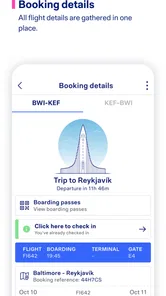
Analysis by Reviewed
When I travel with other people, the difficult part is often not choosing a flight. It is keeping everyone aligned once the booking exists: departure details, airport timing, baggage expectations, and the small changes that can turn a calm morning into a rushed one. I tested the Icelandair app with that shared-travel problem in mind, and I found it most useful as a focused companion for Icelandair passengers rather than as a complete travel organizer.
That distinction matters. This is a free Travel & Local app from Icelandair, designed around the airline’s own journey. Its purpose is less about comparing every possible route and more about giving passengers a convenient place to manage and follow an Icelandair trip. I liked that narrower focus because it keeps the experience relevant once I have already chosen the airline. At the same time, someone who wants broad flight comparison, independent hotel planning, or a single dashboard for several airlines may find a general travel app more suitable.
How Icelandair fits into a shared trip
A realistic household example is a couple traveling with children, or a group of friends who booked together but do not all use the same phone. One person may handle the original reservation, while another keeps track of the airport plan and a third needs the latest journey details during the trip. In that situation, the Icelandair app can serve as a useful reference point for the passenger who is responsible for the airline booking.
I would not treat it as a replacement for communication between travelers. An app can help one person check the journey, but it does not automatically solve questions such as who is carrying passports, who has the boarding information, or when the group should leave home. I still prefer to agree on those responsibilities in advance and use the app as the place to verify the airline-related details.
The strongest shared-device habit is simple: the person who controls the booking should review the journey before the group leaves, then share the practical information with everyone else. That avoids the common mistake of assuming every traveler has identical access or has seen the latest details. If the group separates at the airport, each person should know the meeting point and timing without depending entirely on the phone held by the lead traveler.
For a family, this arrangement also keeps the app’s role clear. A parent or guardian can use it to stay organized, while children do not need to manage the travel account themselves. For adult friends, the same approach prevents confusion when one person made the reservation but another is coordinating transport to the airport. The app supports the airline side of the plan; the household still needs a human plan around it.
What I found useful during preparation
The app’s value appears before the flight, when I want to move from a confirmation message to a more deliberate travel routine. Rather than searching through an email thread every time I need to remember the journey, I can use the airline’s own app as a dedicated starting point. That is especially helpful when a trip was booked weeks earlier and the original confirmation is buried under newer messages.
More From Our News Desk

 Weather - By Xiaomi
Weather by Xiaomi Review: Clear at a Glance, Less Clear Up Close
Xiaomi’s weather app makes everyday forecasts quick to scan, but its calm surface can leave useful details and recovery paths harder to find than they should be.

 X
XX Under Pressure: Can It Recover When Posting Goes Wrong?
A resilience-focused review of X, examining setup, mistaken posts, interruptions, weak connections, and the gaps that matter when recovery needs to be dependable.

 Clash of Clans
Clash of Clans Is Won Between the Battles
Its raids are quick; its community is a long-term project of coordination, teaching, rivalry, and shared responsibility—with all the friction that entails.

 Android Auto
Android Auto Makes the Case for Quieter Car Software
The car interface is no longer judged by how much it can do, but by how quietly it helps. Android Auto shows what drivers now expect—and what still gets in the way.

 MobiOffice: Word, Sheets, PDF
MobiOffice: Transforming Mobile Productivity with Seamless Integration
MobiOffice: Word, Sheets, PDF is redefining mobile productivity with a surprising blend of functionality and innovation.

 EA SPORTS FC Soccer Mobile 26
EA SPORTS FC™ Mobile Soccer: Redefining Mobile Sports Gaming
Dive into EA SPORTS FC™ Mobile Soccer, where immersive gameplay and strategic depth transform mobile sports gaming.
Latest News



My practical workflow would be to open the app while the booking is still easy to locate, check that the trip belongs to the correct traveler, and then review it again shortly before leaving. I would also keep the booking reference or other travel documents available separately. That is not a criticism of Icelandair; it is sensible backup planning for any travel app, particularly when several people are sharing responsibility.
A less obvious benefit is reducing the number of conversations needed for routine checking. Instead of asking the booking holder to forward the same details repeatedly, another traveler can look at the relevant information when access is available. This works best when the group agrees on which person is the source of truth and does not mix an old screenshot with a newer app view.
I also recommend checking the app at a calm moment rather than waiting until everyone is standing in a departure queue. Travel information is easier to interpret when there is time to compare it with the group’s transport plan, luggage preparation, and meeting arrangements. The app can support that preparation, but it cannot compensate for a household that leaves every decision until the last minute.
Account boundaries deserve attention
Shared travel creates a boundary question that is easy to overlook: who should use whose device or account? My preference is to keep the booking under the traveler who is responsible for it and avoid casually handing a logged-in phone to every member of the group. A shared tablet or family phone may be convenient, but it should be treated as a travel document holder, not as a communal place where everyone changes details.
This matters even more when several people have similar names or when one household member is arranging travel for another. Before relying on the displayed journey, I would check the passenger and booking details carefully. A quick verification at home is much safer than discovering at the airport that someone has been looking at the wrong trip.
I would also separate viewing from editing. If the app presents an action that could alter a reservation or passenger-related information, the booking holder should make that decision deliberately. Other household members can help read and coordinate, but giving everyone unrestricted control is unnecessary and can create avoidable mistakes. The app is most comfortable in a shared-use arrangement where one person owns the booking task and others support it.
That approach is particularly useful for older relatives who may travel with younger family members. One adult can prepare the trip on the primary device, while the traveler receives the information they need in plain language. The goal is not to create a complicated technical system; it is to make responsibility visible. Everyone should know who is checking the app and who is making the final call.
Coordinating the airport without overpromising
Icelandair’s app is helpful for airline-centered coordination, but I would not confuse that with a full family itinerary. A household may still need a calendar, a messaging conversation, a map, and separate arrangements for hotels or ground transport. Keeping those tools separate can actually be clearer than forcing every travel task into one application.
For example, I would use the app to review the Icelandair journey, a shared calendar to record when the group plans to leave home, and a message to confirm who is traveling together. That division prevents a common planning error: assuming that seeing a flight in an airline app also means every person knows the pickup time, terminal routine, or child-care arrangement.
Another useful habit is to nominate a backup coordinator. If the main booking holder’s phone loses power, another adult should know where the essential travel documents are and how to contact the group. I would not rely on a single screen for the entire trip. The app can be central to the airline information, but resilient travel planning always includes a second way to reach the important details.
When a group has different comfort levels with technology, the simplest method wins. One traveler can open the app and read the relevant information aloud, while the rest focus on passports, luggage, and getting to the airport. This is more practical than expecting every person to install and learn the app, especially for a one-off journey or for relatives who rarely use travel applications.
The trade-off is that a dedicated airline app may feel less convenient when the trip involves multiple carriers. If my itinerary included several airlines, I would probably keep a broader travel organizer or email folder alongside Icelandair’s app. The dedicated app is strongest when the Icelandair segment is the part I need to follow closely; it is less likely to become my only travel command center for a complex, multi-company itinerary.
Age context and trust in a household
The app is rated Everyone, which makes it suitable in an age-rating sense for a broad audience. In practical terms, though, age suitability is not the same as independent travel responsibility. A child may be able to view the app with an adult, but that does not mean the child should be expected to manage booking information, identity documents, or last-minute decisions alone.
I see the app working well for a parent and child who want to review a journey together. The adult can explain what the displayed trip means, while the child becomes familiar with the sequence of travel without being given control over every important step. That shared review can make the airport experience less intimidating, particularly when the child knows what the family is checking and why.
For teenagers traveling with relatives or friends, the right boundary depends on the family’s trust and the actual responsibility involved. I would provide the information needed for the journey, but I would still keep the main booking responsibility with the designated adult unless there is a clear reason to do otherwise. The app does not need to become a substitute for parental judgment or group supervision.
Privacy is another reason to avoid casual sharing. A travel screen can contain information that belongs to a specific passenger or booking. I would only show it to people who need it for the trip, and I would sign out or lock the device according to the phone’s normal security habits when the journey is over. These are ordinary precautions, but they matter more when one phone is passed around a household.
Older travelers may appreciate the focused nature of the app if an adult helps with the initial setup. I would enlarge the phone’s text where possible, save the important travel information in an agreed place, and avoid making the traveler depend on a fast internet search at the airport. The best experience comes from preparation, not from assuming the app alone will remove every source of stress.
Everyday use compared with other travel tools
Compared with an airline website, the app feels like a more natural option for someone who expects to check the same Icelandair journey from a phone. A website can be perfectly adequate for occasional access, but an installed app is easier to place alongside the other tools I use while preparing to travel. The advantage is convenience and focus, not universal coverage.
Compared with a general flight-tracking app, Icelandair has a different purpose. A tracker is often better for watching flights across many airlines or keeping an eye on someone else’s arrival. Icelandair’s own app makes more sense when I am the passenger or booking coordinator for an Icelandair trip and want the airline’s journey information in the same place.
Compared with an email inbox, the app reduces the chance that a confirmation will disappear among unrelated messages. Email remains valuable as a backup record, though, so I would not delete it after opening the app. The most reliable setup is to use the app for quick access and retain the original travel correspondence for reference.
Compared with a full itinerary planner, the app is narrower and therefore potentially less cluttered. I would choose the broader planner for a trip with several airlines, hotels, trains, and reservations. I would choose Icelandair’s app when the airline segment is the main thing I need to manage and I want the household conversation to be based on the same airline-specific view.
Performance expectations and practical friction
The app has an average rating of 4.2 from around 2.1 thousand ratings, with over 500 thousand installs. Those figures suggest that it has found a real audience among travelers, but they should not be read as a guarantee that every passenger will find every part effortless. Travel apps are judged in stressful moments, and even a small login, loading, or account mismatch can feel significant when departure is close.
I would install and open it well before travel day rather than making the airport the first test. That gives me time to identify the correct booking, make sure I understand where the journey appears, and prepare a backup. This is one of the most useful tips for any airline app, but it is especially important when other people are depending on the same phone or account holder.
The current version is 4.5.2, and the app supports Android from version 7.0 onward. That makes it accessible to many older Android devices, although I would still keep the phone’s operating system and normal security updates in good condition. A supported minimum version does not remove the need to check that a particular device has enough battery, storage, and connectivity for travel day.
Because the app is free, there is little financial downside to trying it before deciding whether it deserves a place in the household’s travel routine. The more important cost is attention. If the app does not fit the way a group shares bookings, forcing everyone to use it may create more confusion than it removes. In that case, the airline website, email confirmation, or a broader itinerary tool may be the better practical choice.
Who should use it and who should skip it
I would recommend it to travelers flying with Icelandair who want a phone-based way to keep their airline journey close at hand. It is also a good fit for a household where one person manages the booking and needs to coordinate with a partner, relative, or small group without repeatedly searching through old messages.
It is less compelling for someone who is only comparing airlines and has not chosen Icelandair yet. A general booking service is better for that stage because it can put different carriers and routes side by side. Likewise, frequent travelers with a carefully maintained multi-airline system may prefer to keep everything in one independent planner rather than switch between separate airline apps.
I would also skip making it the sole tool for a complicated group itinerary. If different travelers have separate bookings, different airlines, or different onward transport, the app may cover only one part of the coordination problem. It can still be useful for the Icelandair portion, but the group needs a wider plan so that nobody assumes one passenger’s view represents everyone’s journey.
My strongest recommendation is to decide who owns the travel information before installing anything. When that boundary is clear, the app becomes easier to use: the responsible traveler checks the journey, the household confirms the plan, and everyone knows where the airline-specific details come from. Without that agreement, even a well-focused app can become another source of duplicated screenshots and conflicting assumptions.
My household verdict
Icelandair is best understood as a focused travel companion for Icelandair passengers, not a universal family itinerary manager. I appreciate that its purpose is clear, and I can see real value in having the airline journey available on a phone when a household is preparing for a flight. The free price and Everyone age rating also make it easy to introduce into a shared travel routine without creating a financial or age-related barrier.
My final advice is to use it with sensible boundaries. Let one trusted traveler remain responsible for the booking, review the journey before departure, share only what the group needs, and keep an independent backup such as the original confirmation. For a straightforward Icelandair trip, that combination can make coordination calmer. For a multi-airline journey or a household that wants one place for every reservation, a broader travel tool will probably serve better.
After considering its 2019 release, its current 4.5.2 version, and the way it fits into real shared-device habits, I see it as a practical specialist rather than an all-purpose solution. If Icelandair is the airline I am traveling with, I would install it early, test my access at home, and use it as the airline-focused part of a wider household plan.
Icelandair Frequently Asked Questions
What devices can run the Icelandair app?
The Icelandair app is available for Android and iOS, making it possible to keep trip information on a compatible phone while traveling. On Android, it requires version 7.0 or later. Before downloading, check that your device’s operating system meets that requirement and that you have enough space for the app and its updates.
Who makes the Icelandair app, and what is it for?
The app is developed by Icelandair and belongs to the Travel & Local category. Its purpose is to guide passengers through their journey and provide convenient access to travel information and booking-related tools. It is most relevant to people flying with Icelandair, though travelers can also use it to explore available features before a trip.
What can I do with the Icelandair app?
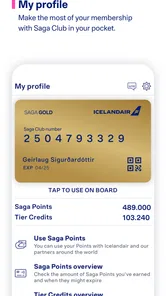
The Icelandair app is designed to manage most parts of your journey in one place. After signing in or retrieving a booking, you can view trip details, check flight status, access mobile check-in when available, review boarding information, and receive travel updates. It is especially useful for passengers flying with Icelandair who want quick access to itinerary information without repeatedly visiting the airline’s website.
Can I check in and access my boarding pass through the Icelandair app?
In many cases, the app allows eligible passengers to check in for their flight and display a mobile boarding pass. Availability can depend on the route, airport, booking type, passenger documentation, and check-in window. I recommend checking that your name and flight details are correct before traveling, and keeping a saved or alternative copy of your boarding information in case your phone has limited battery or internet access.
Does the Icelandair app provide flight status and travel notifications?
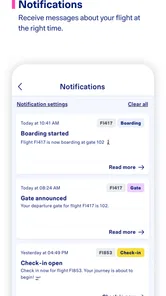
Yes, the app can help you monitor important flight information, including scheduled departure and arrival times, gate details when available, and possible changes to your itinerary. Notifications may be useful for delays, boarding updates, or other operational changes, but they should not be your only source of information. Always confirm airport screens and announcements, particularly during weather disruptions or busy travel periods.
Pros
- Easy access to flight bookings
- check-in
- and boarding passes
- Useful flight status updates help track schedule changes
- Saga Club loyalty program rewards frequent Icelandair travelers
- Stopover options make Iceland convenient for multi-city trips
- In-app travel details keep reservations organized in one place
Cons
- Some features may require an Icelandair account or booking
- App performance can vary during busy travel periods
- Ancillary fees may increase the final ticket price
- Limited usefulness if you rarely fly with Icelandair
- Support options may be less convenient outside operating hours











