

ICD-10 CM Codes 2023 Reference
- 4.00
- 4.0
- Installs
- 10.00K
- Price
- Free

Screenshots
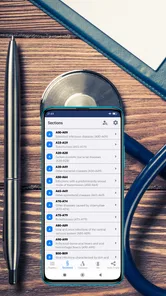
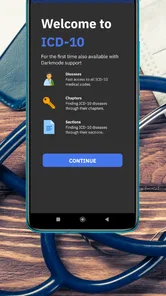
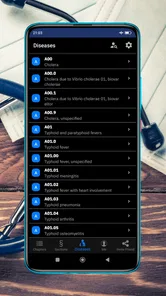
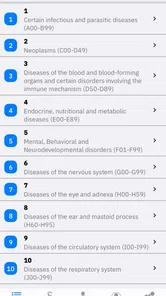
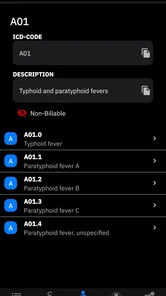
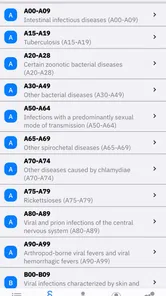
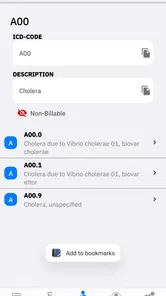

Analysis by Reviewed
I found ICD-10 CM Codes 2023 Reference most useful in a shared household where one person needs to check medical terminology and another simply wants a quick second look at a code. It is a focused medical reference app from treeinspired GmbH, aimed at browsing ICD-10-CM codes rather than replacing professional advice. That distinction matters: this is a lookup tool, not a diagnostic service, symptom checker, or treatment guide.
In my experience, its appeal comes from being narrower than a general health app. Instead of surrounding a search with wellness articles, reminders, or symptom questions, it keeps attention on the coding reference itself. That makes it suitable for students, administrative workers, caregivers handling paperwork, and households where medical documents occasionally need decoding. It is also free to install, with optional purchases ranging from a few dollars to the mid-twenties per item, so I would check the purchase screen carefully before treating it as a completely cost-free reference.
How the reference works in everyday household use
When I use an ICD-10-CM reference around the house, I treat it as a way to make paperwork less opaque, not as a shortcut to a medical conclusion. The most useful habit is to keep the document beside the phone and compare the complete code and its wording before discussing it with anyone else. That careful first check makes the next step—turning an unfamiliar label into a clear question for a provider or insurer—much easier.
A practical shared-device scenario
Imagine a family member receives an insurance letter containing an unfamiliar code. They may not need a long explanation; they may only want to identify the wording attached to that entry before calling a clinic or insurer. With this app available on a shared phone or tablet, the person handling the paperwork can look up the code while another household member reads the document aloud. That is a modest use case, but it is exactly where a compact reference can be more convenient than opening a browser and sorting through unrelated medical pages.
I would still keep the conversation focused on identification, not interpretation. Seeing a code label does not explain why it was used, whether it is accurate for a particular patient, or what should happen next. My preferred household workflow is to use the app to prepare a clearer question for a doctor, billing office, or insurer. That keeps the reference useful without allowing a quick lookup to become an accidental medical conclusion.
The app also makes sense for someone who regularly helps a relative organize health paperwork. A caregiver may recognize the general subject of a document but not the coding language. Looking up an entry can help them sort papers, note questions, or understand which part of a bill deserves clarification. The benefit is practical rather than dramatic: less time switching between documents, search results, and unfamiliar terminology.
For a student, the same tool can support revision. A learner can search a code while reading course material and compare the official-looking entry with class notes. I would use it as a companion to structured study, not as the sole learning resource, because memorizing labels without understanding coding conventions can create false confidence. Its strongest role is quick recall and verification during a broader study routine.
More From Our News Desk

 Gmail
GmailGmail in a Busy Inbox: Who Benefits Most?
From first account to crowded workday, Gmail earns its place through dependable search and flexible sorting—but its best fit depends on how much inbox maintenance you can tolerate.

 Prime Video
Switching to Prime Video: What Changes in Your Viewing Routine
Prime Video can make a compelling second home for streaming, but switching means learning a different catalog, rental layer, and route from browsing to playback.

 Universal TV Remote Control
Universal TV Remote Control Works Best as a Reliable Backup
A phone remote earns its place through quick setup and reliable habits. Here is how to get more from Universal TV Remote Control—and where its limits show.

 Weather - By Xiaomi
Weather by Xiaomi Review: Clear at a Glance, Less Clear Up Close
Xiaomi’s weather app makes everyday forecasts quick to scan, but its calm surface can leave useful details and recovery paths harder to find than they should be.

 X
XX Under Pressure: Can It Recover When Posting Goes Wrong?
A resilience-focused review of X, examining setup, mistaken posts, interruptions, weak connections, and the gaps that matter when recovery needs to be dependable.

 Clash of Clans
Clash of Clans Is Won Between the Battles
Its raids are quick; its community is a long-term project of coordination, teaching, rivalry, and shared responsibility—with all the friction that entails.
Latest News



Keeping boundaries clear on a shared device
Shared use brings a simple but important question: whose work is being done, and who is responsible for the information? The app is suitable for looking up a code, but a family should avoid treating the device as a communal medical record. I would not type personal names, diagnoses, or other identifying details into any search field unless I had first checked exactly how the app handles that information. A code-only workflow is safer and usually sufficient for the task.
There is also a difference between sharing an app and sharing an account. If several people use one device, they may see the same app state or purchase options, but that does not automatically make the underlying medical questions shared property. Someone checking a relative’s paperwork should ask permission before discussing the result with other household members. The app can support coordination, but it cannot decide who should have access to sensitive health information.
I would create a household routine around the document rather than around the app. Keep the original letter or bill nearby, write down the code exactly as shown, and record the question that remains after the lookup. This avoids the common mistake of searching a similar-looking entry from memory. It also gives the family something concrete to take to a professional instead of relying on a screenshot or an incomplete recollection.
Another useful boundary is separating reference work from urgent care. If someone has severe symptoms or believes they may be in immediate danger, browsing a code is the wrong next step. The app does not turn a coding reference into emergency guidance. In that situation, contacting local emergency services or a qualified healthcare professional takes priority.
Coordinating paperwork without overreading the result
One of the less obvious strengths of a code reference is that it can improve the quality of a phone call. Before contacting a provider, I would use the app to identify the wording connected with the code, then prepare a short list: where the code appeared, which date is on the document, and what seems unclear. This is more effective than calling with only “I do not understand this bill.” The app contributes organization, while the professional supplies context.
For households with several people involved in care, a shared note can be useful, but I would keep it factual. Record the code exactly, the plain-language label displayed by the app, and the question awaiting confirmation. Avoid adding assumptions such as “this means the condition is confirmed” or “this must be the reason for the visit.” That discipline is especially important when different family members have different levels of medical knowledge.
The app can also help prevent a communication mix-up when two documents contain similar terminology. I would compare the complete code, not just the first few characters, and check whether the surrounding document gives additional context. A partial match may sound convincing while pointing to a different entry. This is the kind of careful habit that makes a reference app more valuable than a casual web search.
At the same time, I would not expect the app to coordinate appointments, send findings to a clinic, or manage a family care plan. Its job is narrower. If your household needs shared calendars, medication reminders, secure messaging, or a central health record, a dedicated care-coordination service will be a better fit. Using this reference for those tasks would create unnecessary friction because the app is built around codes, not household management.
Age, trust, and the right level of supervision
The content rating is Everyone, which makes the app approachable for a broad audience. That does not mean every medical entry is emotionally easy for every reader. A child may be able to open the reference but may not understand clinical language or the difference between a code description and a diagnosis. I would keep younger users with a trusted adult and explain that the app names categories used in medical paperwork; it does not tell them what illness they have.
Older children and teenagers studying health subjects may use it more independently, especially when an adult is available to discuss confusing entries. The key is not technical supervision so much as interpretation. A responsible adult can ask, “Where did this code come from?” and “What question are we trying to answer?” Those two questions reduce the risk of turning an isolated label into a frightening self-diagnosis.
Trust matters for adults as well. If a partner or relative asks someone else to look up a code, the person doing the search should not assume permission to circulate the result. A household device can blur personal boundaries, particularly when notifications, recent searches, or open pages are visible. I would close the reference after use and avoid leaving sensitive paperwork beside a shared screen. These are ordinary privacy habits, but they matter more with medical information.
The app’s rating and simple purpose make it easier to introduce into a family routine than a more complex clinical platform. Still, I would explain its limits before handing it to someone anxious about symptoms. The most trustworthy use is “help me understand this document well enough to ask a better question,” not “tell me what is wrong with me.” That framing keeps the tool helpful for both confident users and people who are easily alarmed by medical vocabulary.
What I noticed about the version and cost structure
The current version is 3.1, and the app supports devices running Android 7.1 or later. That gives it a relatively broad place in a household with an older Android phone, although compatibility alone does not guarantee that every device will feel equally comfortable for reading reference material. A larger screen is preferable when comparing a code with a printed document, while a phone is more convenient for a quick lookup away from home.
The app has passed the early experimental stage: it was released on October 18, 2022, and has reached over ten thousand installs. Its average rating is 4.0 from roughly fifty-six ratings, with four written reviews. I read that as moderate evidence that people find it useful, but not as proof that it will suit every workflow. A small reference app can satisfy one user completely and feel too limited to another, depending on whether the need is occasional lookup or professional-level coding work.
Because the installation is free but optional purchases are available, I would begin with the free experience and identify exactly what is included before paying. The listed purchase range runs from $3.99 to $25.99 per item. That spread suggests that different users may encounter different upgrade choices, so I would not assume that every useful function is included automatically or that one purchase unlocks everything. For a household, decide first whether one person needs advanced access or whether occasional free lookups are enough.
This pricing structure also changes the comparison with ordinary search engines. A web search costs nothing at the point of use and may provide surrounding explanations, but it can return outdated, incomplete, or poorly organized pages. A dedicated reference can be faster and more focused. On the other hand, a professional coding database or institutional resource may offer broader context and stronger workflow support. I would choose this app for convenient personal reference, not as a replacement for a workplace system that requires authoritative documentation and formal processes.
Where it is stronger than common alternatives
The usual alternative is searching the code on the open web. That approach is flexible, especially when you do not know the exact code, but it often mixes official terminology with blogs, billing explanations, and symptom pages. A focused ICD-10-CM reference keeps the task closer to the code itself. When I already have the entry from a document, that narrower path is more efficient than turning the lookup into a general medical search.
Another alternative is asking a healthcare professional immediately. That remains the right choice for interpretation, but not every preliminary question needs an appointment. If I only need to recognize the wording attached to a code before making a call, the app can save time and make the eventual conversation more precise. The trade-off is that the app cannot see the patient’s history, the clinician’s reasoning, or the billing context.
Printed coding books and large desktop references are better for sustained study or professional work. They can offer surrounding categories and a more deliberate browsing experience. This app is more appealing when portability and speed matter. A student reviewing notes in a library or a caregiver sorting mail at the kitchen table is likely to appreciate a phone-based reference more than a large manual. Someone responsible for claims accuracy should confirm entries against the resource required by their employer or institution.
The most useful advanced habit is to treat the app as the first step in a two-step check. First, locate the exact code and read its label. Second, return to the document and ask whether the label fits the section where it appears. If it is on a bill, the billing context matters; if it is in a clinical summary, the surrounding wording matters. This simple cross-check is more reliable than copying the label into a family message without context.
Who should use it, and who should skip it
I would recommend this app to people who encounter ICD-10-CM codes often enough to want a dedicated reference but do not need a full professional coding suite. Medical students, office staff in training, caregivers, and organized patients are the clearest audiences. It is also a sensible household utility when one person regularly handles insurance correspondence and wants a quick way to prepare questions.
I would be more cautious recommending it to someone who expects plain-language medical explanations. A code reference can identify terminology while leaving the reader with more questions than answers. If your main goal is to understand symptoms, compare treatments, or decide whether to seek urgent care, a clinician or a purpose-built health information service is more appropriate.
Professional coders should also judge it against their required references before relying on it. The app may be convenient for a quick check, but convenience is not the same as compliance, completeness, or suitability for a production billing workflow. I would use it as a supplementary tool unless my workplace specifically approves it for the task at hand.
For families, the best fit is a household that can maintain clear boundaries. If several people share one device casually and nobody wants to discuss privacy, a dedicated medical reference may encourage oversharing or misinterpretation. If the family agrees that codes are looked up only to organize questions and that sensitive results stay with the relevant person, the app becomes much more useful.
My household verdict
After using it as a focused reference, I see ICD-10-CM lookup without the distraction of a general health portal as its central value. It is free to start, available to a wide range of Android users, and practical for the small but recurring moments when a medical document contains a code that needs checking. The developer, treeinspired GmbH, has kept the product positioned around a specific reference task rather than trying to make it a complete healthcare companion.
Its limitations are equally clear. It does not replace a clinician, a secure family record, a scheduling tool, or a professional coding database. Optional purchases mean I would inspect the available access before committing money, and the moderate rating suggests a useful but not universally polished experience. I would also avoid assuming that a label alone provides enough context to understand a diagnosis or a bill.
My recommendation is therefore conditional but positive. Install it if you or someone in your household regularly needs to identify ICD-10-CM entries, especially before contacting a provider or sorting paperwork. Use exact codes, keep personal details out of casual shared searches, and write down questions rather than conclusions. Skip it if you want symptom advice, family care coordination, or authoritative professional billing support. Used within those boundaries, it is a sensible medical reference for everyday lookup work rather than a tool that promises more than it can safely deliver.
ICD-10 CM Codes 2023 Reference Frequently Asked Questions
How much does ICD-10 CM Codes 2023 Reference cost to download?
ICD-10 CM Codes 2023 Reference is free to download, so users can try its basic reference features without paying upfront. The app also offers in-app purchases, with items priced from around $3.99 to $25.99. Check the purchase details in the app before confirming anything, especially if you only need a quick code lookup or plan to use it regularly.
What is ICD-10 CM Codes 2023 Reference used for?
ICD-10 CM Codes 2023 Reference is designed as a convenient lookup tool for the 2023 edition of the International Classification of Diseases, Tenth Revision, Clinical Modification. It can help students, healthcare professionals, medical coders, and administrative staff search diagnostic codes, review descriptions, and better understand code organization without carrying a printed code book.
Does the app include the complete 2023 ICD-10-CM code set?
The app is intended to provide access to the 2023 ICD-10-CM reference material, including code listings and descriptions available within its database. However, users should check the app’s store listing and update notes to confirm the exact coverage, included chapters, supplementary information, and whether any coding guidelines or payer-specific instructions are provided.
Can ICD-10 CM Codes 2023 Reference be used for official medical billing?
It may be useful for research, education, preliminary code searches, and everyday reference, but it should not automatically be treated as a replacement for official coding guidance. Medical billing and reimbursement depend on current regulations, payer policies, documentation, and professional judgment. Always verify important codes against authoritative sources and the rules applicable to your location and healthcare system.
Does the app work offline?
Offline availability depends on how the application stores its code database and on the version installed on your device. If the reference content is downloaded with the app, basic searching may work without an internet connection, which is helpful in clinics or classrooms with limited connectivity. Nevertheless, downloads, updates, advertisements, or external links may still require internet access.
Pros
- Works offline
- making code lookup possible without an internet connection.
- Includes detailed code descriptions for more informed clinical reference.
- Search tools help locate codes faster than browsing the full classification.
- Useful for students
- coders
- and healthcare professionals during daily work.
- Compact reference format takes up little storage and is easy to carry.
Cons
- May not reflect the latest annual ICD-10-CM updates or coding guidance.
- Should not replace official coding manuals
- payer rules
- or expert advice.
- Some entries may require clinical context to choose the correct billable code.
- Interface and navigation may feel basic compared with professional coding platforms.
- Availability and features may vary between Android and iOS versions.











