

IAFF Mobile
- 13.00
- 4.2
- Installs
- 10.00K
- Price
- Free

Screenshots
Analysis by Reviewed
When I first opened IAFF Mobile, I approached it as a practical events app rather than something I would browse for entertainment. Its purpose is closely tied to the International Association of Fire Fighters, so the right question is not whether it replaces every communication tool on a phone, but whether it gives members and event attendees a more focused way to stay connected with IAFF-related activity. In my experience, that focus is its main appeal.
The app is free, aimed at everyone, and available for devices running Android 7.0 or later. It was released on January 11, 2017, and the current version is 18.6.14. Those details matter because this is not a brand-new experiment with an untested audience; it is an established mobile presence for the association. At the same time, its relatively specific purpose means it will feel useful to one group and unnecessary to another.
Following an IAFF event from preparation to outcome
I find it useful to think of an IAFF event as a short chain of decisions, not just a date to look up: first I check the shared reference, then I turn relevant details into my own plan, and finally I follow through with the people involved. That perspective helps me keep the app in its proper role while avoiding missed handoffs. The next section looks at how that routine starts before an event is underway.
Starting with a clear reason to open it
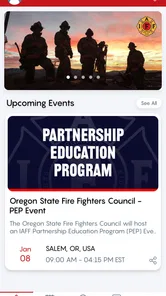
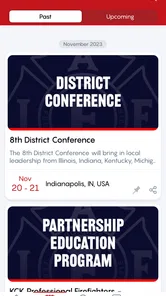
The most realistic starting point is a member, delegate, supporter, or event participant who needs IAFF information in one place. Perhaps you are preparing to attend an association gathering, checking what is happening around an event, or trying to keep up with activity connected to the International Association of Fire Fighters without mixing it into a crowded social feed. That is where a dedicated events app makes more sense than a general web search.
I like this starting condition because it gives the app a defined job. You do not need to wonder whether it is a general firefighter utility, an emergency-response tool, or a broad news platform. It is an IAFF-focused app in the Events category. That distinction is important: it should be judged by how quickly it helps you orient yourself around association activity, not by whether it offers the wide range of tools found in a calendar, messaging service, or news application.
The first useful habit is to open it with a specific task in mind. If I am looking for event-related information, I want to identify the relevant item, understand what action is expected from me, and then know where to go next. A focused app can reduce the distraction that comes with searching through unrelated posts or emails. The trade-off is that it only becomes valuable when my task is genuinely connected to IAFF activity.
That makes the audience fairly easy to define. Members who regularly follow association events are the strongest candidates. People attending an IAFF gathering may also appreciate having an official mobile channel available rather than relying entirely on printed material or scattered messages. Someone who only wants a general calendar, local fire-service news, or an all-purpose event planner will probably find a broader alternative more useful.
More From Our News Desk

 Gmail
GmailGmail in a Busy Inbox: Who Benefits Most?
From first account to crowded workday, Gmail earns its place through dependable search and flexible sorting—but its best fit depends on how much inbox maintenance you can tolerate.

 Prime Video
Switching to Prime Video: What Changes in Your Viewing Routine
Prime Video can make a compelling second home for streaming, but switching means learning a different catalog, rental layer, and route from browsing to playback.

 Universal TV Remote Control
Universal TV Remote Control Works Best as a Reliable Backup
A phone remote earns its place through quick setup and reliable habits. Here is how to get more from Universal TV Remote Control—and where its limits show.

 Weather - By Xiaomi
Weather by Xiaomi Review: Clear at a Glance, Less Clear Up Close
Xiaomi’s weather app makes everyday forecasts quick to scan, but its calm surface can leave useful details and recovery paths harder to find than they should be.

 X
XX Under Pressure: Can It Recover When Posting Goes Wrong?
A resilience-focused review of X, examining setup, mistaken posts, interruptions, weak connections, and the gaps that matter when recovery needs to be dependable.

 Clash of Clans
Clash of Clans Is Won Between the Battles
Its raids are quick; its community is a long-term project of coordination, teaching, rivalry, and shared responsibility—with all the friction that entails.
Latest News



Moving from discovery to preparation
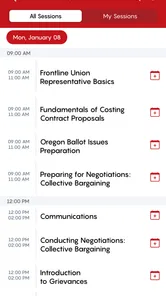
Once I have a reason to use the app, the next step is turning information into a plan. A good event workflow is not just about seeing that something exists. I need to know what deserves attention, what I should remember, and which details I may need to pass to another person. This is where I would use IAFF Mobile as a reference point before an event, rather than treating it as a replacement for every conversation around the event.
My practical approach would be to review the relevant event information early, then revisit it closer to the day. That simple two-pass workflow is more reliable than opening an event app once and assuming I will remember everything. On the first pass, I would look for the overall shape of the event and note anything that affects travel, timing, or participation. On the second, I would check the same information again before leaving, especially if I am coordinating with colleagues.
This is also where I see one of the app’s less obvious strengths: a dedicated association app can act as a shared reference during preparation. If several people are discussing the same IAFF activity, pointing them toward one official place is cleaner than sending different screenshots or repeating details in separate messages. It does not eliminate the need for communication, but it can give those conversations a common starting point.
There is a small but important discipline involved. I would not assume that opening the app means every personal arrangement is handled. Travel plans, shift coverage, transport, and last-minute coordination still belong in the tools designed for those jobs. IAFF Mobile works best as the event-centered layer of the workflow, while a calendar, email thread, or messaging group handles personal commitments and direct coordination.
Handling the handoffs between people
The handoff is where event information often becomes messy. One person finds a detail, another needs to act on it, and a third may need a reminder later. In this situation, I would use the app to verify the source before passing information along. That is more dependable than relying on memory, especially when several event details are being discussed at once.
A useful routine is to separate information into three parts: what the event is, what I need to do, and what someone else needs to know. The app can serve as the reference for the first part. My phone’s calendar or notes can hold the second. A direct message or group conversation can handle the third. This division prevents a common mistake: expecting one events app to manage discovery, personal scheduling, and team communication equally well.
For a local or regional group preparing together, the app could be used at the beginning of a short briefing. I would open the relevant IAFF information, confirm the shared details, and then move the group discussion into the channel everyone already uses. That creates a clean handoff: the app supplies the common reference, while the group decides who is attending, who needs help, and what follow-up is required.
This workflow is especially useful when people have different levels of involvement. A regular member may already understand the association’s context, while a first-time attendee may need a clearer explanation of why an event matters. Showing the source first makes the conversation easier. However, I would still explain the practical next steps in plain language rather than assuming that the app alone will answer every personal question.
Another useful trade-off is speed versus completeness. A specialized app can be faster than searching through general channels, but a focused presentation may not cover every detail that a person wants before committing to travel or a schedule. I would use it to establish the official event context, then confirm any personal logistics through the appropriate human contact or planning tool.
Turning the event into a completed task
The outcome I want from IAFF Mobile is not simply a screen viewed; it is a completed event-related task. That might mean arriving with the right information, knowing what to expect, or being able to direct another member to the same source. The app earns its place on my phone when it reduces uncertainty at one of those points.
In a realistic scenario, imagine that I am preparing for an IAFF event while working a busy schedule. I open the app during a short break, locate the relevant information, and identify what I need to remember. I then place the personal commitment in my calendar and send a concise message to the colleague attending with me. Before leaving, I return to the app for a final reference check. The useful result is not dramatic, but it is practical: fewer assumptions, fewer repeated questions, and a clearer handoff between the official source and my own plans.
That scenario also shows why the app should be considered part of a workflow rather than the entire workflow. Its value comes from the connection between official event information and the actions I take afterward. If I only browse without recording anything or communicating with the people involved, I may still forget important details. My recommendation is to pair each important discovery with a concrete next step.
The app’s audience size gives some context for its role. It has passed ten thousand installs, with an average rating of 4.2 from 47 ratings and 13 reviews. I read that as a sign of a specialized tool with an identifiable user base, not as evidence that it is designed for everyone who happens to be interested in public events. The rating is encouraging, but the small review pool also means I would place more weight on whether its purpose matches my own needs.
Where the workflow becomes less comfortable
The main limitation is scope. If I want a complete event-management system with detailed personal scheduling, team chat, task assignments, or broad discovery across unrelated organizations, IAFF Mobile would not be my first choice. A general calendar is better for appointments, a messaging app is better for live coordination, and a broad event platform may be better when I am comparing many organizations or venues.
There is also a risk of depending too heavily on a specialized app during a busy event day. If I need an immediate answer from another person, I would not wait for an app to replace direct communication. Likewise, if I am coordinating transportation or responding to a changing personal situation, a phone call or messaging channel is usually more appropriate. The app can support the handoff, but it cannot remove the human decisions around it.
New users may also need a moment to understand how the app fits into their routine. Because its identity is tied to the International Association of Fire Fighters, its usefulness is not obvious to someone outside that community. I would not install it casually expecting a broad collection of public events. The better approach is to install it when I have a direct IAFF-related reason, then judge it by how quickly it helps with that specific task.
Device compatibility is another practical point. The minimum requirement of Android 7.0 makes it accessible to many older Android phones, but anyone using a device below that requirement will need to check compatibility before planning around it. The app is free, which removes a financial barrier, and its Everyone age rating makes it broadly approachable from an age-classification standpoint. Those are helpful advantages, but they do not change its specialized purpose.
How it compares with the usual alternatives
Compared with a mobile browser, IAFF Mobile should provide a more direct route to IAFF-focused information. A browser is more flexible and can search across many sources, but that flexibility also creates more noise. I would choose the browser when I need background research or information beyond the association’s event context. I would choose the app when I want a more focused starting point.
Compared with a calendar, the difference is even clearer. A calendar is where I record my own commitment, set reminders, and protect the time. IAFF Mobile is better positioned as the place I consult to understand the association-related event before I make that calendar entry. Using one instead of the other would be a mistake; using them together is the stronger workflow.
Compared with a messaging group, the app offers a more stable reference point, while messaging is better for questions, confirmations, and changes involving specific people. I would not ask the app to replace a group conversation, and I would not want a fast-moving chat to become the only place where event information lives. The two tools solve different parts of the handoff problem.
Compared with a general event platform, IAFF Mobile has the advantage of relevance for its intended community. A broad platform may offer richer discovery and more varied event tools, but it can also make association-specific information harder to find. If my event life extends far beyond IAFF activity, the general platform may be more efficient overall. If my priority is IAFF-related participation, the narrower focus is a benefit rather than a weakness.
Who should install it and who should skip it
I would recommend trying IAFF Mobile if you are an IAFF member, regularly follow the association’s events, or need a direct mobile reference while preparing to participate. It is most convincing when used repeatedly across a simple cycle: find the relevant information, confirm it, transfer personal obligations to your calendar, and communicate the necessary parts to colleagues.
I would be more cautious if you are looking for a general-purpose event organizer. The app is not the obvious choice for managing a busy personal schedule, coordinating a large project, or discovering unrelated activities. In those cases, I would install a calendar or collaboration tool first and use a browser or broader event service for discovery.
My strongest practical tip is to avoid treating the app as a passive information shelf. Open it with a question, write down the action that follows, and make the handoff immediately while the details are fresh. That habit turns a specialized events app into something useful in daily planning. Without that follow-through, even relevant event information can disappear into the background of a phone.
Another tip is to use a final-check routine before the event rather than relying on an old message or saved screenshot. A saved copy can become outdated when plans change, while returning to the current source gives me a better chance of working from the latest information available in the app. I would still keep a backup contact route for urgent questions, because no event app should be the only link between people.
Finally, I would judge the app after using it for a complete event cycle, not after a quick launch. The real test is whether it helps me move from awareness to preparation, from preparation to coordination, and from coordination to attendance or follow-up. That is a more meaningful measure than simply counting how polished the first screen feels.
My overall view after using the complete workflow
IAFF Mobile is a focused, free Events app developed by the International Association of Fire Fighters. I see it as a practical companion for people who already have a connection to IAFF activity and want a dedicated mobile route to event information. Its strength is concentration: it keeps the association context in view instead of asking users to reconstruct it from general searches and scattered conversations.
Its limitations are just as clear. It should not be mistaken for a complete calendar, a live messaging service, or a universal event directory. The best experience comes from giving it one job, then handing the result to the tool or person responsible for the next step. That may sound modest, but it is exactly why the app can be useful in a real working routine.
With an average of 4.2 and more than ten thousand installs, it has enough user activity to feel established while remaining clearly specialized. I would recommend it to IAFF-connected users who want a focused event reference and are comfortable combining it with their existing calendar and communication habits. For everyone else, the usual alternatives will probably offer broader value. The deciding question is simple: do your event needs begin with the International Association of Fire Fighters? If they do, IAFF Mobile is worth keeping close; if they do not, its narrow focus will likely be more limitation than advantage.
IAFF Mobile Frequently Asked Questions
Will IAFF Mobile work on my phone?
IAFF Mobile is available for Android devices running version 7.0 or later, so it may suit older phones as well as newer ones that meet that requirement. Before downloading, check your device’s operating system version and confirm that you are using the official app from the International Association of Fire Fighters. The app is free, and its content rating is Everyone.
Who develops IAFF Mobile, and is it an official IAFF app?
IAFF Mobile is developed by the International Association of Fire Fighters, and its stated purpose is to serve the association. That makes it relevant to firefighters and people seeking IAFF-related information and services. If you are looking for a particular local organization’s content, check with that organization about its support for the app and any sign-in or access steps you may need.
What is IAFF Mobile, and who is it designed for?
IAFF Mobile is a member-focused app created for firefighters and members of the International Association of Fire Fighters (IAFF). It is intended to provide convenient access to union-related information, news, resources, alerts, and member services from a smartphone. Availability and the exact features may depend on your local IAFF organization, membership status, and the version of the app installed.
Do I need to be an IAFF member to use IAFF Mobile?
Many of the app’s most useful features may require IAFF membership or credentials supplied by a participating local or affiliated organization. Some content, such as general news or public information, may be available without signing in, but private resources and member tools can be restricted. Before downloading, check whether your local IAFF organization supports the app and whether registration information is required.
What features can I expect from IAFF Mobile?
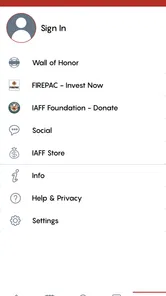
Depending on your organization’s configuration, IAFF Mobile may provide access to IAFF news, announcements, event information, member resources, important notifications, contact details, and links to related services. The experience is generally designed to keep firefighters informed while they are away from a computer. Features can vary by region, local, and account permissions, so not every user will see the same menus.
Pros
- Quick access to IAFF-related news
- updates
- and member information.
- Useful mobile format for checking information while away from a computer.
- Can help members stay connected with IAFF activities and resources.
- Simple navigation makes essential sections easy to locate.
- Convenient way to receive organization-focused information in one place.
Cons
- Some features may require an IAFF membership or account login.
- Content usefulness depends on how frequently the organization updates it.
- Push notifications may become distracting if too many are enabled.
- Certain resources may redirect to external websites or services.
- Availability and features can vary depending on region or membership status.











