IAA Buyer Salvage Auctions
- 2.45K
- 4.0
- Installs
- 1.00M
- Price
- Free

Screenshots

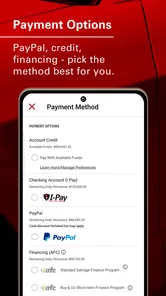
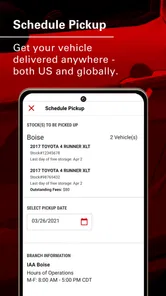
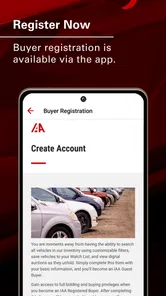
Analysis by Reviewed
I would give IAA Buyer a place on my phone only if I had a continuing reason to follow salvage vehicles. The first few visits can feel like a treasure hunt: there are listings to browse, auctions to track, and the chance that a damaged vehicle might suit a repair plan. But novelty fades quickly. What keeps the app useful is a focused search, a realistic budget, and the discipline to leave a listing alone when the numbers no longer make sense.
What makes the first week appealing
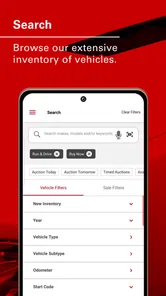
For a new user, the most engaging part is seeing how many possibilities a salvage auction can put in front of you. The app makes it easier to scan vehicles from a phone than to keep a browser full of tabs open, and its search tools help turn a broad catalog into a more manageable shortlist. That convenience is especially useful when you are learning what kinds of vehicles and damage descriptions are worth a closer look.
I would resist treating early browsing as research by itself. A striking photo or a low-looking bid can draw your attention, but neither tells you whether the vehicle is a sensible buy. Before saving anything, I’d decide what models I can actually use, what repairs I can arrange, and how much money must remain available after the bid. That simple preparation turns browsing from entertainment into a buying workflow.
Where it fits into a regular search
A useful routine is to set a realistic shortlist before opening the app: a few makes or models, a maximum repair budget, and a firm limit for the bid itself. Filters can then reduce the pile of listings to something you can assess properly. This is more effective than browsing every appealing car and trying to justify it later, especially because visible damage is only part of the decision.
For example, I might check listings during a lunch break, save a small number of plausible candidates, then review their photos and vehicle details at home before deciding whether an auction deserves more attention. The watchlist helps separate “interesting” from “worth investigating,” while bid history can offer context when judging auction activity. Neither replaces a careful assessment of repair costs or a bidding plan.
Who benefits—and who may not
The app is best suited to people comfortable researching vehicles, comparing likely repair work, and accepting that an auction purchase can involve uncertainty. A mechanic, a hands-on project-car owner, or a buyer who already understands salvage vehicles may find it a convenient way to keep listings and auction dates in view.
If you need a dependable car quickly, want a straightforward purchase, or aren’t ready to investigate damage and total costs, I’d look at ordinary used-car listings instead. Those are usually a better fit for someone who values a simpler buying process over the possibility of a bargain. The same caution applies if you tend to bid impulsively: an alert is a prompt to review a listing, not a reason to raise your offer.
More From Our News Desk

Weather by Xiaomi Review: Clear at a Glance, Less Clear Up Close

X Under Pressure: Can It Recover When Posting Goes Wrong?

Clash of Clans Is Won Between the Battles

Android Auto Makes the Case for Quieter Car Software

MobiOffice: Transforming Mobile Productivity with Seamless Integration

EA SPORTS FC™ Mobile Soccer: Redefining Mobile Sports Gaming
What the app can and cannot settle
Photos and listing details help with screening, but they should be the beginning of due diligence, not the final word on a vehicle’s condition. I would compare the visible damage with the kind of repair work I can realistically arrange, then account for auction-related costs before choosing a maximum bid. A tempting price can become less attractive once the full project is considered.
One practical habit is to write down the reason each vehicle made your shortlist: a suitable model, damage you understand, or a price range that still leaves room for repairs. That small note makes it easier to compare candidates later and walk away when the numbers stop working. It also keeps the app useful without turning every notification into a new bidding decision.
Getting Started with IAA Buyer Salvage Auctions
So, let’s dive right into it. The IAA Buyer Salvage Auctions app is like a treasure trove for car enthusiasts and bargain hunters alike. Right off the bat, you’ll notice the sleek interface that makes navigation a breeze. I was pleasantly surprised by how user-friendly it is. Once you log in, you’re greeted with a dashboard that shows upcoming auctions and available vehicles. It’s kind of like window shopping, but for cars!
Exploring the Features
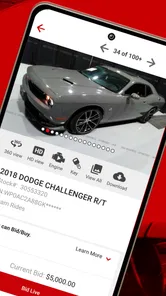
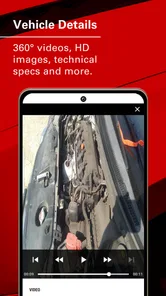
One of the standout features of this app is the detailed listing of each vehicle. You get a comprehensive overview, including photos, vehicle details, and the auction's specifics. I found the search functionality particularly handy. You can filter by make, model, year, and even the type of damage, which means you can easily narrow down your options to find exactly what you’re looking for.
Another great aspect is the auction calendar. It keeps you in the loop with upcoming events, so you never miss out on a potential deal. Plus, they’ve got this nifty feature where you can set alerts for specific auctions or vehicles. Imagine getting a little nudge when that dream car is up for grabs—pretty sweet, right?
Keeping the process manageable
For a recurring search, I’d use alerts sparingly. Start with a narrow set of vehicles or auctions, then adjust only after you see whether the results are useful. Too many notifications can make every listing feel urgent; a short, deliberate check of the calendar is often a better habit than reacting to every nudge. The point is to keep track of relevant opportunities, not to let the auction schedule take over your day.
It also helps to decide in advance what would make you stop considering a listing. If the damage looks outside your skills or repair budget, remove it from the shortlist rather than keeping it around because the model is appealing. That makes the watchlist a working set of candidates instead of a collection of tempting possibilities.
Making the app earn its place month to month
The recurring value depends on whether your search has a defined purpose. If you are restoring a particular kind of vehicle, sourcing a car for a repair business, or watching for a replacement project, a saved shortlist and auction calendar can help you check in without starting over every time. If you are only curious about salvage auctions, the app may be interesting for a few sessions but have little reason to stay in your routine.
I would also separate checking from deciding. A quick scan on a phone is good for spotting a candidate; a larger screen or a more deliberate review is better for comparing details and costs. That division keeps the app convenient without pretending that a compact listing view is enough to make a major purchase decision. When a vehicle looks promising, I’d move the research into a checklist and return to the app only to follow the auction.
Tips and Tricks
Just a quick heads-up: if you’re new to the world of salvage auctions, it might be worth doing a bit of homework first. The app does a great job at providing information, but having some knowledge about vehicle repairs and costs can really help you make informed decisions. Also, keep an eye on the auction fees, as they can add up if you’re not careful.
For those who are more experienced, the app offers tools like bid history and vehicle watchlists, which can be incredibly useful. It’s like having a personal assistant to help you keep track of everything!
A practical decision routine
One useful way to avoid being pulled along by auction momentum is to set two limits before bidding: the most you are willing to pay for the vehicle and the total project amount you can tolerate once repairs and auction costs are included. Those are different numbers. If the bid stays under the first limit but the whole project exceeds the second, the vehicle still is not a good fit.
I’d also compare candidates by what is known and what remains uncertain, rather than by headline appeal. A familiar model with damage I can assess may be a better prospect than a more exciting vehicle whose repair needs I cannot estimate. This is not a hidden app feature; it is a way to use the listings, photos, filters, watchlist, and bid history without letting any one of them stand in for a full inspection or a realistic plan.
Day-to-day value and friction
As a business app from Insurance Auto Auctions, Inc., it serves a focused purpose: keeping salvage-vehicle listings and bidding activity close at hand. IAA Buyer is free, has an Everyone age rating, and has been available since December 5, 2011. Its current version is 25.2, and it requires Android 10 or later. It has a 3.9 average from around 13,000 ratings, with roughly 2,400 written reviews and over a million installs. That scale suggests an established audience, but the rating also makes me think newcomers should judge the workflow for themselves rather than assume it will suit every buying style.
Compared with general vehicle marketplaces, the distinction is the auction focus: this is for following and bidding on salvage vehicles, not simply browsing ordinary used cars as though every listing were ready for everyday driving. That focus is valuable when you have a repair plan; it is less useful if you only want a quick way to find a road-ready vehicle. The app can organize the search, but it cannot make the underlying purchase low-risk.
Questions worth answering before you rely on it
Can I use it just to browse? Yes, browsing can help you understand the kinds of listings available and how auctions are organized, but browsing should not be confused with readiness to buy. If you are not prepared to research a vehicle and its likely total cost, treat what you see as a starting point rather than a shopping recommendation.
Is a watchlist enough to manage a serious search? It is useful for keeping a few candidates together, but I would pair it with a separate note of why each one qualifies and what would rule it out. The app can help you follow the vehicles; your own comparison keeps the shortlist from becoming a pile of saved temptations.
Does the app make sense for someone who already uses general car marketplaces? It can complement them if you specifically want to consider salvage vehicles and auction activity. It is not a replacement for ordinary listings when your priority is a simpler route to a vehicle you can use with less project planning. I would keep the two searches separate because they serve different buying goals.
Will alerts make it easier to win a suitable vehicle? They can help you notice relevant activity, but they do not make a listing more suitable or a bid more affordable. I’d use them as reminders to review a candidate against my preset limits, not as a reason to act quickly. The best safeguard is to decide what you will pay before an auction feels urgent.
Long-term verdict
Overall, IAA Buyer Salvage Auctions is a solid choice for anyone interested in salvage vehicles. It’s packed with features that cater to both newbies and seasoned bidders. The interface is intuitive, and the range of vehicles is impressive. Whether you’re looking for a project car or a more affordable option, this app has got you covered.
So, if you’re in the market for a salvage vehicle or just curious about the process, I’d definitely recommend giving this app a whirl. Who knows, you might just find your next set of wheels!
IAA Buyer Salvage Auctions Frequently Asked Questions
What kind of vehicles can I find through IAA Buyer Salvage Auctions?
IAA Buyer Salvage Auctions focuses on vehicle auctions, including salvage vehicles. The app gives buyers a mobile way to browse auction inventory and follow bidding activity. If you are considering a particular vehicle, review its listing carefully and use the available details to decide whether it fits your needs before participating.
Is IAA Buyer Salvage Auctions suitable for someone new to salvage auctions?
The app brings IAA’s live internet bidding to a phone, which can make following auctions more convenient for first-time users as well as experienced buyers. However, salvage auctions have their own bidding process, fees, and eligibility requirements. Take time to understand the terms and review vehicle information before placing a bid, especially if you are unfamiliar with buying salvage vehicles.
What is IAA Buyer Salvage Auctions’ rating and how widely is it used?
IAA Buyer Salvage Auctions has an average rating of 3.9 from around 13,000 ratings, with roughly 2,400 written reviews and over one million installs. Those figures offer a general sense of its reach and user feedback, but individual experiences can differ. The app is a business tool for people interested in following IAA vehicle auctions on a mobile device.
Is IAA Buyer Salvage Auctions free to download, and what devices can run it?
IAA Buyer Salvage Auctions is free to download and is intended for mobile use, making it convenient to follow auction activity away from a computer. It requires an operating system version 10 or later, so check your device’s software before installing. The app is listed for everyone, though taking part in auctions may involve separate costs and eligibility requirements.
Who develops IAA Buyer Salvage Auctions, and what is it designed to do?
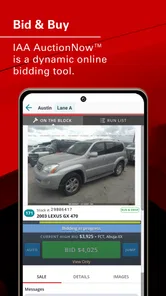
IAA Buyer Salvage Auctions is developed by Insurance Auto Auctions, Inc. Its purpose is to bring IAA’s live internet bidding to your phone, giving users a mobile way to browse vehicles and take part in salvage auctions. It is a business app, and its focus is on auction activity rather than general vehicle shopping or entertainment.
Pros
- User-friendly interface for easy navigation
- Wide selection of vehicles available
- Real-time auction updates
- Secure payment options
- Detailed vehicle history reports
Cons
- Limited customer support availability
- Occasional app crashes
- Inconsistent auction timings
- Some features require premium access
- Limited language options











