Housecall Pro: Field Service
- 1.59K
- 4.5
- Installs
- 500.00K
- Price
- Free

Screenshots

Analysis by Reviewed
For a field-service business, the biggest daily headache is often not the work itself but the handoffs around it: a request becomes an estimate, an appointment, a technician’s visit, and finally an invoice. When those details live in different places, even a small change can trigger calls and duplicate admin. I see Housecall Pro as a way to give that chain a shared home, provided the team is willing to keep its records current.
Build a routine before moving everything in
Before adopting any field-service app, I’d map how a job currently moves: request, estimate, booking, assignment, work, invoice, and payment. That makes it easier to spot where information gets lost and to decide what should live in the app. Housecall Pro is aimed at businesses that need to coordinate those stages, so it makes more sense when the owner and field staff agree on a consistent process than when everyone enters information differently.
For example, a small heating or plumbing team could begin the morning by checking scheduled work, assigning visits, and confirming that each technician has the details needed to arrive prepared. When a job changes during the day, keeping the schedule and customer communication connected can reduce the back-and-forth between the office and the van. The practical benefit is not simply having more features; it is having fewer separate places to check.
I would not move every habit into the app on day one. Start by identifying the handoff that causes the most avoidable friction: perhaps the office cannot tell whether a technician has the right job notes, or invoices tend to wait until the evening. Agree on who updates that information and at what point in the job. The software can support a routine, but it cannot decide the routine for a team.
Keeping jobs and information together
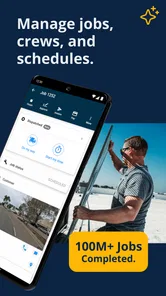
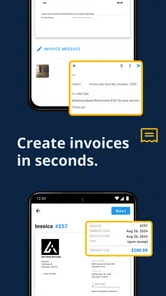
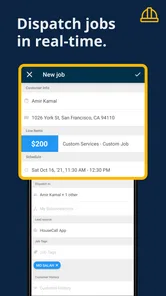
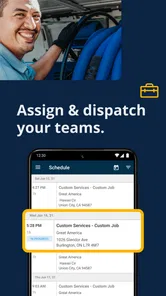
One of the first things that hit me when I started using Housecall Pro was how effortlessly it handles job management. Seriously, it’s like having a personal assistant right in your pocket. From scheduling jobs to dispatching technicians, everything is just a tap away. The interface is intuitive, making it easy even for those who aren’t tech-savvy. And, oh, let's not forget the quick invoicing feature that lets you send professional-looking invoices faster than you can say "paid."
Capture details once, then use them well
A useful habit is to treat each job record as the place where the team keeps the working context: what the customer needs, when the visit is planned, and what needs to happen next. I would encourage office staff to enter clear, concise notes before dispatch rather than relying on someone to remember a phone conversation later. That small discipline is especially valuable when a technician is covering a job for a colleague or the schedule changes at short notice.
Estimates, scheduling, dispatch, and invoicing belong to different moments in a job, but they connect naturally in a field-service workflow. That connection can help a business avoid copying the same customer and job details across a calendar, messaging app, and separate invoice tool. It does not remove the need to check entries: an incorrect address or vague job note can still travel through the process and cause trouble downstream.
More From Our News Desk

Weather by Xiaomi Review: Clear at a Glance, Less Clear Up Close

X Under Pressure: Can It Recover When Posting Goes Wrong?

Clash of Clans Is Won Between the Battles

Android Auto Makes the Case for Quieter Car Software

MobiOffice: Transforming Mobile Productivity with Seamless Integration

EA SPORTS FC™ Mobile Soccer: Redefining Mobile Sports Gaming
One practical detail worth agreeing on is how much context belongs in a note. A short description of the customer’s request and the next action is more useful to a technician than a long, unstructured account of every call. I’d also separate what is known from what still needs checking, so an estimate or dispatch decision is not based on an assumption. That kind of consistency makes records easier to hand over without turning every job into a paperwork exercise.
Make customer updates part of the routine
Keeping in touch with customers has never been easier. With automated text reminders and notifications, you can keep your clients in the loop without lifting a finger. This not only saves time but also boosts customer satisfaction, which is crucial for any service business. Plus, the app allows for easy communication through its built-in chat feature, a lifesaver when you need to quickly clarify details with a client.
Those communication tools are most useful when the business decides what deserves an update and who is responsible for sending it. I’d build a simple routine around confirming the appointment, sharing a change promptly, and closing the loop after the visit. Automation can make routine contact less laborious, but it should not replace a thoughtful reply when a customer has a complicated question or a job needs a careful explanation.
A realistic example is a technician running behind after an earlier visit takes longer than expected. The office can use the shared job context to identify which customer needs an update, while the technician can focus on finishing the current work rather than retelling the entire day by phone. I would still keep the message specific and human: an automated reminder is useful for predictable events, but a changed arrival plan deserves a clear explanation rather than a generic notification.
Close out the job while the details are fresh
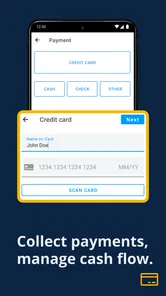
Now, let's talk about money. Nobody likes chasing payments, and with Housecall Pro, you don’t have to. The app integrates with payment systems, allowing customers to pay online seamlessly. This feature not only speeds up the payment process but also helps in maintaining a steady cash flow, which is vital for the growth of any business.
For a practical end-of-visit routine, I’d review the work completed, make sure the invoice reflects what was agreed, and send it while the customer and technician still have the same details in mind. That can make follow-up easier than reconstructing the job from scraps of paper at the end of the week. The trade-off is that a digital process still depends on accurate entries and staff consistently completing the closeout, so it will not fix a habit of leaving records unfinished.
It helps to decide in advance what “finished” means for a job. For one team, that may mean the work notes and invoice are ready before the technician leaves; for another, an office review may be needed first. Either way, doing a quick check at the point of completion is safer than assuming the invoice automatically captures every detail. If a customer questions a charge later, a timely, clear record is more useful than a vague recollection.
Use reports to ask better questions
If you're a data nerd like me, you’ll love the reporting and analytics features. Housecall Pro provides you with detailed insights into your business operations. From tracking sales to analyzing customer behavior, the app offers comprehensive reports that can help you make informed decisions. It’s like having a crystal ball for your business.
I’d use reports as prompts for practical questions rather than treating them as automatic answers: are jobs being completed as planned, are estimates turning into work, and where does follow-up keep slipping? A report is only as useful as the records behind it, so consistent job entry matters more than checking dashboards constantly. A small operator may get more value from reviewing a few relevant measures regularly than trying to interpret every available view.
For instance, if estimates are regularly left without a clear next step, the useful response may be to create a follow-up habit rather than to stare at a report more often. If completed work is not being invoiced promptly, look at where the closeout routine breaks down. I would use whatever reporting the app offers to find a question worth investigating, then check the underlying job records before changing how the business operates.
Where the system can feel like extra work
Putting scheduling, customer communication, and billing into one app can simplify a team’s routine, but it also asks everyone to adopt the same process. For a solo tradesperson with a simple calendar and few jobs, the setup and daily record-keeping may feel heavier than the problem they are trying to solve. A basic calendar plus a familiar invoicing method can be the better choice if coordination is not a real pain point.
It is also worth thinking through how the business works before relying on a connected workflow. If staff rarely update job details, if the owner prefers to handle every customer conversation personally, or if the company needs a highly specialized system outside ordinary field-service work, an all-in-one approach may not fit as well. I’d start by bringing over one repeatable part of the day, then see whether the team actually keeps it current before making it central to every handoff.
There is a trade-off in consolidating work as well as a benefit. Separate tools can be less elegant, but a team may already know how to use them and may only need one narrow improvement. A connected app is more appealing when the same job information has to travel repeatedly between office and field. If your main difficulty is a specialized operational requirement rather than ordinary scheduling and job coordination, a purpose-built system may be a better match than asking a broad service app to cover every exception.
Who is likely to get the most from it?
Housecall Pro is a business app from Codefied Inc. It is free to download, is rated for Everyone, and has an average rating of 4.6 from around 4.9 thousand ratings, with over 500 thousand installs. It first appeared on June 9, 2014, and version 2025.11.17 supports devices running Android 8.0 or later. Those figures suggest an established product, but the more important question is whether its workflow matches the way you serve customers.
I’d recommend considering it if you run a home-service operation where estimates, appointments, dispatch, and invoices regularly pass between office staff and technicians. It is less compelling for someone who only needs a way to remember a handful of appointments, or for a business whose work does not involve field visits and customer job records. Compared with assembling separate calendar, messaging, and invoicing apps, the appeal is having a shared operational thread; the trade-off is committing the team to maintaining that thread.
That makes the fit question more practical than simply asking whether you need an app. A small team with an office coordinator and several people doing visits may benefit from shared job context because one person can update the plan while another carries it out. A solo worker who books only occasional jobs may be better served by a calendar and invoice process already familiar to them. Likewise, a business with unusual approval steps should test those steps directly rather than assume a general field-service workflow will accommodate them neatly.
A grounded way to decide
My advice is to test the routine, not just browse the feature set. Pick a normal workday, enter the jobs with enough detail for someone else to act on them, and see whether scheduling, customer updates, and invoicing feel clearer by the end. Ask the person doing office coordination and the person doing the field work where the process slows down. If both can use the same records without creating more admin, that is a meaningful sign the app suits your business.
I’d make the trial representative rather than unusually simple: include a job that needs an estimate, one that changes timing, and a normal closeout. That reveals whether the workflow holds together when information moves between people, not just when one person enters a straightforward appointment. Before relying on it for every customer, agree on who owns updates and how the team will handle corrections. A shared process is only dependable when the people using it know what they are expected to maintain.
In conclusion, Housecall Pro is more than just an app; it’s a complete solution for managing a service business. With its robust features, it’s designed to simplify your life and help your business thrive. Whether you’re a small business owner or managing a fleet of technicians, this app has something for everyone. So, if you're ready to take your business to the next level, give Housecall Pro a shot. You might wonder how you ever managed without it!
My more measured recommendation is to adopt it when coordination is costing you time, not because every business needs a larger digital system. Housecall Pro is free, carries an Everyone age rating, and has a 4.6 average from about 4.9 thousand ratings; it has also passed 500 thousand installs. For an Android phone, version 2025.11.17 requires Android 8.0 or later. I’d use those facts as a starting point, then judge it by whether the team can keep job information accurate and close work out without adding an unwanted layer of admin.
Housecall Pro: Field Service Frequently Asked Questions
Who is Housecall Pro intended for, and can a small service business use it?
Housecall Pro is a business app built for managing field service work, so it may suit owners and teams who need to keep jobs and office tasks organized in one place. It is aimed at service professionals, including businesses in areas such as HVAC, plumbing, and electrical work. Its focus on estimates, scheduling, dispatch, and invoicing makes it relevant to companies that handle appointments at customers’ locations.
What is Housecall Pro and what does it offer?
Housecall Pro is a comprehensive business management application designed primarily for service professionals. It offers a range of features including scheduling, dispatching, payment processing, and customer relationship management. The app aims to streamline operations for businesses such as HVAC, plumbing, electrical, and other field service industries, allowing professionals to focus more on their work and less on administrative tasks.
Is Housecall Pro available on both Android and iOS platforms?
Yes, Housecall Pro is available for download on both Android and iOS platforms. This ensures that users can access the app's full suite of features from their smartphones or tablets, providing flexibility and convenience for field technicians and business owners who are always on the move. Before downloading, check that your device meets the platform’s requirements; the Android version requires Android 8.0 or later.
How does Housecall Pro help with scheduling and dispatching?
Housecall Pro simplifies scheduling and dispatching by allowing users to create, edit, and manage jobs directly from the app. The real-time scheduling feature ensures that technicians are always aware of their daily tasks. Additionally, the app provides GPS tracking to help dispatchers optimize routes and improve efficiency, leading to increased productivity and customer satisfaction.
Can Housecall Pro be integrated with other software tools?
Yes, Housecall Pro supports integration with a variety of other software tools to enhance its functionality. Users can connect the app with QuickBooks for accounting, Google Calendar for scheduling, and other popular platforms. This interoperability makes it easier for businesses to manage their operations seamlessly and maintain a cohesive workflow.
Pros
- User-friendly interface for easy navigation.
- Comprehensive scheduling and dispatching tools.
- Integrates well with QuickBooks for accounting.
- Real-time notifications for job updates.
- Strong customer support and community.
Cons
- Limited customization for invoices.
- Mobile app can be slow at times.
- Subscription can be pricey for small businesses.
- Occasional syncing issues with calendar.
- No offline mode available.











