Hours Tracker Time Tracking
- 2.14K
- 3.6
- Installs
- 1.00M
- Price
- Free

Screenshots
Analysis by Reviewed
Keeping track of paid hours sounds simple until a week fills up with different shifts, changing rates, unpaid breaks, travel, and small jobs that are easy to forget. Hours Tracker Time Tracking is built for that practical problem: it is a business app for recording work time and estimating pay when you work by the hour, operate as a contractor, or handle freelance assignments. I found its appeal in the straightforward idea of turning scattered time entries into something I could review before sending an invoice or checking a paycheck.
The app comes from cribasoft, LLC, and it has been available since June 23, 2013. That long presence helps explain why it is familiar to many Android users, with over a million installs and an average rating of 3.6 from roughly six thousand ratings. Those figures suggest a useful but not universally loved tool: people clearly use it for real work, while the middling score is a reminder that convenience depends heavily on whether its workflow matches the way you earn money.
How Hours Tracker fits into real working routines
At its best, this is not a general project-management suite and it is not trying to replace a full accounting system. I see it as a personal time ledger. You record when work starts and ends, connect that time with an hourly rate, and use the resulting record to understand what your labor should be worth. That focus makes it easier to approach than a large business platform filled with team dashboards, task assignments, and billing tools you may never touch.
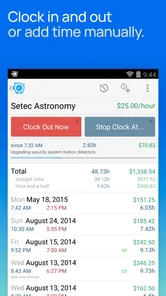
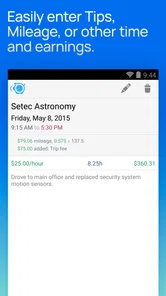
A realistic example is a part-time worker with two employers. Instead of keeping separate notes in a phone app and trying to reconstruct the week from memory, I would use a separate work entry for each employer, start the appropriate timer when a shift begins, and check the accumulated hours before payday. A freelancer could use the same habit for client work, while a contractor might use it to separate jobs that have different rates. The important benefit is not merely having a stopwatch; it is creating a consistent record that can be checked later.
The free price makes that first experiment easy. You can try the basic idea without committing money upfront, which matters for someone who only needs occasional tracking or wants to see whether recording time becomes a reliable habit. The app also includes in-app purchases ranging from $2.99 to $47.99 per item. I would treat those purchases as an optional value decision rather than assuming every user needs them: the right choice depends on how much time the app saves and which paid tools are relevant to your routine.
That distinction is worth keeping clear. Free access gives the app a low-risk starting point, but it does not automatically mean the complete experience costs nothing. If you only need a simple personal record, the no-cost entry may be enough. If your work depends on more advanced organization or reporting, inspect what each purchase provides before paying. I would not buy the highest-priced option merely because it exists; I would first use the free version long enough to discover whether the app actually fits my workday.
Setting up entries without creating extra work
The most useful setup is the one that mirrors how you are paid. If every job uses the same rate, a simple arrangement keeps daily tracking quick. If rates vary, separating clients or employers prevents one total from becoming misleading. I would also decide in advance whether breaks should be handled by stopping the timer or by correcting the entry afterward. That small choice has a large effect on accuracy, especially during busy shifts when it is easy to forget what happened several hours earlier.
More From Our News Desk

Weather by Xiaomi Review: Clear at a Glance, Less Clear Up Close

X Under Pressure: Can It Recover When Posting Goes Wrong?

Clash of Clans Is Won Between the Battles

Android Auto Makes the Case for Quieter Car Software

MobiOffice: Transforming Mobile Productivity with Seamless Integration

EA SPORTS FC™ Mobile Soccer: Redefining Mobile Sports Gaming
For freelancers, the temptation is to create too many categories. I think that is a mistake. A category for each client or billable type is usually more useful than a category for every tiny task. The goal is to answer practical questions such as “How much time did I spend on this client?” rather than produce a diary so detailed that updating it becomes a chore. Hours Tracker works best when the structure is prepared once and daily input stays minimal.
Contractors have a different concern: travel, preparation, and on-site work may not all be paid in the same way. The app can help you record those blocks, but the judgment about what is billable still belongs to you. I would create separate entries when the distinction affects an invoice, then review them together before billing. That approach avoids the common mistake of treating every minute connected to a job as automatically chargeable.
Where the time record becomes genuinely useful
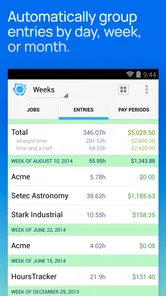
A time tracker earns its place when it changes a decision. I would use the app at the end of a week to compare expected pay with the hours actually recorded, not just to watch a running number during the day. If the total looks wrong, checking individual entries while the week is still fresh is far easier than trying to remember an entire month. This makes regular review more valuable than occasional frantic reconstruction.
Another non-obvious use is checking whether a supposedly profitable freelance project is consuming too much unpaid time. Suppose a client pays for a fixed piece of work. Recording research, revisions, messages, and the final delivery separately can reveal that the project takes much longer than expected. The app does not make that business decision for me, but it gives me a better basis for changing a quote, setting a boundary, or deciding not to accept similar work again.
I also like the idea of using it as a negotiation aid. An employee who regularly stays late can build a clearer personal record before discussing scheduling or missing pay. A contractor can review several completed jobs and identify which ones consistently run over estimate. The value here is not a fancy presentation; it is the discipline of capturing time close to when it happens, rather than relying on a vague memory that may be challenged later.
There is a trade-off between live tracking and manual correction. Starting and stopping a timer is more accurate in theory, but real work interrupts people. A customer arrives, a meeting runs over, or a phone is left in a bag. I would make a quick note whenever the timer cannot be used, then correct the entry as soon as possible. The app is most dependable when it supports that mixed method instead of pretending every workday follows a perfect schedule.
What the free option is worth
Because the app is free to download and use at its starting level, it is easy to recommend as a trial for hourly workers who currently rely on memory, paper, or a basic notes app. Those alternatives cost nothing, but they often make totals and rate calculations harder to review. A dedicated tracker gives the task a clear home and encourages a repeatable routine.
For someone with only one job and predictable shifts, the free experience may deliver all the value needed. The decision becomes less obvious for a freelancer with several clients, complicated billing rules, or a need to share polished records. In that situation, the time saved by paid capabilities could justify an in-app purchase, but only after confirming that the specific capability solves a problem you actually have. The purchase range, from $2.99 to $47.99 per item, is broad enough that comparing the options matters.
I would measure value in minutes saved and mistakes avoided, not in the number of screens or settings. If I spend less time reconstructing hours and feel more confident about an invoice, even a modest purchase can make sense. If I still need to copy everything into another system, fix frequent entries, or manually explain every total, paying more will not automatically solve the underlying workflow.
Limitations that affect the decision
The 3.6 average rating is the clearest signal that the experience has friction for a meaningful portion of users. I would not interpret that as proof that the app is poor, but I would take it seriously when choosing it for important payroll or billing records. A time log is only useful if I can enter hours consistently and understand the totals without second-guessing them.
The app’s narrow focus can also be a limitation. If you need a complete business system with team permissions, project planning, customer management, accounting connections, or a formal invoicing pipeline, a larger platform may be a better fit. Hours Tracker makes more sense when one person owns the record and wants a practical way to track paid time. It is less convincing as the central system for a growing company.
There is also a human limitation that no time tracker removes: forgotten entries. A timer cannot help if I never start it, and a manually entered shift can still be wrong. For that reason, I would pair the app with a daily reminder habit, even if that reminder is simply checking the record before bed. I would also keep supporting evidence such as schedules, messages, or calendar appointments when the hours could later be disputed.
Another trade-off is simplicity versus detail. A clean setup is fast, but it may not capture every distinction required by a particular contract. A highly detailed setup may produce better records, yet it increases the chance that I stop using the app. My recommendation is to begin with the smallest structure that answers the payment question, then add categories only when a real reporting problem appears.
Who should use it and who should choose something else
I think this app is a good candidate for hourly employees, independent contractors, and freelancers who want personal control over their work record. It is especially suitable for people who do not need a complicated team platform and who are willing to spend a few minutes setting up clients, employers, or rates carefully. The Everyone content rating also makes it broadly accessible for ordinary work-related use.
It may be a strong match for a person with irregular shifts. A restaurant worker covering different hours, a tutor moving between students, or a repair professional handling jobs throughout the day can benefit from recording time as it happens. The same is true for someone whose work is split between paid and unpaid activities and needs to understand where the day is really going.
I would be more cautious for anyone who must submit highly formal timesheets with strict approval rules, or for a business where several people need to edit and verify the same records. In those cases, a collaborative service designed around approvals and centralized administration is likely more appropriate. The app can still help as a private cross-check, but I would not assume it replaces an employer’s official system.
People who dislike manual organization should also test it before relying on it. The app can make tracking clearer, but it cannot decide how to classify unusual work, whether a break is payable, or how a contract defines billable time. If your work changes constantly and you rarely have a moment to correct entries, an automated system connected to your schedule may suit you better, even if it costs more.
Android support and long-term practicality
The current version is 5.0.14, and the minimum operating system is Android 7.0. That makes the app relevant to users with older Android phones as well as newer devices, provided the phone meets that requirement. I would still test the actual workflow on the device used during work, because a tracker needs to be quick to open and easy to operate when attention is elsewhere.
Its age and install base give it a certain practical credibility, but popularity should not replace a personal trial. The large number of installations shows that the concept has found an audience, while the average score suggests different users experience different levels of satisfaction. I would use the free version through a complete pay period before deciding whether it deserves a permanent place in my routine.
One useful test is to simulate a complicated week rather than only trying one short shift. Create the work categories you genuinely need, record a missed start, correct an end time, and review the resulting total. If that process feels understandable, the app is more likely to help when work becomes hectic. If those corrections feel confusing, choosing a simpler notes-based method or a more structured professional service may save frustration.
My buy-or-skip verdict
My recommendation is to try Hours Tracker Time Tracking if you need a personal record of hourly work and want to start without an upfront payment. The free access lowers the risk, and the app’s focused purpose is more approachable than a full business suite. I would use it for regular reviews, not just live timers, and I would establish a simple naming and break-tracking routine before depending on the totals.
I would consider an in-app purchase only after identifying a specific limitation in the free experience. The available items range from $2.99 to $47.99, so paid value should be judged by a concrete improvement to your workflow rather than by the promise of having more options. For occasional work, the free route may be enough. For frequent billing, a purchase can be sensible if it reduces repeated manual work and produces records you trust.
Skip it if you need a shared company timesheet, advanced payroll administration, or a complete invoicing and accounting environment. In those situations, a specialized professional platform is likely to justify its cost more clearly. I would also skip it if you know you will not maintain entries; an unused tracker is no better than an empty notebook.
For the right person, however, this is a practical and inexpensive way to turn work hours into a record that can support better pay checks, cleaner invoices, and more realistic project decisions. The real value is consistency: record close to the moment, review before money changes hands, and pay only when a specific upgrade earns its place. That makes the app worth trying, while its middling rating and focused design are good reasons to evaluate it honestly before building your entire work system around it.
Hours Tracker Time Tracking Frequently Asked Questions
Is Hours Tracker Time Tracking free to download, and does it include in-app purchases?
Hours Tracker Time Tracking is free to download, so you can try its core time-tracking features without an upfront purchase. The app also offers in-app purchases, with listed items ranging from $2.99 to $47.99, so check what a purchase unlocks before paying. It is a business app from cribasoft, LLC, intended for people who want to track work time and pay.
Which devices and operating systems can run Hours Tracker Time Tracking?
The minimum operating-system requirement is version 7.0, which may help you judge whether the app is compatible with your device before installing it. Hours Tracker Time Tracking is available for Android and iOS, although the exact experience and available features can differ by platform. The app is rated Everyone, making its content suitable for a broad audience.
What is Hours Tracker Time Tracking used for?
Hours Tracker Time Tracking is designed to help you record working hours, freelance sessions, appointments, and other time-based activities. You can create separate jobs or projects, start and stop a timer, or enter hours manually. It is particularly useful for freelancers, contractors, consultants, students, and anyone who needs a clear record of time spent on different tasks.
Can I track multiple jobs, clients, or projects in the app?
Yes, the app is built around organizing time entries by job, client, or project. This makes it easier to keep personal and professional activities separate and review the hours associated with each one. Before downloading, keep in mind that the exact number of available jobs, advanced organization options, and certain features may depend on the version of the app or the subscription plan you use.
Does Hours Tracker support manual time entries and automatic timers?
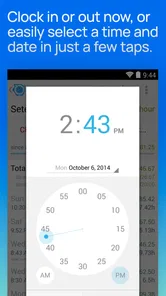
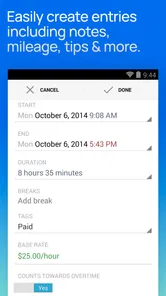
Hours Tracker generally offers both options, allowing you to start and stop a live timer while working or add a completed shift manually afterward. Manual entry is convenient when you forget to start the timer or need to record time from another source. You should still review entries carefully, especially when editing start times, breaks, rates, or dates.
Pros
- Simple clock-in and clock-out controls for quick time entries.
- Supports multiple jobs
- projects
- or clients in one account.
- Manual editing helps correct missed punches or inaccurate entries.
- Useful summaries make it easier to review hours before billing.
- Can work well for freelancers and hourly workers with changing schedules.
Cons
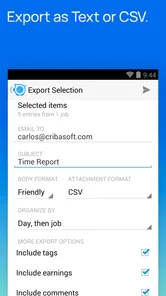
- Some advanced reporting and export options may require a paid plan.
- The interface can feel dated compared with newer time-tracking apps.
- Limited collaboration features for teams managing shared projects.
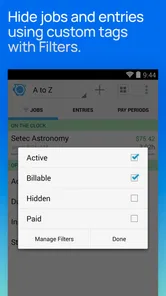
- Users may need to configure pay rates and categories before tracking.
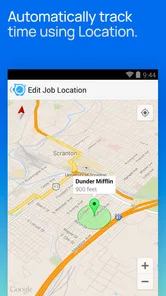
- Battery or background restrictions can affect automatic tracking features.











