HopSkipDrive CareDriver
- 520.00
- 4.6
- Installs
- 500.00K
- Price
- Free

Screenshots

Analysis by Reviewed
HopSkipDrive CareDriver is a business app built for people who drive with HopSkipDrive, Inc. rather than for passengers looking for a conventional ride-booking service. I approached it as a working tool: something opened before a trip, checked during a busy day, and relied on when timing and communication matter. That distinction is important because the app makes the most sense when your role is to provide scheduled transportation through the HopSkipDrive network.
The app is free, carries an Everyone age rating, and has reached over 500 thousand installs. It holds a 4.6 average from around 4 thousand ratings, which suggests that many drivers find the overall workflow dependable enough for regular use. I would not treat those figures as a substitute for trying it in your own driving routine, though. A driver’s experience depends heavily on phone reliability, mobile coverage, local demand, and how comfortably the app fits around real-world pickups.
How the app feels when connectivity is part of the job
The central lesson from using a driver-focused app like this is that the phone is not merely displaying information. It is part of the working connection between the driver, the service, and the trip details. That makes network quality more noticeable than it would be in a casual business app. When the connection is steady, the experience can feel straightforward: check what is relevant, move through the day, and use the phone as a reference while handling the practical work outside the screen.
When coverage becomes inconsistent, even a small delay can feel more serious. A page that takes longer to refresh, a status change that is not immediately visible, or a message that needs another attempt can interrupt concentration. I found it useful to treat the app as one part of a larger routine rather than assuming it should carry every detail perfectly at every moment. Before leaving, I would review the information I needed and make sure the phone was ready for the route, instead of waiting until the curbside moment to discover a weak signal.
The most important habit is preparing before the vehicle moves. That means checking the day’s relevant information while parked, confirming that the app is responsive, and keeping the device charged enough for navigation, communication, and repeated screen use. This is not a flashy feature, but it is the difference between a calm shift and a series of avoidable interruptions.
What happens during a connected trip
In a normal mobile setting, the app’s value comes from keeping the driver connected to the work at hand without requiring a desk. That is especially useful when the day is divided into separate pickups and drop-offs rather than one continuous journey. I could see the appeal for someone who wants the operational side of driving gathered in one place instead of relying on scattered notes, memory, and several unrelated tools.
Still, I would avoid using the app while actively driving. The safest workflow is to review information before departure, pull over when something needs attention, and let a separate navigation setup handle road guidance if that is what you normally use. A driver app can support the trip, but it should not encourage screen interaction at the exact moment your attention belongs on traffic and pedestrians.
More From Our News Desk

Weather by Xiaomi Review: Clear at a Glance, Less Clear Up Close

X Under Pressure: Can It Recover When Posting Goes Wrong?

Clash of Clans Is Won Between the Battles

Android Auto Makes the Case for Quieter Car Software

MobiOffice: Transforming Mobile Productivity with Seamless Integration

EA SPORTS FC™ Mobile Soccer: Redefining Mobile Sports Gaming
Connectivity also affects confidence. If an update appears promptly, I can make a decision and continue. If I am unsure whether the latest information has loaded, I become more cautious and may need to pause. That is a practical trade-off: the app can reduce administrative clutter, but it does not remove the need for judgment when the phone, network, or surroundings are not cooperating.
Useful mobile contexts beyond the ideal commute
The strongest use case is a driver moving between scheduled responsibilities in different neighborhoods. Imagine starting the morning with a charged phone, checking the first assignment while parked, and then using the app again after completing that part of the day. The benefit is not simply having an app instead of paper. It is having a work-oriented mobile point of reference that can be revisited as the day changes.
A second useful context is the transition between trips. Drivers often have only a short window to confirm what comes next, reset their attention, and prepare for another pickup. I would use that pause to verify the next relevant details rather than trying to manage the transition while walking, loading the vehicle, or navigating traffic. This creates a small but meaningful separation between driving and administration.
A third context is an unfamiliar area. The app may help organize the service-related side of the work, but I would not expect it to replace local route planning. Before beginning, I would identify likely problem spots such as large campuses, busy entrances, or locations where stopping is difficult. That preparation matters because connectivity cannot solve a physical access problem, and a clear screen does not guarantee an easy pickup point.
For a driver who works only occasionally, the app may still be useful, but the setup routine becomes more important. I would open it before accepting a busy day, check that the current version is installed, and make sure I remember the basic flow. The current version is 6.9.5, and the app requires at least OS 10. Those details make compatibility worth checking before relying on it for work, particularly if your phone is older or receives updates infrequently.
Where recovery becomes more important than convenience
No connected mobile workflow should be judged only by its best moment. The practical question is what I do when something goes wrong. If the screen loads slowly, I would first stop in a safe place and check whether the issue is limited to the connection or affects the whole phone. Reopening the relevant screen, moving to a stronger signal, and avoiding repeated actions while the app is still responding are sensible first steps.
I would also keep a simple mental recovery plan: know the next immediate task, avoid making assumptions from an old screen, and contact the appropriate support channel through the normal driver process if the problem affects a live trip. The key is not to invent a workaround that could create confusion. A delayed update is frustrating; acting on information that may no longer be current can be worse.
This is one area where the app’s mobile nature creates both strength and weakness. A phone is available in more places than a desktop, but it is also exposed to dead zones, battery drain, heat, notifications, and accidental interruptions. A driver who treats the app as a dependable aid but keeps basic situational awareness will be better prepared than someone who assumes the phone will always be available at the exact second it is needed.
Recovery is also about preventing small failures from becoming large ones. I would avoid leaving the app until the last possible moment before a pickup, especially in an area where coverage is unpredictable. I would keep the device accessible without placing it where it could distract me, and I would handle any required interaction while parked. Those choices do more for reliability than repeatedly refreshing a screen during a stressful moment.
Using mobile data without making the workflow fragile
Because this is a connected driver tool, data-conscious use is less about avoiding the network entirely and more about using it deliberately. I would review information in advance when I have a stable connection, avoid unnecessary browsing inside the app during a trip, and keep other data-heavy activity away from the moments when the app is most important. This can help preserve both battery and attention.
Battery planning deserves equal attention. A long driving day can involve navigation, calls, screen brightness, and repeated app checks, so the app is only one part of the phone’s workload. I would begin with a strong charge and carry a reliable charging option suited to the vehicle. A driver who waits for a low-battery warning has already lost useful flexibility, particularly if the next stop is not convenient for a break.
I would also be careful with background activity and notifications without assuming that changing a setting will improve every situation. The right balance depends on how you work. Too many interruptions can make the phone distracting, while too few can make you overlook something important. My preference would be to keep the app easy to reach, silence unrelated distractions during active driving, and review the device after parking.
One non-obvious trade-off is that conserving data too aggressively can be counterproductive if it causes you to postpone important checks until a difficult location. The better approach is to use a stable connection for preparation and reserve mobile use for the information that genuinely supports the current task. That keeps the workflow lean without pretending that a driver can plan every change in advance.
Who will appreciate it, and who should look elsewhere
I think HopSkipDrive CareDriver is best suited to an approved HopSkipDrive driver who wants a dedicated mobile workspace for the service side of driving. It is particularly appealing if you prefer a structured routine: prepare before leaving, check the relevant information between trips, and keep the phone focused on work rather than juggling notes and unrelated apps.
It is less suitable for someone searching for a general taxi app, a passenger booking tool, or a broad delivery platform. The store summary identifies it as the CareDriver mobile application, and that role shapes the experience. If your goal is simply to compare fares, hail a ride, or manage ordinary personal transportation, this is not the kind of app I would choose.
I would also hesitate to recommend it as the only tool for drivers who frequently work in areas with unreliable coverage. The app can be useful, but network-dependent tasks are naturally more comfortable when the phone can communicate consistently. In that situation, careful preparation and a recovery routine become essential, and another service with a workflow better matched to your local conditions may be preferable.
Compared with paper notes, the app has the obvious advantage of keeping the work process mobile and easier to revisit. Compared with a generic navigation app, it serves a different purpose: navigation helps you get somewhere, while a CareDriver tool is intended to support the driver’s relationship with the scheduled service. Compared with trying to coordinate everything through calls and messages, a dedicated app should reduce some of the scattered information, though it still cannot eliminate human communication when circumstances change.
My practical routine for getting more from it
I would start each driving period by checking the phone itself, not just the app. Is the battery sufficient? Is the device responsive? Is the connection usable where I am parked? Then I would review the information needed for the first part of the day and avoid beginning the drive until that preparation is complete.
Between trips, I would use a short checklist rather than repeatedly staring at the screen: park safely, review what is next, confirm any detail that matters, and put the phone away before moving. This makes the app part of a repeatable driving habit instead of an interruption that competes with the road.
If something looks outdated or unclear, I would pause rather than guess. That may cost a minute, but it is a better trade-off than carrying an assumption into a pickup. I would also distinguish between an app problem and a location problem. If the screen works but the entrance is confusing, the solution is planning and patience; if the screen does not update, the solution is safe troubleshooting and appropriate support.
Finally, I would update the app and operating system when practical, while avoiding a first-time update immediately before a critical shift. The app was released on June 28, 2016, and its continued presence alongside the current version shows that it has an established history, but an older phone can still create its own limitations. Compatibility and device condition are part of the driver experience, not separate technical footnotes.
My connectivity verdict
After looking at it as a working driver rather than a casual app user, I see HopSkipDrive CareDriver as a focused tool whose usefulness depends on disciplined mobile habits. It can make the service side of driving feel more organized, especially when I prepare while parked and use the app at clear transition points. Its free price removes an obvious barrier, and the strong average rating from thousands of users gives it encouraging context.
My reservation is not that it is trying to do too much; it is that any connected driver workflow becomes vulnerable when coverage, battery, or attention fails. I would not rely on it casually or interact with it while moving. I would use it with a charged phone, a clear pre-trip routine, and a plan for what to do if an update is delayed.
My recommendation is straightforward: choose it if you are working within HopSkipDrive’s CareDriver system and want a dedicated mobile companion, but skip it if you need a general ride app or cannot depend on a connected phone during your driving day. For the right user, it is practical and appropriately focused. Its best quality is not spectacle; it is the way a prepared driver can fold it into a careful, repeatable routine.
HopSkipDrive CareDriver Frequently Asked Questions
Do I need to be approved before I can use HopSkipDrive CareDriver?
Yes. HopSkipDrive CareDriver is intended for approved CareDrivers, not for passengers seeking a ride. The app connects drivers with transportation assignments through the HopSkipDrive service, so downloading it is only one step toward getting started. Prospective drivers should review the application and approval process and make sure they meet the requirements for their location before relying on the app for work.
What kind of app is HopSkipDrive CareDriver, and who publishes it?
HopSkipDrive CareDriver is a business app from HopSkipDrive, Inc., built for the driver side of the HopSkipDrive transportation service. Its focus is helping approved CareDrivers manage rides rather than helping families book a trip directly. It is free to download, has an Everyone age rating, and is listed as version 6.9.5. The app is available for devices running iOS 10 or later.
What is HopSkipDrive CareDriver?
HopSkipDrive CareDriver is a transportation platform designed for approved caregivers, parents, and trusted adults who provide rides to children and other eligible passengers. It is connected to the HopSkipDrive service, which helps families, schools, social-service organizations, and youth programs arrange scheduled transportation. The app is intended for verified drivers rather than ordinary passengers looking for an on-demand taxi or rideshare.
Who can use the HopSkipDrive CareDriver app?
The app is generally intended for adults who want to become CareDrivers and provide prearranged rides through HopSkipDrive. Applicants must meet the company’s eligibility requirements, which may include minimum age, driving experience, a suitable vehicle, a valid license and insurance, background screening, and vehicle inspections. Requirements can vary by location, so prospective drivers should confirm local rules before applying or downloading.
How does a CareDriver accept and complete rides?
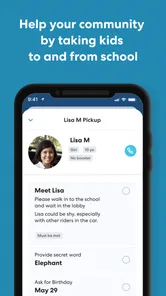
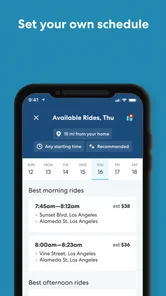
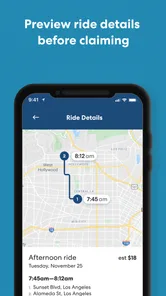
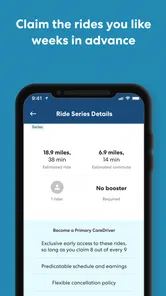
After completing the approval process, a CareDriver can review available ride opportunities, including important details such as pickup time, route, passenger information, and compensation where provided. The driver chooses suitable assignments rather than accepting random street pickups. During a trip, the app supports navigation, status updates, communication, and ride documentation, helping families or organizations follow the journey and confirm that the passenger arrived safely.
Pros
- Flexible driving schedules suit caregivers with changing availability.
- Designed for recurring rides
- helping build familiarity with families.
- Clear trip details can simplify planning and pickup coordination.
- Useful option for drivers who enjoy working with children and families.
- May provide steady local ride opportunities in supported service areas.
Cons
- Driver approval may require extensive background and safety checks.
- Availability is limited to selected cities and service regions.
- Trips can involve waiting
- school traffic
- or complicated pickup logistics.
- Child transportation requires patience and strong communication skills.
- Earnings and ride volume may vary significantly by location and demand.











