HoneyBook - Small Business CRM
- 387.00
- 4.4
- Installs
- 100.00K
- Price
- Free

Screenshots




Analysis by Reviewed
When I first opened HoneyBook - Small Business CRM, I understood its appeal quickly: it is built for people who manage clients, projects, and payments themselves, rather than for large sales teams with complicated systems. The app sits in the business category and comes from HoneyBook Inc, with the goal of keeping client work in one place while making it easier to move a project from conversation to payment.
That focus makes it especially interesting for freelancers, consultants, photographers, designers, event professionals, and other small businesses that are tired of switching between messages, documents, calendars, and payment tools. I would not describe it as a simple notes app or a basic contact list. It is closer to a compact client-management workspace that you can carry on a phone, with financial activity included in the same general workflow.
My overall impression is positive, but with an important qualification: HoneyBook works best when you are willing to organize your client process around it. If you only need a place to store names and phone numbers, it may feel like more than you need. If you regularly send proposals, manage ongoing work, and wait for clients to pay, its structure becomes much more useful.
What to expect before you start
The first thing to understand is that this is not primarily a traditional CRM designed for a large sales pipeline. Its strength is the relationship between client management and the practical steps of a small project. Instead of treating a client as just a record, the app is intended to help you keep the work around that client organized and make payment collection part of the same process.
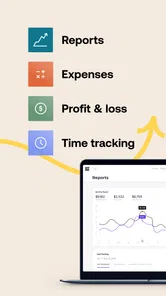
That distinction matters for expectations. A solo professional may find the app much more relevant than a heavyweight business platform filled with dashboards and terminology aimed at sales departments. At the same time, someone looking for advanced team administration, deep reporting, or a highly customizable enterprise database may prefer a more specialized alternative.
The app is free to install, while in-app purchases range from $35.99 to $789.99 per item. I would treat that as a reason to explore the workflow carefully before committing to a paid plan or purchase. The free entry point is useful for seeing whether the way HoneyBook handles clients matches your business, but the broader value depends on how often you use its client and payment tools.
Its audience is broad enough to include many independent businesses, yet the experience feels most natural when your work follows a repeatable pattern. For example, you might receive an inquiry, discuss the job, send an agreement or project information, complete the work, and collect payment. The more closely your work resembles that sequence, the easier it is to see why an all-in-one tool can be preferable to several disconnected apps.
More From Our News Desk

Weather by Xiaomi Review: Clear at a Glance, Less Clear Up Close

X Under Pressure: Can It Recover When Posting Goes Wrong?

Clash of Clans Is Won Between the Battles

Android Auto Makes the Case for Quieter Car Software

MobiOffice: Transforming Mobile Productivity with Seamless Integration

EA SPORTS FC™ Mobile Soccer: Redefining Mobile Sports Gaming
The app has an average rating of 4.4 from around 2.3 thousand ratings, and it has passed 100 thousand installs. Those figures suggest that it has found a real audience among small-business users, although popularity alone should not decide whether it suits you. I would pay more attention to whether you need client records and payment activity to live together.
HoneyBook is rated for Everyone, which makes it approachable from a content perspective. It was released on January 29, 2019, and the current version is 1.72.2, with Android support from version 8.0 onward. That combination makes it accessible to many Android users, but I would still check that your device is compatible before planning to use it as your main business tool.
Who gets the most from it
I think the best match is a person who is personally responsible for both the client relationship and the administration behind it. A freelance photographer who needs to keep a couple’s project details together, a designer handling several client jobs, or a consultant who wants fewer loose ends after a meeting can all benefit from this approach.
It is also useful for someone who works away from a desk. A mobile client-management app becomes valuable when you need to check a project, respond to a customer, or confirm payment progress while you are between appointments. The phone experience cannot replace every desktop task, but it can reduce the need to remember what still needs attention until you get back to your computer.
I would be more cautious if your business has a very unusual process that does not fit a client-project-payment pattern. A company with complex inventory, detailed accounting requirements, or a large sales team may need dedicated systems rather than a small-business tool. HoneyBook can help organize the relationship around work, but it should not automatically be treated as a replacement for every business application.
Setting up a useful workspace instead of just opening an account
The most important part of setup is deciding what you want HoneyBook to control. If you install it without a clear purpose, you may create another place to check without solving the scattered-work problem. I recommend choosing one active client project as your starting point rather than trying to transfer your entire business immediately.
Begin with a project that has a clear next action. It could be a new inquiry that needs a response, a job waiting for approval, or a completed assignment with an outstanding payment. This gives the app a practical test. You are not simply exploring buttons; you are checking whether the app helps you move real work forward.
When adding a client, use the information you genuinely need to recognize and serve that person. Avoid filling the workspace with old contacts just to make it look complete. A smaller, accurate client list is more helpful than a large collection of names that you never use. It also makes the first experience less overwhelming.
Next, define the stages you normally follow. You might think in terms of inquiry, discussion, confirmed work, delivery, and payment. The exact labels are less important than making your own process visible. This is one of the less obvious benefits of a client-management app: it can reveal where projects tend to stall. If many jobs remain in the same stage, the problem may be a missing follow-up habit rather than a lack of new clients.
For a first-time user, I would resist the temptation to customize everything before testing one project. Start with the simplest version of your workflow, then adjust it after you have seen where information gets lost. This approach is less frustrating than designing an elaborate system that looks tidy but does not match the way you actually work.
Payment handling deserves special attention during setup. Because HoneyBook connects client organization with accepting payments, you should think about when you want to request money and what the client should understand before paying. A payment step is not merely an administrative button; it affects trust, timing, and the clarity of your agreement with the customer.
My practical advice is to write down your normal payment sequence before configuring it. Do you ask for money before beginning, after approval, in stages, or at completion? The app can be most useful when it reflects that decision instead of encouraging you to improvise with every client. A consistent process also makes your messages easier to understand.
Another helpful setup habit is to separate internal reminders from client-facing communication. A client needs clear information about what happens next, while you may need a private note about a deadline, missing detail, or follow-up. Mixing those two kinds of information can create confusion, especially when you are working quickly from a phone.
The first meaningful success
For me, the first real test of HoneyBook would not be creating a profile or browsing the interface. It would be taking one live client from an uncertain next step to a clearly documented action. For example, imagine that a customer has asked for a quote but has not yet committed. I would add the client, create the related project, record the relevant context, and prepare the next communication from that single workspace.
The goal is simple: after using the app, I should know who the client is, what they are asking for, what I am waiting on, and what I need to do next. If payment is part of the immediate step, I would also want the payment request to be connected to the same project rather than handled as an unrelated task.
This is where the app can save more time than a basic contact manager. A contact list may tell you a customer’s name, but it usually does not give you a useful picture of the current job. A general notes app may hold the details, but it leaves you responsible for remembering how those notes connect to the client and the money. HoneyBook’s advantage is the attempt to keep those pieces connected.
A realistic everyday scenario might look like this: I finish a consultation in the morning, receive confirmation from the client while traveling, and need to move the project forward before the details fade. Instead of waiting until evening to reconstruct the conversation, I can use the mobile workspace to check the client record, confirm the project status, and handle the next administrative action. The value is not dramatic automation; it is fewer small gaps where information can disappear.
Once that first action is complete, I would check the client view from the perspective of future me. Could I return to the project a week later and understand its status without rereading every message? If the answer is no, the solution is probably not adding more information. It may be choosing clearer project names, recording the next action consistently, or keeping client communication more focused.
One advanced but practical use is treating the project record as a handoff point, even if you work alone. When you are busy, your future self is effectively another team member who needs context. A short note about the agreed deliverable, the next deadline, and the outstanding client response can prevent repeated searching through email and chat.
Where new users may hesitate
The first source of confusion is the difference between managing a client and managing a project. A client can have more than one piece of work associated with them, and treating every interaction as a new client record can make the workspace messy. I recommend thinking of the person or business as the relationship, and the project as the specific engagement.
The second is the difference between a project being active and a payment being complete. These are not necessarily the same thing. A job can be underway while money is still due, or payment can arrive while you still have delivery work to finish. Keeping those ideas separate helps you avoid assuming that a paid project is automatically finished.
Another point that may surprise first-time users is that an all-in-one workflow still needs discipline. HoneyBook can put tools near each other, but it cannot decide what your promises to a client are, which deadline matters most, or whether a project is truly ready to close. If your records are vague, the app will not magically make them precise.
Mobile convenience also has a trade-off. A phone is excellent for checking status, capturing a quick update, or responding while away from your desk. It is less comfortable for long-form editing, reviewing many projects at once, or designing a complicated process. I would use the mobile app for timely actions and keep larger planning sessions for a device that gives me more room to think.
Payment-related work deserves a careful review before you rely on it for every customer. Confirm the amount, the project context, and the wording shown to the client before sending anything. A small mistake in a payment request can create more work than the app saves, particularly when a client is already waiting for clarification.
The in-app purchase range also means that “free” should be understood as an accessible starting point, not a guarantee that every useful business workflow will remain free. I would compare the cost of the plan or item you are considering with the value of the time it could save. For a business with regular client projects, that calculation may be reasonable; for occasional work, a simpler low-cost combination of tools could be better.
How it compares with familiar alternatives
Compared with a spreadsheet, HoneyBook offers a more client-centered structure. A spreadsheet is flexible and easy to adapt, but it usually requires you to build your own connection between contact details, project status, and payment follow-up. If you enjoy designing systems and only manage a few jobs, a spreadsheet may remain sufficient. If you repeatedly forget which client is waiting for what, HoneyBook has a clearer purpose.
Compared with a general notes app, HoneyBook is more deliberate about turning client information into an active business workflow. Notes are excellent for brainstorming and detailed reference material, but they can become a pile of pages with no obvious next step. HoneyBook is more appropriate when the important question is not just “what did I write?” but “what needs to happen next with this client?”
Compared with a full CRM, HoneyBook feels more approachable for a solo operator or small team. A traditional CRM may offer more extensive sales reporting, custom fields, automation, and team controls. Those capabilities can matter when lead management is the center of the business. HoneyBook makes more sense when the relationship continues into an actual service project and payment collection.
Compared with separate invoicing and payment apps, its appeal is reduced switching. The trade-off is that you may have less freedom to choose a specialized tool for every individual task. I would choose HoneyBook when continuity matters more than maximum specialization. I would choose separate tools when accounting, inventory, or financial reporting needs are unusually demanding.
Small habits that make the app more effective
My first recommendation is to always leave a project with one visible next action. “Follow up” is better than nothing, but “send the revised proposal tomorrow morning” is more useful because it tells you what the action actually is. This habit turns the app from a storage cabinet into a working queue.
Second, use one project as a test case for your payment communication. Read it as if you were the client, not the business owner. Is it obvious what they are paying for and what happens afterward? The app can help present the transaction, but clarity still comes from the way you describe the work.
Third, review stalled projects rather than only checking new inquiries. A weekly look at clients who have not moved forward can uncover missing approvals, unanswered questions, or payment steps that were never completed. This is a more valuable use of a CRM than simply counting contacts.
Fourth, keep the record concise enough to be useful under pressure. A long history may feel thorough, but the information you need most often is usually the current status, the commitment made, and the next decision. I find that a short, well-maintained project note is more helpful than a detailed archive that takes time to interpret.
Finally, decide what HoneyBook should not contain. Your business may still need a dedicated accounting system, file storage, calendar, or communication channel. The app becomes easier to manage when you define its role instead of forcing it to become the answer to every administrative problem.
My recommendation after using it
I would recommend HoneyBook to a freelancer or small-business owner who wants a clearer path from client inquiry to completed work and payment. Its strongest quality is the way it brings client context and business follow-through closer together. That can make a real difference when the main problem is not a lack of tools, but the constant effort of moving information between them.
I would not recommend adopting it blindly as a complete replacement for every business system. If your work is mostly simple appointments, a contact list and calendar may be enough. If you need advanced accounting, inventory control, or enterprise-level sales management, a specialized platform is likely a better foundation. HoneyBook is most convincing in the middle ground: independent professionals with repeatable client projects and enough administrative work to justify a dedicated workspace.
For a first-time user, the safest path is to start with one current client, define the next action, and test one complete step involving communication or payment. If that experience leaves you with a clearer understanding of what is happening and what you need to do, expand gradually. Do not migrate everything until the workflow proves itself.
The app is free to begin, supports Android 8.0 and later, and has an Everyone age rating, so the initial barrier is relatively low for many users. The real decision is whether its paid options and combined workflow match the amount of client administration you handle. In my view, the best reason to choose HoneyBook is not that it contains many business tools, but that it can make one client project easier to finish correctly.
That is the standard I would use before recommending it to a friend. If you regularly lose track of follow-ups, approvals, or payment progress, give it one real project and judge the result. If your work is too simple for a CRM or too complex for a small-business client platform, choose something narrower or more powerful. For the right independent professional, HoneyBook offers a reassuring way to turn scattered client work into a process you can actually see and manage.
HoneyBook - Small Business CRM Frequently Asked Questions
Is HoneyBook free to download, and what might I need to pay for?
HoneyBook is free to download, so you can install the app and explore its role as a business tool without an upfront app-store purchase. Some features or continued use may require a paid plan, and in-app purchases are listed from $35.99 to $789.99 per item. Check the available plan details before committing, especially if you are comparing the cost with the amount of client administration you expect to handle.
Who develops HoneyBook, and is it intended for general business use?
HoneyBook is developed by HoneyBook Inc and is a business app focused on client management. Its tools are most relevant to independent professionals and small businesses that handle projects, bookings, proposals, or payments for clients. The app has an Everyone content rating, but whether it suits your work depends more on your business process than on the rating: it is designed around organized client relationships rather than general-purpose bookkeeping or inventory management.
What is HoneyBook - Small Business CRM used for?
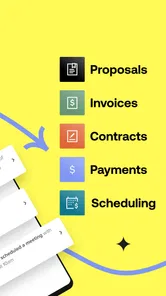
HoneyBook is a client-management and business-operations platform designed mainly for freelancers, entrepreneurs, and small service-based businesses. After exploring its tools, its main purpose is to organize inquiries, projects, proposals, contracts, invoices, payments, and client communication in one place. It can be especially useful for photographers, event professionals, designers, consultants, and other businesses that manage bookings and paid client work.
Can I create proposals, contracts, invoices, and payment requests in HoneyBook?
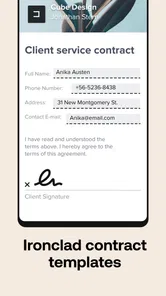
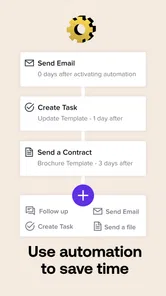
Yes. HoneyBook lets you create and send professional-looking proposals, brochures, contracts, invoices, and payment requests from a centralized workspace. The app is designed to help reduce repetitive administrative work by connecting these steps into client workflows. Depending on your plan and location, available templates, payment methods, transaction features, and customization options may vary, so reviewing the current pricing and feature limits is recommended before subscribing.
Does HoneyBook support online payments and automatic payment schedules?
HoneyBook supports online client payments and can help businesses request deposits, schedule installments, and track outstanding balances. This is convenient when you want contracts, invoices, and payment collection to work together instead of relying on several separate services. However, payment processing fees, supported currencies, payout timing, and available payment methods can depend on your country, account type, and the latest HoneyBook policies.
Pros
- Combines CRM
- invoices
- contracts
- and payments in one workspace.
- Customizable templates help maintain a consistent
- professional client experience.
- Automated reminders can reduce follow-ups for overdue invoices and approvals.
- Client portal keeps shared files
- messages
- and payment details organized.
- Mobile app supports managing leads and projects while working away from a desk.
Cons
- Pricing may be high for freelancers with only occasional client projects.
- Some advanced features require upgrading to a higher subscription plan.
- Payment processing fees can add to the overall cost of using the platform.
- The many tools may feel overwhelming during the initial setup.
- Limited customization may frustrate businesses with highly specialized workflows.











