Homeopathy at Home
- 46.00
- 4.8
- Installs
- 1.00K
- Price
- $6.99

Screenshots

Analysis by Reviewed
I approached Homeopathy at Home as a first-time user would: looking for a clear way to explore homeopathy for everyday family questions, without assuming I already knew remedy names or where to begin. It is a medical reference app from Espiro Media Ltd, and its central appeal is having homeopathy information gathered in one place. My main advice is to treat it as a guide for learning and organizing questions, not as a substitute for sound medical care.
A Handy Guide in Your Pocket
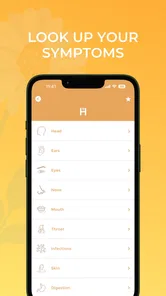
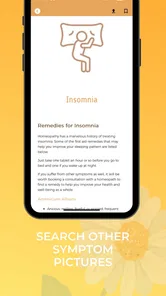
So, what’s the deal with Homeopathy at Home? Essentially, it’s like having a mini homeopath in your pocket. The app is packed with a wealth of information on various homeopathic remedies. You can browse through different categories like allergies, coughs, headaches, and more. It’s pretty much a one-stop-shop for anyone interested in alternative medicine.
What to expect when you open it
The experience is centered on browsing remedy information and looking up symptoms. That makes the app most useful when you want to understand the language of homeopathy or compare the suggestions it presents, rather than when you need an urgent diagnosis. Homeopathy is not supported by strong scientific evidence as a treatment for illness, so I would not rely on an app—or any remedy guide—to decide whether a serious symptom needs medical attention.
How to approach a first search
When I’m new to a reference app, I want to know whether I need specialist vocabulary before I can get anywhere. Here, the practical starting point is an everyday symptom you can describe in your own words. I’d keep the search narrow: one concern, one person, and enough time to read rather than scanning only for a remedy name. That simple limit helps prevent a list of possibilities from feeling like a diagnosis.
It also gives you a way to judge whether the app’s style suits you. If the descriptions make sense as background reading, you can continue exploring. If you find yourself uncertain about what a term means or what action is safe, stop there and ask a qualified professional instead of filling in the gaps yourself. A health reference should help you ask better questions; it should not make uncertainty look like certainty.
User-Friendly Interface
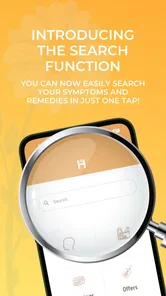
The first thing you’ll notice when you fire up the app is how user-friendly it is. Navigating through the app is a breeze, thanks to its clean and intuitive design. Whether you’re a seasoned homeopathy enthusiast or a curious newbie, the app makes it easy to find what you’re looking for. The search function is particularly helpful, allowing you to type in symptoms and get a list of potential remedies in seconds.
Getting started without overthinking it
For a first visit, I’d begin with one mild, familiar question rather than trying to build a remedy plan for the whole household. Search a plain-language symptom, read the entry in full, and note any terms or suggestions you want to discuss with a qualified clinician. This gives you a useful first result while keeping the app in its proper role: an information source, not a prescriber. If the issue is severe, worsening, persistent, or involves a child who seems seriously unwell, skip app-based troubleshooting and seek medical advice.
More From Our News Desk

 Gmail
Gmail in a Busy Inbox: Who Benefits Most?
From first account to crowded workday, Gmail earns its place through dependable search and flexible sorting—but its best fit depends on how much inbox maintenance you can tolerate.

 Prime Video
Switching to Prime Video: What Changes in Your Viewing Routine
Prime Video can make a compelling second home for streaming, but switching means learning a different catalog, rental layer, and route from browsing to playback.

 Universal TV Remote Control
 Works Best as a Reliable Backup
A phone remote earns its place through quick setup and reliable habits. Here is how to get more from Universal TV Remote Control—and where its limits show.

 Weather - By Xiaomi
Weather by Xiaomi Review: Clear at a Glance, Less Clear Up Close
Xiaomi’s weather app makes everyday forecasts quick to scan, but its calm surface can leave useful details and recovery paths harder to find than they should be.

 X
X Under Pressure: Can It Recover When Posting Goes Wrong?
A resilience-focused review of X, examining setup, mistaken posts, interruptions, weak connections, and the gaps that matter when recovery needs to be dependable.

 Clash of Clans
 Is Won Between the Battles
Its raids are quick; its community is a long-term project of coordination, teaching, rivalry, and shared responsibility—with all the friction that entails.
Latest News



What a useful first session looks like
I’d make the first session a short reading exercise rather than a treatment decision. Write down the symptom in ordinary language, search it, and compare the result with what you already know about the situation. Then note what remains unclear: how long the issue has lasted, whether it is changing, and what you would want a clinician to know. This is a more dependable use of the app than treating a suggested match as confirmation.
One small but useful habit is to keep the app separate from your emergency routine. If someone has a worrying or rapidly changing problem, don’t spend time refining search terms or comparing entries. Get appropriate medical help first. The app is better suited to calm, non-urgent curiosity, when you have room to read carefully and can decide whether the information is worth discussing later.
Comprehensive Remedy Database
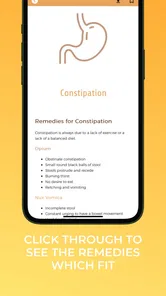
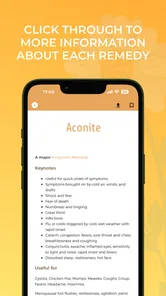
One of the standout features of this app is its comprehensive remedy database. It’s like an encyclopedia of homeopathy, covering a wide range of ailments and their corresponding treatments. Each remedy comes with detailed descriptions, including symptoms it addresses and how it should be administered. This is a godsend for anyone who wants to learn more about homeopathy or find a quick fix for minor health issues.
Reading remedy descriptions critically
The detail in a remedy entry can be useful for learning how homeopathic material is organized, but detail should not be mistaken for proof. A description that sounds familiar may still be too broad to identify what is actually causing someone’s symptoms. I’d treat each entry as a prompt for questions, not a personalized recommendation, and avoid changing prescribed medicines or delaying evidence-based care because a passage seems to fit.
There is also a practical trade-off in having many remedy descriptions gathered together: more information can make browsing convenient, but it can also make it easier to keep searching until one entry feels persuasive. I’d set a stopping point before I begin. If the information does not answer a low-stakes learning question clearly, I would not try to resolve that uncertainty by cycling through more suggestions.
A practical family scenario
Imagine someone in your household mentions a minor headache after a long day. Instead of guessing at a remedy from memory, you could use the app to look up the symptom, read the relevant descriptions, and keep track of what you found for a later conversation with a healthcare professional. The useful part is the structured reference and the chance to slow down before acting. The trade-off is that a matching description does not establish the cause of a symptom or show that a remedy will work.
Using it alongside ordinary care
For that headache, I’d first pay attention to the person’s overall condition and follow ordinary medical judgment. If there are concerning symptoms, a sudden severe change, or a reason to worry, the right next step is medical care—not another search. If it is mild and familiar, the app can help someone curious about homeopathy read and organize questions without taking the place of rest, appropriate advice, or an established treatment plan.
This distinction matters especially in a family setting, where one person’s experience can be mistakenly applied to another. The same symptom label does not make two situations identical. Age, medical history, current medicines, and how symptoms develop all affect what advice is suitable, so I would not transfer an entry from one family member to another as if it were a universal recipe.
Personalized Experience
Another cool aspect is the personalized experience it offers. You can create profiles for each family member and keep track of their specific needs and treatments. This feature is particularly useful for parents who want to manage their children’s health naturally. Plus, the app gives you the option to set reminders for taking remedies, so you never miss a dose.
Keeping household notes clear
Separate profiles can be handy if several people in a household are browsing, because they offer a place to keep personal notes associated with the right person. I would keep those notes restrained: a brief description of what prompted the search and questions to follow up on are more helpful than a long record that makes an unverified remedy plan look established. For ongoing care, the clinician’s record and medication instructions should remain the source of truth.
Reminders are another feature I’d use carefully. A notification can help you remember to revisit a question or follow a clinician-approved routine, but it cannot tell you whether a remedy is appropriate, safe, or effective. If a reminder starts to feel like evidence that you must take something, I’d change how I use it—or avoid setting it for a treatment decision that has not been checked with a health professional.
Privacy and practical boundaries
Family health notes can be sensitive, so I’d think before entering details that are not needed for browsing. A symptom and a question may be enough for your own reference; highly personal history is better handled through appropriate medical channels. I’d also keep urgent contacts and essential care information accessible outside the app, rather than assuming a phone reference will always be available when you need it.
Where it fits among other options
Compared with a general web search, a focused remedy reference can make browsing feel more organized and less scattered. Compared with a conventional symptom checker or a clinician’s advice, though, it is not a dependable route to diagnosis or evidence-based treatment. I’d recommend it to adults who are already curious about homeopathy and want a convenient reference, while anyone seeking proven care, urgent triage, or guidance for a complex condition should choose a qualified health professional instead.
Choosing between a reference, search, and clinical advice
The best alternative depends on the question. If your goal is to learn homeopathic terminology, this focused reference may feel tidier than sorting through unrelated web pages. If you need to decide whether a symptom requires care, use an appropriate medical service or speak with a clinician; a remedy-focused resource is the wrong tool for that job. For questions about a diagnosis, medicines, or a persistent problem, professional advice is more useful than comparing homeopathic descriptions.
I would also avoid using several online sources to vote on a remedy. A collection of matching descriptions can create confidence without providing better evidence. If you explore this app alongside other reading, keep the distinction clear: it can show you how homeopathy discusses a symptom, while reliable medical guidance is what you should use for decisions about diagnosis and treatment.
Who will get the most from it
I think the best fit is an adult who is already interested in homeopathy, understands its evidence limitations, and wants a portable way to browse remedy information. It may also suit a curious learner who prefers a focused collection to open-ended searching. The value is in convenient reading and keeping questions organized, not in getting a dependable answer to every health concern.
I would skip it as a primary health tool if you want evidence-based symptom assessment, need help deciding whether to seek urgent care, or are managing a complex or serious condition. It is also a poor match if you expect an app to confirm a diagnosis or recommend a safe course of action for a child. In those situations, a clinician or an established medical resource is the better choice.
Who should pause before using it
The app’s Everyone age rating describes its audience classification, not a guarantee that every suggestion is suitable for every age or health situation. Parents should not use a remedy entry to delay care for a child, and people managing ongoing conditions should check with their clinician before changing treatment. If you prefer medical tools grounded in clinical evidence, this is probably not the right app for your main health decisions.
Cost, compatibility, and version
The app costs $6.99, so I’d consider whether a dedicated homeopathy reference is something you expect to revisit before buying it. It has a 4.8 average from 92 ratings, with 46 written reviews, and has passed 1K installs. It was released on October 20, 2021; the current version is 2.5 and it requires Android 7.0 or later. Those details make it easier to judge fit, but they don’t tell you whether its approach suits your medical needs.
Deciding whether the purchase makes sense
I’d think about the price in terms of how often I would use a homeopathy-specific library, rather than expecting it to replace a doctor visit or a medical reference grounded in clinical evidence. Someone who plans to browse regularly may value having material in one focused place. If your interest is occasional, or your main need is safe guidance for symptoms, I’d put that money toward a more suitable source of care or information.
Before installing, it is also worth checking that your device meets the listed Android requirement and that you are comfortable using a paid app for this particular purpose. The age classification is broad, but it should not be read as clinical guidance for children. Those are simple checks that help avoid a mismatch between what you expect and what a remedy reference can responsibly provide.
Final Thoughts
In a nutshell, Homeopathy at Home is a fantastic tool for anyone interested in exploring the world of homeopathy. It’s informative, easy to use, and offers a personalized touch that’s perfect for managing the health needs of you and your family. Whether you’re looking to treat a pesky cold or simply want to dabble in homeopathic remedies, this app has got you covered. So why not give it a try? You might just find it’s the natural solution you’ve been searching for.
My recommendation for a first-time user
I’d describe it more cautiously: it can be a handy starting point for browsing homeopathy, but I wouldn’t call it a reliable way to treat illness or replace a clinician’s advice. If you install it, start with a low-stakes learning question, use the material to guide further discussion, and keep proven care as your priority. That balance lets you explore the app without asking it to do a job it cannot safely do.
A sensible next step
After that first search, decide what you actually learned: perhaps a term you want explained, a question for a healthcare professional, or simply confirmation that the topic needs a different kind of resource. Save only the notes that will help you follow up, and resist turning a browsing session into a treatment plan. That gives the app a clear, limited role and makes it easier to recognize when you have reached the point where professional advice matters more.
Homeopathy at Home Frequently Asked Questions
Who develops Homeopathy at Home, and what kind of app is it?
Homeopathy at Home is a medical app developed by Espiro Media Ltd. Its focus is homeopathy for use at home, with the store summary describing it as a way to feel more confident prescribing homeopathy for your family. The app is intended for people exploring homeopathic approaches, but it should not be treated as a substitute for qualified medical care.
What is Homeopathy at Home?
Homeopathy at Home is a mobile application designed to guide users through the principles and practices of homeopathy. It offers a comprehensive resource for both beginners and experienced practitioners, featuring detailed remedy guides, symptom checkers, and expert advice to support holistic health management from the comfort of your home.
How user-friendly is the Homeopathy at Home app?
The app is designed with a user-friendly interface that ensures easy navigation. It offers intuitive features like a symptom checker and remedy finder, making it accessible for users of all experience levels. The clear instructions and organized layout help users to efficiently find the information they need without any hassle.
Does Homeopathy at Home provide personalized treatment suggestions?
Yes, Homeopathy at Home offers personalized treatment suggestions based on user input. By analyzing symptoms and personal health data, the app recommends specific homeopathic remedies. However, it's crucial to consult a healthcare professional for any health-related decisions, as the app is intended to supplement professional advice, not replace it.
Is Homeopathy at Home suitable for beginners in homeopathy?
Absolutely, Homeopathy at Home is an excellent resource for beginners. It provides educational materials, detailed explanations of homeopathic principles, and a step-by-step guide to using remedies safely. The app's comprehensive resources and user-friendly design make it an ideal starting point for those new to homeopathy.
Pros
- User-friendly interface
- Comprehensive remedy database
- Offline access available
- Regular updates
- Customizable treatment plans
Cons
- Limited free content
- Requires internet for updates
- No professional verification
- Ads in free version
- Limited customer support