

Holy Quran: 16 Lines Per Page
- 2.00
- 3.9
- Installs
- 500.00K
- Price
- Free

Screenshots

Analysis by Reviewed
I can see Holy Quran: 16 Lines Per Page being useful in a household where people want a straightforward way to read the Quran on a phone without turning the device into a complicated family project. One person might use it for a regular reading session, while another checks the Qibla direction before prayer or looks at the Ramadan calendar. That combination gives the app a practical place in daily routines, especially when a dedicated printed copy or several separate tools are not always close at hand.
My main reservation is that shared access is not the same as shared-user support. I would treat this as a reading and reference app available on a device, rather than assume it provides separate profiles, household controls, or a way to coordinate everyone’s progress. If you keep that boundary clear, its range of Quran-related tools can be convenient without expecting it to organize family use for you.
Reading together without making the phone a family account
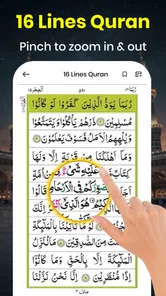
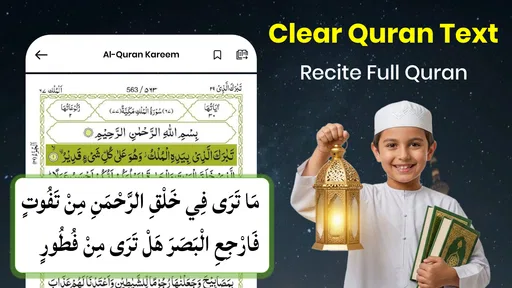
The app comes from Translator Kingdom and sits in the broad library-and-demo area, but its practical focus is devotional reading rather than browsing a general collection. The name points to a 16-line page format, a detail that matters to readers who prefer a familiar page layout and want a phone-based reading session to feel closer to following a page than scanning a long, continuously scrolling screen.
That layout can also help when more than one person in a home uses the same device. Someone who knows where they left off on a page can orient themselves by the page structure, instead of having to search through a long passage. I would still make a simple household habit of noting the last page or passage before handing the phone over. The app’s shared availability does not, by itself, guarantee that each person’s reading place is kept separate.
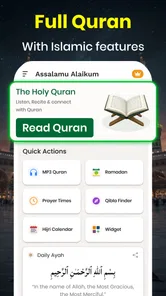
A realistic use case is a quiet moment after a meal: one family member reads for a while, then another opens the app to check the direction for prayer. The Quran, Qibla direction, and Ramadan calendar bring related tasks together, so there is less need to switch between unrelated apps for those particular needs. That is the strongest household argument in its favor: convenience through a focused set of tools, not a full suite of family-management features.
Set expectations before passing the device around
Before making the app a shared household resource, I would decide whether everyone is comfortable using the same app state and device. If you care about keeping reading sessions distinct, a shared phone may blur that distinction. A paper bookmark, a note kept elsewhere, or simply agreeing to leave the app on the page last read can prevent avoidable confusion. Those are ordinary workarounds, not built-in tracking features.
The app’s free entry point makes it easy to try with no purchase commitment, while in-app items range from $0.99 to $28.99 each. I would check the purchase screen carefully before confirming anything, particularly if a child or another household member may use the device. That is sensible on any shared phone: decide who can authorize purchases and avoid treating “free” as a promise that every optional item is included at no cost.
More From Our News Desk

 Gmail
GmailGmail in a Busy Inbox: Who Benefits Most?
From first account to crowded workday, Gmail earns its place through dependable search and flexible sorting—but its best fit depends on how much inbox maintenance you can tolerate.

 Prime Video
Switching to Prime Video: What Changes in Your Viewing Routine
Prime Video can make a compelling second home for streaming, but switching means learning a different catalog, rental layer, and route from browsing to playback.

 Universal TV Remote Control
Universal TV Remote Control Works Best as a Reliable Backup
A phone remote earns its place through quick setup and reliable habits. Here is how to get more from Universal TV Remote Control—and where its limits show.

 Weather - By Xiaomi
Weather by Xiaomi Review: Clear at a Glance, Less Clear Up Close
Xiaomi’s weather app makes everyday forecasts quick to scan, but its calm surface can leave useful details and recovery paths harder to find than they should be.

 X
XX Under Pressure: Can It Recover When Posting Goes Wrong?
A resilience-focused review of X, examining setup, mistaken posts, interruptions, weak connections, and the gaps that matter when recovery needs to be dependable.

 Clash of Clans
Clash of Clans Is Won Between the Battles
Its raids are quick; its community is a long-term project of coordination, teaching, rivalry, and shared responsibility—with all the friction that entails.
Latest News



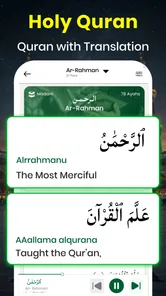
For someone installing it only to read, the key question is whether the page presentation and available translation suit their reading habits. The store summary mentions translations, but readers should choose the language and rendering that they can comfortably follow rather than assume every household member will prefer the same version. In practice, one person may want to read in Arabic while another relies on a translation for understanding; those are different needs, so it is worth checking the app directly before making it the household’s sole reading option.
Coordination works best when it stays simple
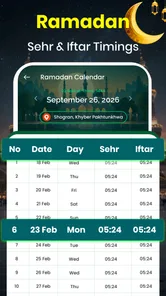
The Ramadan calendar and Qibla direction make the app more useful at moments when people are coordinating around prayer or fasting. A household member can consult the calendar as part of planning the day, then use the reading section at a separate time. I would treat these tools as convenient prompts and references, not as a substitute for a family’s established calendar, local guidance, or conversations about plans.
A helpful workflow is to agree on one person’s responsibility for checking the household schedule, while leaving reading choices personal. That avoids the common shared-device problem where a utility app gets mistaken for a shared record of everyone’s activity. The app can bring several relevant functions into one place, but family members still need to communicate about who is using the phone and what they have checked.
There is a trade-off here. Putting the Quran, direction tool, and seasonal calendar together reduces app-hopping, but a person who wants a dedicated prayer-time planner, a detailed household calendar, or a reading tracker may prefer separate specialist tools. I would not choose this app on the assumption that its compact collection replaces every part of a religious routine. Its appeal is having a few closely related resources together, not a promise of extensive coordination.
Age suitability and trust in a shared setting
Its Everyone age classification makes it broadly suitable for a general audience, and the religious subject matter can make it a natural reading option for different generations. Still, an age label does not tell you whether the presentation, translation, or optional purchase choices will fit a particular child or family. I would open the app together with a younger user, check that they can navigate to the reading material they need, and explain that any purchase should be discussed with an adult.
That is especially relevant on a device used by several people. Keep the device’s usual purchase safeguards in place, and do not assume this app supplies family accounts or child-specific restrictions. I find that distinction important: the app may be suitable for family access, but suitability does not remove the need for ordinary device-level boundaries.
For trust, I would also encourage readers to confirm that the text and translation they are using match their preferences. A digital reading tool is most useful when people feel confident in what is displayed, and a household may have different expectations about language or presentation. If accuracy, a particular edition, or a teacher’s recommended text is central to your use, compare the app with that trusted source before relying on it as your only copy.
How it compares with familiar alternatives
Against a printed Quran, the obvious advantage is portability: a phone can also provide the Qibla direction and Ramadan calendar in the same app. A physical copy, on the other hand, avoids battery concerns and can make it easier for several people to read together without negotiating over one screen. If group recitation or a stable, shared reading place is the priority, print may remain the more comfortable choice.
Compared with a general-purpose Quran app, the 16-line page identity is the point to investigate first. Readers who like that page rhythm may find it easier to settle into a familiar routine than in a layout built around continuous scrolling. Readers who primarily want a rich collection of study tools, detailed progress tracking, or features for separate household members should compare alternatives on those exact needs rather than assume this app includes them.
Its audience figures suggest that it has found a sizable group of users: it has over 500,000 installs and a 3.9 average from around 6,400 ratings. I would take that as context, not as proof that the app will fit every reader. There are only a small number of written reviews, so I would rely more on trying the layout and checking the functions that matter to my own routine than on expecting a deep pool of detailed user experiences.
Practical details before you settle on it
The app is free to download, is currently at version 2.1, and requires Android 7.0 or later. Its release date is December 29, 2025. Those details make it worth checking the Android version on an older household phone before planning to use it there; a device that falls below the minimum will need another reading option.
I would test the app in the exact situations where the household expects to use it: open a few pages, see whether the 16-line arrangement feels readable on that screen, locate the translation you want, and check how quickly you can reach the Qibla and calendar tools. A layout that feels comfortable on one person’s phone may be too small or awkward on another device, so a brief hands-on check is more useful than relying on the app’s name alone.
One non-obvious trade-off of a shared phone is that the best reading setup may not be the best quick-reference setup. A reader may want to leave the Quran open at a particular place, while another person needs to switch over to the direction tool. Agreeing to return the app to a useful starting point after each session can make handoffs smoother. It is a small household convention, but it prevents the next person from having to guess where to begin.
Making a short reading session work
For an individual routine, I would treat the page layout as a cue to make the session manageable rather than assume I need to spend a long stretch with the phone. I might read a page or two during a quiet break, then leave myself a brief note outside the app if I expect someone else to use the device. That small habit is especially helpful when a household has one shared phone and several people read at different times.
The 16-line format also gives a practical way to judge whether the screen works for you before committing to a routine. Try holding the phone at the distance you normally read, not just tapping through pages quickly. If you need to enlarge text or adjust your grip often, that friction may matter more during a longer session than during a quick test. Someone who reads comfortably from a larger printed page may find a tablet or physical copy a better everyday choice.
When checking a translation, I would compare a short passage with a version I already understand, rather than browsing only the opening screen. That lets me assess whether the language feels clear for the purpose I have in mind. A translation can support comprehension, but it is not interchangeable with the Arabic text or with a teacher’s explanation; readers using it for study should keep that distinction in view.
Choosing it for the right kind of household
This app is a better fit for a household that wants a convenient personal reading option and occasional reference tools than for one that expects a central system for everyone’s religious routine. It can save a little time when the same phone is already nearby, but the family still has to decide how to share it, how to protect purchases, and how to keep each reader’s place straight.
If the main need is a reliable group reading session, I would choose a printed copy or make sure each participant has a screen of their own. If the main need is a broad set of study resources, I would compare dedicated Quran apps and look for the exact tools that matter, such as the language options or progress features I expect to use. If the need is simply to read in a familiar page style and occasionally check direction or the Ramadan calendar, this app’s focused mix makes more sense.
That distinction answers a common practical question: does one install make it a good choice for everyone at home? Not automatically. It can be a shared utility, but individual comfort with the page format, language, and screen size still matters. I would let each regular reader try it rather than making the household’s choice based only on the person who installed it.
My household verdict
I would recommend Holy Quran: 16 Lines Per Page to someone who wants Quran reading on Android alongside a Qibla reference and a Ramadan calendar, especially if the 16-line page style matches how they prefer to read. It can be a practical shared-device option for a household that is comfortable with informal coordination and understands that one app does not automatically create separate reading spaces or family controls.
I would skip it as the household’s only solution if you need distinct profiles, organized progress for multiple readers, or a more comprehensive planning system. I would also keep a printed copy or another trusted resource available when several people need to read together or when a specific edition and presentation are essential. For a simple, personal reading routine with a few related tools close by, though, it has a clear everyday role. My advice is to try the page layout first, confirm the translation works for you, and agree on basic shared-device boundaries before making it part of the family routine.
Holy Quran: 16 Lines Per Page Frequently Asked Questions
What is Holy Quran: 16 Lines Per Page?
Holy Quran: 16 Lines Per Page is a digital Quran app designed for readers who prefer the familiar 16-line page layout found in many printed mushafs. It lets you read Quranic text on a mobile device and is intended to make it easier to follow along with a traditional page structure. The exact reading, navigation, and display options can vary by app version and device.
Does the app work offline?
Offline access depends on how the app stores its Quran pages and any optional audio or other content. Some versions may let you read after content has been downloaded or loaded, while features such as streaming recitations may require an internet connection. Before relying on it without data access, open the app while online and check whether pages and any features you need remain available in airplane mode.
Can I change the text size or page display?
The 16-line layout is a central part of the app’s format, so the page design may be less flexible than a standard reflowable ebook. Depending on the version, you may be able to zoom in or adjust screen settings, but that does not necessarily change the number of lines per page. Check the display controls on your device to see what options are available and comfortable for reading.
Is Holy Quran: 16 Lines Per Page suitable for memorization and daily reading?
A consistent page layout can help readers keep their place and recognize passages visually, which some people find useful for regular reading or memorization practice. However, the app should be treated as a reading aid rather than a substitute for checking recitation and meaning with a qualified teacher or trusted reference. If you use it for study, confirm that the script and any translations or audio meet your needs.
Is the app free, and what should I check before downloading?
The app’s price, advertisements, and any optional purchases can depend on the store listing and the version available in your region. Before downloading, review the current listing for device compatibility, permissions, developer information, privacy details, and recent user feedback. Also confirm that the app displays the Quran text clearly on your screen and includes the specific reading features you expect, since availability may differ across releases.
Pros
- A consistent 16-line layout makes it easier to follow familiar page-based reading.
- Useful for readers who prefer a compact
- traditional Quran page format.
- Page layout can support memorization by keeping verse positions consistent.
- Suitable for short reading sessions
- such as reviewing a page at a time.
- A focused Quran-reading format avoids the clutter of unrelated content.
Cons
- The fixed 16-line layout may be less comfortable on smaller screens.
- Readers used to other Quran page formats may find page positions unfamiliar.
- Small text can require frequent zooming on some devices.
- A page-based layout may be less convenient than continuous scrolling.
- Reading options and tools may be limited compared with fuller Quran apps.










