

Holiday Calendar
- 656.00
- 4.5
- Installs
- 500.00K
- Price
- Free

Screenshots
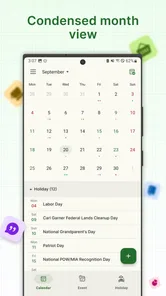
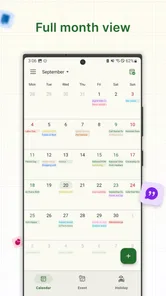
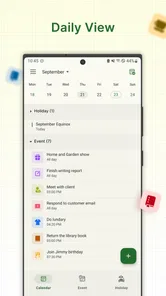
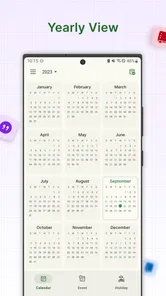
Analysis by Reviewed
I find a holiday calendar most useful when it answers a small but recurring question: is that day a public holiday where I live, or somewhere I’m planning to visit? Holiday Calendar is focused on that job rather than trying to replace a full planner. It is a free events app from Paraga Mobile, and its straightforward purpose makes it appealing if you want holiday dates without building a complicated calendar routine around them.
Where holiday calendars can cause confusion
The first thing I would check is whether the dates shown match the country or region I care about. A holiday that matters to a colleague, customer, or travel destination may not be a day off where I live. Before relying on a date for a booking or work deadline, I’d confirm the relevant location in the app and cross-check especially important plans with an official local source.
That distinction is easy to overlook when scanning a month quickly. For a household coordinating school breaks, or a small team scheduling calls across borders, I’d use the calendar as a prompt to ask, “Whose holiday is this?” rather than assume every marked date applies to everyone. That habit is more useful than simply collecting dates: it prevents a regional observance from being mistaken for a universal closure.
Simple setup checks that save time
On first use, I’d take a moment to check the selected location and the device’s calendar settings before deciding the app is missing something. If the dates don’t look right, changing the view or confirming which country’s holidays are relevant is a sensible first step. Holiday information is only helpful when it matches the place and purpose you have in mind.
The app is aimed at a narrow task, so I wouldn’t expect it to replace a work calendar, shared family planner, or appointment system. Its practical role is to help me notice holiday dates; I’d keep meetings, deadlines, and personal reminders in whichever calendar I already use. That separation also makes it easier to tell whether a problem concerns holiday information or an event I added elsewhere.
Why Choose Holiday Calendar?
With the hustle and bustle of everyday life, it's easy to lose track of important dates. The Holiday Calendar app serves as a handy tool to keep all those significant dates at your fingertips. Upon installing the app, I was welcomed with a clean and intuitive interface that makes navigating through the calendar a breeze. No more flipping through pages or scrolling endlessly on generic apps!
Features That Stand Out
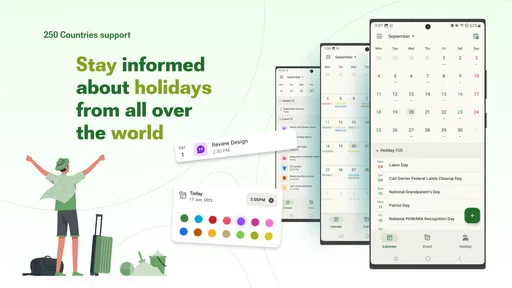
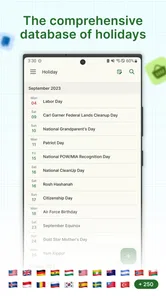
One of the standout features of this app is its ability to integrate national holidays from various countries. Whether you're planning a trip abroad or just curious about international festivities, the app covers it all. I was particularly impressed with how the app seamlessly updates and notifies me about upcoming holidays, ensuring I'm always in the know.
More From Our News Desk

 Gmail
GmailGmail in a Busy Inbox: Who Benefits Most?
From first account to crowded workday, Gmail earns its place through dependable search and flexible sorting—but its best fit depends on how much inbox maintenance you can tolerate.

 Prime Video
Switching to Prime Video: What Changes in Your Viewing Routine
Prime Video can make a compelling second home for streaming, but switching means learning a different catalog, rental layer, and route from browsing to playback.

 Universal TV Remote Control
Universal TV Remote Control Works Best as a Reliable Backup
A phone remote earns its place through quick setup and reliable habits. Here is how to get more from Universal TV Remote Control—and where its limits show.

 Weather - By Xiaomi
Weather by Xiaomi Review: Clear at a Glance, Less Clear Up Close
Xiaomi’s weather app makes everyday forecasts quick to scan, but its calm surface can leave useful details and recovery paths harder to find than they should be.

 X
XX Under Pressure: Can It Recover When Posting Goes Wrong?
A resilience-focused review of X, examining setup, mistaken posts, interruptions, weak connections, and the gaps that matter when recovery needs to be dependable.

 Clash of Clans
Clash of Clans Is Won Between the Battles
Its raids are quick; its community is a long-term project of coordination, teaching, rivalry, and shared responsibility—with all the friction that entails.
Latest News



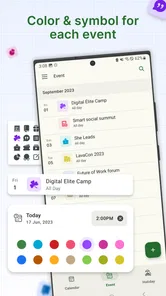
Another feature that caught my eye is the customizable notification settings. You can tailor the alerts to fit your schedule, so you never miss out on a holiday celebration or a day off. Plus, it syncs effortlessly with other calendars, which means zero hassle in keeping all your events in one place.
Using it alongside your usual calendar
For everyday use, I’d treat this as a holiday reference rather than the single source of truth for every commitment. A practical workflow is to check the relevant dates here, then keep any travel reservations, family plans, or work deadlines in the calendar you already rely on. If a holiday affects a meeting, I’d add a separate reminder there; that way, the date stays visible even if I’m looking at a different calendar later.
This also helps when something seems out of sync. I’d first confirm the location and date in question, then check whether the event belongs to Holiday Calendar or to a separate calendar on the phone. If a notification does not appear, reviewing the app’s notification choices and the phone’s own notification settings is a sensible troubleshooting step. I wouldn’t assume a missing alert means the holiday itself has disappeared.
User Experience
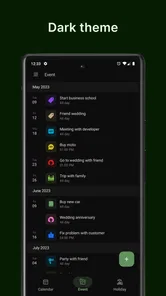
Let’s talk about the user experience. The app’s design is minimalistic but effective, focusing on functionality rather than overwhelming aesthetics. It’s lightweight, meaning it doesn't hog your phone's resources, which is a huge plus for me. As someone who tends to overload their phone with apps, it’s refreshing to have one that’s efficient and fast.
Another thing worth mentioning is the community support. The app has a dedicated team constantly working on updates and improvements, and they genuinely listen to user feedback. It feels like being part of a community that values user experience above all.
Who will get the most from it
I’d recommend this kind of focused calendar to people who regularly coordinate across countries, want a quick way to look up holiday dates, or simply like seeing public holidays alongside the flow of the year. For example, before arranging a video call with an overseas client, I can check whether the date may coincide with a local holiday and choose another time before invitations go out. That is a small check with a useful payoff.
If you mainly need task lists, shared schedules, appointment reminders, or detailed event planning, a general-purpose calendar is the better main tool. Holiday Calendar’s appeal is that it keeps attention on holidays instead of asking you to manage every part of your life in one place. It is also worth knowing that the app is free, has a 4.5 average from around 6,000 ratings, and offers in-app purchases at $8.99 per item. I’d decide whether its focused role suits me before paying for anything extra.
When the issue may be elsewhere
Not every mismatch comes from the holiday app. A phone’s date, time, or regional settings can affect how dates appear across apps, while a separate calendar may have its own sync behavior. If one holiday looks wrong, I’d compare the displayed date with a trusted local calendar and check the device’s basic date settings before changing several things at once. This makes it easier to identify the source of the confusion without losing track of personal events.
The app is rated for Everyone, has been available since December 29, 2018, and its current version is 4.20.3, with Android 6.0 as the minimum OS. It has over 500,000 installs, which suggests it has found an audience for this simple use case. Those details may help you judge compatibility, but the more important question is whether you want a dedicated holiday view or prefer to keep all date information inside one broader calendar.
Making holiday dates useful in real plans
A good way to use a dedicated holiday calendar is as an early planning check, not a last-minute authority. If I’m arranging a visit with relatives in another country, I’d look ahead before choosing travel days, then verify any date that could affect transport, opening hours, or work schedules. The calendar can flag a day worth investigating; it cannot make every local business or service follow the same timetable.
For a family, I’d use the same idea when comparing school routines with public holidays. I can mark the dates that might change childcare or travel plans, then confirm details with the relevant school or local source. That extra step avoids treating a national holiday as proof that every institution is closed, a common assumption that can turn a helpful date lookup into a frustrating surprise.
For work across time zones, I’d check the holiday location before sending invitations, and include the place in my own note when the date is important. A reminder such as “check local office schedule” is more actionable than a holiday name alone. This is a small workflow choice, but it helps when several countries or regions are involved and reduces the chance of confusing one observance with another.
Choosing between a focused app and a full calendar
Compared with a general phone calendar, Holiday Calendar is useful when I want the subject to stay narrow: holidays, rather than every appointment competing for attention. A broader calendar usually makes more sense as the main organizer because it is where I already manage personal and work commitments. Keeping both roles clear can be simpler than trying to turn a holiday reference into a complete planning system.
Searching the web is another alternative, especially for a one-off question. But repeated searches mean I have to remember to look each time, and I may land on information for the wrong country or region. A dedicated calendar makes recurring checks more convenient, while a trusted local source remains the better choice when the consequences of getting a date wrong are significant. I see these tools as complementary rather than mutually exclusive.
The trade-off is that a focused app only earns a place on my phone if I check holidays often enough to value that convenience. If I rarely plan around them, a quick search may be all I need. If I coordinate with people abroad, travel regularly, or want to scan the year for likely closures, keeping a separate holiday view can save repeated effort without forcing me to move all my events into a new system.
Small checks that make the workflow steadier
When a date or alert looks unexpected, I’d change one thing at a time. First I’d confirm the location, then check the date and the phone’s calendar or notification settings. If the holiday appears correctly but an alert does not, I’d focus on notification settings rather than repeatedly searching for the date. Separating those checks makes troubleshooting less confusing and reduces the risk of changing unrelated settings.
I’d also avoid treating a notification as the only way to remember a consequential date. For a flight, deadline, or appointment affected by a holiday, I’d put a reminder in the calendar I use for those commitments. This gives me a backup and keeps the action attached to the plan itself, instead of relying on a holiday alert to carry all the context.
One useful habit is to record the reason for a date when transferring it into another calendar. “Public holiday—confirm opening hours” is clearer than copying only the name, especially if I revisit the event months later. It turns a quick lookup into a decision aid while leaving the final confirmation where it belongs: with the organization or local source that controls the schedule.
Final Thoughts
In conclusion, the Holiday Calendar app is a must-have for anyone looking to stay organized and informed about holidays worldwide. It’s not just an app; it’s your personal assistant for all things celebratory. Whether you're a frequent traveler, a culture enthusiast, or just someone who enjoys a well-planned day off, this app has got you covered. So why not give it a try? You might find it becoming an indispensable part of your daily routine, just as I have!
My more measured recommendation is to use it as a convenient holiday-checking companion, especially when dates in another country could affect plans. I would not rely on any single calendar without checking the relevant location for consequential decisions, and I’d keep appointments and shared commitments in the calendar system my household or workplace already uses. If that division suits you, this focused approach can be simpler than searching the web each time; if you want one app to manage every kind of event, a broader calendar is likely the better fit.
Who should skip it, and what to expect
I’d skip a separate holiday app if I want a single place to create appointments, assign tasks, share availability, and coordinate changes with other people. A general calendar built around those jobs is a better fit. Holiday Calendar makes more sense when the missing piece in my routine is a quick view of holidays, not a new home for every date in my life.
It is also best for people willing to verify details that affect real commitments. Holiday names and dates are useful context, but a particular employer, school, shop, or transport provider can follow its own schedule. If I need certainty about an opening or a day off, I’d check directly with the organization rather than infer its plans from a calendar entry.
For someone installing it on an older Android phone, the minimum operating system is Android 6.0, so checking the device version before troubleshooting is a practical first move. The Everyone age rating also makes the app suitable for a broad audience, while its simple purpose is likely most valuable to adults coordinating work, travel, or household plans. The app has 656 reviews as well as its larger rating pool, so I’d treat other users’ comments as individual experiences, not a substitute for checking whether its approach suits my own routine.
Holiday Calendar Frequently Asked Questions
Is Holiday Calendar suitable for users who only need a simple way to check holidays?
Holiday Calendar is an events app with a straightforward purpose: checking holidays. Its simple focus may suit someone who wants a holiday calendar rather than a broader event-planning tool. The app is free to download and is rated for everyone, so it can be considered by users looking for an accessible way to keep holiday dates in view.
What devices and Android requirements should I check before downloading Holiday Calendar?
Holiday Calendar is available for Android, and its current version is 4.20.3. It requires Android 6.0 or later, so check your device’s operating system before installing. The app was released on December 29, 2018, and is developed by Paraga Mobile. If your device meets the minimum requirement, you can decide whether its holiday-focused purpose fits what you need.
What features does the Holiday Calendar app offer?
The Holiday Calendar app provides a comprehensive list of holidays from various countries and religions, allowing users to tailor their calendar based on personal preferences. It includes features like reminders for upcoming holidays, details about each holiday's significance, and the ability to sync with your existing calendar applications. This makes it an excellent tool for planning vacations and understanding cultural celebrations worldwide.
Is the Holiday Calendar app available for both Android and iOS devices?
Yes, the Holiday Calendar app is available for download on both Android and iOS platforms. It is designed to be compatible with a wide range of devices, ensuring that users have access to its features regardless of their choice of smartphone or tablet. Be sure to check the device compatibility and operating system requirements before downloading.
Does the Holiday Calendar app require a subscription or purchase to access all features?
The Holiday Calendar app is free to download, with in-app purchases listed at $8.99 per item. The published description presents it as a simple calendar app for checking holidays, so consider whether the free experience meets your needs before making a purchase. Check the purchase details in the app before proceeding, since paid items may differ in purpose.
Pros
- User-friendly interface
- Customizable reminders
- Syncs with Google Calendar
- Includes major holidays
- Multiple language support
Cons
- Limited free version
- Occasional ads
- Infrequent updates
- Requires internet connection
- No offline access











