Hole19 Golf GPS & Range Finder
- 1.10K
- 4.4
- Installs
- 5.00M
- Price
- Free

Screenshots

Analysis by Reviewed
I choose a golf app by asking a practical question: will it help me make a decision on the course without turning every hole into a screen session? Hole19 Golf GPS & Range Finder is aimed at golfers who want distance guidance and a scorekeeping tool in one place. I’d treat it as a useful companion, not a replacement for course judgment or a dedicated coaching routine.
Who gets the most from a phone-based caddie
For a casual round, the appeal is straightforward: check a yardage, record a score, then put the phone away and play. That workflow suits golfers who often forget to note scores or want a simple record to review later. It is also handy when playing an unfamiliar course, where knowing the distance to different parts of a green can help me think through a shot rather than simply guessing.
A realistic use is a weekend round with friends. I can check a distance before choosing a club, enter the score after the hole, and keep the group’s friendly competition in view without carrying a separate GPS device and paper card. My tip is to enter scores consistently at the same point in the hole—after finishing, rather than while walking or chatting—so the record is less likely to become a chore or contain missed entries.
The app is free to download, with in-app purchases ranging from $2.99 to $69.99 per item. That makes trying the basic experience a relatively low-commitment way to see whether a phone-based golf tool fits your routine; I’d only consider paying once I knew which features I actually used. It’s a sports app from Hole19, with an Everyone age rating, and its version 5.26.0 supports devices running at least OS 10.
All-in-One Golfing Solution
One of the standout features of Hole19 Golf GPS & Range Finder is its comprehensive range of tools that cater to every golfer's needs. From GPS distances to digital scorecards, it pretty much covers everything. The interface is user-friendly, which means even if you’re not tech-savvy, you’ll find it easy to navigate through different options.
Accurate GPS Distances
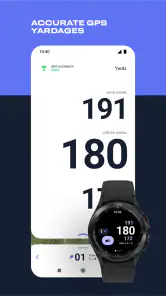
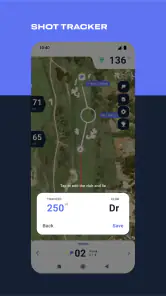
Let’s talk about the GPS functionality. It’s spot-on! The app provides accurate yardages to the front, back, and center of the green, which is crucial when you’re making those critical shots. The precision it offers can genuinely help you lower your scores, and I’ve noticed a marked improvement in my game since I started using it.
Digital Scorecards and Performance Tracking
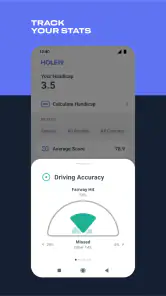
Keeping track of your scores is a breeze with the digital scorecard feature. Not only does it save the hassle of carrying around a paper scorecard, but it also offers a neat way to look back at your performance. The app tracks your stats and provides insights into areas where you can improve. It’s like having a personal coach in your pocket!
More From Our News Desk

Weather by Xiaomi Review: Clear at a Glance, Less Clear Up Close

X Under Pressure: Can It Recover When Posting Goes Wrong?

Clash of Clans Is Won Between the Battles

Android Auto Makes the Case for Quieter Car Software

MobiOffice: Transforming Mobile Productivity with Seamless Integration

EA SPORTS FC™ Mobile Soccer: Redefining Mobile Sports Gaming
“Having Hole19 by your side is like having a caddy who knows exactly what you need to improve your game.”
Community and Social Features
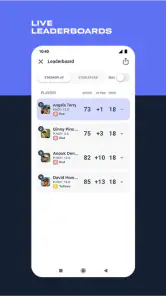
What’s golf without a little friendly competition? Hole19 connects you with a community of golfers. You can share your scores, challenge friends, and even join tournaments. It adds a social element to the sport, which I find incredibly motivating. Plus, the app’s integration with social media platforms makes it easy to boast about your latest achievements!
Where another option may suit you better
The main trade-off is using a phone during a round. Even a clear interface can take attention away from play, and relying on a handset may not suit someone who prefers a dedicated golf watch or handheld GPS unit. Those alternatives can keep a phone tucked away; a paper scorecard is simpler still if all you want is to record strokes and avoid checking a screen. I’d also avoid treating any GPS reading as a guarantee: use it as one input alongside lie, wind, hazards, and your own feel for the shot.
Compared with a basic scorecard, this app brings distance checks and performance records together, but that extra convenience only pays off if you keep the entries current. For useful comparisons over time, record rounds in a consistent way and look for recurring patterns rather than judging your game from one unusually good or bad day. If you mainly want structured instruction or swing analysis, a golf GPS and scoring app is not a substitute for a coach or a dedicated practice plan.
Making the switch without adding hassle
If you currently use paper, try the digital card for one round while keeping your usual method as a backup. That gives you a low-pressure way to learn when to enter scores and whether checking distances feels natural. If you already use another GPS tool, compare the actual on-course routine—not just the feature list. The best choice is the one you can consult quickly and reliably without slowing down your group.
Hole19 has a 4.4 average from around 29,000 ratings, and more than five million installs. Those figures suggest it has found a broad audience, but they don’t tell me whether its approach will match your habits. I’d recommend it to golfers who want distances, scoring, and a social layer in one app, especially if they enjoy reviewing rounds. If you prefer a screen-free round, need coaching above all else, or already have a setup you trust, sticking with that may be the better call.
In conclusion, Hole19 Golf GPS & Range Finder is not just an app; it’s an experience. Whether you’re a beginner wanting to learn the ropes or a seasoned golfer aiming to refine your skills, this app caters to all. Its blend of technology and community engagement makes golfing more enjoyable and rewarding. So next time you hit the course, make sure Hole19 is in your toolkit!
Decide what you want the app to solve
Before adding any golf app to my routine, I separate three jobs that can easily get bundled together: choosing a target, remembering what happened on the hole, and getting better over time. Hole19 is most compelling when I want the first two handled together. The GPS view can inform a club choice, while the scorecard gives me a record to revisit. Those are related tasks, but they are not the same as getting a lesson or a detailed swing diagnosis.
That distinction matters for beginners. If you are still learning how to keep score, a digital card can make the round feel less fiddly, and distance references can give you a starting point for decisions. But a number on the screen will not tell you which club you personally hit reliably or how to correct a poor strike. I’d use the app to build awareness, then rely on practice and instruction for the parts that require technique.
For an experienced golfer, the value may be less about discovering a new way to play and more about consistency. A familiar yardage routine and a record of rounds can make it easier to notice repeated scoring problems. I would not expect a single round’s stats to explain much on their own. The useful habit is logging enough rounds in a similar way to spot a pattern, then deciding whether it is worth working on.
Use distance as a prompt, not a command
A practical on-course tip is to check the reading before you settle on a shot, then look up and assess the actual situation. A green distance is only one piece of the decision: the ball’s lie, wind, obstacles, and the shot you can confidently play still count. This is why I prefer a GPS app as a decision aid, rather than something that appears to choose a club for me.
On an unfamiliar course, the front, center, and back references can help turn an indistinct target into a more considered plan. I might choose a safer landing area instead of trying to reach the most ambitious point. On a course I know well, I may need fewer checks; using the app selectively keeps it from interrupting the rhythm of play. It is perfectly reasonable to leave the phone away for holes where the information would not change my decision.
Another helpful habit is to settle on a score-entry routine before the first tee. If you enter a result immediately after each hole, it is easier to remember than trying to reconstruct several holes at the end. When playing with others, agree on whether you are recording only your own score or keeping the group’s friendly competition there too. A consistent routine makes the digital card useful; frequent corrections and forgotten entries undermine the convenience.
How it compares with other ways to play
The usual alternatives serve different preferences. Paper is the most direct choice for someone who wants a record and nothing more. A dedicated golf watch or handheld unit makes more sense for a player who wants distance information but would rather not handle a phone during play. A general golf app can be a good middle ground when you value having GPS and scoring together and are comfortable carrying your phone.
I would compare these options by asking how often I will actually consult them, not by counting features. If a watch already gives you the distances you need and you rarely look back at scores, switching to a phone app may add little. If a paper card is often lost or left unfilled, a digital record could be a meaningful improvement. And if your main goal is coaching, a dedicated lesson or practice resource is a more direct match than a scoring tool with extra conveniences.
There is also a small attention cost that is easy to overlook. Finding the phone, waking it, checking a reading, and putting it away can become distracting if repeated on every shot. I’d keep checks brief and use the app at moments that fit naturally into the round, rather than making it the center of each decision. Golfers who value a fully screen-free experience should trust that preference; convenience is not useful if it makes the round less enjoyable.
Try it before paying or replacing your routine
Because the download is free but optional purchases are available, I would start by identifying one clear reason to use it. Maybe that is checking distances on unfamiliar holes, keeping a reliable score record, or reviewing how rounds go. Give the basic routine a fair trial, then consider whether any paid option addresses a need you have actually encountered. The listed purchase range is broad, so it is worth checking the specific item and its terms in the app before committing rather than assuming every feature is included.
If you already use a different scoring or GPS setup, there is no need to abandon it in one go. Try Hole19 for a round or two and note whether it saves effort, provides information you use, and stays out of the way. Keep your old method available while you learn the new one, especially if you are playing an important round. That is a more useful test than deciding from a feature list or from another golfer’s preferences.
Compatibility is worth checking before download: the current version is 5.26.0 and requires OS 10 or later. The app has been available since January 28, 2015, and its 4.4 average across around 29,000 ratings gives a sense of its broad reception, though neither popularity nor an average score guarantees that its workflow will suit you. Its Everyone rating also makes the intended audience broad, but the best fit still depends on how you like to manage a round.
My recommendation for the right golfer
I’d choose Hole19 if I wanted a phone-based combination of green distances, digital scoring, and a social element, and if I were willing to use the phone in short, purposeful bursts. It is especially appealing to casual players who want less paper to manage, golfers visiting unfamiliar courses, and anyone who likes reviewing rounds rather than relying on memory alone. Its strongest case is the convenience of bringing several parts of a golf routine together.
I’d skip it if checking a phone would bother me, if a dedicated device already handles the job comfortably, or if I am primarily looking for coaching and technical feedback. I would also avoid paying for extras before I know which part of the app I rely on. Starting with a simple test round lets me judge the real trade-off: does it make decisions and scorekeeping easier without making me more absorbed in the screen?
For me, that is the standard a golf companion should meet. Use its distances as useful context, keep score in a repeatable way, and let the round—not the app—remain the focus. If those habits sound natural to you, Hole19 is a sensible option to try. If your preferred game is screen-free or your current tools already work, there is no strong reason to switch just for the sake of having another app.
Hole19 Golf GPS & Range Finder Frequently Asked Questions
Can I use Hole19 to keep score during a round?
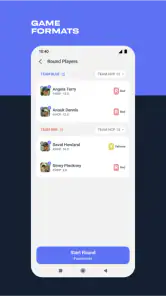
Hole19 includes a digital scorecard, which can help you record scores as you play instead of relying on paper. It is intended to sit alongside the app’s GPS and performance tools, giving you one place to follow key details during a round. If you prefer a particular scoring routine, take a look at the scorecard options before play so the app fits your habits.
Does Hole19 include maps for the courses I play?
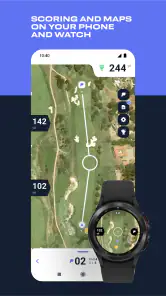
Hole19 provides course maps as part of its golfing tools, and those maps can be downloaded while you have an internet connection. It is sensible to check that your course is available and save its map before you leave for the round. Having the course information stored on your device also helps when mobile connectivity is limited on the course.
Is Hole19 Golf GPS & Range Finder suitable for beginners as well as experienced golfers?
Hole19 is a golf app designed to support players who want help with course distances, scoring, and tracking their performance. Beginners may find the GPS information and digital scorecard useful for following a round, while more experienced golfers can use the available statistics to review their play. Its tools are intended to complement your decisions on the course rather than replace your own judgment.
What is Hole19 Golf GPS & Range Finder and how does it work?
Hole19 Golf GPS & Range Finder is a comprehensive app designed to enhance your golfing experience by providing accurate GPS distances on over 43,000 golf courses worldwide. It offers detailed maps, digital scorecards, and statistics tracking. By using your phone’s GPS, the app helps golfers make informed decisions on the course, ensuring they choose the right club and approach for each shot.
Does Hole19 Golf GPS & Range Finder require an internet connection to function?
While an internet connection is required to download course maps and updates, Hole19 Golf GPS & Range Finder can function offline once the data is stored on your device. This means you can access GPS distances and track your game even in areas with no internet connectivity, making it highly convenient for golfers playing in remote locations.
Pros
- Accurate GPS for precise course mapping.
- Intuitive user interface
- easy to navigate.
- Detailed statistics tracking for game improvement.
- Compatible with most golf courses worldwide.
- Offers digital scorecard for easy tracking.
Cons
- Some features require in-app purchases.
- Occasional GPS signal issues reported.
- User interface may lag on older devices.
- Limited offline functionality.
- Requires registration to access full features.
- Category
- Sports
- Version
- 5.26.0





