HiPaint -Sketch Draw Paint it!
- 1.36K
- 4.2
- Installs
- 1.00M
- Price
- Free
Screenshots
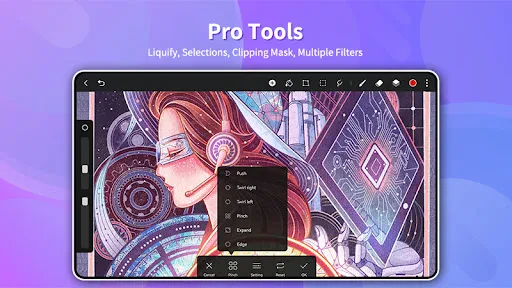
Analysis by Reviewed
When it comes to digital art on mobile, we've got a plethora of options. But let me tell you, HiPaint - Sketch Draw Paint it! is a standout. I stumbled upon this app while searching for a good drawing app, and I must say, it has been a delightful find.
Choosing a drawing app for the way you work
I’d choose a mobile art app by asking what I want to make, how much control I need, and whether I’m happy working on a small screen. HiPaint is an art and design app from Aige, and its focus on sketching, illustration, design, and digital painting makes it a natural fit for people who want one place to explore those activities. It’s free to install, rated for Everyone, and has a 4.2 average from around 50,000 ratings, so it has a sizable audience without being a guarantee that every artist will like its workflow.
A practical way to judge it is to try a small, low-stakes piece first: a rough character sketch, a color study, or a simple poster concept. That lets you see whether the brush feel and canvas controls suit your hand before you commit to a detailed project. If your main goal is polished vector artwork, precise page layout, or professional work that must move through a specific desktop production pipeline, a dedicated tool for that job may be a better choice.
First Impressions
As soon as you open HiPaint, you are greeted with an intuitive and sleek interface. It's one of those apps that don't require a manual to get started. You're not bombarded with features, yet everything you need is at your fingertips. The app has a minimalistic design, ensuring that you focus on what’s important – creating art.
Features That Capture the Artist in You
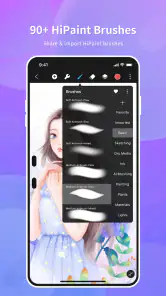
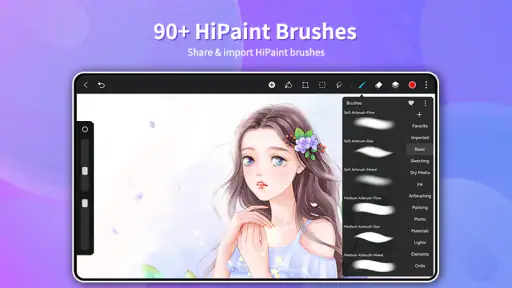
One of the first things that caught my attention was the variety of brushes available. Whether you're into sketching, painting, or inking, there's a brush for every occasion. The customization options are vast, allowing you to adjust size, opacity, and pressure sensitivity to suit your needs.
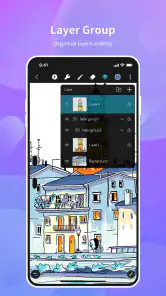
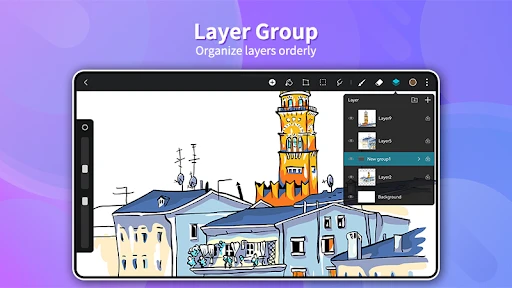
The layering system is another feature worth mentioning. It's smooth and doesn’t lag, even when you’re working on high-resolution projects. This is crucial for any digital artist who loves to work with intricate details. Plus, the blending features are quite impressive, making shading and coloring a breeze.
For a useful everyday workflow, I’d keep the early stages deliberately simple: sketch loosely, separate major elements onto layers, then use blending when the composition is settled. That makes revisions less awkward than painting every mark onto one layer. It also gives you a practical way to test whether the app’s controls feel comfortable before building a piece around fine detail. A stylus can make controlled strokes easier, but anyone drawing with a finger should start with broad shapes and zoom in only when needed.
More From Our News Desk

Clash of Clans Is Won Between the Battles

Android Auto Makes the Case for Quieter Car Software

MobiOffice: Transforming Mobile Productivity with Seamless Integration

EA SPORTS FC™ Mobile Soccer: Redefining Mobile Sports Gaming

How Microsoft OneDrive Became a Mobile Productivity Giant

How Google Translate Breaks Language Barriers Effortlessly
Performance and Usability
Performance-wise, HiPaint runs like a dream. It's lightweight yet powerful, ensuring that even older devices can handle it without breaking a sweat. I’ve tried it on both Android and iOS, and the experience is consistently smooth across platforms. The app doesn’t crash or freeze, which is a huge relief when you’re in the creative zone.
Another aspect worth highlighting is the community feature. You can share your artwork directly from the app and get feedback from fellow artists. It’s a great way to grow and get inspired by others. There’s also a beginner-friendly tutorial section which is a blessing for those new to digital art.
In a real day-to-day example, I’d use it during a commute or a quiet break to capture a thumbnail idea, then return later to develop the strongest version. That kind of short session suits a touchscreen canvas better than trying to finish a complex illustration in one sitting. Before investing time in a large canvas, I’d also test the brush response and layer organization on a small piece; keeping a clean working structure is a more reliable safeguard than assuming every project will behave the same way.
Making a first project easier to manage
For a first session, I’d pick a drawing with a clear silhouette and only a few colors rather than attempting a fully rendered scene. That gives you room to learn how brush size, opacity, and pressure change the mark without having to troubleshoot several artistic decisions at once. I’d also keep a rough layer for construction lines and put the cleaner drawing above it, so I can hide the rough work instead of erasing it prematurely.
A useful habit is to pause before adding detail and look at the image at its normal viewing size. On a phone, zooming in can make tiny marks feel important even when they disappear in the finished view. I’d use zoom for edge cleanup, then zoom back out to judge the whole composition. This is a simple way to avoid spending a break polishing details that do not improve the final image.
If you are unsure whether the app will suit your preferred way of drawing, make two quick tests: one with a loose sketch brush and one with a firmer line. The first shows whether you enjoy its painting feel; the second reveals whether you can control clean outlines on your screen. Those small exercises answer a more useful question than browsing a long brush menu: does making a mark here feel natural to you?
Where another tool may suit you better
Compared with basic note-taking sketch pads, HiPaint is the more appealing choice when I want room to refine marks, build layers, and work with color rather than simply jot down an idea. Compared with specialized desktop art software, though, a phone or tablet interface can feel constrained when a task depends on intricate selections, exact alignment, or a long sequence of production steps. Those alternatives are not automatically better; they simply make more sense when their particular workflow is the priority.
The trade-off is worth considering before switching from a familiar app. A new drawing environment means learning where its controls sit and deciding how to organize works in progress. I’d move one small project first rather than rebuilding an entire routine at once. If you need to share a finished image, check how the available export and sharing options fit your destination before relying on it for a deadline. That quick trial can reveal whether the app fits your process without risking a larger piece.
Choosing between a phone canvas and a tablet canvas
The same app can feel like a different kind of tool depending on the screen in front of you. On a phone, I’d treat it as a compact sketchbook for thumbnails, color experiments, and small illustrations; the limited working area encourages quick decisions, but it can make fine corrections feel fiddly. On a larger touchscreen, there is more breathing room for gestures and broader strokes, though the app still asks you to work through a touch-based interface rather than a desktop setup.
That difference matters if you regularly draw long, precise outlines. A stylus may help with control, but it does not turn a small display into a full desktop workspace. If your work depends on repeatedly switching between many precise controls, compare the physical setup as carefully as the app itself. For casual sketching and personal illustration, the convenience of opening a canvas wherever you are may matter more than having every adjustment within easy reach.
I’d also think about where finished images need to go. A personal character study or a sketch shared with friends has a forgiving destination; a client handoff or a file that must slot into a strict production process is less forgiving. Try the intended sharing route with a sample image before making a serious project there. That way, you are judging the whole workflow, not only how pleasant the brush feels.
Who should install it—and who should pass
HiPaint is a sensible starting point for beginners who want to practice drawing, and it can also suit experienced hobbyists who want a portable canvas for sketches and illustrations. Its version 6.1.7 is available for devices running Android 9 or later, and the app has passed one million installs. The free entry point makes experimentation easy, while optional in-app purchases range from $0.99 to $9.99 per item, so I’d explore the tools I actually use before paying for extras.
I’d pass if you need a dedicated vector-design workflow, depend on a particular desktop file pipeline, or strongly prefer creating with a mouse and keyboard. I’d also be cautious about choosing any mobile canvas as the sole home for a complicated, deadline-critical project until I had tested its controls and sharing routine. The better fit depends less on an app’s feature count than on whether its way of working matches yours.
It is especially appealing if you learn by trying rather than by planning a perfect piece in advance. Beginners can use it to repeat basic exercises—line confidence, simple shapes, and color choices—while hobbyists can keep a portable place for ideas they might otherwise lose. Someone who mostly needs diagrams, handwritten notes, or crisp scalable logos may be happier with an app built around those outcomes rather than adapting a painting canvas to do them.
There is also a practical difference between a tool for practice and a tool for delivery. For personal art, a workable sketch and a satisfying creative session may be enough. If another person must edit the project later, or if every file must follow a precise naming and handoff routine, test those requirements before you commit. I would not assume that a mobile drawing app automatically replaces every stage of a studio workflow, even when it is comfortable for making the artwork itself.
Why You Should Give It a Try
If you’re passionate about digital art and looking for an app that caters to both beginners and professionals, HiPaint is worth a download. The balance between functionality and simplicity makes it a favorite. Not to mention, it’s free to use with some in-app purchases, which is pretty standard these days.
In conclusion, HiPaint - Sketch Draw Paint it! is not just an app; it’s your portable art studio. Whether you’re doodling for fun or creating a masterpiece, it has something for everyone. So why not give it a try and unleash your creativity?
My recommendation is to begin with one small drawing that resembles something you already enjoy making, then decide whether the controls help or interrupt your process. If the app feels comfortable, keep it as a convenient sketching and painting space and build your habits gradually. If you find yourself fighting the screen or needing stricter layout and file handling, that is a good reason to choose a more specialized alternative instead.
HiPaint -Sketch Draw Paint it! Frequently Asked Questions
Can I use HiPaint with a stylus or on a tablet?
HiPaint is a drawing and painting app, so it is intended for creating artwork on a touchscreen. A larger screen can give you more room to sketch, work with layers, and arrange a composition, while a stylus can make drawing feel more natural than using a finger. Check that your device and chosen input method work comfortably for your preferred style before downloading.
Who is HiPaint best suited for: hobbyists, students, or professional artists?
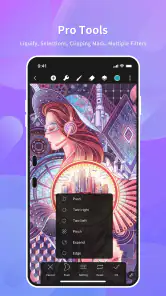
HiPaint is aimed at people who want a dedicated place to sketch, illustrate, design, and create digital art. Its mix of basic and more advanced tools can suit hobbyists and learners as well as artists who want to work on detailed projects. Whether it fits a professional workflow depends on the tools and working habits you need, so exploring its free offering is a practical way to judge the fit.
Can I export or share artwork created in HiPaint?
HiPaint is designed for digital art creation, and sharing artwork online is one activity that may require an internet connection. If exporting or sharing is an important part of your workflow, explore the available save and sharing options in the app and check that they suit the formats and destinations you use. You can still use its core sketching and drawing functions offline.
How much storage space does HiPaint need, and will it run smoothly on my device?
The space and performance you need can depend on your device and the artwork you create. Working with canvases, layers, and detailed projects may place different demands on a phone or tablet than making simple sketches. Before installing, make sure your device has enough free storage and meets the Android system requirement. Trying the app with a small project can help you assess how it feels on your device.
Is HiPaint appropriate for children?
HiPaint has an Everyone content rating, and its purpose is art and design: users can sketch, illustrate, and create digital artwork. Parents may still want to explore the app together with younger children, especially if they plan to use online sharing or make purchases. The app is free to download, while optional in-app purchases are available, so review purchase settings on the device if needed.
Pros
- Intuitive user interface
- Wide range of brushes
- Customizable canvas sizes
- Layer support for complex art
- Smooth and responsive drawing
Cons
- Limited free features
- Occasional performance lags
- Requires internet for some tools
- Ads in the free version
- No vector graphic support

- Category
- Art & Design
- Version
- 6.1.7











