Highway Weather
- 881.00
- 3.6
- Installs
- 100.00K
- Price
- Free
Screenshots
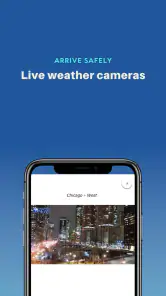
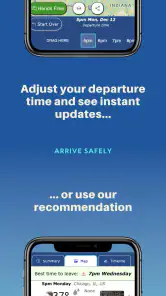
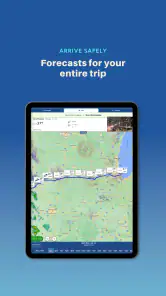
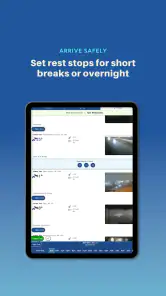
Analysis by Reviewed
I judge a road-weather app by whether it helps me make a better decision before I set off, not by how many colorful forecast tiles it can show. Highway Weather is built around a useful question: what conditions might I meet as I travel, and when? That makes it most appealing for people planning longer drives, where the weather at the destination can be very different from the weather outside the front door.
A route-first way to plan
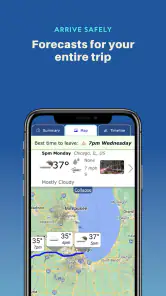
My best use for a tool like this is to enter a route while I’m still parked, then look at the forecast in the context of the journey rather than checking only my current location. For example, on a drive that starts during a clear morning but crosses into a rainy region later, an arrival-time forecast can prompt me to leave earlier, allow more time, or reconsider the trip. It is a planning aid, not a reason to take risks: I would never read or adjust a forecast while driving.
That route-based view is the main distinction from the usual weather app. A standard forecast is convenient for checking the town I’m in; Highway Weather is more relevant when conditions may change between stops. I’d use the two together: this app to think ahead along the drive, and a familiar local forecast when I need a quick check for one place.
Habits that make the forecast more useful
I’d enter the full journey before departure and review the expected conditions at the times I anticipate reaching different parts of the route. If my departure time changes, I’d check again rather than treating an earlier forecast as fixed. That small habit matters because a route forecast is tied to timing; the same road can present a different planning question when the trip starts later.
It also helps to treat alerts as prompts to reassess, not instructions to continue or reroute. If the app flags concerning weather, I’d stop somewhere safe and compare the situation with road information and my own judgment before deciding what to do. Forecasts can guide preparation, but they can’t account for every local condition or replace careful driving.
Your Road Trip Companion
The Highway Weather app is designed to make your road trips smoother by providing real-time weather updates along your route. Imagine planning a trip from sunny California to snowy Colorado – this app's got you covered with forecasts for every leg of your journey. No more unexpected rain showers or surprise snowstorms!
Features That Drive You
One of the coolest things about this app is its ability to give you hourly forecasts tailored to your specific route. You enter your start and end points, and it calculates the weather for every segment of your trip. It's like having a personal weather station in your pocket.
More From Our News Desk

Clash of Clans Is Won Between the Battles

Android Auto Makes the Case for Quieter Car Software

MobiOffice: Transforming Mobile Productivity with Seamless Integration

EA SPORTS FC™ Mobile Soccer: Redefining Mobile Sports Gaming

How Microsoft OneDrive Became a Mobile Productivity Giant

How Google Translate Breaks Language Barriers Effortlessly
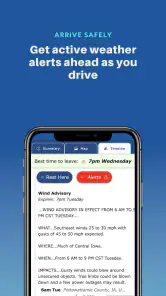
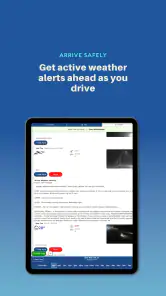
Another handy feature is the app's alert system. It sends you notifications if there's any severe weather ahead, allowing you to make informed decisions on whether to push through or take a safer detour. This feature alone can be a lifesaver, especially if you're traveling through areas known for sudden weather changes.
Making a route forecast part of an actual trip
For a realistic example, picture leaving after work for a several-hour drive to visit family. The sky looks fine where you are, but the route crosses a different weather area later in the evening. I’d check the journey before leaving, note when conditions may become less favorable, and decide while parked whether to go now, wait, or make a planned stop. The value is not that the forecast makes the decision for me; it gives me a chance to make one before fatigue and time pressure set in.
On a family trip, I’d use the route view to think about practical preparation as well as timing. If rain is expected later, I can pack items where they are easy to reach and avoid planning an outdoor stop for the wrong part of the day. If the forecast looks unsettled, I can tell passengers that the schedule may change rather than promising a precise arrival. These are modest benefits, but they are the sort of everyday decisions that make a weather tool useful beyond simply satisfying curiosity.
What to expect before installing
Highway Weather is a free weather app from Weather Route, Inc., with optional in-app purchases priced from $3.99 to $17.99 per item. It is rated for Everyone, has a 3.6 average from around 2,200 ratings, and has been installed over 100,000 times. The app first appeared on January 24, 2013, and version 6.127 requires Android 7.0 or later. Those details make it easy to judge whether it fits your phone and budget, but the practical question is whether route-aware forecasts match the way you travel.
Useful, with sensible limits
I would recommend it most to someone who regularly drives between regions, plans family road trips, or wants to consider weather timing before a long haul. If you usually make short trips in one town, a conventional local forecast may be quicker and more useful. It is also not a navigation replacement: don’t assume that a weather warning automatically identifies the safest road, and don’t use your phone in motion. Check the route while parked, then rely on safe driving habits and current road guidance.
It is also a weaker fit for someone who wants a general-purpose weather dashboard first and a travel tool second. If your daily question is whether to take an umbrella on a walk around your neighborhood, a local forecast app will likely answer it with fewer steps. Likewise, drivers who need turn-by-turn directions should keep using a navigation app for that job. Highway Weather earns a place beside those tools when the journey itself matters, not by replacing every other source of information.
User Experience: Smooth Sailing
Using the Highway Weather app feels like a breeze. The interface is clean and intuitive, making it easy to navigate even for the less tech-savvy among us. Setting up a trip is straightforward – just punch in the details, and you're good to go. Plus, the app is surprisingly light on data usage, which is great if you're on the road and relying on mobile data.
Settings and preparation worth checking
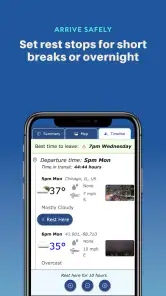
Before a long drive, I’d take a moment to check the travel details I entered and make sure they still match the real plan. An early start that turns into a late departure changes the time I expect to reach later sections of the route, so I would refresh the plan rather than rely on yesterday’s glance. This is especially useful when a trip includes a long meal break or an overnight stop: a single uninterrupted estimate may no longer represent the journey I’m actually taking.
The language and measurement options are worth setting to what I use every day, rather than trying to interpret unfamiliar units while planning. That small bit of setup reduces mental arithmetic when I’m comparing conditions with road information or discussing plans with another driver. I would also decide how I want to handle a concerning alert before I leave: stop at a safe place, check current road guidance, and then reassess. A pre-decided routine is calmer than making a hurried choice because a notification appeared.
One useful trade-off is deciding how much detail is enough. The route forecast can help me identify when to pay attention, but I don’t need to keep reopening the app for every small change in the sky. I’d make a deliberate check before departure and another when plans materially change. That keeps the app in a supporting role and avoids turning a useful forecast into a distraction or a source of unnecessary worry.
Faster patterns for repeat journeys
For a drive I make often, I’d treat each trip as a fresh planning check rather than assuming that last week’s conditions apply. The route may be familiar, but the relevant question is still what conditions could coincide with the time I expect to be on it today. A repeatable habit—enter the journey, check timing, note any weather concern, then put the phone away—makes the process quick without encouraging me to skip the part that matters.
When traveling with another adult, I’d share the planning role before setting off. One person can review the route forecast while parked, while the driver focuses on driving once the trip begins. If conditions change, the passenger can help compare the forecast with road updates and suggest a suitable place to pause. This is a safer and more practical use of alerts than expecting the driver to read a screen or make a complex decision in motion.
For a trip with flexible timing, the most useful question may not be “Will it rain?” but “Would changing my departure time put the difficult stretch at a better time?” A forecast tied to the journey can make that question easier to consider. It still cannot promise that a later departure will be safer, and I would weigh fatigue, daylight, and road conditions too. The app gives a weather perspective; it does not settle the whole travel plan.
Why It Stands Out
What sets this app apart is its focus on road trip weather. While there are plenty of weather apps out there, few cater specifically to travelers in the way Highway Weather does. It's like having a co-pilot who knows every weather pattern along your route.
Moreover, the app supports multiple languages and units of measurement, making it accessible to a broader audience. Whether you're a metric or imperial person, this app speaks your language.
Where other tools still do better
Compared with the usual weather app, Highway Weather is strongest when I care about conditions over the course of a drive rather than at one address. A local forecast is often the faster choice for checking today’s weather at home, and a navigation app remains the better choice for directions and live route guidance. For a road trip, I see these as complementary: use the route-focused view to prepare, then consult local forecasts or road information when a specific place or changing situation needs a closer look.
That distinction matters because a route forecast is an estimate, not a guarantee that every point along a road will match the prediction. Weather can vary locally, and actual driving conditions can change quickly. I would not interpret a clear-looking forecast as proof that a road is safe, nor treat an alert as an automatic instruction to take a detour. When conditions are serious, current road information and sensible judgment should take priority over convenience.
Advanced limits and sensible expectations
The app’s central advantage—putting weather in the context of a journey—also defines its limits. It can help me anticipate a weather-related planning issue, but it cannot know how comfortable I am driving in poor conditions, whether a stop is appropriate for my passengers, or whether a particular road is safe at that moment. Those decisions require context beyond a forecast. I would use its information to prepare questions and options, not to outsource responsibility.
Alerts can be useful, but they are not a substitute for a deliberate check before setting out. A notification may arrive at an inconvenient moment, and responding immediately is not always safe or necessary. I’d wait until I’m parked or ask a passenger to review it, then check a current road source before changing course. If I’m driving alone, the right response may simply be to continue safely to a suitable place where I can stop and reassess.
The 3.6 average from around 2,200 ratings is a reason for me to test the experience on a familiar route before depending on it for a difficult trip. I would check whether the route information is easy to interpret on my phone and whether the timing suits my planning style. The app is free to start, while optional purchases range from $3.99 to $17.99 per item; I’d first decide whether the core route view is genuinely helpful to me rather than assuming I need extras. That is a practical way to judge value without turning a simple planning task into a purchase decision.
Checking fit and keeping expectations grounded
Before relying on it for a trip, I’d check that the route and travel time I entered still reflect my plan, especially after a long stop or a change of departure. I’d also decide in advance what I’ll do if weather worsens—pause somewhere suitable, delay, or consult road updates—rather than making a rushed choice from a notification. That repeatable routine is more valuable than treating any forecast as a guarantee.
The app’s 3.6 average suggests experiences vary, so I’d try it on a familiar drive first and see whether its route view is clear and helpful on my device. It costs nothing to get started, while optional purchases mean anyone who wants to avoid spending can begin with the free offering and judge its usefulness before considering extras. That low-pressure trial is sensible; the app is most worthwhile when its route perspective changes how you prepare, not simply when it gives you another screen to check.
Final Thoughts
In conclusion, if you're planning a road trip and want to stay ahead of the weather, the Highway Weather app is a must-have. It's like having a trusty navigator that ensures you not only reach your destination but do so safely and comfortably. So next time you hit the road, make sure to have this app riding shotgun with you. Safe travels!
Highway Weather Frequently Asked Questions
Is Highway Weather free to download, and are there optional purchases?
Highway Weather is free to download, so you can try its travel-focused weather features without an upfront purchase. The app also offers in-app purchases, with items ranging from $3.99 to $17.99. Consider checking the available options in the app before buying, and keep in mind that the core idea is to help you view weather along a planned drive.
Who makes Highway Weather, and is it suitable for everyone?
Highway Weather is developed by Weather Route, Inc. and is a weather app focused on conditions along driving routes. Its content rating is Everyone, making it suitable for a broad audience. It has an average rating of 3.6 from around 2,200 ratings, giving prospective users a quick sense of how other people have rated the app.
What is Highway Weather and how does it work?
Highway Weather is an app designed to provide travelers with crucial weather information along their driving routes. By inputting your start and end points, the app generates a weather forecast for each segment of your journey, helping you plan the safest and most comfortable travel experience. It uses real-time weather data to alert you of any potential weather hazards on your path.
Can Highway Weather predict weather changes during my trip?
Yes, Highway Weather is equipped to predict weather changes as you travel. The app updates forecasts in real-time, so you can stay informed about sudden weather shifts that may affect your journey. This feature is particularly useful for long-distance drivers who need to anticipate weather conditions and adjust their travel plans accordingly.
Is Highway Weather available for both Android and iOS devices?
Highway Weather is available on both Android and iOS platforms, making it accessible to a wide range of users. You can download it from the Google Play Store for Android devices or the Apple App Store for iOS devices, ensuring you have the latest weather updates at your fingertips, regardless of your device.
Pros
- Accurate weather updates for road trips.
- Customizable alerts for weather changes.
- User-friendly interface and easy navigation.
- Includes traffic and road condition info.
- Supports offline maps for remote areas.
Cons
- Limited free features
- subscription required.
- Occasional ad interruptions.
- Battery usage can be high on long trips.
- Requires GPS for full functionality.
- Some users report minor app crashes.
- Category
- Weather
- Version
- 6.127











