HHAeXchange
- 4.38K
- 4.1
- Installs
- 500.00K
- Price
- Free

Screenshots
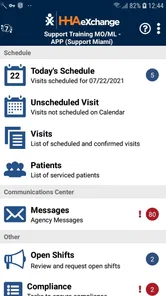
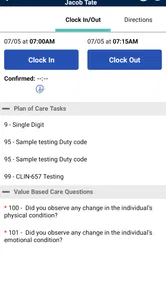

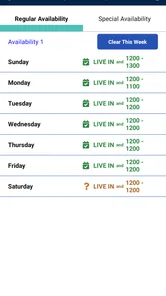
Analysis by Reviewed
When a home-care day starts with a changed appointment, a caregiver waiting for instructions, and office staff trying to keep records aligned, the hard part is not any single task—it is getting each person the right information at the right time. HHAeXchange is built around coordinating that work on mobile. I see its main value in connecting agency administration with caregivers in the field, rather than serving as a general-purpose planner for anyone arranging care informally.
From a shift change to the day’s plan
A practical way to approach the app is to begin with the agency’s schedule: staff organize assignments, while caregivers use the mobile app to check what they are expected to do and update task statuses. That division matters. The app is most useful when the agency has established a shared workflow and workers know which updates they are responsible for. Before relying on it during a busy visit, I would make a habit of checking the current schedule at the start of the day and reviewing any changes through the agency’s normal communication process.
For example, if a caregiver’s day includes several visits and one appointment changes, having the schedule and status updates in one work system can help the agency see where the plan stands. It can also make a handoff clearer: the caregiver records progress, and office staff have a more organized view than they would from scattered calls or handwritten notes. That does not remove the need to clarify an urgent change directly, but it gives routine coordination a more structured place to happen.
A realistic day in the field
Imagine starting a morning with a first visit, then moving between several clients while the office manages the wider schedule. The app’s value in that situation is not simply that a phone replaces a paper sheet. It gives the caregiver a work-focused place to consult assignments and record task progress, while the agency can follow the information that comes back. I would check the schedule before leaving, make sure I understand any changes, and avoid treating an old note or remembered conversation as the final plan.
After a visit, recording the status while details are still fresh can make the next handoff more useful. If an office coordinator needs to know whether a visit has progressed as expected, a timely update gives them a clearer operational picture than waiting until the end of the day. It is still sensible to contact the agency directly when a situation is urgent or ambiguous. A mobile record helps organize routine work; it should not become a reason to delay a conversation that needs a person’s judgment.
This workflow also gives caregivers a practical way to avoid a common end-of-shift problem: trying to reconstruct a sequence of visits from memory. I would make updates part of the natural close of each task rather than saving them for a quiet moment that may never arrive. That small discipline is especially useful when a day changes shape, because a current record is easier for office staff to interpret than a batch of late entries.
Where coordination helps—and where it takes discipline
The strongest fit is an agency that wants scheduling, service-hour tracking, billing, and compliance work connected to its care operations. Homecare Software Solutions LLC develops the app, which sits in the business-software category rather than the consumer health-app space. If you are a family member looking for a simple way to arrange occasional help, a shared calendar or direct conversation with a provider may be easier. HHAeXchange is aimed at organized home-care work, not casual household scheduling.
More From Our News Desk

Weather by Xiaomi Review: Clear at a Glance, Less Clear Up Close

X Under Pressure: Can It Recover When Posting Goes Wrong?

Clash of Clans Is Won Between the Battles

Android Auto Makes the Case for Quieter Car Software

MobiOffice: Transforming Mobile Productivity with Seamless Integration

EA SPORTS FC™ Mobile Soccer: Redefining Mobile Sports Gaming
There is a trade-off in putting several administrative jobs into one system: the benefit depends on consistent use. A caregiver who forgets to update a task can leave the office with an incomplete picture, while an agency that keeps separate records may still have to reconcile information. I would treat mobile updates as part of the handoff routine, not as a replacement for clear instructions, especially when a change affects the next person’s visit or the agency’s records.
One useful but easy-to-overlook point is that a shared system only creates a shared picture when the people involved use the same process. Before a busy week, a supervisor and caregivers should agree on what counts as a completed update and how a last-minute schedule change is communicated. This is not an app setting so much as a workflow decision, but it can determine whether the mobile record is genuinely useful or simply another place to check.
What is HHAeXchange?
So, what’s the buzz about HHAeXchange? In plain terms, it’s an all-in-one platform designed to manage and coordinate home healthcare services. From scheduling and billing to compliance management, this app covers all bases. Whether you’re an agency owner, a caregiver, or a patient, HHAeXchange is tailored to meet your needs by ensuring everything runs smoothly and efficiently.
Features that Stand Out
One of the things I appreciate about HHAeXchange is its intuitive and user-friendly interface. You don’t need to be a tech wizard to navigate through its features. It offers a comprehensive scheduling system that allows agencies to assign tasks to caregivers seamlessly. Plus, caregivers can easily check their schedules, update task statuses, and communicate with the agency all through the app.
Another standout feature is the billing and payroll management tool. It automatically tracks service hours and generates invoices, making the tedious task of billing a breeze. This feature not only saves time but also minimizes errors that could occur with manual entries.
For an agency, linking field activity to administrative work is most valuable when it reduces the need to copy information from one place to another. I would still expect a manager to review the records rather than treating automation as a substitute for oversight. Service-hour tracking can support billing and payroll routines, but the quality of the outcome depends on accurate entries and a clear process for correcting mistakes. That is a practical trade-off: fewer disconnected steps can make work easier, while one incorrect or missing update may still need attention across the workflow.
Why You’ll Love It
Now, let’s talk about the real-world benefits. For agencies, HHAeXchange ensures compliance with industry standards, which is crucial in today’s regulatory environment. This peace of mind alone is worth its weight in gold. Caregivers will appreciate the flexibility and ease of managing their schedules, while patients benefit from consistent and reliable care.
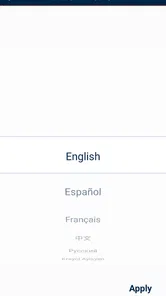
The app also supports multilingual capabilities, which is a huge plus for diverse teams and clients. This shows that HHAeXchange is committed to inclusivity and making healthcare accessible to all.
In my view, the day-to-day advantage is less about a dramatic change and more about reducing avoidable uncertainty. A caregiver can refer to the agency’s work process instead of relying only on a paper reminder, and office staff have a defined channel for following up. That is particularly helpful when a visit affects the next person’s plans. Still, a record cannot explain every detail of a care situation, and people should use direct communication whenever context matters more than a status update.
Language support can also matter in practical ways: teams may be more comfortable following a shared process when the tools work for a range of users. I would not assume that language support eliminates the need for training, though. Agencies still need to explain their own expectations, especially around schedule changes, visit records, and who should be contacted when a caregiver encounters an exception.
Deciding whether it fits your role
Compared with the usual alternatives—paper schedules, spreadsheets, phone calls, and separate billing tools—an integrated home-care system can reduce the effort of copying the same shift information between places. The trade-off is that an agency needs to establish who updates each item and when. A small team with few visits may find a simple calendar less demanding; an agency coordinating multiple caregivers may value having scheduling and administrative work tied together.
If you are a caregiver, a useful habit is to review your assignments before setting out, then complete status updates while the visit is still fresh in your mind. If you manage an agency, agree on a clear process for schedule changes and billing review rather than assuming that an app update alone has reached everyone. These small routines make the handoff more dependable and help catch mismatches before they affect the next visit.
The comparison with a spreadsheet deserves a little nuance. A spreadsheet can be quicker for a small operation that only needs a basic rota and has few people making changes. It also leaves staff responsible for keeping versions aligned and moving information into other administrative tools. A connected home-care workflow is more compelling when assignments, field updates, and office follow-through need to stay in step. I would choose the simpler option if the agency does not have the time or training to maintain a more structured process.
It is also worth distinguishing the caregiver’s needs from the manager’s. A caregiver mainly needs a dependable way to see assignments and complete expected updates; an agency administrator has a wider concern, because records may feed into service-hour, billing, and compliance work. One app can serve both roles without making their daily experience identical. If you are evaluating it for a team, ask each group to walk through a normal day rather than judging the system only from an administrator’s perspective.
People often ask whether the app is free to try: it is free to download, though an agency’s wider software arrangements may shape how it is used. It is rated for Everyone, has an average rating of 3.7 from around 11,000 ratings, and has passed 500,000 installs. Its current version is 25.12.01, and it supports Android 6.0 or later. Those figures suggest an established user base, but they are not a substitute for checking whether your agency already uses the platform and can provide the access and training you need.
That last point is the most useful first question for a prospective caregiver: does your agency already use HHAeXchange, and will someone show you the routine for checking assignments and recording updates? The app is not a stand-alone way to join an agency’s operation. If you are choosing software on behalf of an agency, the parallel question is whether the people who schedule visits, work in the field, and handle billing can all agree on one process. A free download is helpful, but it does not by itself make the wider workflow ready.
Another practical consideration is the device itself. A phone is convenient to carry between visits, but reading a schedule or entering information while rushed can be awkward. I would make the review of assignments part of preparation, not something to do while driving or in the middle of a care task. If a caregiver relies on a larger screen for office work, a mobile app may complement that work rather than replace it. The best arrangement depends on the role and the moment: mobile access for field coordination, with careful review for administrative decisions.
Who should consider a different approach
I would not recommend this as the first choice for a household arranging help independently, a family that only needs to share occasional appointment reminders, or a small provider with no agency workflow to connect. A shared calendar and direct conversation can be easier to understand when there are only a few people and little administrative coordination. The point is not that those alternatives are more powerful; they may simply ask less of everyone.
On the other hand, a caregiver working within an agency’s established system has a stronger reason to use the app than someone comparing generic planners. The value comes from fitting into the agency’s process for assignments and updates. If a team is already handling its work through another established system, switching tools without a clear reason could add confusion rather than remove it. I would look for a concrete coordination problem first, then decide whether a shared mobile workflow addresses it.
For a supervisor, a sensible trial of the workflow is to follow one ordinary shift from assignment through the caregiver’s update and the office’s review. That makes it easier to spot unclear ownership: who notices a change, who records it, and who confirms the resulting information. This is more revealing than simply asking whether the interface looks straightforward, because even an easy-to-use app cannot resolve a handoff that the team has not defined.
The Final Word
In a nutshell, if you’re involved in the home healthcare industry, HHAeXchange is a game-changer. It’s designed to take the hassle out of healthcare management and let you focus on what truly matters – providing excellent care. So why not give it a shot? With its robust features and user-centric design, HHAeXchange might just be the app you didn’t know you needed.
My recommendation is narrower: it makes the most sense when an agency has adopted it and staff can follow one shared routine for schedules, task updates, and records. I would not choose it as a standalone solution for a family coordinating care independently, and I would not assume that downloading it alone replaces an agency’s onboarding. For the right team, though, it can give the daily chain—from assignment to visit update to office follow-through—a clearer structure.
Overall, I would judge it by whether it makes that chain easier to trust, not by the number of administrative tasks it can bring together. For agency staff, the most useful outcome is a clearer handoff between the person delivering care and the office coordinating the day. For caregivers, the benefit depends on having a consistent routine and enough guidance to use it confidently. If those conditions are in place, this is a practical business app for organized home-care work; if they are not, a simpler tool and more direct communication may be the better starting point.
HHAeXchange Frequently Asked Questions
Who is HHAeXchange intended for, and is it free to download?
HHAeXchange is a business app developed by Homecare Software Solutions LLC for people involved in home care, including providers, payers, and caregivers. It is free to download, so users can install it without an upfront purchase. Its usefulness depends on whether the organization or care program they work with uses HHAeXchange and provides access to the relevant services.
What is HHAeXchange and what does it offer?
HHAeXchange is a comprehensive home care management software designed to streamline operations for providers, payers, and caregivers. It offers features like scheduling, billing, compliance monitoring, and communication tools to enhance efficiency in home healthcare services. The app aims to improve the coordination between caregivers and clients, ensuring quality care delivery.
Is HHAeXchange available for both Android and iOS devices?
Yes, HHAeXchange is available for download on both Android and iOS platforms. Users can access the app through the Google Play Store for Android devices and the Apple App Store for iOS devices. This ensures that caregivers and administrators can manage their tasks on-the-go, regardless of their smartphone preference. Android users need version 6.0 or later to install it.
How does HHAeXchange ensure data security and compliance?
HHAeXchange employs robust security measures to protect sensitive healthcare data, ensuring compliance with HIPAA regulations. The app uses encryption protocols, secure login methods, and regular audits to maintain data integrity and prevent unauthorized access. This focus on security helps users trust the app with their critical information.
Can HHAeXchange be integrated with existing healthcare systems?
Yes, HHAeXchange is designed to seamlessly integrate with existing healthcare systems and electronic health records (EHR). This integration capability allows for a more unified and efficient workflow, reducing the need for manual data entry and minimizing errors. Users can easily sync data across platforms, enhancing operational efficiency.
Pros
- User-friendly interface with intuitive navigation
- Robust scheduling and management tools
- Real-time updates for caregivers and clients
- Seamless integration with billing systems
- Comprehensive reporting and analytics
Cons
- Limited offline functionality
- Occasional app crashes
- Customer support response can be slow
- Limited customization options
- Requires stable internet connection











