

Hertz Rent-a-Car
- 5.67K
- 4.7
- Installs
- 1.00M
- Price
- Free

Screenshots
Analysis by Reviewed
Ever found yourself in a new city with a desperate need for a reliable car rental service? Well, let me introduce you to the Hertz Rent-a-Car Deals - Easy! app. I recently gave it a whirl, and here's the lowdown on what I discovered.
What to expect from a rental app
This is a travel app from The Hertz Corporation, built around arranging a Hertz rental rather than comparing every rental company in one place. That distinction matters. If you already want to rent from Hertz, having the booking process on your phone can make planning easier; if your first priority is finding the lowest offer across several brands, you will still want to compare options elsewhere before committing.
The app is free, and its Everyone age rating makes it broadly suitable for general audiences. Its average rating is 4.7 from around 40,000 ratings, with over one million installs. Those figures suggest that many people use it, but they are not a substitute for checking whether a particular vehicle, pickup location, or rental arrangement fits your trip.
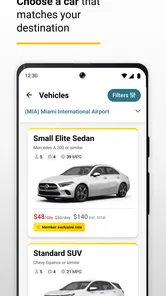
The range of vehicle types can be useful when a standard car is not enough. Depending on what is available for your chosen place and dates, the rental choices may include SUVs, vans, sports cars, electric vehicles, and trucks. I would treat those as categories to explore, not a promise that every type will be offered at every outlet. For a first booking, choose the vehicle that solves the real transport problem rather than assuming the largest or most eye-catching option is the best fit.
Why Choose Hertz?
We've all heard of Hertz, right? They've been in the rental game for what feels like forever. Now, with Hertz Rent-a-Car Deals - Easy!, they’ve taken their stellar service and packed it into your smartphone. Whether you're planning a road trip or need a quick ride for a business meeting, this app is designed to make the process seamless. And trust me, it does just that.
Getting Started
First things first, downloading and setting up the app is a breeze. It's available on both Android and iOS, so no one's left out. Once installed, you're greeted with a clean interface that’s really easy on the eyes. Navigating through the app is quite intuitive, even for those who aren't exactly tech-savvy. After a quick sign-up process, you’re good to go!
Set up a first booking with care
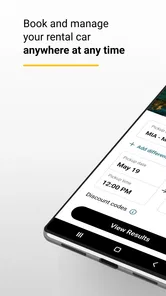
When you open the app for the first time, I suggest beginning with the trip details you already know: where you want to collect the car, when you need it, and when you expect to return it. That gives you a practical starting point for seeing which rental options match your plans. If you are still deciding on dates or pickup arrangements, it can be more useful to explore availability first than to rush through a reservation.
More From Our News Desk

 Weather - By Xiaomi
Weather by Xiaomi Review: Clear at a Glance, Less Clear Up Close
Xiaomi’s weather app makes everyday forecasts quick to scan, but its calm surface can leave useful details and recovery paths harder to find than they should be.

 X
XX Under Pressure: Can It Recover When Posting Goes Wrong?
A resilience-focused review of X, examining setup, mistaken posts, interruptions, weak connections, and the gaps that matter when recovery needs to be dependable.

 Clash of Clans
Clash of Clans Is Won Between the Battles
Its raids are quick; its community is a long-term project of coordination, teaching, rivalry, and shared responsibility—with all the friction that entails.

 Android Auto
Android Auto Makes the Case for Quieter Car Software
The car interface is no longer judged by how much it can do, but by how quietly it helps. Android Auto shows what drivers now expect—and what still gets in the way.

 MobiOffice: Word, Sheets, PDF
MobiOffice: Transforming Mobile Productivity with Seamless Integration
MobiOffice: Word, Sheets, PDF is redefining mobile productivity with a surprising blend of functionality and innovation.

 EA SPORTS FC Soccer Mobile 26
EA SPORTS FC™ Mobile Soccer: Redefining Mobile Sports Gaming
Dive into EA SPORTS FC™ Mobile Soccer, where immersive gameplay and strategic depth transform mobile sports gaming.
Latest News



Before you book, check that the pickup location makes sense for the journey you are actually taking. An airport outlet can be convenient after a flight, while a local branch may be a better fit if you are already in town. The nearest result is not automatically the most convenient one: think about how you will reach it, whether your travel companions are arriving at the same place, and where you will return the vehicle.
For a first-time renter, I would also pause before selecting a vehicle and consider luggage, passengers, parking, and the roads on your route. A compact car may be easier to manage in a crowded city; a larger vehicle may make more sense when several people and their bags are travelling together. An electric vehicle is worth considering only if its practical fit for your route and charging plans works for you. The useful choice is the one that removes a problem from the trip, not simply the one with the most appealing name.
Features That Stand Out
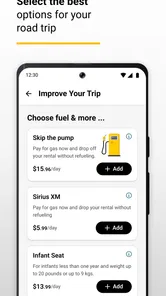
Now, let’s talk about what makes this app tick. One of the standout features is the ability to find and book cars in just a few taps. The app connects you to a wide range of vehicles, from compact cars to luxury rides, all at competitive prices. And if you're like me, always on the lookout for a good deal, you'll appreciate the special offers that pop up regularly.
For me, the strongest reason to use a rental company’s own app is keeping the search and reservation within the same service. It can be a direct route from choosing an available vehicle to arranging a booking, rather than starting with a general travel search and then moving between providers. That convenience is most valuable when I have already decided that Hertz is a reasonable option; it is less useful if I have not yet compared the total cost or location choices with other companies.
Offers are worth a look, but I would not let a discount headline decide the rental by itself. Compare the dates, location, vehicle, and terms that apply to the specific booking you are considering. A lower-looking offer may not be the best practical choice if the pickup point is awkward or the vehicle does not suit your plans. I find it helpful to settle the basic trip requirements first and then see whether an offer improves that actual option.
Another useful habit is to search with realistic timing rather than leaving every detail until the last moment. If your arrival time is fixed, use it to shape the pickup plan; if your return time could move, think through the likely schedule before finalizing. Rental planning involves more than selecting a car, and checking those details together can help prevent a convenient-looking booking from becoming inconvenient on travel day.
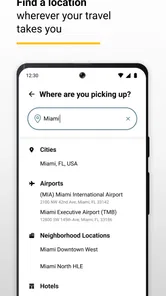
Another nifty feature is the location-based services. The app uses your location to show you the nearest Hertz outlets, making pick-up and drop-off a cinch. Plus, the in-app customer service is top-notch. Whether you have a question or need assistance, help is just a tap away.
Location results are a starting point, not a substitute for checking the branch against your itinerary. For example, a traveller landing at an airport may see a nearby city outlet that looks close on a map but would add an extra transfer after a tiring flight. I would compare the collection point with the places I will actually be, then make sure the return plan works just as well. That small check is especially useful when the trip begins and ends in different parts of a city.
A realistic first trip
Imagine arriving for a work meeting in a city where your hotel, meeting venue, and evening plans are spread out. I would use the app to look for a rental around the arrival point, choose a vehicle suited to the number of passengers and bags, and confirm that the return location fits the end of the visit. If a suitable local option appears, the booking can simplify the journey between stops; if the meeting is only a short walk or taxi ride from the hotel, renting may add parking and pickup steps without saving much time.
That is the trade-off I think is easy to overlook: a rental car gives flexibility, but it also creates responsibilities around collection, return, and where the vehicle will sit while you are not using it. For a road trip with several stops, that flexibility can be the point. For a one-night city stay with everything close by, public transport or a taxi may be the calmer choice. The app helps with arranging a rental, but it cannot make a car the right transport option for every itinerary.
Booking and On-the-Go Convenience
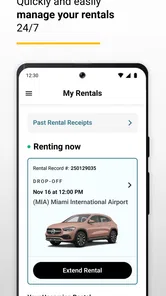
Booking a car has never been this straightforward. With the app, you can reserve, modify, or cancel your rentals without breaking a sweat. The payment process is secure and hassle-free, which is always a relief when dealing with online transactions. And if plans change, the app provides the flexibility to adjust your bookings on-the-go.
That ability to manage a reservation on a phone is particularly useful when a flight, meeting, or road-trip plan shifts. I would still review the updated booking carefully after making a change: confirm that the new dates and pickup details match what you intended, rather than assuming that a quick adjustment left every part of the reservation untouched. Convenience is most helpful when paired with a final check.
A sensible workflow is to make the reservation once the important trip details are settled, then keep the booking information easy to find before you travel. If your plans change, use the app to review the available modification or cancellation route, and read the terms attached to your booking before relying on a particular outcome. The app may make it easier to submit a change, but the relevant conditions still matter.
People often wonder whether they need to know the exact vehicle before starting. I would begin with the type and size that suit the trip, then review the choices presented for the location and dates. Availability can shape the final decision, so staying flexible about the precise model is more practical than building an itinerary around a particular car. The important thing is that the option shown meets your needs and that you understand the booking details before confirming.
Another common question is whether the app is useful if you have not rented from Hertz before. I think it can be a reasonable place to begin if you are comfortable choosing Hertz and want to arrange a trip through the company’s own app. First-time users should take their time with the rental details and check the pickup and return plan. If you want to compare several companies before making that choice, a broader rental search may be a better first stop.
Where it fits among alternatives
Compared with a general travel or car-rental comparison app, this one is more focused: it is for people who want to explore Hertz rentals and manage that booking. A comparison service can be more convenient when you are weighing several providers, while the Hertz app is the more direct choice once you are looking at Hertz as your rental company. Neither approach is automatically better; it depends on whether you value surveying the market or keeping the booking process centered on one provider.
It is also not a replacement for deciding whether to rent at all. In dense areas, local transport may be simpler; for a brief point-to-point trip, a taxi may avoid the time spent collecting and returning a vehicle. I would choose this app when having a car for a meaningful part of the journey solves a real problem, such as carrying equipment, travelling with a group, or visiting places that are difficult to connect by other means.
The developer is The Hertz Corporation, and the app’s travel focus comes through in its emphasis on finding and handling a rental rather than planning every part of a holiday. It is free to install, but that does not mean the rental itself is free. I would keep those two things separate when budgeting: use the app to investigate a booking, then check the actual rental details and applicable terms before making a decision.
Final Thoughts
So, is the Hertz Rent-a-Car Deals - Easy! app worth it? In my opinion, absolutely! It brings the reliability of Hertz right to your fingertips, offering convenient, efficient, and flexible car rental solutions. Next time you’re in need of a ride, give this app a spin. You might find yourself saving time and scoring some sweet deals in the process.
My recommendation is strongest for travellers who already expect to rent from Hertz, want to check options on a phone, and appreciate being able to manage a reservation while plans are in motion. I would be less likely to recommend it as the only tool for someone whose main goal is to compare every rental provider, or for a traveller who may not need a car once they reach their destination. Those are not flaws so much as different needs: this app is most useful when a Hertz rental is already a serious option.
The current version is 4.77.1, and the app supports devices running Android 8.0 or later. If you are installing it on an older Android phone, check that requirement before planning to rely on it during a trip. For everyone else, my practical first step would be simple: enter a real destination and travel window, compare the available vehicle choices with your passenger and luggage needs, and check the pickup and return locations before booking.
In a world where convenience is key, having a reliable car rental app like this one can be a game-changer. So go ahead, download it, and take it for a test drive. You won't regret it!
Hertz Rent-a-Car Frequently Asked Questions
Can I use the app to find a rental near an airport or in town?
Yes. Hertz Rent-a-Car Deals - Easy is for booking airport and local car rentals, so you can search for a vehicle that fits either kind of trip. The app brings the rental search and booking process into one place, which can be convenient when arranging transportation before a flight or looking for a car at a local destination.
What types of trips might this app be useful for?
The app may suit travelers who want to arrange a Hertz rental for an airport pickup or a local journey. Its vehicle choices include everyday options as well as SUVs, vans, sports cars, electric vehicles, and trucks. Searching with your intended pickup area and travel dates can help you see whether the available rentals match the kind of trip you have planned.
Is Hertz Rent-a-Car Deals - Easy available for my phone?
Hertz Rent-a-Car Deals - Easy is a travel app from The Hertz Corporation for Android and iOS. The Android version requires Android 8.0 or later, so checking your device’s software version before downloading is worthwhile. The app is free to download, and its Everyone age rating makes it suitable for a general audience.
What kinds of vehicles can I look for in the app?
The app is intended for booking airport and local car rentals, with options that include SUVs, vans, sports cars, electric vehicles, and trucks. What you can book may depend on the location and dates you choose, so it is useful to search for your planned pickup area and travel dates when deciding whether the available selection suits your trip.
What is Hertz Rent-a-Car Deals - Easy?
Hertz Rent-a-Car Deals - Easy is a user-friendly app designed to simplify the car rental process for travelers. Available for both Android and iOS, this app provides quick access to exclusive deals and discounts on Hertz rentals, allows users to manage reservations, and offers a seamless experience for booking cars across various global locations. It is a free Travel & Local app developed by The Hertz Corporation.
Pros
- Wide selection of vehicles available
- Easy-to-navigate user interface
- Competitive rental prices
- Quick booking process
- Multiple payment options
Cons
- Limited customer support hours
- Occasional app crashes
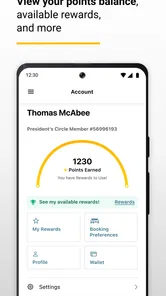
- No loyalty program integration
- Limited international locations
- Frequent login prompts











