

Hersheypark
- 1.47K
- 4.7
- Installs
- 500.00K
- Price
- Free

Screenshots


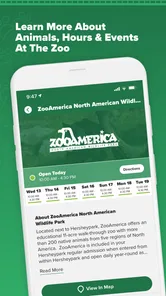
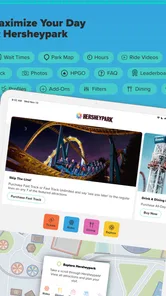
Analysis by Reviewed
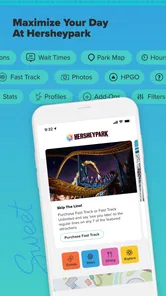
When I’m planning a day at a large amusement park, I want the useful details to be easy to reach without turning every decision into a phone task. The official Hersheypark app is built for that kind of visit: it brings park information into one place, so I can check where I’m going and make small adjustments as the day unfolds. It makes the most sense as a companion for time inside the park, rather than a general travel planner.
How quickly it helps you get oriented
The first thing you notice when you download the app is its intuitive interface. As someone who isn’t exactly tech-savvy, I appreciated how straightforward it was to navigate. You’re immediately greeted with vibrant visuals of the park, and it feels like you’ve already stepped into the world of roller coasters and chocolate bars. The app requires a quick sign-up, but hey, who doesn’t love a little anticipation before the fun begins?
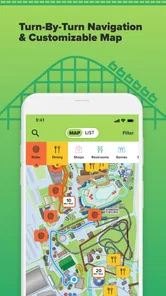
That simplicity matters when everyone in a group is ready to move. Before setting off, I’d use the map to locate the next area and agree on a destination, instead of stopping repeatedly to work out directions. During a busy visit, that small habit can cut down on aimless wandering. I’d also check the screen before leaving a food stop or meeting point, so the group starts walking with a shared plan rather than several competing guesses.
Making the map work for your group
A useful trick is to choose a recognizable destination before splitting up, even if the group plans to browse different parts of the park. That gives everyone a simple place to regroup without relying on a long chain of texts or trying to describe a location from memory. If the group is staying together, one person can check the map and call out the next stop; passing the phone around at every junction is more likely to slow the walk than help.
I’d also treat the map as a way to reduce uncertainty, not as a reason to follow the shortest possible route every time. A route that looks efficient on a screen may not suit a stroller, a tired child, or someone who needs a break. For those situations, choosing a convenient landmark and moving at the group’s pace is more useful than trying to optimize every turn.
Using it when the park gets busy
As a travel-and-local app, this is a focused alternative to relying on a general map app or searching the web for individual park details. A regular map can help with the wider journey, but a dedicated park guide is more useful once the visit is underway. I’d still keep my usual navigation app for getting to Hershey, then switch to this one for finding things inside the park.
Planning rides and breaks without overplanning
Let’s talk features because this app is packed with them. One of my favorites is the interactive map. It’s not just any map; it’s your personal guide through the park. Whether you’re looking for the nearest restroom, your next adrenaline rush on a roller coaster, or a sweet spot to grab some Hershey’s chocolate, this map has got you covered. It updates in real-time, which is a lifesaver on busy days.
More From Our News Desk

 Weather - By Xiaomi
Weather by Xiaomi Review: Clear at a Glance, Less Clear Up Close
Xiaomi’s weather app makes everyday forecasts quick to scan, but its calm surface can leave useful details and recovery paths harder to find than they should be.

 X
XX Under Pressure: Can It Recover When Posting Goes Wrong?
A resilience-focused review of X, examining setup, mistaken posts, interruptions, weak connections, and the gaps that matter when recovery needs to be dependable.

 Clash of Clans
Clash of Clans Is Won Between the Battles
Its raids are quick; its community is a long-term project of coordination, teaching, rivalry, and shared responsibility—with all the friction that entails.

 Android Auto
Android Auto Makes the Case for Quieter Car Software
The car interface is no longer judged by how much it can do, but by how quietly it helps. Android Auto shows what drivers now expect—and what still gets in the way.

 MobiOffice: Word, Sheets, PDF
MobiOffice: Transforming Mobile Productivity with Seamless Integration
MobiOffice: Word, Sheets, PDF is redefining mobile productivity with a surprising blend of functionality and innovation.

 EA SPORTS FC Soccer Mobile 26
EA SPORTS FC™ Mobile Soccer: Redefining Mobile Sports Gaming
Dive into EA SPORTS FC™ Mobile Soccer, where immersive gameplay and strategic depth transform mobile sports gaming.
Latest News



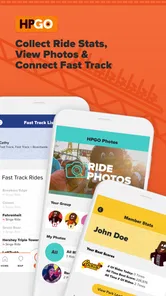
Then there’s the ride wait time feature. Gone are the days of standing in long queues with nothing but your phone to fiddle with. The app gives you live updates on wait times, so you can plan your day efficiently. Believe me, it’s like having a personal amusement park assistant!
I’d treat those wait estimates as a planning aid, not a promise. Conditions can change between checking a ride and reaching it, so I wouldn’t cross the park solely to chase a number on the screen. A more useful approach is to compare nearby options, pick the one that fits the group’s mood, and check again before committing to a longer walk. That’s especially helpful when some people want a high-energy ride while others would rather pause for food or a calmer stretch.
Using wait information without letting it run the day
For a realistic example, imagine arriving near a ride your group has been looking forward to, only to find that the wait estimate has shifted since you last checked. I’d first compare it with attractions already nearby, then decide whether everyone is comfortable with the trade-off. If the group is hungry or low on energy, taking a break can be a better choice than treating the shortest displayed wait as a command.
There is also a small but useful planning distinction between checking an estimate while deciding and repeatedly refreshing it while standing in line. The first can help you choose where to go; the second may not change what you can do once you have committed. I’d check again at natural decision points—after a ride, before crossing to another area, or when the group changes its mind—rather than making every few minutes a new planning session.
Tickets, meals, and keeping the group together
One cool aspect of the app is its ability to store tickets and passes digitally. This means no more fumbling with paper tickets at the entrance. Just a quick scan from your phone, and you’re in. Plus, the app sends you notifications about special events and offers, ensuring you don’t miss out on any chocolate-themed festivities.
For a family or group, I’d settle the ticket question before reaching the entrance: make sure the person carrying the phone can bring it out quickly, and agree on a backup meeting spot in case anyone gets separated. Digital access is convenient, but it also makes that phone part of the day’s essentials. Keeping it charged and easy to reach is a practical trade-off for leaving paper tickets behind.
Another feature worth mentioning is the dining options section. With a variety of food outlets available, it can be overwhelming to decide where to eat. The app helps you explore menus and even offers recommendations based on your preferences. So, whether you’re craving a classic Hershey’s chocolate bar or something more substantial, you’ll find it with ease.
A realistic use is to look at food choices before the group gets hungry, then pick a nearby option when a ride queue or walking stretch makes a meal break sensible. I wouldn’t let a recommendation dictate the day, though; preferences, timing, and where the group happens to be matter more than finding a theoretically perfect meal. If someone has a specific dietary need, checking details directly before ordering is the safer way to make the choice.
Making practical choices around meals and tickets
For a group with different appetites, I’d use the dining section to narrow down the area and options before asking everyone to choose. That is more manageable than trying to settle on food while people are already tired and impatient. Menus and recommendations can help start the conversation, but they don’t replace checking that a choice works for the people actually eating it.
Digital tickets are most convenient when the phone holder is the person approaching the entrance with the group. If that person is carrying bags, helping a child, or managing several people, it can be worth deciding in advance who will handle the scan and where the phone will be kept. That little bit of coordination avoids turning the entrance into a last-minute search through pockets and screens.
Reliability, phone demands, and who benefits most
For a park day, the app’s value depends less on flashy extras than on whether the basics are easy to find when you need them. The map, ride information, tickets, and dining details each serve a different decision, so I’d open the relevant section and then put the phone away rather than constantly refreshing. That keeps the app useful without letting screen-checking interrupt the visit.
Maps, live information, ticket access, and notifications can involve more screen time and connectivity than simply carrying a paper guide. I’d start with a charged phone, avoid leaving the display open between decisions, and keep ticket access ready near entry. These are sensible precautions for a day out, not a guarantee of how the app behaves on every device or in every part of the park. If your phone is older or you’re trying to conserve battery, use the app selectively and agree on destinations before walking.
The app is most useful for first-time visitors, families coordinating several people, and anyone who wants park-specific information in one place. If you already know the layout and prefer to wander without checking ride estimates or menus, you may get by with less phone use. Likewise, it isn’t a replacement for a broad route planner when your main need is getting to the area or arranging the rest of a trip.
When another approach makes more sense
Compared with a paper map, the app can bring several kinds of park information together, but paper has one straightforward advantage: it doesn’t ask you to conserve a phone battery or keep a device handy. A printed map is also easy to share across a group. I’d consider carrying one if I expect to rely on my phone for other important tasks throughout the day, or if someone in the group strongly prefers not to use a screen while walking.
A general navigation app remains the better tool for the journey to the park and for planning stops outside it. Searching the web can also be useful when comparing broader travel choices, but it is less convenient for quick decisions once the group is moving through the grounds. I see the official app as a complement to those tools, not a replacement for every travel need.
It may not be the right fit for someone who wants a completely unplanned visit and is happy to ask staff or follow signs as they go. That approach can be perfectly enjoyable, especially for a repeat visitor who already knows the layout. The app earns its place when a specific question comes up—where to head next, what is nearby, or how to coordinate the group—not simply because it is available.
What to expect from the experience
The app is free, and Hershey Entertainment and Resorts Company is its developer. It has a 4.7 average from around 9,000 ratings, with over 500,000 installs. It is rated for Everyone, and version 3.1.40 runs on devices using Android 8.0 or later. Those details make it easy to judge whether it fits an Android phone before a visit, while the app’s practical appeal remains its park-focused set of tools.
In everyday use, I’d expect quick orientation to be the biggest benefit, with the most pressure on the app coming when several people are checking plans during a crowded stretch. I wouldn’t assume that every screen will feel instant under every condition; for any park app, network access, device age, and the amount of information being loaded can affect the experience. If something takes a moment, I’d keep the group moving toward a known landmark rather than letting one loading screen stall the outing.
Keeping expectations realistic on a busy day
Speed matters most at decision points, not as a benchmark to chase. When I’m choosing between nearby rides or trying to find a place to eat, I want to reach the useful information without making the rest of the group wait. If a page is slow to load, I’d avoid repeatedly tapping or reopening it; I’d give it a moment, use a clear landmark as a fallback, and return to the screen when there is a natural pause.
Reliability also depends on how the phone is being used. A device that is already low on battery or handling several tasks has less room for constant map checks, notifications, and ticket access. I’d keep the app closed when it isn’t helping with an immediate choice and make sure the person holding the tickets knows where to find them. That is a modest routine, but it makes the app less likely to become another thing the group has to manage.
For visitors bringing an older Android phone, the minimum system requirement is worth checking before the trip. Meeting it tells you the device can run the app, but it doesn’t guarantee the same responsiveness on every model. If your phone tends to struggle with demanding apps, keep your plan simple: use the map and ticket access when needed, avoid unnecessary screen time, and have a meeting point everyone can remember without consulting a device.
A useful companion, not the whole day
In essence, the Hersheypark app is more than just a digital map or a ticket holder; it’s your gateway to an enriched park experience. It keeps you informed, organized, and most importantly, excited for what awaits. While no app can replicate the feeling of wind in your hair on a roller coaster or the smell of chocolate in the air, this one comes pretty close.
My main reservation is that a park companion only helps when you remember to use it at the right moments. Constantly checking estimates can make a day feel overmanaged, and digital tickets put extra importance on having your phone ready. I’d use it to answer concrete questions—where to go next, whether a ride is worth heading toward, or what food is nearby—then let the actual visit take over.
Whether you’re a thrill-seeker, a chocolate lover, or just someone looking for a fun day out, the app meets all your needs and then some. So, if you’re planning a trip to Hersheypark, downloading this app is a no-brainer. Trust me, your future self will thank you as you glide effortlessly from ride to ride, chocolate in hand, and a smile on your face.
Hersheypark Frequently Asked Questions
Is Hersheypark compatible with my phone, and who publishes the app?
Hersheypark is a Travel & Local app published by Hershey Entertainment and Resorts Company. It is available for Android and iOS, and the Android version requires Android 8.0 or later. The app is rated for Everyone, so its listed age classification is suitable for a general audience. Checking your device’s operating-system version before downloading can help you avoid compatibility surprises.
What is Hersheypark and what does the app offer?
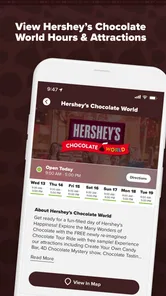
Hersheypark is a popular amusement park located in Hershey, Pennsylvania. The app is designed to enhance your visit by providing you with information about the park, including ride wait times, an interactive map, and show schedules. Additionally, the app offers exclusive deals and discounts, making it an essential tool for anyone planning a trip to Hersheypark.
How can I use the Hersheypark app to plan my visit?
The Hersheypark app allows you to plan your visit by offering features such as a customizable itinerary, ride wait times, and show schedules. You can also explore dining options and make reservations for restaurants within the park. With these planning tools, you can make the most of your day at Hersheypark and ensure a fun experience for everyone.
Is the Hersheypark app free to download and use?
Yes, the Hersheypark app is free to download on both Android and iOS devices. While the app itself is free, keep in mind that certain features, such as purchasing tickets or making in-app purchases for merchandise, may require payment. Overall, the app provides valuable resources and information at no additional cost to enhance your visit.
Does the Hersheypark app provide real-time updates?
Absolutely! The Hersheypark app is equipped with updates to keep you informed about various aspects of the park, such as ride wait times, weather conditions, and any special events happening during your visit. This feature helps you make informed decisions as you explore the park, while the interactive map and schedules provide further support for navigating your day.
Pros
- Variety of thrilling rides
- Family-friendly attractions
- Beautiful park scenery
- Frequent special events
- Excellent dining options
Cons
- Long wait times for rides
- Expensive ticket prices
- Limited parking availability
- Crowded during peak times
- Some rides under maintenance











