

Helper Helper
- 23.00
- 4.4
- Installs
- 50.00K
- Price
- Free

Screenshots
Analysis by Reviewed
I approached Helper Helper as a practical tool for finding and organizing volunteer opportunities, rather than as another social app competing for attention. Its purpose is straightforward: connect people with meaningful experiences in their communities. After spending time with it, my impression is that its value depends less on constant browsing and more on whether you build a repeatable habit around discovering an opportunity, checking its details, and following through.
That makes it interesting for a few different people. Someone who wants to volunteer but does not know where to begin can use it as a starting point. A regular volunteer can use it to keep community activities in view instead of searching from scratch every time. It can also suit people who prefer a focused events app over broad social networks, where volunteer information is often mixed with unrelated posts, fundraising appeals, or general announcements.
Helper Helper is a free Android app in the Events category, developed by Helper Helper. It is rated for Everyone, so its basic audience is broad. The app has been around since January 28, 2014, and its current version is 13.4. It supports Android 5.0 and later, which makes it accessible on many older devices as well as newer phones.
Building a dependable volunteering routine
The most useful way to begin is to treat the app as a planning aid, not a catalog that you casually scroll through once. I would open it with a specific intention: find something suitable for a particular day, discover a cause I want to support, or check whether a previously interesting opportunity still fits my schedule. That small change in approach makes the experience less overwhelming and turns browsing into a decision-making process.
When I look at a volunteer opportunity, I pay attention to more than its title. The important questions are practical ones: Is the activity close enough to reach easily? Does the timing work without making the rest of the day stressful? Would I be comfortable attending alone? Does the description give me enough context to understand what I would actually be doing? An events app can help surface possibilities, but the quality of the final choice still depends on reading carefully and planning realistically.
A useful first session is to explore the available opportunities without immediately committing to the first appealing option. I would make a short mental shortlist based on location, timing, and the kind of contribution involved. This is especially helpful for new volunteers, because “volunteering” can mean very different things: a one-time community activity, a recurring commitment, hands-on work, or a supporting role that requires less preparation.
For a realistic everyday example, imagine that I have a free Saturday morning but do not want to spend the entire day traveling. I can use Helper Helper to look for an event that fits that window, compare the practical details of a few possibilities, and choose one that leaves enough time for getting there and returning home. The app does not remove the need for judgment, but it can reduce the friction between wanting to help and finding a concrete place to start.
More From Our News Desk

 Gmail
GmailGmail in a Busy Inbox: Who Benefits Most?
From first account to crowded workday, Gmail earns its place through dependable search and flexible sorting—but its best fit depends on how much inbox maintenance you can tolerate.

 Prime Video
Switching to Prime Video: What Changes in Your Viewing Routine
Prime Video can make a compelling second home for streaming, but switching means learning a different catalog, rental layer, and route from browsing to playback.

 Universal TV Remote Control
Universal TV Remote Control Works Best as a Reliable Backup
A phone remote earns its place through quick setup and reliable habits. Here is how to get more from Universal TV Remote Control—and where its limits show.

 Weather - By Xiaomi
Weather by Xiaomi Review: Clear at a Glance, Less Clear Up Close
Xiaomi’s weather app makes everyday forecasts quick to scan, but its calm surface can leave useful details and recovery paths harder to find than they should be.

 X
XX Under Pressure: Can It Recover When Posting Goes Wrong?
A resilience-focused review of X, examining setup, mistaken posts, interruptions, weak connections, and the gaps that matter when recovery needs to be dependable.

 Clash of Clans
Clash of Clans Is Won Between the Battles
Its raids are quick; its community is a long-term project of coordination, teaching, rivalry, and shared responsibility—with all the friction that entails.
Latest News



I also recommend setting a personal rule before browsing: decide how much time you can genuinely give, how far you are willing to travel, and whether you want a single event or an ongoing activity. Without those limits, it is easy to choose based on an appealing description and only later realize that the commitment is inconvenient. The strongest workflow is the one you can repeat, not the one that looks most ambitious on the first day.
Another practical habit is to check the app at a predictable point in the week. I prefer a short review when I am already planning my calendar. That makes volunteering part of my normal routine instead of something I remember only when I happen to feel motivated. If an opportunity needs preparation, this habit also gives me time to organize transport, clothing, supplies, or any other personal arrangements mentioned in its details.
For people who coordinate their lives around a busy school or work schedule, the app is most useful when paired with an existing calendar or notes routine. I would not rely on memory after finding an event. I would record the date, start time, location, and any instructions in the planning system I already use. This is not a glamorous tip, but it prevents a common failure: discovering a good opportunity and then losing track of it before the day arrives.
Settings and personal checks that matter
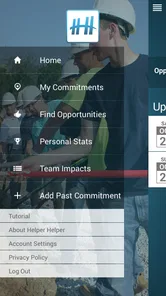
Before settling into regular use, I would inspect the app’s available settings and account choices rather than accepting every default automatically. The exact options that appear can depend on the device and app version, but the principle is consistent: make the app support the way you volunteer. Review notification behavior, location-related choices, and any profile or participation details that affect what you see or how you organize activities.
Notifications deserve particular attention. If they are too frequent, they can make the app feel noisy and encourage aimless checking. If they are too limited, you may miss a useful reminder or update. I prefer notifications that support a decision I have already made, while avoiding a constant stream of prompts that turns volunteering into another source of digital clutter. Adjusting them early is one of the simplest ways to make the app feel more intentional.
Location choices are also worth considering. Community opportunities are only useful when they are realistically reachable, so location can improve discovery. At the same time, I would choose the least intrusive option that still makes the app convenient for me. If I am browsing from home, I may want nearby results; if I am planning around another destination, I would rather evaluate opportunities manually than assume the phone’s current position represents my plans.
Profile information should be handled with the same care. I would fill in only what helps me participate or communicate clearly, and I would avoid treating a volunteer profile like a public biography. The best profile is not necessarily the most detailed one; it is the one that makes participation straightforward without adding information that does not serve a practical purpose.
A small but valuable check is compatibility. The app requires Android 5.0 or newer, so most current Android users should be able to install it, while someone using a very old phone should check the operating system before planning around it. I would also keep the app updated when possible, especially because event-related tools benefit from maintenance and improvements over time. The current release is version 13.4, which gives users a clear reference point when troubleshooting installation or behavior.
One limitation is that an app cannot guarantee that every event will match your expectations simply because it appears relevant. Community information can change, schedules can shift, and descriptions may not answer every question a first-time volunteer has. I therefore treat the app as the discovery and organization layer, then verify any important practical detail through the event information or the appropriate organizer contact method when needed.
Faster patterns for repeat users
After the first few sessions, the biggest improvement comes from reducing repeated decisions. I would divide opportunities into three mental groups: “possible soon,” “good idea later,” and “not for me.” This simple sorting habit prevents me from reconsidering the same event every time I open the app. It also helps distinguish a temporary scheduling problem from a genuine mismatch with the kind of volunteering I want to do.
Another efficient pattern is to search with a purpose rather than browsing every available option. On one visit, I might focus only on activities that fit a particular day. On another, I might look for a cause or format that I have not tried before. Narrowing the question makes it easier to notice useful details and avoids the fatigue that comes from comparing too many possibilities with no clear criteria.
I also like to plan a backup. If an event is important to me, I would identify a second suitable option before closing the app, especially when my schedule is uncertain. This does not mean making multiple commitments. It means keeping a realistic alternative in mind so that a change of plans does not end the entire attempt to volunteer.
For recurring users, consistency matters more than volume. It is better to choose an activity I can attend reliably than to collect a long list of possibilities that never become real commitments. Helper Helper works well with this mindset because it places meaningful community experiences within reach, but the app cannot create reliability for me. That comes from choosing carefully and respecting my own limits.
A less obvious use is to use the app as a reflection tool after participating. I would note what made the experience work: the travel distance, the time of day, the type of task, and whether I preferred attending alone or with someone else. On the next visit, those observations become filters for better choices. Over time, the app becomes more useful because my decisions become more informed, not because I am simply opening it more often.
It can also help to introduce a friend without turning the experience into a complicated group project. I would choose one opportunity that seems approachable, share the basic plan outside the app, and agree on a meeting point and backup plan. This is often easier than asking someone to browse a large list independently. The app supplies a common starting point, while the personal conversation handles comfort, travel, and expectations.
Compared with searching the general web, Helper Helper offers a more focused path to community activities. A web search can be broader, but it often produces scattered pages, outdated announcements, and unrelated results. Compared with social media, the app is less distracting because its purpose is clearer. On the other hand, broad search and direct contact with local organizations may be better when I need highly specific information, want to compare many independent sources, or am looking for a niche opportunity that is not represented in the app.
Where the app reaches its limits
The main trade-off is that a centralized volunteer app can simplify discovery while still leaving important responsibility with the user. I cannot assume that a listing answers every question about accessibility, physical demands, transport, age-related expectations, or what to bring. If any of those factors affect my ability to participate, I would look for explicit details and ask before committing rather than treating a short event description as a complete briefing.
This matters particularly for first-time volunteers. Someone who expects a fully guided experience may find the app less reassuring than a direct conversation with an established local organization. Helper Helper can point me toward an opportunity, but it is not a substitute for understanding the setting, the responsibilities, or the people involved. For that reason, cautious users should begin with an activity whose timing and practical requirements are easy to manage.
The app may also be a poor fit for people who want a sophisticated project-management system. I would not use it as my only tool for tracking a large team, assigning complex responsibilities, or maintaining detailed long-term records. A shared calendar, task manager, spreadsheet, or direct organizer system may be better for those needs. Helper Helper is strongest at connecting discovery with participation, not at replacing every planning tool around it.
There is also a personal trade-off between convenience and attention. The easier it is to browse opportunities, the easier it can become to browse without acting. I have found that setting a clear next step helps: save the details in my calendar, decide whether to attend, or move on. If I close the app with no decision every time, the experience becomes passive and the original purpose is lost.
People who already have a trusted volunteer organization and a stable schedule may not gain much from adding another app. Direct communication can be faster when I know exactly where I want to help. The stronger case for Helper Helper is uncertainty: I want to contribute, but I need help discovering a suitable opportunity or seeing community activities in one place.
The app’s broad Everyone rating makes it approachable for a wide audience, but that should not be confused with every event being appropriate for every individual. Suitability still depends on the details of each activity and the volunteer’s own circumstances. I would involve a parent, guardian, or responsible adult when a younger user needs help evaluating an opportunity or arranging participation.
My verdict after making it part of a routine
Helper Helper is a focused, practical option for turning general interest in volunteering into a concrete search. Its strongest quality is not a flashy feature; it is the way it gives community participation a clear starting point. With a 4.4 average from around 256 ratings and more than 50 thousand installs, it has found a real audience, and that makes sense for an app with such a direct purpose.
I would recommend it to someone who regularly says, “I should volunteer sometime,” but never knows where to look. I would also recommend it to an experienced volunteer who wants another way to discover local events and keep possibilities visible. The free price removes an obvious barrier, and the age rating makes the app broadly approachable.
My recommendation comes with a condition: use it actively, not passively. Check the settings, control notifications, define your practical limits, and turn promising opportunities into calendar entries or clear decisions. The app becomes much more valuable when it is part of a repeatable habit that includes planning and follow-through.
I would steer away from it if I needed a complete volunteer-management platform, highly specialized research, or guaranteed detail about every logistical question. In those cases, direct contact with an organization or a more general planning tool may serve me better. For discovering meaningful community experiences without wading through unrelated online noise, though, Helper Helper is a sensible companion.
My bottom line: use Helper Helper as the bridge between intention and action. It will not choose the right commitment for me, and it cannot replace careful questions or reliable planning. What it does well is make the first step easier, then give me a focused place to return when I am ready to find the next one.
Helper Helper Frequently Asked Questions
Is Helper Helper suitable for someone who is new to volunteering?
Yes. Helper Helper is intended to connect volunteers with meaningful experiences in their community, so it can be a useful starting point if you are looking for ways to get involved. Opportunities are organized by the group that uses the app, and each event can provide details to help you decide whether it fits your interests, schedule, and requirements.
What should I check before installing Helper Helper on my phone?
Helper Helper is an events app from developer Helper Helper, and its current version is 13.4. It requires Android 5.0 or later, so check your device’s operating system before downloading. The app is rated for Everyone, and it is free to install. If you are using an iPhone, check the relevant app store for compatibility with your device.
What is Helper Helper and what can I use it for?
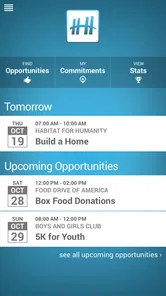
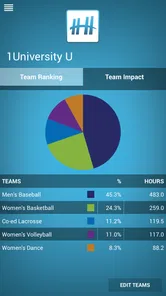
Helper Helper is a volunteering and community-engagement app designed to help people discover, organize, and participate in service opportunities. Depending on the organization using it, you may be able to browse volunteer events, sign up for shifts, track completed hours, receive announcements, and connect with other participants. The available features can vary between schools, companies, nonprofits, and community groups.
Do I need an invitation or organization account to use Helper Helper?
In many cases, Helper Helper is connected to a specific school, employer, nonprofit, or community organization. You may be able to download the app freely, but full access can require an invitation, an organization code, or registration through an affiliated group. If you cannot find your organization during setup, check with its volunteer coordinator because access and enrollment rules may differ.
How do I find and sign up for volunteer opportunities?
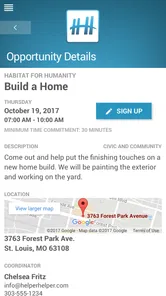
After creating or joining your Helper Helper account, you can generally browse available opportunities by category, date, location, or participating organization. Opening an event usually shows its description, time, meeting details, requirements, and remaining spaces. You can then register directly in the app when the opportunity is available. Some events may require approval or additional instructions.
Pros
- Makes it easy to discover and join local volunteer opportunities.
- Tracks service hours and personal volunteering history in one place.
- Supports team-based volunteering for schools
- workplaces
- and groups.
- Event details and registration help simplify volunteer planning.
- Encourages community engagement through shared impact and updates.
Cons
- Availability of opportunities depends heavily on your location.
- Some listings may have limited details or outdated availability.
- Requires organizations to actively maintain their event information.
- The app may feel less useful in areas with few participating groups.
- Account and location permissions may be needed for the full experience.











