

HealtheLife
- 1.27K
- 3.4
- Installs
- 1.00M
- Price
- Free

Screenshots

Analysis by Reviewed
I find the first question to ask about HealtheLife is not whether a health app sounds useful, but whether your healthcare provider supports the service behind it. This is a medical app from Cerner Corporation, and its practical value depends on whether your care team’s system connects to it. If it does, it can give you a convenient place to check health information; if it does not, it is unlikely to replace your provider’s own portal or the usual phone-and-paper routine.
Start with your provider, not the download
Before building a routine around it, I’d check with the clinic or hospital you use and ask whether HealtheLife is the portal they expect patients to use. That small step can save frustration: a health app is only as current and useful as the information and services available through the connected provider. It also helps set realistic expectations about which tasks you can handle in the app and which still require a call or a conversation at an appointment.
The app is free, rated for Everyone, and has an average rating of 3.2 from around 2.6 thousand ratings. It has over one million installs, which suggests that it reaches a broad audience, though popularity alone does not tell me whether it will fit your particular provider’s setup. I’d treat it as a practical access point rather than a complete replacement for medical advice or direct contact with your care team.
Your Health, Your Hands
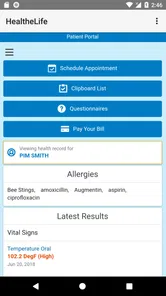
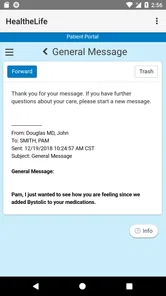
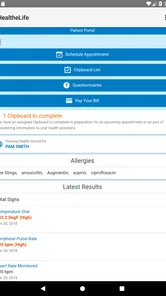
One of the first things you'll notice about HealtheLife is how user-friendly it is. The app has a neat and intuitive interface that makes it easy to navigate through your health data. Right off the bat, you can access your medical records, upcoming appointments, and even communicate directly with your healthcare team. It's like having a personal health assistant in your pocket.
Features That Matter
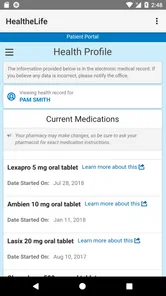
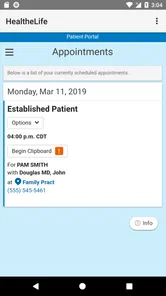
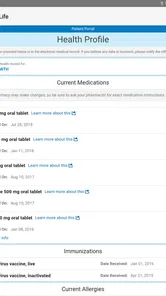
What sets this app apart is its ability to integrate with your healthcare provider's system seamlessly. You can view test results, track your medications, and even schedule appointments without the hassle of long phone calls. The app sends timely reminders for medication and appointments, ensuring you never miss a beat on your health journey.
Another cool feature is the ability to share your health data with family members or caregivers. This is particularly useful for elderly users or those managing chronic conditions who need extra support. Plus, the app provides educational resources tailored to your specific health needs, empowering you to make informed decisions.
Make everyday use more dependable
A useful way to get value from a patient portal is to check it before an appointment and keep a short list of questions for anything you do not understand. For example, if a result appears before your scheduled visit, note what you want to ask rather than treating an isolated number as a diagnosis. The app can make information easier to reach, but interpretation still belongs in a conversation with a qualified clinician.
More From Our News Desk

 Gmail
GmailGmail in a Busy Inbox: Who Benefits Most?
From first account to crowded workday, Gmail earns its place through dependable search and flexible sorting—but its best fit depends on how much inbox maintenance you can tolerate.

 Prime Video
Switching to Prime Video: What Changes in Your Viewing Routine
Prime Video can make a compelling second home for streaming, but switching means learning a different catalog, rental layer, and route from browsing to playback.

 Universal TV Remote Control
Universal TV Remote Control Works Best as a Reliable Backup
A phone remote earns its place through quick setup and reliable habits. Here is how to get more from Universal TV Remote Control—and where its limits show.

 Weather - By Xiaomi
Weather by Xiaomi Review: Clear at a Glance, Less Clear Up Close
Xiaomi’s weather app makes everyday forecasts quick to scan, but its calm surface can leave useful details and recovery paths harder to find than they should be.

 X
XX Under Pressure: Can It Recover When Posting Goes Wrong?
A resilience-focused review of X, examining setup, mistaken posts, interruptions, weak connections, and the gaps that matter when recovery needs to be dependable.

 Clash of Clans
Clash of Clans Is Won Between the Battles
Its raids are quick; its community is a long-term project of coordination, teaching, rivalry, and shared responsibility—with all the friction that entails.
Latest News



For someone helping a parent or partner, shared access can make appointment planning and follow-up less dependent on memory. I’d agree together on what information needs attention and who will contact the provider, rather than assuming that sharing a record automatically makes someone responsible for acting on it. If you manage several people’s care, confirm whose account is open before sending a message or discussing a result; that simple habit can prevent mix-ups.
Privacy and Security
In the digital age, privacy is a big concern, and rightly so. HealtheLife takes this seriously, offering robust security features. Your data is encrypted, and the app complies with healthcare regulations to protect your information. You can rest easy knowing your health data is safe and secure.
Where alternatives may fit better
Compared with a general wellness tracker, a provider-connected portal is more relevant when you want to deal with appointments, records, or messages tied to your care. A wellness app may be a better fit if your main goal is building personal habits or logging activity independently of a clinic. Likewise, if your provider uses another patient portal, that official option is more likely to be useful than maintaining a separate account that does not connect to your records.
There is also a trade-off between convenience and having everything in one place. A portal can gather information from its connected care setting, while visits with unrelated providers may still leave you checking another system or keeping your own notes. I would not rely on any single app as the only record of what to do next: save appointment details in a way you can find, and use the clinician’s instructions as the authority when they differ from a reminder or an older entry.
Room for Improvement?
No app is perfect, and HealtheLife is no exception. Some users have reported minor glitches, like slow loading times or occasional crashes. However, these seem to be rare and are often fixed swiftly with updates. The developers are active and responsive, which is a reassuring sign for any app user.
My practical test would be whether the app makes a task you already do easier: checking an appointment, reviewing information, or contacting your care team. If it does, use it as a companion to that relationship, not as a source of urgent care. For an urgent or worsening problem, contact an appropriate medical service directly rather than waiting for an app message to be seen.
Who should choose it?
I’d recommend trying it if your provider uses HealtheLife and you want a simpler way to keep up with routine care. It may be especially helpful when you have recurring appointments or want a caregiver involved in organizing follow-up. I’d skip it if you are looking for a standalone diagnosis tool, a universal record that automatically gathers every provider’s information, or an alternative to speaking with a clinician.
The app was released on October 26, 2015, and its current version is 102.0.31, with Android 9 as the minimum operating system. That makes compatibility worth checking before installing, particularly if you use an older device. Its medical focus is clear, but the experience still depends on the provider connection and on whether the tools you need are available in your account.
Overall, HealtheLife is a solid choice for anyone looking to manage their health more effectively. It brings all your health information to your fingertips, making healthcare management not only accessible but also convenient. Whether you're tech-savvy or just looking for a simple way to keep track of your health, this app has got you covered.
So, if you're ready to take control of your health, why not give HealtheLife a shot? It's more than just an app; it's a gateway to better health management.
HealtheLife Frequently Asked Questions
Is HealtheLife free to download, and what kind of app is it?
HealtheLife is a free medical app from Cerner Corporation, intended to make it easier to manage health online. It has an Everyone content rating, so its store age classification is broad. Before downloading, keep in mind that its usefulness depends on whether the healthcare services and information you need are available through the providers you use.
What is HealtheLife and how does it work?
HealtheLife is a comprehensive health management app designed to help users keep track of their personal health records and medical history. The app seamlessly connects you with your healthcare providers, allowing you to book appointments, receive test results, and communicate with your doctors directly. It provides a centralized platform for managing your ongoing healthcare needs, ensuring all your health information is accessible whenever you need it.
Is HealtheLife secure for storing my personal health information?
Yes, HealtheLife prioritizes the security and privacy of your personal health information. The app uses advanced encryption technologies to protect your data from unauthorized access. Moreover, it complies with various health regulations such as HIPAA, ensuring that your health records and any personal data shared within the app are handled with the utmost confidentiality and care.
Can I use HealtheLife to communicate with my healthcare providers?
Absolutely. HealtheLife provides a convenient messaging feature that allows you to communicate directly with your healthcare providers. Whether you need to ask a quick question, request prescription refills, or discuss your health concerns, you can do so securely within the app. This feature ensures you have a direct line of communication with your medical team, enhancing your overall healthcare experience.
Does HealtheLife support appointment scheduling and reminders?
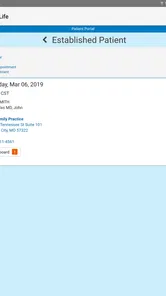
Yes, HealtheLife makes managing your healthcare appointments easy. You can schedule, reschedule, or cancel appointments directly through the app. Additionally, it offers customizable reminder notifications to help you keep track of upcoming appointments, ensuring that you never miss a visit with your healthcare provider. This functionality helps streamline the management of your healthcare schedule.
Pros
- User-friendly interface for easy navigation.
- Comprehensive health tracking features.
- Seamless integration with wearable devices.
- Customizable health goals and reminders.
- Secure data storage and privacy features.
Cons
- Limited free version features.
- Occasional syncing issues with devices.
- Requires stable internet connection.
- Lack of multilingual support.
- No direct customer support chat option.











