

Headout: Travel Experiences
- 567.00
- 4.8
- Installs
- 1.00M
- Price
- Free

Screenshots




Analysis by Reviewed
Travel planning gets harder when the group has different needs: one person wants to book quickly, another needs time to compare options, and someone else may find small text or busy screens tiring. I find Headout: Travel Experiences most useful as a way to explore and book activities in one place, rather than as a complete trip planner. That distinction matters: it can help with choosing what to do, while the visitor still needs to check whether each outing suits their pace, access needs, and schedule.
Readability and finding the right activity
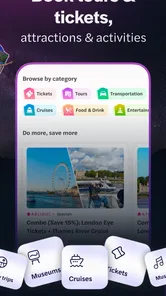
The first thing that struck me about Headout is its user-friendly interface. The app is designed to be intuitive, making it easy for even the least tech-savvy traveler to navigate. You open the app, and instantly, you're greeted with a plethora of travel experiences tailored to your location. Whether you're in New York or Tokyo, Headout has got you covered.
For me, the practical value is less about browsing endlessly and more about narrowing a decision. Before opening an activity, I’d decide what matters most that day: indoor or outdoor, a fixed start time or a flexible plan, and how much walking the group is comfortable with. Then I’d use the descriptions and reviews to check the details rather than relying on a striking image or short title. That small habit makes the app more useful for families and mixed-interest groups, where a tempting option may not work equally well for everyone.
The app is a free travel and local guide from Headout, with a 4.2 average from around 5,200 ratings and more than a million installs. It is rated for Everyone, and its latest version is 9.1.1. Those figures suggest that it has found a broad audience, but they don’t replace checking a particular experience carefully. Reviews can help identify what other visitors noticed; I’d still treat the activity’s own practical information as the deciding source.
As a travel app, it works best when I approach it with a specific question—what can we do in this area, at this time, that suits this group? That is a more manageable starting point than scrolling through every possibility. If I’m deciding with someone who finds dense screens tiring, I’d take turns: one person reads the activity title and key details aloud, while the other weighs up whether it fits the day. This simple shared workflow is more useful than assuming that a polished interface will make every detail equally easy for everyone to scan.
Motor, sensory, and pace considerations
One feature I particularly loved is the "Last Minute Deals" section. It's perfect for spontaneous travelers who thrive on the thrill of the unknown. You can snag tickets for various attractions at discounted rates, sometimes up to 50% off. It's like a treasure hunt for adventure seekers!
That spontaneous style is not ideal for every traveler, though. A same-day choice can leave less time to confirm transport, rest breaks, crowd levels, or whether an attraction is manageable for someone with limited stamina. If I were traveling with a companion who needs a predictable routine, I’d shortlist options earlier and use last-minute browsing only when the basic logistics were already settled. The useful trade-off is flexibility versus preparation: a quick booking can save planning effort, but it should not replace checking the physical demands of the outing.
More From Our News Desk

 Weather - By Xiaomi
Weather by Xiaomi Review: Clear at a Glance, Less Clear Up Close
Xiaomi’s weather app makes everyday forecasts quick to scan, but its calm surface can leave useful details and recovery paths harder to find than they should be.

 X
XX Under Pressure: Can It Recover When Posting Goes Wrong?
A resilience-focused review of X, examining setup, mistaken posts, interruptions, weak connections, and the gaps that matter when recovery needs to be dependable.

 Clash of Clans
Clash of Clans Is Won Between the Battles
Its raids are quick; its community is a long-term project of coordination, teaching, rivalry, and shared responsibility—with all the friction that entails.

 Android Auto
Android Auto Makes the Case for Quieter Car Software
The car interface is no longer judged by how much it can do, but by how quietly it helps. Android Auto shows what drivers now expect—and what still gets in the way.

 MobiOffice: Word, Sheets, PDF
MobiOffice: Transforming Mobile Productivity with Seamless Integration
MobiOffice: Word, Sheets, PDF is redefining mobile productivity with a surprising blend of functionality and innovation.

 EA SPORTS FC Soccer Mobile 26
EA SPORTS FC™ Mobile Soccer: Redefining Mobile Sports Gaming
Dive into EA SPORTS FC™ Mobile Soccer, where immersive gameplay and strategic depth transform mobile sports gaming.
Latest News



For sensory needs, I would also look beyond the headline activity. A lively event or guided tour may be appealing but could involve noise, queues, or a tightly scheduled group. Reading descriptions and visitor comments before paying can help surface clues, although the app should be treated as a discovery and booking tool, not a guarantee that an experience will suit a particular sensory profile. When a detail affects someone’s comfort, I’d confirm it with the activity provider before committing.
There is also a practical motor consideration that can be easy to overlook: an app may make buying a ticket simpler without making the actual outing physically simple. I’d check how far the meeting point is from the transport stop, whether the plan involves standing in line, and how much time the activity leaves for getting between places. Those checks matter for a traveler using a mobility aid, someone recovering from an injury, or anyone who needs frequent pauses. They are best treated as part of choosing the activity, not as something to sort out after the ticket is booked.
Choosing and booking with confidence
I use this section to think through the checks that make a booking feel considered rather than rushed: matching the activity to the group, the available time, and the day’s route. A useful extra step is to have the person who will manage the ticket confirm the meeting details with everyone before leaving, especially when plans or phone access are shared. That turns a promising option into a plan the whole group can follow.
Personalizing Your Journey
Another standout feature is the personalization options. The app allows you to customize your itinerary based on your interests. Are you a history buff? Or perhaps you have a penchant for culinary tours? Just set your preferences, and the app curates a list of experiences just for you. It feels like the app genuinely understands what you want from your travels.
Headout also ensures you have all the info you need before embarking on any activity. From detailed descriptions and user reviews to helpful tips and safety measures, it’s like having a local guide in your pocket. This level of detail not only enhances your experience but also builds confidence in your travel plans.
One practical workflow I like is to use the app for discovery first, then compare the chosen experience with the day’s route before booking. For example, if I have a free afternoon after checking in, I’d look for something that fits the available time and is near where I already expect to be, rather than choosing a popular ticket across town. I’d check the start time, meeting point, and what the description says to bring or expect, then keep the ticket easy to find for the day itself. This avoids a common travel mistake: buying an appealing activity that quietly consumes more of the day than the group has available.
Personalization is a useful first filter, but I wouldn’t let it make the final choice for me. A recommendation that matches someone’s interest can still be a poor fit if it lands at an awkward time, requires more walking than expected, or does not leave room for a meal or rest. I use tailored suggestions to create a shortlist, then compare those candidates against the actual day’s constraints. For a group, it can help to agree on one shared priority—such as avoiding a rushed transfer—before browsing, so the app’s options support a decision rather than creating another debate.
Booking, alternatives, and remaining barriers
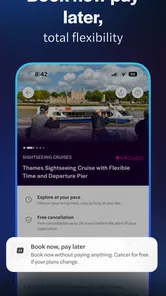
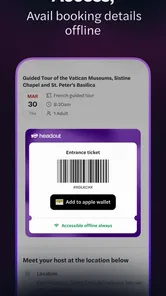
Booking through the app is a breeze. No more fumbling with multiple websites or dealing with tedious reservation processes. With just a few taps, your tickets are booked, and you're good to go. The app even stores your tickets, so there's no need to worry about printing them out or losing them amidst your luggage.
That streamlined approach is handy when I want to keep activity bookings together instead of searching through separate tabs or messages. Still, I’d check each ticket’s instructions before setting off and make sure everyone in the group can access the booking details. A stored ticket reduces paper handling, but it doesn’t remove the need to keep a phone available and charged. If someone in the party relies on another person to manage bookings, sharing the plan in advance is a sensible backup.
For a realistic everyday travel scenario, imagine arriving after a long journey with an unplanned stretch of free time before dinner. I’d open the app to see what fits nearby, rule out anything with a start time that makes the meal stressful, and read the practical description before deciding. If a companion is tired, I’d favor an activity with a clear duration and straightforward meeting point over an exciting-sounding option that could involve an uncertain amount of walking. The point is not to book just because a ticket is available; it is to use the booking flow to make a choice that leaves the rest of the evening workable.
Compared with searching the web, venue pages, and local recommendations separately, Headout gives me a more focused path from browsing to booking. That convenience is strongest when I’m choosing a specific activity; it is less useful if I want to build a whole route from public transport, meals, and free stops. For those needs, a map app or a personally planned itinerary may be a better companion. I also wouldn’t assume that every activity has the same booking terms or suitability: check the details for the individual option, especially if timing, mobility, or sensory comfort is important.
When I already know exactly which venue I want, going directly to that venue’s own booking channel may be the clearer comparison, especially if I need to ask a detailed question before paying. For broad browsing across activities, Headout can save the effort of opening many separate pages; for route planning, transport, or deciding what is accessible along the whole day, a map and a manually assembled plan remain better tools. I see these approaches as complementary rather than interchangeable. The right choice depends on whether the main problem is finding an experience, confirming its conditions, or organizing the journey around it.
Moreover, the app's partnership with reliable vendors ensures that you always get the best deals and authentic experiences. It's a relief knowing that what you see is what you get, without any hidden surprises.
Even when the booking itself feels straightforward, I’d keep a small backup plan for the day: save the activity details where I can find them, note the meeting point, and make sure the person who will show the ticket knows how to access it. If the phone battery is low or a traveler is uncomfortable navigating the app under pressure, a companion can help check the booking before leaving the hotel. This kind of preparation is especially helpful for groups with different levels of confidence using travel apps, and it costs little time compared with trying to solve a ticket question while already on the way.
Who I’d recommend it to
A realistic use case is arriving in a city with one open evening and no appetite for hours of research. I’d browse for an activity that matches the group’s interests, compare its timing with dinner and the journey back, and book only once the practical details look workable. Headout is a good fit for travelers who value that direct browse-and-book flow, particularly when they are open to tours, events, and attractions rather than building every part of a trip themselves.
I’d be more cautious if I were planning around strict access requirements, very limited energy, or a schedule where a missed start time would cause serious problems. In those cases, I’d use the app to find candidates, then verify the relevant arrangements with the provider and compare against direct booking or another source. That extra step is not a flaw unique to this app; it is simply important when an activity’s conditions matter more than convenience.
I would also skip it as my main planning tool if I wanted a complete, step-by-step itinerary or needed every part of a day coordinated in one place. Its strongest role is helping me choose and book an experience, not replacing a map, a transport planner, or careful conversations about what the group can manage. For travelers who prefer to decide slowly, compare a venue’s own terms, and build their plans from several sources, using it only to discover possible activities may be the more comfortable approach.
In conclusion, Headout: Travel Experiences is a game-changer for travelers. It takes the stress out of planning and lets you focus on the joy of exploring new places. Whether you're a meticulous planner or an impulsive adventurer, this app has something for everyone. So next time you're prepping for a trip, give Headout a try. I bet it'll become your trusty travel companion, just like it did for me!
Headout: Travel Experiences Frequently Asked Questions
Is Headout free to download, and what does using it cost?
Headout is free to download, so you can browse its travel experiences before deciding whether to book. The cost of using the app comes from the tours, activities, event tickets, and attractions you choose, rather than a download charge. Before confirming any purchase, check the experience details and booking total so you understand what you are paying for.
What is Headout and how does it work?
Headout is a mobile app that offers a wide range of travel experiences, from tours and activities to tickets for events and attractions. Users can browse and book experiences directly from the app. It provides curated options tailored to various interests and travel styles, ensuring a seamless and enjoyable booking process.
Is Headout available for both Android and iOS devices?
Yes, Headout is available for download on both Android and iOS platforms. Users can find the app on the Google Play Store for Android devices and the Apple App Store for iOS devices, making it accessible to a wide range of smartphone users. The Android version requires Android 7.0 or later, so it is worth checking your device’s software before downloading.
Can I browse Headout before deciding whether to create an account or book?
You can explore the types of experiences Headout offers and review individual options before making a booking decision. The app focuses on tours, events, activities, and last-minute tickets, giving travelers a place to compare possible plans. Take time to read the details for an experience that interests you, including its terms, before proceeding with a purchase.
Are there any additional fees when booking through Headout?
Headout generally displays the final price inclusive of all taxes and fees upfront, providing transparency in pricing. However, users should double-check for any additional charges or optional add-ons that might apply to certain experiences, ensuring they are fully aware of the total cost before booking.
Pros
- User-friendly interface makes booking easy.
- Offers exclusive discounts and deals.
- Wide range of activities and experiences.
- Instant confirmation on bookings.
- Supports multiple currencies and languages.
Cons
- Limited customer support options.
- Occasional app crashes reported.
- High service fees on some bookings.
- Limited coverage in rural areas.
- Inconsistent refund policy.











