

HD Video Downloader: Private
- 0.00
- 0.0
- Installs
- 100.00K
- Price
- Free

Screenshots
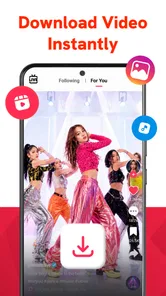
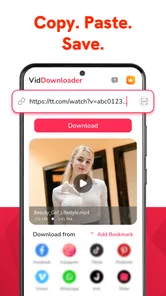
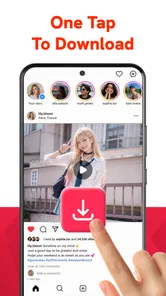

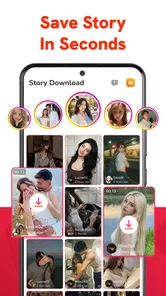
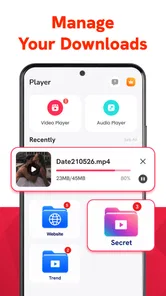
Analysis by Reviewed
I judge a video downloader not just by whether it can save a clip, but by how much effort it asks of someone who wants to find, keep, and watch that clip. HD Video Downloader: Private is aimed at a straightforward job: bringing videos onto an Android device for later viewing. That focus can be useful when a connection is unreliable or when you want fewer steps between finding a video and replaying it. It also means the app is best assessed as a practical utility, not as a full video-editing suite or a replacement for every streaming service.
Check the workflow before you depend on it
Before installing a downloader for a particular plan, I would ask one practical question: can it save the kind of video you are allowed to keep from the place you normally watch it? A downloader’s general purpose does not guarantee that every source will work the same way. Try a permitted, short clip first, and make sure you can find and replay it. That test is more useful than planning a whole trip around an untested workflow.
For example, if I wanted to review a repair demonstration while helping a family member, I would save it before leaving home, then open it once while still connected. That catches two separate problems early: whether the video can be saved and whether the resulting copy is easy to locate. It also lets me check that the instructions are clear enough to follow on the screen I will use. If any of those steps are awkward, I would keep the source’s own offline option or another familiar method as a backup.
How readable and navigable is the experience?
The name and purpose set a clear expectation: this is an app for downloading and playing video, rather than one that asks you to manage a complicated media project. In my view, that narrow purpose is a potential advantage for people who want a direct route to offline playback. Fewer kinds of tasks can mean less conceptual clutter, though the quality of the actual interface still matters: a clear label for each action is more useful than a screen crowded with controls whose purpose is hard to infer.
Lokifyy publishes the app in the video players and editors category, but its role is more specific than a general editor. I would approach it as a tool for saving and watching, not for trimming clips, adding captions, or assembling a finished video. That distinction helps set expectations before installing: if you mainly need playback away from a network, a focused downloader may suit you better than an editor with a large set of unrelated controls.
For readability, the most important practical test is whether the app makes the next step obvious. A downloader has several points where uncertainty can cause friction: choosing a video, starting a save, noticing whether it has finished, and locating it afterward. If you have difficulty reading small text or scanning dense screens, take a moment on first launch to check whether the main actions are visually distinct and whether the saved-video area is easy to find. I would not assume that a simple purpose automatically guarantees a simple interface.
There is a useful distinction between a clear app and a clear workflow. Even when controls are easy to spot, downloading can still feel confusing if the app does not communicate progress or where files end up. Before relying on it for a trip or an important offline moment, I recommend saving a short, nonessential video and then reopening it from the app. That small trial tells you more than a quick glance at the home screen: you can learn whether the process makes sense to you and whether playback is easy to resume.
More From Our News Desk

 Instagram
Instagram’s Power Comes From Its Place in Your Phone
A close look at how Instagram turns Meta’s reach, recommendation systems and everyday camera habits into durable platform power—and what that costs users.

 Gmail
GmailGmail in a Busy Inbox: Who Benefits Most?
From first account to crowded workday, Gmail earns its place through dependable search and flexible sorting—but its best fit depends on how much inbox maintenance you can tolerate.

 Prime Video
Switching to Prime Video: What Changes in Your Viewing Routine
Prime Video can make a compelling second home for streaming, but switching means learning a different catalog, rental layer, and route from browsing to playback.

 Universal TV Remote Control
Universal TV Remote Control Works Best as a Reliable Backup
A phone remote earns its place through quick setup and reliable habits. Here is how to get more from Universal TV Remote Control—and where its limits show.

 Weather - By Xiaomi
Weather by Xiaomi Review: Clear at a Glance, Less Clear Up Close
Xiaomi’s weather app makes everyday forecasts quick to scan, but its calm surface can leave useful details and recovery paths harder to find than they should be.

 X
XX Under Pressure: Can It Recover When Posting Goes Wrong?
A resilience-focused review of X, examining setup, mistaken posts, interruptions, weak connections, and the gaps that matter when recovery needs to be dependable.
Latest News



Making downloads easier to manage
A practical habit is to download only the videos you expect to watch soon, then check your saved list before adding more. This is not a special feature claim; it is a way to avoid turning a small utility into an unorganized pile of files. If you save clips for several different purposes, such as cooking instructions and travel information, decide on a simple naming or cleanup routine that works with the app’s available controls. The point is to confirm what organization options you actually have rather than plan around folders or labels you may not find.
One non-obvious trade-off is that convenience can shift work from the moment of watching to the moment of choosing what to keep. Offline copies are useful, but they take up device storage and can be easy to forget about. I would treat downloads as a short-term viewing queue, especially if your phone also stores photos, work documents, or accessibility tools that you need to preserve. A quick review after a long journey can prevent old clips from quietly taking up room.
Motor, sensory, and situational access
For someone with limited dexterity, the number and precision of required taps matter more than a feature list. A video downloader may be a good fit if its common actions are easy to activate without repeated attempts, but I would test that directly rather than assume. Try the whole path—selecting a video, starting the download, and opening it for playback—using the way you normally hold and operate your phone. If small targets or tightly spaced controls cause missed taps, the app may demand more careful input than you want for a routine task.
Sensory needs also vary. Some people prefer a restrained screen that lets them concentrate on one task; others need strong visual feedback to understand whether an action has completed. When you try the app, notice whether its state changes are easy for you to perceive and whether video playback is comfortable in your usual setting. I would not treat a claim of smooth playback as a promise about captions, audio description, contrast, or compatibility with a particular assistive setup. Those needs deserve a direct check with the content and device you actually use.
Offline viewing can improve access in a very ordinary situation: imagine saving a short set of instructional videos at home before going somewhere with weak reception. Later, you can watch without waiting for a network connection, which may reduce interruptions and make the information easier to revisit. For someone who learns by replaying a demonstration, having a local copy can be more convenient than searching for the same clip again. The useful workflow is to test playback before leaving, not to assume a download is ready just because you tapped the control.
There is another situational benefit for people who share a device or have unpredictable connectivity: preparing material while a connection is available can make the later viewing moment less dependent on signal quality. But offline access is not the same as universal access. A saved video may still be hard to use if its sound is unclear, its text is tiny, or its visual instructions move too quickly. In those cases, a transcript, a slower tutorial, or a format designed around your needs may be a better choice than simply keeping the clip offline.
Where this app fits among alternatives
Compared with watching videos directly in a browser or a streaming app, a downloader’s main advantage is preparation: you can arrange access before the connection becomes inconvenient. A browser is often preferable when you only need to view something once, want to avoid keeping extra files, or need the site’s own controls. A dedicated media player may be better if your priority is organizing a large personal library or adjusting playback in ways a simple downloader does not offer. I would choose this app when the task is modest and specific, not merely because downloading sounds more capable.
There is also an important content-use consideration. Downloading should be limited to videos you are allowed to save and watch offline. Some services and creators restrict copying, and a tool that can save a video does not change those rules. If your goal is dependable offline access to a subscription service’s catalogue, that service’s own download option is usually the more appropriate route because it keeps playback within the intended system.
For people who rely on assistive technology, I would make the first test deliberately small. Check whether you can identify the key controls, complete a download, and start playback using your preferred interaction method. If the app does not work comfortably with your setup, a browser or a player already familiar to you may be the more inclusive option, even if it requires a network connection. The better choice is the one that lets you complete the task independently and predictably.
Practical limits, cost, and who should choose it
The app is free to install and is listed for Everyone. It has more than 100,000 installs, and Lokifyy’s current release is version 1.0.6, with Android 8.0 as the minimum operating system. Optional in-app purchases range from $4.99 to $19.99 per item. I would check the purchase screen carefully before paying for anything and consider whether the free experience already handles your actual routine. A paid option is worthwhile only if it solves a need you have, not simply because it is presented alongside the download workflow.
Those details make the app accessible to a broad range of Android devices, but they do not settle whether it is right for every user. Someone who wants a simple way to prepare a few videos for offline viewing is the clearest match. Someone managing a large archive, editing footage, or depending on specific accessibility controls should compare it with a tool built for that more demanding purpose. Likewise, if you rarely lose connectivity and prefer not to store copies locally, a familiar streaming or browser workflow may be easier.
The biggest practical friction is the need to evaluate the process yourself: whether the app’s controls are understandable, whether the saved item is easy to retrieve, and whether playback suits your needs. I would not build an important routine around it until that basic sequence works reliably on your device. A short trial also reveals whether the interface feels comfortable for your vision, hearing, and motor preferences, without requiring you to commit your whole video library to a new tool.
One useful decision rule is to ask what problem you are actually solving. If it is “I need to replay this permitted video where the connection may fail,” this app’s focused purpose is relevant. If the problem is “I need captions, a transcript, a managed media library, or editing controls,” the downloader label alone is not a reason to expect those capabilities. Choosing on that basis avoids the common disappointment of installing a narrow utility and expecting it to behave like a complete media platform.
My inclusive verdict
I see HD Video Downloader: Private as a potentially handy, focused option for people who want to prepare videos for later playback and are comfortable checking that the saving process works for them. Its strongest inclusive angle is situational: offline copies can reduce dependence on a stable connection and make it easier to revisit material at a convenient time. That can help in travel, weak-signal settings, or repeat-learning routines, provided the video itself is usable for the viewer.
I would recommend trying it with one low-stakes video before relying on it. Pay attention to the clarity of the controls, the effort required to operate them, and whether you can find and play the saved result without guesswork. If those steps feel straightforward, the app may earn a useful place on your phone. If they are difficult, or if you need specialized playback or accessibility support, another player or the content provider’s own offline option is likely a better fit.
Overall, this is best considered a practical helper rather than a universal answer to offline video access. Its value depends on a simple match between the task and the tool: save permitted material, confirm it plays, and keep only what you intend to watch. I appreciate that focused use case, but I would make the final choice based on your own comfort and access needs—not on the promise of downloads alone.
HD Video Downloader: Private Frequently Asked Questions
What is HD Video Downloader: Private, and what can it do?
HD Video Downloader: Private is designed to help users find and save supported online videos for later viewing, with privacy-oriented features suggested by its name. Available functions can vary by app version and platform, so check the store listing for current details. It may not work with every website, and downloading content is subject to the site’s rules and the creator’s rights.
Can I download videos from any website or social media service?
No downloader can reliably save videos from every website. Some services restrict downloads, require sign-in, use protected streams, or change their technical setup, which can prevent the app from working. Before using HD Video Downloader: Private with a particular site, review that site’s terms and the app’s current compatibility information. Avoid trying to bypass access controls or download material without permission.
Where are downloaded videos stored, and are they really private?
Storage options and privacy controls depend on the app’s current version and your device settings. Check the app for its download location, any private-folder or lock features, and whether files can be opened by other apps. A privacy label does not guarantee that content is encrypted or hidden from every person with device access, so use a strong device passcode and review requested permissions.
Is HD Video Downloader: Private free, and are there ads or in-app purchases?
Pricing, advertising, and optional purchases can differ between the Android and iOS versions and may change over time. Read the app-store listing and check the purchase screen before subscribing or paying for an upgrade. If a free version is offered, it may include limits or advertisements. Confirm the price, billing period, and cancellation terms before approving any recurring payment.
Is it safe and legal to download videos with this app?
Safety depends on where you install the app and the permissions it requests. Download it only from a trusted official store, review recent ratings and privacy disclosures, and avoid granting access that does not seem necessary. Legality depends on the video, your location, and the source’s terms. Download only content you own, have permission to save, or are otherwise legally allowed to download.
Pros
- Simple interface makes it easy to find and manage downloaded videos.
- Private storage helps keep saved videos separate from the main photo library.
- Built-in playback lets you watch downloaded videos without switching apps.
- Useful for keeping videos available when you expect to be offline.
- Download management makes it easier to review and remove saved files.
Cons
- Downloaded videos may take up substantial storage space.
- Some websites may block downloads or change how their videos are served.
- Video quality and format options may be limited for certain sources.
- Private storage is not a substitute for device encryption or a secure backup.
- Availability and performance can vary across websites and app versions.











