HCMToGo
- 4.28K
- 3.6
- Installs
- 1.00M
- Price
- Free

Screenshots
Analysis by Reviewed
Work routines get harder to manage when schedules, time-off requests, payroll details, and workplace updates live in different places. I see HCMToGo as most useful when an employer already relies on a compatible HR system and wants staff to handle everyday tasks from a phone. It is a business app from Workforce Ready, and its value depends less on having every possible tool than on whether it fits the process your workplace already uses.
Start with the workplace workflow
Before relying on any mobile HR app, I would check what my employer has enabled and where official instructions come from. A phone app can make routine actions easier, but it does not replace a manager’s approval or an organization’s rules. Treat it as a convenient doorway into your workplace’s HR setup, not as a separate system that can settle every scheduling or pay question on its own.
That distinction matters when choosing between HCMToGo and the usual alternatives. A calendar app can track shifts you enter yourself, while email or a company chat may handle announcements; neither necessarily connects those tasks to HR records. HCMToGo is a better fit when your workplace uses it for employee self-service. If your employer does not use it, or you only need a personal calendar, a simpler alternative may be less effort.
Check the fit before building habits around it
A useful first step is to ask a manager or HR contact which actions employees are expected to complete in the app and which still belong elsewhere. That quick check prevents a frustrating situation where you submit something in one place but your workplace expects it through another channel. It also helps you learn whether the app is intended for occasional checks or is part of the regular process for your role.
I would also distinguish between information you can view and actions that change an official record. Checking a schedule is different from submitting a time-related entry or requesting a change. For the latter, I’d make a habit of confirming that the action went through and noting any next step your employer expects. That is a small amount of care, but it can save confusion when a deadline or shift is involved.
Your Mobile HR Companion
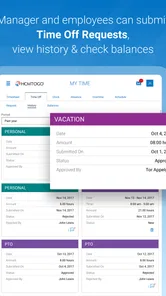
Picture this: you’re sipping coffee at your favorite café or lounging on your couch, and you’ve got to check your work schedule or request time off. With HCMToGo, all you need is your smartphone. It’s designed to make your work-life balance a little less chaotic and a lot more organized.
Capture and organize the small tasks
One practical way to use an employee app is to deal with HR tasks when they come to mind instead of saving them for a paper note or a later conversation. For example, if I notice a scheduling conflict while checking the week ahead, I can use the relevant workplace process to raise it promptly rather than rely on memory. I would still keep personal plans in my own calendar: a work app is not a substitute for an independent reminder system.
More From Our News Desk

Weather by Xiaomi Review: Clear at a Glance, Less Clear Up Close

X Under Pressure: Can It Recover When Posting Goes Wrong?

Clash of Clans Is Won Between the Battles

Android Auto Makes the Case for Quieter Car Software

MobiOffice: Transforming Mobile Productivity with Seamless Integration

EA SPORTS FC™ Mobile Soccer: Redefining Mobile Sports Gaming
It also helps to separate “I submitted a request” from “my request was approved.” That small habit prevents a common mix-up: making plans based on an action that may still need a manager’s response. For anything time-sensitive, I’d check the status in the app and follow the workplace’s normal channel if the matter needs a human answer.
Make a request easy to follow up
For a request that could affect a shift, I would check the relevant details before submitting it, then make a note in my personal calendar to revisit the outcome. The calendar reminder is not a second request; it is simply a prompt to verify the decision. This two-part approach is useful because a mobile workflow makes submission convenient, but convenience can also make it easy to assume that the process is finished.
The same principle applies to pay questions. An app can be a handy place to review available payroll information, but if an amount looks unfamiliar, I would gather the relevant details and ask the appropriate workplace contact rather than guess at the reason. Keeping the question specific makes it easier to get a useful answer and avoids treating an on-screen figure as an explanation by itself.
What Makes It Tick?
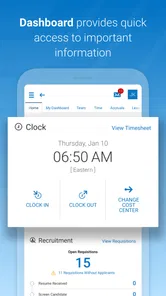
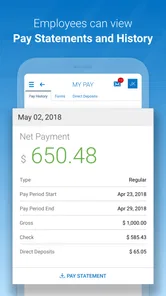
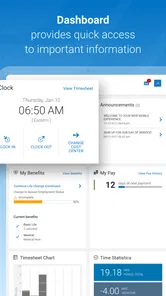
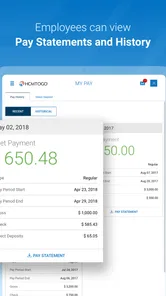
One of the first things I noticed about HCMToGo is its user-friendly interface. Trust me, even if you’re not tech-savvy, navigating through it is a breeze. You can easily clock in and out, view your pay stubs, and get updates on company news. It’s like having the company’s HR department in your hand.
Another great feature is how seamlessly it integrates with your existing HR systems. This means less manual data entry and more time for you to focus on what matters most – your work and personal life. Plus, it offers a secure way to manage your personal data, which is a huge relief knowing your info is safe.
Build a repeatable routine
I’d get the most out of an HR app by making a quick check part of a routine I already have: review the upcoming schedule at the start of the week, check for workplace updates before a shift, and handle a time entry or request when it is relevant. That is more dependable than opening the app only when something has gone wrong. If notifications are available in the setup, I’d use them as prompts, then still verify important details in the app rather than treating a notification as the complete record.
A realistic example is a worker who spots an appointment during a scheduled shift. They can check the work schedule, submit the appropriate request, and revisit it later to see whether the workplace has acted on it. The benefit is a clearer sequence and fewer forgotten follow-ups; the trade-off is that the employee still needs to understand the employer’s approval process.
Use the phone for quick checks, not every decision
For someone who works changing shifts, a short check before leaving home can help avoid relying on an old note or memory. I would confirm the schedule in the workplace system, then use my own calendar for travel, childcare, or other personal arrangements. Keeping those roles separate is a practical safeguard: the HR system remains the reference for work information, while the personal calendar helps organize the rest of the day.
There is a similar trade-off with alerts. They can draw attention to an update, but an alert is easy to miss, dismiss, or glance at without understanding the full context. I would treat it as a nudge to open the relevant information, especially when it affects a shift or request, rather than as proof that I have reviewed every detail.
Engagement and Connectivity
Now, let’s talk engagement. The app includes features that help you stay connected with your colleagues. Whether it’s sending a quick message or joining a team discussion, it’s all possible with just a few taps. It’s like keeping that office camaraderie alive, even when you’re working remotely.
Moreover, the notifications keep you in the loop. No more missing important updates or announcements. You get everything you need to stay informed and engaged, without the clutter.
When the mobile route is not enough
If a workplace update is unclear or seems to conflict with what a supervisor has said, I would not try to resolve the contradiction by relying on an alert alone. I’d check the full information in the app and ask the relevant person if it remains ambiguous. This is particularly important for changes that affect attendance or a time-sensitive request: a convenient record is valuable, but a clear answer matters more.
For employees who share a device, have limited access to their phone during work, or prefer not to keep work information on a personal device, the mobile approach may be inconvenient. In that case, the employer’s other approved route may be a better fit. The right choice is the one that lets you complete the task reliably, not the one that puts every task on a screen.
Where the convenience can break down
The main limitation is that a mobile interface cannot fix an unclear workplace process. If a schedule looks wrong, a request seems stuck, or a pay detail needs explanation, the app may help you find the relevant information, but a manager or HR contact may still be the right person to resolve it. I would avoid assuming that every employer enables the same tools or that every workplace uses the same steps.
There is also a practical trade-off in putting several kinds of work information on one phone: quick access is useful, but employees should be deliberate about checking sensitive details in an appropriate setting. If you prefer not to handle work matters on your personal device, or your employer’s system is not configured for your needs, the usual direct route through HR may suit you better.
Make the workflow resilient
A dependable routine should not collapse if you forget to open the app one day. For important items, I would keep a separate reminder to follow up, and I would use the employer’s normal contact route when a task is urgent or unclear. This is not needless duplication: the app can hold the workplace action, while the reminder helps me remember when to check its outcome.
I would also avoid entering a sensitive request while rushed or distracted. Taking a moment to review what I am submitting and what response I need can reduce avoidable back-and-forth. The convenience is strongest when the mobile step is simple and the employee knows what happens after submission; without that understanding, the phone can make an uncertain process feel faster without making it clearer.
The Little Things That Matter
What really stood out to me is the attention to detail. The app allows you to customize your dashboard according to what you need to access most frequently. It’s these little things that make HCMToGo not just an app, but a personalized experience.
If you’ve ever had to deal with the hassle of HR paperwork, you’ll appreciate how this app simplifies everything. It’s like having a personal assistant who takes care of all the nitty-gritty details for you.
Think about your own work pattern
The app is most compelling for people who check work information on the move, especially employees whose schedules or HR tasks are not confined to a desk. A worker who needs to review a shift before commuting, keep up with workplace notices, or handle a routine request may find a phone-based entry point more practical than waiting until they are near a computer.
It is less compelling for someone whose employer handles all HR matters through a different system, or for a worker who rarely needs mobile access and prefers a direct conversation for every question. A standalone calendar is simpler for personal planning, while email or a company chat can be more suitable for informal updates. Those tools do not necessarily connect to HR records, so they are alternatives only when the workplace process supports them.
Who should make it part of the routine?
I’d recommend it to employees whose organization already uses HCMToGo and who regularly need mobile access to work information. It is free, rated for Everyone, and has an average rating of 3.6 from around 11,000 ratings, with more than a million installs. Its current version is 1.102.4, and it first appeared on March 27, 2018. Those figures give a sense of its reach, but the real test is whether your employer’s setup makes the app useful for your role.
For a small team that manages everything informally, or for someone seeking a standalone shift planner, it may be more than necessary. I would first confirm that the employer supports it and that the tasks I care about are part of that setup. The app is best judged as a companion to an existing HR workflow, not a replacement for every workplace tool.
A practical adoption test
Rather than trying to move every work habit into the app immediately, I would start with one recurring task that the employer expects employees to handle there. Use it for that task, check how the result is confirmed, and decide whether it genuinely makes the routine easier. If the process is clear and the mobile access saves a trip to another channel, expanding its role may make sense. If the first task leads to uncertainty about who must act next, ask for guidance before depending on it for something more urgent.
That approach also answers a common question: does installing it by itself make it useful? Not necessarily. Its value depends on the organization’s setup and on whether the employee has a reason to use the available workflow. I would check with the employer before treating the app as the official place for scheduling, time, or payroll matters.
In conclusion, HCMToGo offers a seamless blend of functionality and convenience. It’s perfect for anyone who wants to manage their work commitments without the hassle. So, if you’re looking for an app that keeps you connected and organized, give it a try! Trust me, your work-life balance will thank you.
HCMToGo Frequently Asked Questions
Is HCMToGo free to download, and who can use it?
HCMToGo is free to download and is listed as suitable for everyone. It is a business app developed by Workforce Ready, with a modern version of the TotalHRWorks Mobile App as its store summary. Its intended use centers on workforce and HR tasks, so whether its features are available to you will depend on your organization’s setup and access.
What is HCMToGo and what can I use it for?
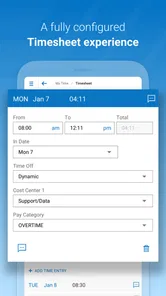
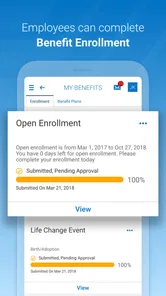
HCMToGo is a versatile Human Capital Management mobile application designed to help businesses manage their workforce efficiently. It offers features like time tracking, scheduling, payroll management, and employee self-service functionalities. This app is ideal for both employees and managers seeking to streamline HR processes and improve workforce productivity on the go.
Is HCMToGo compatible with both Android and iOS devices?
Yes, HCMToGo is compatible with both Android and iOS devices. It is available for download on the Google Play Store for Android users and the Apple App Store for iOS users, ensuring that the app is accessible to a wide range of mobile users looking to manage their HR tasks conveniently. The listed minimum operating system is version 11, so check that your device meets the requirement before installing.
How secure is the data within HCMToGo?
HCMToGo prioritizes user data security by implementing industry-standard encryption protocols and security measures to protect sensitive information. The app ensures that all personal and organizational data is securely stored and transmitted, making it a reliable choice for businesses concerned about data privacy and security.
What features does HCMToGo offer for employee self-service?
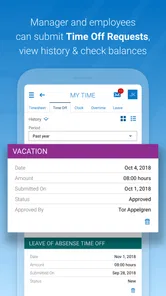
HCMToGo offers a comprehensive suite of employee self-service features, including the ability to view and manage personal information, access payslips, request time off, and track attendance. These features empower employees to take control of their HR-related tasks, reducing the administrative burden on HR departments and improving overall efficiency.
Pros
- User-friendly interface for easy navigation.
- Real-time updates on schedules and tasks.
- Seamless integration with payroll systems.
- Efficient time tracking and management.
- Supports multiple languages for global use.
Cons
- Occasional sync issues with server.
- Limited customization options for users.
- Requires stable internet connection.
- Complex setup process for beginners.
- No offline mode for remote areas.











