

Hawaiian Airlines
- 2.21K
- 4.6
- Installs
- 1.00M
- Price
- Free

Screenshots





Analysis by Reviewed
For a first trip to Hawaii, I’d want one reliable place to handle the airline side of the journey without making every airport step feel like a separate task. Hawaiian Airlines is a free travel app from Hawaiian Airlines, and its focus is practical: plan or manage a flight, check in, and keep useful trip details close at hand. It’s rated for Everyone, and its 4.6 average from around 27,000 ratings suggests many travelers find it worthwhile. I see it as most useful when you’re flying with this airline, rather than as a general-purpose travel planner.
What to expect from the app
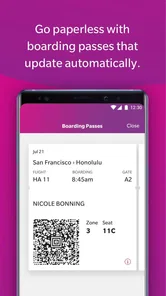
The app brings several airline tasks together on your phone. You can look for flights, book, manage a reservation, check in, and access a mobile boarding pass. Flight updates can also help you keep track of changes as travel day approaches. That combination is convenient, but it doesn’t replace every airport resource: I’d still pay attention to airline and airport announcements, especially if plans shift quickly.
It has passed one million installs, and the current version is 5.8.6.5878. The app was released on February 25, 2019, and supports devices running Android 10 or later. Those details make it easier to judge whether your phone is a fit before you start planning around it. If you use iOS, check the relevant app store for compatibility with your device.
Getting set up without overthinking it
After installing it, I’d start by searching for a flight or opening an existing reservation. If you already have a booking, keeping its details available while you get started can make it easier to find the right trip. Then review the itinerary and passenger information before travel day, rather than waiting until you’re in a busy terminal. That small bit of preparation makes the app more useful when time is tight.
If you’re new to the airline’s loyalty program, take a moment to see whether HawaiianMiles fits how often you travel. The app can show a miles balance and support reward-related tasks for members. I wouldn’t treat miles as an automatic discount on every trip; their usefulness depends on your travel habits and the options available when you’re ready to redeem them.
Easy and Efficient Booking
First things first, the booking process. With the Hawaiian Airlines app, booking your flight is as breezy as a Hawaiian beach day. The interface is user-friendly, and you can easily search for flights, compare prices, and book your tickets in just a few taps. You can also manage your bookings effortlessly, which is super handy if your plans change last minute. I’ve found the app's search functionality to be quite intuitive, saving me time and effort.
Choosing the right starting point
For a first-time user, the main decision is whether you’re still shopping around or already committed to a Hawaiian Airlines flight. If you’re comparing several airlines, I’d begin with a broad travel search so you can weigh routes and schedules across carriers in one place. Once you’ve chosen Hawaiian Airlines, this app becomes more relevant: it keeps the airline-specific parts of the trip within reach instead of trying to replace your whole planning routine.
More From Our News Desk

 Weather - By Xiaomi
Weather by Xiaomi Review: Clear at a Glance, Less Clear Up Close
Xiaomi’s weather app makes everyday forecasts quick to scan, but its calm surface can leave useful details and recovery paths harder to find than they should be.

 X
X Under Pressure: Can It Recover When Posting Goes Wrong?
A resilience-focused review of X, examining setup, mistaken posts, interruptions, weak connections, and the gaps that matter when recovery needs to be dependable.

 Clash of Clans
 Is Won Between the Battles
Its raids are quick; its community is a long-term project of coordination, teaching, rivalry, and shared responsibility—with all the friction that entails.

 Android Auto
 Makes the Case for Quieter Car Software
The car interface is no longer judged by how much it can do, but by how quietly it helps. Android Auto shows what drivers now expect—and what still gets in the way.

 MobiOffice: Word, Sheets, PDF
MobiOffice: Transforming Mobile Productivity with Seamless Integration
MobiOffice: Word, Sheets, PDF is redefining mobile productivity with a surprising blend of functionality and innovation.

 EA SPORTS FC Soccer Mobile 26
EA SPORTS FC™ Mobile Soccer: Redefining Mobile Sports Gaming
Dive into EA SPORTS FC™ Mobile Soccer, where immersive gameplay and strategic depth transform mobile sports gaming.
Latest News



That division of labor is useful when a holiday has several moving parts. I might use a general travel service to compare flights and organize lodging, then switch to the airline app for the reservation, check-in, boarding pass, and flight updates. It avoids duplicating every detail in multiple places, while preserving a direct way to see the airline portion. For a trip involving multiple carriers, I’d keep each airline’s own app available for its segment rather than expect one airline app to coordinate everything.
From reservation to boarding pass
Once your trip is booked, a useful first win is completing check-in and bringing up your boarding pass on your phone. I’d do this when you have a moment to review your details, not while juggling bags at the airport. Check that the displayed trip is the one you intend to travel on, and keep an eye on flight updates as departure gets closer. A mobile pass can reduce paper handling, though it’s sensible to have a backup plan if your phone battery runs low.
For a smoother first setup, I’d make sure I can access the reservation before relying on the app at the airport. If the trip doesn’t appear immediately, I’d recheck the information I used to locate it and confirm I’m looking at the correct itinerary. Once it’s visible, I’d scan the travel dates, passenger details, and route rather than tapping quickly through screens. The point is not to explore every menu; it’s to make sure the essential trip information is easy to find when you need it.
For example, imagine you’re leaving for the airport after work and want to confirm the flight is still on schedule. Checking the app before you set off can help you spot an update early enough to adjust your timing. At the airport, the boarding pass and trip information are easier to reach than a confirmation buried in your inbox. I’d still follow airport screens and staff instructions; an app is a helpful companion, not the final authority on every gate or operational change.
Using updates without relying on a single screen
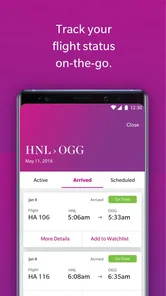
Flight updates are most valuable as a prompt to check what has changed, not as a reason to stop paying attention elsewhere. I’d look at the app before leaving home and again while making my way through the airport, then compare important changes with the terminal displays and announcements. That is a practical safeguard for any traveler, particularly when a schedule adjustment could affect ground transport, a pickup, or a connection.
If your plans involve meeting someone, share the planned arrival details with them separately and tell them you’ll send an update if the itinerary changes. This is more reliable than assuming another person can see the same information on your phone. The app can help you follow your own flight, but it doesn’t remove the need to communicate when other people’s plans depend on yours.
In-Flight Features
Once you’ve booked your flight, the app enhances your in-flight experience too. You can check in online, select your seats, and even get your boarding pass directly on your phone. No more fumbling with papers at the airport! The app also provides real-time flight updates, so you’re always in the know about your flight status. Trust me, you’ll appreciate this feature when there are unexpected delays.
There’s a useful distinction between what helps before boarding and what you should verify at the airport. A pass on your phone is convenient for carrying the trip information in one place, but I’d avoid treating it as a substitute for checking the current boarding instructions. If the phone is nearly out of power, the screen is hard to read, or you have trouble opening the pass, ask airline staff what to do rather than losing time trying the same action repeatedly.
Loyalty Rewards
Let’s not forget about the HawaiianMiles program. If you’re a frequent flyer, you’ll love how the app keeps track of your miles. You can easily view your reward balance and redeem miles for perks like upgrades or discounts. It’s a sweet deal if you ask me, especially if Hawaii is your go-to vacation spot. Plus, the app often features exclusive deals and promotions for its users, so it’s worth keeping an eye out.
For an occasional traveler, I’d treat the loyalty area as something to check when it has a clear purpose, not a reason to change your booking decision by itself. Before using miles, compare the available reward option with the cash fare and your own travel plans. A balance can be satisfying to see, but its practical value depends on whether the redemption fits the dates and trip you actually want. Frequent travelers are more likely to benefit from keeping that information handy.
Where its limits matter
This is an airline-focused tool, so I wouldn’t choose it as my only travel app if I needed to compare every carrier, coordinate a multi-airline itinerary, or organize hotels and activities in one place. For that, a general travel search or trip-planning service may be a better starting point. I’d use this app for the Hawaiian Airlines portion of a journey, then keep other bookings and plans in whatever system I already use.
There’s also a practical distinction between seeing a booking and resolving every complication. The app can make routine tasks more convenient, but a disrupted trip may still call for direct help or airport staff, depending on the situation. I’d check the reservation details after any change and avoid assuming that a saved screen reflects the latest information. That habit is especially useful when you’re traveling with other people or connecting onward.
It may also be the wrong choice if you want one place to plan an entire vacation before deciding which airline to fly. Its strength is the airline relationship, not neutral comparison across travel providers. Likewise, if you rarely fly Hawaiian Airlines and don’t need mobile check-in or trip updates for an upcoming journey, installing another app may not add much to your routine. I’d download it when there’s a real booking to manage, rather than expecting it to serve as a destination guide or universal itinerary organizer.
Travel Guides and Assistance
Planning your itinerary? The app has you covered with its travel guides and tips. From popular attractions to hidden gems, you’ll get recommendations tailored to your interests. It’s like having a local friend guide you through the islands. Additionally, customer support is just a tap away, which is reassuring if you run into any snags during your trip. The support team is responsive and helpful, making sure your travel experience remains stress-free.
When a question affects a booking, I’d first identify exactly what I need to resolve: a detail in the itinerary, a change to the trip, or help with an airport situation. Having the reservation open and the relevant information in front of you can make a support conversation more focused. If the issue is urgent at the airport, speaking with staff in person may be more practical than searching through app menus while a line or boarding process is moving.
A realistic first trip workflow
Picture a traveler who has booked a flight, is heading home from work the evening before departure, and wants to avoid a frantic morning. I’d open the app, locate the reservation, review the itinerary, and complete check-in when available. I’d then bring up the boarding pass once to confirm I know where it is, check for a flight update before leaving, and keep the phone charged for the journey. That simple sequence turns the app into a useful travel tool without adding a complicated checklist.
If traveling with family, I’d be especially careful to review the correct reservation and passenger details instead of assuming that one person’s screen covers every traveler’s needs. Before departure, I’d make sure everyone knows who is keeping the boarding information accessible and who will watch for announcements. The app can reduce paper handling, but a shared plan matters more when several people are moving through the airport together.
Who will get the most from it
I’d recommend it most to people who are booking with Hawaiian Airlines, want their reservation and boarding details easy to reach, or travel often enough to make checking HawaiianMiles worthwhile. It can also suit a first-time flyer who prefers to handle the basic airline steps on a phone before arriving at the airport. If you’re only browsing destinations or comparing airlines, start with a broader travel search instead; you can return here once you’ve chosen this carrier.
The app is also a sensible fit for someone who likes to prepare in small steps: find the booking, inspect the itinerary, check in, and revisit updates as the travel day gets closer. That approach is calmer than waiting until you reach the terminal to learn how the app works. On the other hand, travelers who prefer printed documents or don’t want airline tasks on a phone can still use other available airline and airport channels; the app is convenient, but it need not be the center of every person’s travel routine.
My simplest advice for a new user is to install it before departure day, locate the reservation, review the itinerary, and complete check-in when it becomes available for your trip. Then check for updates again before leaving for the airport. That sequence gives you a clear first success without expecting the app to manage every part of a vacation.
In summary, the Hawaiian Airlines app is more than just a tool for booking flights. It’s a comprehensive travel companion that enhances every step of your journey. Whether you’re planning a romantic getaway or a family vacation, this app ensures that your trip to Hawaii is as seamless as it is unforgettable. So, next time you’re dreaming of palm trees and sandy beaches, remember that paradise is just an app download away.
Hawaiian Airlines Frequently Asked Questions
When was the Hawaiian Airlines app released, and what is its current version?
The Hawaiian Airlines app was released on February 25, 2019, and its current version is 5.8.6.5878. These details can help you identify the app and check that you are looking at the right product before downloading. It is a travel app developed by Hawaiian Airlines for people who want to handle airline-related tasks from a mobile device.
How much storage space does the Hawaiian Airlines app require?
Before installing any travel app, it is sensible to check how much free storage your phone has, especially if you keep photos, videos, or other large apps on the device. The Hawaiian Airlines app is available for free and is designed to help with travel tasks such as booking and checking in. You can review the installation prompt on your device to see whether there is enough space to proceed.
Is the Hawaiian Airlines app free, and who is it intended for?
The Hawaiian Airlines app is free to download and is listed for everyone. It is a travel app from Hawaiian Airlines, designed for people who want to handle parts of their trip from a mobile device. You can use it to book and manage travel, check in, and access other airline-related tools without paying to download the app.
What features does the Hawaiian Airlines app offer?
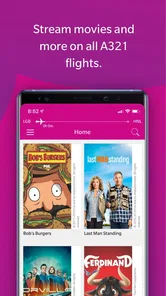
The Hawaiian Airlines app provides a range of features designed to enhance your travel experience. You can book flights, manage bookings, check-in for flights, and receive real-time flight status updates. Additionally, it offers HawaiianMiles account management, in-flight entertainment options, and airport maps to help you navigate your journey smoothly.
Is the Hawaiian Airlines app available for both Android and iOS devices?
Yes, the Hawaiian Airlines app is available for both Android and iOS platforms. You can download it from the Google Play Store for Android devices and the Apple App Store for iOS devices. The app is designed to ensure compatibility and optimal performance across a wide range of smartphones and tablets.
Pros
- User-friendly interface for easy booking.
- Loyalty program with great rewards.
- Real-time flight updates and notifications.
- Easy access to boarding passes and itineraries.
- In-flight entertainment options available.
Cons
- Limited international flight options.
- Occasional app crashes reported.
- Lacks multi-language support.
- No option for seat upgrades via app.
- Requires frequent updates.











