

Harvest Right
- 143.00
- 4.7
- Installs
- 10.00K
- Price
- Free

Screenshots
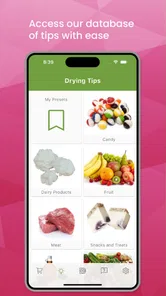
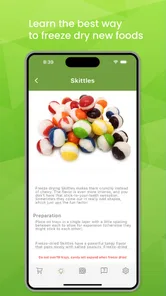
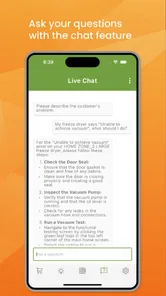
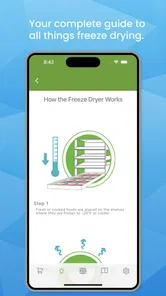
Analysis by Reviewed
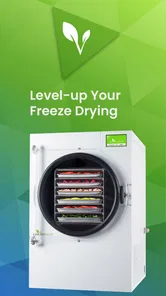
I approached Harvest Right as a companion for people who already own a Harvest Right freeze dryer and want a more direct way to stay connected to the process. It belongs to the House & Home category, is free to use, and is aimed at a very specific household task rather than general kitchen organization. That focus is its main appeal: instead of treating freeze drying as a collection of disconnected chores, it gives the machine a digital point of access.
My overall impression is positive, but with an important qualification. This is not the kind of app that becomes useful simply because it is installed. Its value depends on the relationship between the phone, the freeze dryer, the home network, and the person operating the batch. When those pieces line up, it can make the process feel more manageable. When they do not, the app can initially look like the problem even though the real issue is elsewhere.
Where the experience usually gets stuck
The first surprise is that a companion app for a freeze dryer is only as convenient as its setup. People often expect to open it and immediately see their appliance. In practice, the early experience is better understood as a connection check: the machine must be ready, the phone must be communicating properly, and the user must know which part of the process is controlled by the appliance itself rather than by the app.
That distinction matters because a phone interface can make a physical problem feel like a software problem. If the freeze dryer is not powered, is busy with another operation, or is not reachable through the same home setup the app expects, repeatedly tapping the screen will not solve anything. I found it more useful to treat the app as a window into the appliance, not as a replacement for checking the appliance.
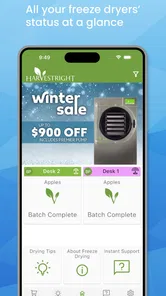
Another point where users may hesitate is deciding what “direct access” should mean in everyday use. The app is most helpful when I want to check on a batch without standing beside the machine every few minutes. It is less useful if I expect it to remove the need for preparation, loading, cleaning, or judgment. Freeze drying remains a hands-on household process, and the app cannot make every decision for you.
That is also why the audience is narrower than the store summary might suggest. If you do not own a compatible Harvest Right freeze dryer, there is little reason to install this. If you own one but only use it occasionally and prefer walking over to the machine, the benefit may be modest. The strongest case is for owners who run batches often, work in another room, or want a clearer way to keep track of what is happening during a long cycle.
The setup checks worth doing first
Before blaming the app, I would begin with the simple physical checks. Confirm that the freeze dryer is powered and responsive at its own controls. Make sure the door and other visible parts are in their expected position, and check that the machine is not already waiting for attention. These steps sound obvious, but they prevent a surprising amount of wasted time because an app cannot report useful progress from an appliance that is not ready to communicate.
More From Our News Desk

 Gmail
GmailGmail in a Busy Inbox: Who Benefits Most?
From first account to crowded workday, Gmail earns its place through dependable search and flexible sorting—but its best fit depends on how much inbox maintenance you can tolerate.

 Prime Video
Switching to Prime Video: What Changes in Your Viewing Routine
Prime Video can make a compelling second home for streaming, but switching means learning a different catalog, rental layer, and route from browsing to playback.

 Universal TV Remote Control
Universal TV Remote Control Works Best as a Reliable Backup
A phone remote earns its place through quick setup and reliable habits. Here is how to get more from Universal TV Remote Control—and where its limits show.

 Weather - By Xiaomi
Weather by Xiaomi Review: Clear at a Glance, Less Clear Up Close
Xiaomi’s weather app makes everyday forecasts quick to scan, but its calm surface can leave useful details and recovery paths harder to find than they should be.

 X
XX Under Pressure: Can It Recover When Posting Goes Wrong?
A resilience-focused review of X, examining setup, mistaken posts, interruptions, weak connections, and the gaps that matter when recovery needs to be dependable.

 Clash of Clans
Clash of Clans Is Won Between the Battles
Its raids are quick; its community is a long-term project of coordination, teaching, rivalry, and shared responsibility—with all the friction that entails.
Latest News



Next, I would keep the phone reasonably close during the first connection attempt. This is not because distance is always the cause, but because reducing variables makes the initial setup easier to understand. If the connection works nearby but becomes unreliable later, that points toward the household network or signal path rather than the basic pairing process.
The phone itself deserves a quick check too. Harvest Right supports Android devices from version 7.0 onward, so an older phone may still meet the operating-system requirement, but an outdated or unstable device can create its own friction. I would close unnecessary apps, restart the phone if the connection behaves strangely, and make sure the application has been updated before spending time on more complicated theories.
One practical habit helped me: I would change only one thing at a time. Restarting the machine, changing the phone network, reinstalling the app, and moving the appliance all at once makes it impossible to know what fixed the problem. A slower sequence is more informative. First confirm the appliance, then the phone, then the connection, and only afterward consider reinstalling or resetting anything.
It is also worth deciding where the app fits into your routine before you begin a batch. For example, I would use the phone to check status while preparing other food, but I would still inspect the machine directly before leaving the house. That division of responsibility is sensible: the app can reduce unnecessary trips, while a physical inspection remains the better choice when safety, loading, or unusual sounds are involved.
A more reliable freeze-drying workflow
The best way to use the app is as part of a repeatable workflow rather than as a substitute for one. I would start by preparing the food and the trays as usual, checking the freeze dryer directly, and then using the app to stay aware of the batch afterward. This keeps the phone in a supporting role, where it is strongest.
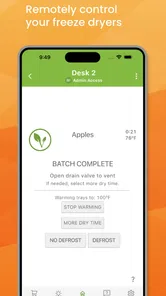
For a realistic household example, imagine starting a batch in the evening after preparing produce or leftovers. I would confirm the machine’s physical state, begin the process, and then use the app to check from another room rather than interrupting dinner or repeatedly opening the door. If the status appears normal, I can leave the machine alone and return for a deliberate inspection later. That is a small convenience, but over many batches it can make the appliance feel less demanding.
A useful habit is to record the food and the start of the batch somewhere outside the app as well. I would note what went into the trays and any preparation detail that may matter next time. This is not a criticism of Harvest Right; it is a practical safeguard. A companion app can help with access to the current machine, while a simple personal note gives you a longer-term reference for comparing results and remembering what you changed.
If the app stops showing the expected state, I would avoid immediately stopping a running batch. First look at the machine itself. If its controls appear normal, wait briefly and try the app again after checking the phone connection. If the machine itself shows an alert or behaves unusually, treat that as an appliance issue first. The safest recovery is to preserve the current state until you understand what has happened, rather than making several commands in quick succession.
This is one of the more important trade-offs. Remote access is convenient, but convenience can encourage overconfidence. I would not use a phone status screen as the only reason to ignore a physical warning, unusual noise, power interruption, or visible problem. The app is useful for reducing routine checking; it should not become a reason to skip basic care.
What to do when a batch or connection behaves oddly
When the app appears stuck, I would separate three possibilities: the display is delayed, the connection has dropped, or the freeze dryer itself needs attention. That simple separation prevents unnecessary resets. Check the appliance directly, then check whether the phone can reconnect, and only then decide whether the app needs to be restarted.
If the machine is operating normally but the phone is not updating, closing and reopening the app is a reasonable first step. A phone restart can help when the device has been running for a long time or has recently switched between networks. I would also return the phone to the same home connection used during setup rather than testing from an unfamiliar network and assuming the result represents normal operation.
Reinstalling is a more disruptive step, so I would save it for cases where ordinary restarting does not help. Before doing that, I would make sure I understand whether any current connection or account details will need to be entered again. The point is not to avoid reinstalling forever; it is to avoid turning a temporary communication issue into a longer setup task while a batch is in progress.
Another realistic recovery situation is a brief power or network interruption. In that case, I would inspect the freeze dryer directly before relying on the phone again. The machine’s own state is the primary reference. Once the appliance is stable, I would restore the phone connection and use the app to resume monitoring. I would not assume that a missing update means the batch has stopped, and I would not assume that a restored connection means every earlier event has been displayed perfectly.
These habits are particularly important for people who run batches overnight or while away from the kitchen. The app can reduce needless checking, but it does not turn an unattended appliance into a fully automatic household system. I see it as a monitoring aid that works best when the owner has already created sensible routines around preparation and inspection.
When the app is not the real cause
It is easy to blame the application when the underlying issue is the home environment. A weak wireless signal, a router problem, a phone that has lost its connection, or a machine that is not ready can all produce similar symptoms from the user’s point of view. That is why I would test the simplest explanation first instead of judging the app from one failed connection.
The physical placement of the freeze dryer can matter as well. A machine in a basement, utility room, garage, or other separated area may be harder for a phone to reach consistently than one near the router. If the app works reliably when the phone is nearby but not from the usual living area, the limitation may be signal coverage. In that situation, improving the home network may help more than changing the app.
There is also a human factor. If I start a batch without checking the appliance, forget what I loaded, or expect the app to interpret the condition of the food, no software update will solve the workflow problem. The application can provide access to the freeze dryer, but it cannot replace experience with preparation, storage, or deciding when a finished result is ready to handle.
This is where a traditional alternative can be better. An owner who prefers a simple, local routine may be happier using the machine’s controls and a paper notebook. A notebook cannot provide remote access, but it is dependable, easy to annotate, and unaffected by phone compatibility or network interruptions. For occasional users, that simplicity may outweigh the convenience of a connected companion.
On the other hand, a frequent user may find the usual alternative unnecessarily inconvenient. Walking to the appliance for every routine check takes time, particularly when the machine is located away from the kitchen or when several household tasks are happening at once. For that person, Harvest Right earns its place by making ordinary monitoring less disruptive, even though direct inspection remains essential for unusual situations.
Who will get the most from it
I would recommend this app most strongly to existing Harvest Right owners who run batches regularly and want a practical way to stay informed while doing other things. It is especially sensible for someone who prepares food in stages, checks the machine from different parts of the home, or wants to build a more consistent routine around freeze drying.
It may also suit households where more than one person shares responsibility for the appliance. A connected view can make it easier for the person who did not start the batch to understand that something is already running. Even then, I would keep a basic handoff habit: note what was loaded, when it was started, and whether anything unusual happened during preparation.
The app is less compelling for someone shopping for a general food-preservation tool, because it is not a substitute for owning and operating the associated appliance. It is also not the right choice for people who want a broad recipe library, meal planner, or all-purpose smart-home dashboard. Its purpose is much narrower, and that narrowness is both its strength and its limitation.
On the technical side, the free price makes trying it low-risk, and the Everyone content rating keeps it approachable for household use. Harvest Right is the developer, and the app has reached a 4.7 average from over 800 ratings, with more than 100 written reviews and over 10 thousand installs. Those figures suggest a useful level of adoption, but I would still judge it by whether it fits your appliance routine rather than by popularity alone.
What changed my view after regular use
My strongest positive takeaway is not that the app eliminates work. It is that it can make the waiting portions of freeze drying less intrusive. The appliance still needs preparation and attention, but the user does not have to remain physically beside it for every ordinary status check. That is a meaningful improvement for a long-running household process.
The biggest limitation is the dependency chain. A connected experience introduces more points to check than a purely local workflow: the appliance, the phone, and the home connection all have to cooperate. Users who dislike troubleshooting may find that frustrating, especially if they expect a companion app to be simpler than the machine it supports.
I also think expectations should be kept realistic around remote control. Direct access sounds powerful, but responsible use still means knowing when not to rely on a screen. If the machine shows a warning, if the power has been interrupted, or if something looks physically wrong, I would move from the phone to the appliance immediately. That is not a weakness unique to this app; it is the sensible boundary for connected equipment.
The current version is 1.0.58, and the app was released on August 9, 2024. I would keep it updated on a compatible device, but I would not treat an update as a guaranteed solution to every connection problem. Updates can improve the software, while placement, network quality, and appliance state remain separate parts of the experience.
For Android users, the minimum operating-system requirement is Android 7.0, which gives the app a broad compatibility range. Still, meeting the minimum does not guarantee a smooth experience on every older phone. If your device is slow, frequently disconnects, or struggles with other connected appliances, the phone may be contributing to the friction.
My practical verdict
I see Harvest Right as a worthwhile companion for the specific owner it is designed to help. It does not transform freeze drying into a push-button task, and it is not valuable without the corresponding appliance. What it does offer is a more convenient way to stay connected during normal operation, especially when the machine is running while I am occupied elsewhere.
I would install it if I owned a Harvest Right freeze dryer and wanted to reduce routine trips to the machine. I would pair that convenience with a short checklist: confirm the appliance directly, keep the phone connection sensible, change one troubleshooting step at a time, and treat physical warnings as more important than an app display. Those habits make the software more useful and prevent it from creating false confidence.
If your preference is a completely local, low-tech routine, the machine’s controls plus a notebook may remain the better option. If you regularly monitor batches and value remote access inside the home, the free companion is easier to justify. The app is at its best when it removes unnecessary checking, not when it tries to replace good freeze-dryer judgment.
Harvest Right Frequently Asked Questions
What devices and operating system does Harvest Right support?
Harvest Right is an app in the House & Home category, developed by Harvest Right. It requires Android 7.0 or later, so check your device’s operating system before downloading. The app is free, is rated for Everyone, and is intended to give users direct access to their freeze dryer and help maximize freeze drying.
What is Harvest Right, and what does the app do?
Harvest Right is primarily a brand known for home and commercial freeze dryers, rather than a conventional standalone mobile game or productivity app. Its digital resources may help owners learn about freeze-drying, find operating guidance, access recipes, and manage product information. Before downloading anything labeled Harvest Right, check the publisher, reviews, permissions, and whether it is an official companion resource for your specific freeze-dryer model.
Can I use the Harvest Right app without owning a Harvest Right freeze dryer?
You may be able to browse educational material, recipes, product information, or support resources without owning a machine, depending on the version and region. However, the most useful features are generally intended for Harvest Right customers, such as operating assistance, maintenance guidance, or access to model-specific information. Confirm compatibility before relying on the app for setup or troubleshooting.
Does Harvest Right provide instructions for operating and maintaining the freeze dryer?
Harvest Right’s official digital resources commonly focus on helping users understand preparation, freeze-drying cycles, vacuum-pump care, cleaning, storage, and troubleshooting. Instructions can vary according to the machine size, pump type, software version, and food being processed. Always compare in-app guidance with the current official manual and safety instructions supplied with your equipment.
Is the Harvest Right app free to download, and are there any additional costs?
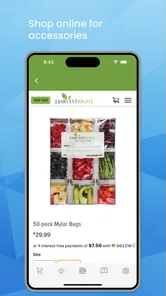
The Harvest Right app is free to download. This does not mean that all related services or products are free: the freeze dryer, accessories, replacement parts, and food supplies are separate expenses. Check the app’s store page for any applicable purchase options or account requirements, and review the terms before using paid products or services connected with freeze-drying.
Pros
- Clear freeze-drying guidance helps beginners get started confidently.
- Supports food preservation for emergencies
- camping
- and long-term storage.
- Can preserve texture
- flavor
- and nutrients better than traditional drying.
- Useful for processing garden harvests and reducing household food waste.
- Compatible with a wide variety of foods
- including snacks and complete meals.
Cons
- The machine requires significant counter or floor space in smaller kitchens.
- Freeze-drying batches can take many hours
- limiting same-day food preparation.
- Food must be cut evenly and prepared carefully for consistent results.
- Stored food still needs airtight packaging and moisture absorbers afterward.
- The process may be impractical for users who preserve food only occasionally.







