

Happy Tunes - Earn & Play
- 29.00
- 4.3
- Installs
- 100.00K
- Price
- Free

Screenshots
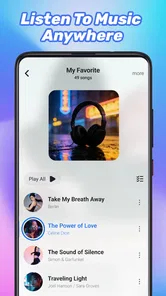

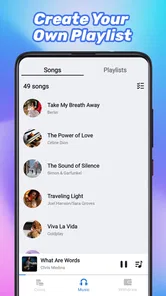
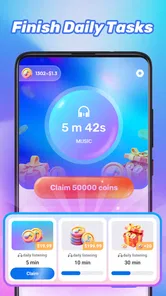

Analysis by Reviewed
I approached Happy Tunes - Earn & Play as a small music companion rather than a complete studio or professional publishing tool. Its simple promise is easy to understand: keep music close at hand and make listening feel lighter during ordinary moments. After spending time with it, I found that its main appeal is convenience. It is aimed at people who want a straightforward music-and-audio app on an Android device, not creators looking for a full production environment.
That distinction matters. Many music apps try to be streaming services, social platforms, recording suites, or learning tools all at once. This one feels more focused in spirit. FortuneView Developer presents it as an app for carrying music with you, and the short store description, “Happy Tunes,” sets an upbeat, uncomplicated tone. I would recommend trying it if you want something approachable and free, but I would not treat it as a replacement for a serious editor, a large streaming catalog, or a desktop workflow.
Starting with a simple listening routine
The best way to approach this app is to begin with a specific everyday need. I found it more useful when I decided exactly when I wanted to use it: during a walk, while doing light household work, or when I needed a quick audio break without opening a more complicated service. That kind of narrow starting point prevents disappointment. Happy Tunes - Earn & Play is easier to judge as a convenient music app than as an all-purpose creative workstation.
Its Music & Audio category also sets a reasonable expectation. The experience is centered on listening and casual engagement, so I would not install it expecting multitrack recording, detailed waveform editing, mastering controls, or a publishing pipeline. Those tools belong to a different class of product. If your goal is to produce a finished song from a brief and deliver stems to a client, this is not the right starting point. If your goal is to have an accessible audio option ready when you need it, the concept makes more sense.
One practical advantage is the low barrier to entry. The app is free, carries an Everyone content rating, and supports Android seven point zero and later. That combination makes it approachable for families and for people using older compatible phones. I still suggest checking how it feels on your particular device before making it part of a daily routine, especially if your phone has limited storage or tends to slow down when several apps are open.
The store page shows an average rating of 4.2 from over 600 ratings, with more than 20 written reviews and over 100 thousand installs. Those figures suggest that the app has attracted a real audience, while also reminding me not to mistake popularity for a guarantee that every listener will enjoy the same experience. Music preferences are personal, and simple audio apps can feel either refreshingly direct or too limited depending on what you normally use.
Who gets the most from it
I see three especially sensible audiences. First are casual listeners who want an uncomplicated music app without paying an upfront price. Second are people who enjoy trying lightweight entertainment apps rather than committing immediately to a large subscription service. Third are users who want a basic audio option for short sessions and do not need advanced organization or production tools.
More From Our News Desk

 Gmail
GmailGmail in a Busy Inbox: Who Benefits Most?
From first account to crowded workday, Gmail earns its place through dependable search and flexible sorting—but its best fit depends on how much inbox maintenance you can tolerate.

 Prime Video
Switching to Prime Video: What Changes in Your Viewing Routine
Prime Video can make a compelling second home for streaming, but switching means learning a different catalog, rental layer, and route from browsing to playback.

 Universal TV Remote Control
Universal TV Remote Control Works Best as a Reliable Backup
A phone remote earns its place through quick setup and reliable habits. Here is how to get more from Universal TV Remote Control—and where its limits show.

 Weather - By Xiaomi
Weather by Xiaomi Review: Clear at a Glance, Less Clear Up Close
Xiaomi’s weather app makes everyday forecasts quick to scan, but its calm surface can leave useful details and recovery paths harder to find than they should be.

 X
XX Under Pressure: Can It Recover When Posting Goes Wrong?
A resilience-focused review of X, examining setup, mistaken posts, interruptions, weak connections, and the gaps that matter when recovery needs to be dependable.

 Clash of Clans
Clash of Clans Is Won Between the Battles
Its raids are quick; its community is a long-term project of coordination, teaching, rivalry, and shared responsibility—with all the friction that entails.
Latest News



The app is less convincing for anyone who already depends on carefully managed playlists, lossless playback, extensive discovery features, offline libraries, or professional editing. A conventional streaming service will usually be the better choice for catalog depth and recommendation quality. A dedicated audio editor will be better for cutting, arranging, recording, and exporting creative work. Happy Tunes sits between those expectations only if you keep the scope modest.
Using the app as part of the making process
When I assess a creative app, I look at the path from the first idea to the final handoff. Here, that path is deliberately short. The creative starting point is not a blank canvas with production controls; it is the decision to choose a listening moment and make audio part of it. That may sound less ambitious, but it can be useful. A tool that gets out of the way has value when the task is simply to start listening rather than spend time configuring a project.
A realistic scenario is a short afternoon break. I might put my phone aside, open the app, and use it for a few songs while stepping away from work. In that situation, speed and clarity matter more than deep customization. I do not need a mixing console or a complicated library screen. I need the app to feel understandable enough that I can begin without turning the break into another technical task.
Another use case is background audio while doing repetitive work. Here, the trade-off becomes clearer. A dedicated streaming app may offer stronger queue management and more predictable control over what comes next. Happy Tunes can still be appealing when I want a lighter experience, but I would not choose it for a carefully timed event, a workout plan that depends on exact tracks, or a professional setting where interruptions would be inconvenient.
My advice is to establish a small personal routine before judging it. Try the same listening task on several occasions rather than opening it once and deciding immediately. Notice how quickly you can reach the audio you want, whether the controls feel obvious, and whether the app fits naturally into the way you use your phone. This is a more useful test than comparing screenshots or assuming that a high-level store summary explains the entire experience.
Where the creative workflow stops
The phrase “making creative output” needs careful handling here. Happy Tunes may support the beginning of an audio-related routine, but it should not be confused with a production suite. I would not plan a song around it, record a client voice-over in it, or expect to prepare a polished release from inside the app. There is no reason to force those jobs onto a tool whose appeal is its lightweight nature.
If I were working on a podcast, I would use a recorder and editor designed for trimming, noise control, arrangement, and file delivery. If I were composing, I would want instruments, timing controls, track layers, and export choices. If I were publishing, I would need metadata and a dependable handoff process. Those are separate needs. Happy Tunes is better viewed as a listening endpoint or a casual part of the inspiration stage, not the entire creative chain.
That limitation is not automatically a flaw. Apps become frustrating when they pretend to replace tools they were never designed to replace. In this case, keeping expectations realistic makes the experience more pleasant. I can use it to get into the mood to create, take a short audio break, or enjoy music without asking it to manage a complex project.
Iteration, routine, and everyday friction
Iteration in a listening app is different from iteration in an editor. Instead of refining a track, I refine the way I use the app. I might change when I open it, decide whether it suits focused work or relaxed listening, and compare it with the audio apps already installed on my phone. That process helps reveal whether it adds something useful or merely duplicates an existing shortcut.
One non-obvious tip is to judge it by transition time rather than by a single listening session. The real question is not only whether the audio is pleasant, but whether moving from “I want music” to “music is playing” feels easy enough to repeat. A small amount of friction becomes noticeable when an app is used several times a day. If the path feels natural, the app can earn a place in a routine; if it feels slower than your usual player, its free price may not compensate for the inconvenience.
A second useful test is to separate discovery from reliability. An app can be enjoyable for browsing or casual exploration while still being a poor choice for planned listening. I would use Happy Tunes for flexible moments first, then decide whether it is dependable enough for longer sessions. For travel, I would be especially cautious about assuming that a listening experience will behave like a fully featured offline music library. I would prepare a backup option rather than relying on one lightweight app for an important journey.
A third insight concerns device age. Because the minimum operating system is Android seven point zero, the app is open to users who are not running the newest phone software. That is helpful, but compatibility alone does not tell me how smoothly every older device will behave. On an aging phone, I would close unnecessary background apps, keep the system updated as far as the device allows, and pay attention to battery behavior during longer sessions. Those are sensible precautions for any audio app, but they matter more when the phone is already under strain.
Version 1.0.1 also makes me think of the app as an early-stage product rather than a mature platform with years of refinement behind it. I would install it with curiosity, use it for a while, and keep an alternative available until it proves that it fits my habits. That is not a criticism of the developer; it is simply a practical way to evaluate a relatively early version without making it responsible for every music task.
Balancing simplicity against control
The central trade-off is straightforward: simplicity can make an app welcoming, but it can also remove the controls that experienced listeners expect. I like a clean starting point when I want a quick audio break. I become less enthusiastic when I need precise organization, a carefully prepared sequence, or a creative handoff.
For example, a student who wants background music while reading may appreciate not having to learn a complicated interface. A small creator who needs to review a draft, mark sections, and send a finished file will probably be better served elsewhere. A parent looking for an Everyone-rated app may find the accessibility reassuring, while a professional musician will likely outgrow the experience quickly.
I would also avoid choosing it solely because it is free. Free removes a financial barrier, but the better question is whether the app saves time and fits your listening habits. If your current player already handles your library perfectly, Happy Tunes may not add enough value. If your current setup feels too heavy for casual sessions, this app has a clearer opportunity to be useful.
Export, handoff, and choosing the right companion tool
For creative work, export and handoff are often where an app proves its worth. This is where I would keep expectations especially measured. I would not use Happy Tunes as the final delivery point for a musical project, because a professional handoff normally requires control over files, formats, naming, versions, and revisions. A dedicated editor or file-sharing workflow is more appropriate for those responsibilities.
That does not make the app irrelevant to creators. It can still occupy the earliest part of a workflow: finding a mood, taking a mental reset, or listening before returning to a project. I sometimes find that a short break with music helps me hear a draft more objectively afterward. The important distinction is that the app supports the creator’s routine rather than managing the creative asset itself.
If I were recommending a workflow to a friend, I would pair this app with a proper editor instead of asking it to do everything. Use a recording tool to capture ideas, an editor to shape them, cloud storage or another transfer method to hand them off, and Happy Tunes only where it genuinely helps with casual listening or inspiration. That division of labor is more dependable than expecting one small app to cover the entire path from concept to delivery.
Compared with a usual streaming alternative, the likely advantage here is approachability and the absence of an upfront charge. The usual alternative may win on catalog organization, personalization, device continuity, and established playback tools. Compared with a music-making app, Happy Tunes is easier to approach but far less suitable for actual production. Compared with a basic phone player, it may feel more purpose-built for a cheerful listening session, though the built-in option may remain faster if your own files are already organized.
Before installing, I would ask myself four practical questions. Do I want casual audio or a complete music library? Do I need to create or edit files? Will I use it mainly for short sessions or dependable long listening? And am I comfortable keeping a second app for more advanced tasks? If the answers point toward casual listening, the app is worth trying. If they point toward control, ownership, and professional delivery, I would choose a more specialized tool.
My verdict for everyday listeners and creators
After looking at it as both a music app and a possible part of a creative routine, I see Happy Tunes - Earn & Play as a modest, accessible option rather than a complete audio solution. Its strongest quality is the low-pressure idea behind it: open a free app, bring music into an ordinary moment, and avoid turning a simple listening session into a technical project.
I would recommend it to a friend who wants an easy experiment, uses a compatible Android phone, and does not need professional controls. The Everyone rating and broad Android compatibility make it approachable, while the growing install base and generally positive average rating offer enough reason to give it a fair trial. I would still evaluate it through actual daily use instead of assuming it will replace a favorite player.
I would skip it if I needed advanced editing, detailed playlist management, reliable project export, or a serious publishing workflow. In those cases, a dedicated streaming service, local music player, recorder, or editor will be a better match. The app’s limitations become important as soon as the task moves from listening to producing and delivering creative work.
My final advice is to give it one clearly defined job. Use it for short music breaks, casual background listening, or a gentle way to reset before returning to a creative project. If it performs that job comfortably, it has earned a place on your phone. If you find yourself searching for editing controls, export options, or deeper library management, move to a specialized alternative rather than fighting the app’s simple design. Its value is not in replacing every music tool; it is in making casual listening feel easy enough to repeat.
Happy Tunes - Earn & Play Frequently Asked Questions
Who publishes Happy Tunes - Earn & Play, and what kind of app is it?
Happy Tunes - Earn & Play is a Music & Audio app from FortuneView Developer. Its short description is simply “Happy Tunes,” while its main message is to take your music with you wherever you go. If you are looking for a music-focused app with an entertainment and rewards angle, that gives you a quick idea of its general appeal before you install it.
Will Happy Tunes - Earn & Play run on my phone?
The app requires Android 7.0 or later, so check your device’s operating-system version before downloading it. It is currently version 1.0.1, and keeping an app updated can help you access its latest available features and fixes. Happy Tunes - Earn & Play is also rated for Everyone, making its content rating suitable for a broad audience.
What is Happy Tunes - Earn & Play, and how does it work?
Happy Tunes - Earn & Play is an entertainment and rewards app that combines casual music-related activities with opportunities to collect in-app points or rewards. After installing it, users typically complete available tasks, interact with content, and monitor their balance through the app. The exact activities, reward values, and availability may vary by location, account status, and current promotions.
Can you really earn money or gift cards with Happy Tunes - Earn & Play?
The app may offer rewards for completing eligible activities, but earnings should be viewed as a small bonus rather than a dependable source of income. Reward amounts, redemption options, minimum thresholds, and processing times can change. Before spending significant time in the app, check the current terms, supported payout methods, and user requirements, because rewards may not be available in every country.
Is Happy Tunes - Earn & Play free to download and use?
Happy Tunes - Earn & Play is free to download, although the experience may include advertising, optional offers, or other monetization features. A free download does not automatically mean that every feature is unrestricted or that rewards are guaranteed. Review the store listing, permissions, subscription details, and any in-app purchase information before confirming installation.
Pros
- Offers simple games that are easy to start playing.
- Short sessions make it convenient for quick breaks.
- Reward progress can add motivation to keep playing.
- The interface is generally straightforward for new users.
- Provides a casual way to explore different mini-games.
Cons
- Rewards may require considerable time before becoming worthwhile.
- Some offers or games may not be available in every region.
- Frequent ads can interrupt gameplay and reduce enjoyment.
- Earning conditions may vary between tasks and promotions.
- The app may collect usage data for personalization or advertising.












