Handshake: Jobs & AI work
- 1.23K
- 4.4
- Installs
- 1.00M
- Price
- Free

Screenshots


Analysis by Reviewed
I’d treat Handshake Jobs & New Careers as a starting point for exploring work, not as a magic route to an offer. It is a business app from Handshake (Stryder Corp.) that focuses on opportunities for students and recent graduates, including internships and jobs. If you are just beginning to build a career, that focus can make the search feel more relevant than browsing a general job board where entry-level roles sit beside postings for every stage of a career.
Who will get the most from it
I see the clearest fit for students who are still learning what their field looks like beyond lectures, and recent graduates who want to compare early-career paths without starting from scratch on a broad job site. It can also help someone returning to a search after a quiet semester: employer activity and role listings give you concrete things to investigate, even if you are not ready to apply that day.
It is less suited to someone seeking senior positions, freelance gigs as a primary income source, or a very specialized role that depends on a narrow professional network. In those cases, I’d use a specialist board, direct employer pages, or industry contacts as the main route, and treat Handshake as a secondary source if relevant opportunities appear. Its student-and-graduate focus is valuable precisely because it is not trying to serve every kind of job hunter equally.
Discovering Opportunities
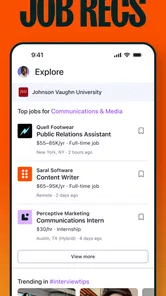
One of the first things that struck me about Handshake Jobs & New Careers is how user-friendly it is. The app's interface is sleek, making it super easy to navigate through various job postings. Whether you’re searching for internships, part-time gigs, or full-time positions, there's a wide range of opportunities listed. You can filter jobs based on your interests, location, and even the type of company you’re eyeing. It's like having a personal job scout right in your pocket!
Start with a useful search, not a perfect plan
On a first visit, I’d begin with a broad idea—an area of study, a kind of role, or a location—and then narrow the results once I see what employers are asking for. That is less intimidating than trying to choose the exact job title before you know what entry-level work in your field looks like. Save a few promising possibilities outside the app in a simple notes document, along with the skills and deadlines each one calls for. This turns browsing into a practical comparison rather than an endless scroll.
A realistic first session might be a student checking the app between classes, filtering for nearby internships, and opening a few listings to compare responsibilities. The useful outcome is not necessarily applying on the spot; it may be discovering that several roles ask for similar experience or skills. I’d use that pattern to decide what to highlight in a profile or learn next, then return with a more focused search.
Make the first session manageable
For a new user, I’d set a small goal before opening the app: identify a handful of roles worth understanding, rather than expecting to find the perfect opening immediately. Read beyond the title and look for the work itself, the qualifications, and any timing details. If a listing sounds appealing but its requirements are unfamiliar, write down the terms and compare them across other postings. That gives you a useful vocabulary for refining searches and discussing your interests with a career adviser or mentor.
More From Our News Desk

Weather by Xiaomi Review: Clear at a Glance, Less Clear Up Close

X Under Pressure: Can It Recover When Posting Goes Wrong?

Clash of Clans Is Won Between the Battles

Android Auto Makes the Case for Quieter Car Software

MobiOffice: Transforming Mobile Productivity with Seamless Integration

EA SPORTS FC™ Mobile Soccer: Redefining Mobile Sports Gaming
It also helps to separate exploration from application work. A quick browse can answer, “What kinds of roles exist?” A later session can be for checking fit and preparing materials. Mixing those tasks often makes every listing feel like a decision you have to make immediately. I find it less stressful to keep a short shortlist, note why each role caught my attention, and return when I can give the application proper attention.
Connecting with Employers
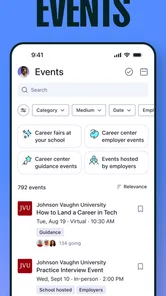
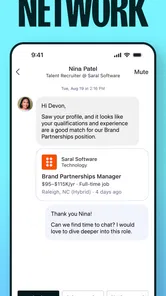
What really sets this app apart is its unique approach to connecting users with potential employers. You can follow companies to stay updated on their latest job postings and even attend virtual career fairs through the app. This feature allows you to engage with employers in a way that's both convenient and efficient. Plus, the app provides insights into company cultures and reviews from current employees, which is invaluable information when considering where to apply.
Following a company is most useful when you have a reason to keep an eye on it, rather than treating every appealing employer as a must-follow. I’d choose a small set of organizations that match my interests, then revisit their updates alongside current openings. At a virtual career fair, I’d prepare a concise introduction and one specific question about the role or hiring process; that gives a conversation more direction than simply asking whether jobs are available.
Use employer contact deliberately
A virtual event can feel less formal than an interview, but I would still prepare as if my time with an employer matters. Before joining, I’d read the relevant job details and choose a question that cannot be answered by the title alone—for example, what a typical early-career project involves or what qualities help a new hire settle into the role. Afterward, I’d jot down the answer and any next step while it is fresh. That small habit makes it easier to compare employers later instead of relying on a vague impression.
Company culture information and employee reviews are useful context, not a substitute for judging a specific position. A positive impression of an organization does not automatically mean the team, location, schedule, or responsibilities suit you. I’d use those details to form better questions and spot themes, while checking the actual posting and any conversation with the employer before deciding whether to apply.
Building Your Professional Profile
Another standout feature is the ability to build a comprehensive professional profile. Think of it as your digital resume that showcases your skills, experiences, and educational background. The app guides you on how to optimize your profile to catch the eye of potential employers. And trust me, having a well-crafted profile can make all the difference in standing out in a competitive job market.
For a first-time user with little formal work history, a profile can still communicate useful evidence: coursework, projects, volunteering, campus activities, and the specific contribution you made. I’d describe outcomes clearly instead of relying on broad labels such as “hard-working.” A project entry, for example, is stronger when it explains what you built or researched and what tools or skills you used. Keep the details consistent with the résumé you send elsewhere, so an employer does not encounter mismatched dates or descriptions.
Make your profile easier to use
I would treat profile writing as an editing task, not a one-time form to rush through. Start with the experiences that best demonstrate the kind of work you want, then make the wording concrete enough that an employer can understand your contribution without knowing your course or club. If you have several different interests, keep the profile accurate and use your searches to explore each path rather than trying to make one description sound like a perfect match for every role.
One practical trade-off is time: polishing every line before browsing can delay the discovery that would tell you what employers actually value. I’d first add enough accurate information to make the profile useful, explore a few relevant listings, and then revise it using recurring requirements as a guide. That is not about copying job descriptions; it is a way to notice which of your real skills deserve clearer emphasis.
Moreover, Handshake Jobs & New Careers offers personalized job recommendations based on your profile. It's like having a career coach who knows exactly what you’re looking for and sends you jobs that fit like a glove. This personalized touch makes the job search less daunting and more exciting.
Making recommendations work for you
I would use recommendations as leads, not as a verdict on what career suits me. A profile that is incomplete or too narrowly worded can steer suggestions in an unhelpful direction, so it is worth reviewing the information that describes your interests and experience as those change. If a recommendation looks promising, check the actual responsibilities and requirements before spending time on an application; a matching title alone does not mean the position is a fit.
Recommendations can also be a gentle way to test whether your search is too narrow. If the same kind of role keeps appearing, compare it with a few adjacent titles and see whether the work overlaps with what you want. Conversely, if suggestions seem far from your interests, revisit the profile and filters before assuming the whole service is unsuitable. The useful question is not whether every suggestion is perfect, but whether the results help you find openings you would otherwise have overlooked.
How it compares with other search routes
This is also where Handshake differs from a broad professional network or a general job-search site. Those alternatives can be better when you want a wider range of experienced roles, a large contact network, or one place to track many kinds of openings. Handshake’s student-and-graduate emphasis is its main reason to choose it, especially if you want to explore early-career openings and employer activity in one place. I would not make it your only channel if you are an experienced professional or looking for work outside that audience.
Direct employer career pages can be the better next stop once you know which organization and position interest you, because they let you check the employer’s own application instructions. A general job board may cast a wider net, while a campus career service can offer human feedback on a résumé or interview preparation. I wouldn’t see these as competing choices. Use this app to discover and investigate opportunities, then choose the route that best fits the action you need to take.
What to expect as a new user
The app is free, rated for Everyone, and has a 4.4 average from around 7,600 ratings, with more than a million installs. It first appeared on August 15, 2018, and version 4.39.1 supports Android 7.0 and later. Those details make it accessible to many Android users, but they do not guarantee that every search will return a suitable opening; results depend on what is available and how closely your profile and filters match your goals.
For a reassuring first use, I’d start with a broad search, complete the profile with truthful basics, and save time for reading rather than tapping through every result. If nothing looks right, change one search choice at a time—such as the role wording or location—so you can tell what improves the results. That is more informative than changing every filter at once and then not knowing why the list looks different.
Common points of confusion
A listing appearing in a recommendation is not the same as a guarantee that you qualify, and following an employer does not mean you have applied or started a conversation. I’d keep those actions distinct: use recommendations to discover, inspect the requirements to assess fit, and follow organizations only when their updates are worth revisiting. When you are ready to apply, read the listing carefully and follow the application steps it describes.
It is also easy to mistake an appealing company profile for evidence that a particular opening is a good match. I’d compare the role’s day-to-day responsibilities with what I want to learn, how much experience it asks for, and any practical constraints I have. If one requirement is unclear, save the question for an employer conversation or a trusted adviser instead of guessing. A careful pause can prevent a polished company page from carrying more weight than the job itself.
Handshake is a sensible choice if you are a student or recent graduate who wants a dedicated place to explore internships, entry-level work, company information, and employer events. Someone who already has a clear target and a strong professional network may prefer direct applications or networking through other channels as well. I’d keep both approaches open: use the app to discover possibilities, then research each employer and tailor the application rather than sending the same materials everywhere.
Take the next step at your own pace
Once you have a shortlist, the next useful move is to turn each listing into a decision. Mark what attracts you, what you already meet, and what you would need to clarify. Then choose one action: adjust a profile detail, prepare a tailored résumé, ask a question at an employer event, or set aside time to apply. Breaking the process into those small steps makes the search feel more manageable and gives each visit a purpose.
If you are comparing several roles, do not let a longer list become a substitute for progress. I’d rather investigate a few relevant opportunities carefully than collect dozens of postings I never revisit. Keep notes on application timing and the employer’s stated requirements, and check that the version of your résumé you use tells the same story as your profile. This simple organization is especially helpful when balancing a search with classes, exams, or a current job.
Final Thoughts
All in all, Handshake Jobs & New Careers is more than just a job search app; it's a comprehensive career-building platform. Whether you're a fresh graduate ready to dive into the workforce or a student exploring internships, this app offers the tools and resources to help you succeed. So, if you're ready to take your career to the next level, give this app a try. Who knows? Your dream job might just be a handshake away!
My honest recommendation is to use it as a focused early-career companion, not as the entire job hunt. It is most helpful when you bring a little patience, keep your profile accurate, and treat each listing as something to evaluate rather than a promise. If you want to explore internships and entry-level paths in a setting aimed at students and recent graduates, I think it is worth trying; if your search is senior, highly specialized, or driven mainly by established contacts, pair it with channels better suited to that goal.
Handshake: Jobs & AI work Frequently Asked Questions
What devices can run Handshake Jobs & New Careers?
Handshake Jobs & New Careers is an app for Android, and it requires Android 7.0 or later. Check your device’s operating system before downloading so you can confirm it meets that requirement. The app is free, and its focus on jobs, internships, and career inspiration makes it worth considering if you want to explore professional opportunities from your phone.
Is Handshake Jobs & New Careers suitable for people who are still exploring career options?
Yes. Handshake Jobs & New Careers is aimed at students and recent graduates, but its career-inspiration focus can also help users think about possible directions and browse opportunities that fit their interests. You do not need to have a fully settled career plan to explore the app. A clear profile and an open mind can make browsing and evaluating potential roles more useful.
What is Handshake Jobs & New Careers and how does it work?
Handshake Jobs & New Careers is a platform designed to connect students and recent graduates with potential employers. It offers a user-friendly interface where users can create profiles, upload resumes, and apply for jobs and internships directly through the app. The app also provides personalized job recommendations based on your profile and career interests, making it a valuable tool for launching your professional journey.
Is Handshake Jobs & New Careers free to use?
Yes, Handshake Jobs & New Careers is free for students and recent graduates. Users can sign up without any cost, gain access to job listings, and apply for positions without incurring any fees. However, institutions and employers may have separate pricing structures or subscriptions to use the platform for recruitment purposes.
How can I ensure my profile stands out on Handshake Jobs & New Careers?
To make your profile stand out on Handshake Jobs & New Careers, ensure that it is complete and up-to-date. Include a professional photo, a detailed biography, and relevant skills that align with your career goals. Additionally, tailor your resume for each opportunity and actively engage with employers by following companies and attending virtual job fairs hosted on the platform.
Pros
- User-friendly interface simplifying job search.
- Diverse job listings across industries.
- Direct communication with employers.
- Customizable profile and job alerts.
- Seamless integration with LinkedIn.
Cons
- Limited international job options.
- Some listings lack detailed descriptions.
- Occasional app crashes reported.
- Requires constant internet connection.
- Basic features locked behind premium.











