

HalesMeds
- 8.00
- 3.3
- Installs
- 10.00K
- Price
- Free

Screenshots
Analysis by Reviewed
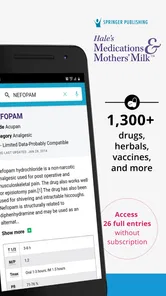
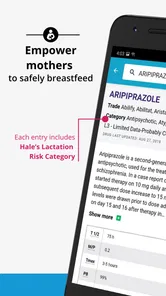
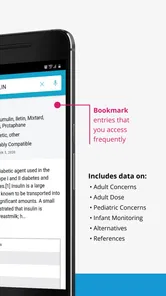
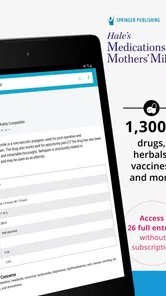
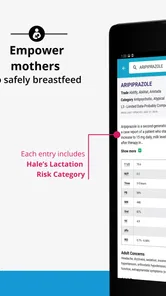
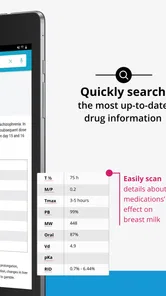
If you are looking for a compact medical reference rather than a symptom checker or a replacement for professional care, HalesMeds is worth a careful look. I found its main purpose easy to understand: it brings evidence-based information about more than 1,300 drugs, diseases, vaccines, and syndromes into one place. That makes it potentially useful when I want to understand an unfamiliar medical term, prepare better questions for a clinician, or review general information about a medicine.
At the same time, I would not treat it like a personal diagnosis tool. Its value is in reference and learning, not in telling me what condition I have or whether I should change treatment. That distinction matters, especially for a medical app aimed at an Everyone audience. My overall impression is that it is most suitable for students, caregivers, health-conscious readers, and anyone who prefers consulting a structured reference before a medical appointment.
Getting from installation to a useful first lookup
I’d make the first lookup a small, deliberate test rather than a tour of the whole reference: choose a medicine or medical term you already encountered, then see whether the explanation helps you frame a clearer question. That gives you a practical sense of the app’s usefulness without mistaking a general entry for personal guidance. From there, it’s easier to decide what to expect before opening it.
What to expect before opening it
HalesMeds is a free medical app from Higher Learning Technologies Inc, although optional in-app purchases range from $9.99 to $94.99 per item. I would therefore approach the installation with a simple expectation: the initial download gives me a way to explore the reference, while some deeper or extended use may involve paid content. The app is rated for Everyone, runs on Android 7.0 or later, and its current version is 7.01.5705.
The app has passed the early adoption stage without becoming a mainstream household name. It has over 10K installs, an average rating of 3.3 from 28 ratings, and eight written reviews. I would read that rating as a reason to test the workflow personally rather than as a final verdict. A smaller review pool can reveal useful friction, but it does not provide the same confidence as a large, consistent user history.
What I would not expect is a complete replacement for a pharmacist, doctor, nurse, or official patient leaflet. A reference app can help me recognize terminology and organize questions, but it cannot evaluate my medical history, allergies, current symptoms, examination results, or the interaction between several treatments. That is the first boundary to keep in mind.
Making the first setup less confusing
After installing the app, I would begin with a narrow goal instead of trying to browse the entire collection. For example, I might choose one medicine already mentioned by a clinician, one disease name I want to understand, or one vaccine term that appeared in a health record. Starting with a known subject makes it easier to judge whether the information is presented at the right level for me.
More From Our News Desk

 Gmail
GmailGmail in a Busy Inbox: Who Benefits Most?
From first account to crowded workday, Gmail earns its place through dependable search and flexible sorting—but its best fit depends on how much inbox maintenance you can tolerate.

 Prime Video
Switching to Prime Video: What Changes in Your Viewing Routine
Prime Video can make a compelling second home for streaming, but switching means learning a different catalog, rental layer, and route from browsing to playback.

 Universal TV Remote Control
Universal TV Remote Control Works Best as a Reliable Backup
A phone remote earns its place through quick setup and reliable habits. Here is how to get more from Universal TV Remote Control—and where its limits show.

 Weather - By Xiaomi
Weather by Xiaomi Review: Clear at a Glance, Less Clear Up Close
Xiaomi’s weather app makes everyday forecasts quick to scan, but its calm surface can leave useful details and recovery paths harder to find than they should be.

 X
XX Under Pressure: Can It Recover When Posting Goes Wrong?
A resilience-focused review of X, examining setup, mistaken posts, interruptions, weak connections, and the gaps that matter when recovery needs to be dependable.

 Clash of Clans
Clash of Clans Is Won Between the Battles
Its raids are quick; its community is a long-term project of coordination, teaching, rivalry, and shared responsibility—with all the friction that entails.
Latest News



I would also keep the purchase model in view during setup. Because the app is free to install but includes optional purchases, I would check which material is immediately available before building a study routine around it. That is not a criticism by itself; many medical references use a free entry point with expanded content. The practical issue is knowing where the free experience ends so I can decide whether the additional material is worthwhile.
A useful setup habit is to keep the app alongside, rather than instead of, the source that prompted the search. If a prescription label raises a question, I would compare the app’s explanation with the label and then ask a pharmacist about anything that affects my own dose or schedule. If a class assignment leads me to a syndrome, I would use HalesMeds to orient myself and then follow the course material or named references for formal study.
The first meaningful action: search with a question in mind
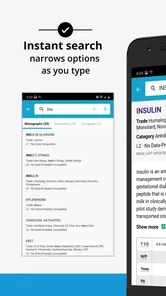
The first successful action should be simple: look up one familiar term and leave with a clearer question than the one I started with. Suppose I have heard the name of a medicine but do not remember why it was prescribed. I would search for that drug, read the general explanation, and note unfamiliar words rather than jumping to a conclusion about whether it is appropriate for me.
This approach turns a broad medical database into a practical preparation tool. Instead of opening the app whenever I feel worried and searching randomly, I can use it before a consultation. I might write down the medicine name, the part of the entry I do not understand, and one question about how the information relates to my situation. The app then helps me communicate more clearly, which is a safer and more realistic success than self-diagnosis.
For a caregiver, the same workflow can be useful after a discharge conversation. I could look up a disease or treatment term while the details are still fresh, identify vocabulary that needs clarification, and return to the care team with focused questions. I would avoid copying general information into a personal medication plan without professional confirmation, but I could use the reference to reduce the feeling of being lost.
Students can take a different route. Rather than memorizing isolated definitions, I would use one entry as a starting point and compare related subjects in the same broad medical area. Looking up a drug, then a disease associated with its use, can expose gaps in understanding. The trade-off is that a reference app may support revision and orientation better than it supports a complete, structured curriculum.
Where the app can save time
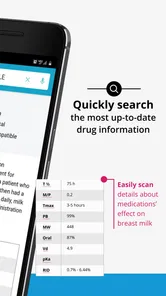
The breadth of the catalog is the clearest practical strength. Having drugs, diseases, vaccines, and syndromes in one medical reference means I do not need to switch between several unrelated searches just to understand the vocabulary around one health topic. That is particularly handy when a consultation includes multiple terms and I want to review them in a calm setting afterward.
I also see value in using it as a pre-appointment filter. Before seeing a clinician, I can separate questions I genuinely need answered from terms I merely want defined. That keeps the appointment focused. The app does not provide the personal judgment, but it can help me arrive prepared enough to ask for it.
Another less obvious use is checking whether I have misunderstood a word. Medical language often sounds more alarming than it is because several conditions share similar roots or abbreviations. Looking up the exact term can prevent me from building an entire worry around a near-match. I would still confirm the interpretation with a professional, especially if the term came from a test result or urgent-care conversation.
Common confusion and the limits I would take seriously
The biggest possible confusion is mistaking evidence-based information for individualized medical advice. A well-written explanation can still be general. It does not know whether I am pregnant, whether I have kidney or liver problems, which other medicines I take, or whether my symptoms require urgent attention. I would never use a general entry to start, stop, double, or halve a treatment.
A second point is that a search result is not automatically the answer to the question I intended to ask. If I search a drug name, I may be trying to understand side effects, purpose, timing, or safety. Those are different questions. I would read slowly enough to identify which part of the entry actually addresses my concern, then take the unresolved part to a pharmacist or doctor.
Vaccines deserve the same care. A reference can help me understand terminology and prepare questions about a vaccine, but personal recommendations depend on age, health history, location, prior doses, and current guidance. I would not use a general description as a substitute for an immunization record review.
The rating also suggests that the experience may not satisfy everyone equally. With an average of 3.3, I would keep my expectations practical: the content may be more important to me than a polished consumer-app experience. If I need an extremely smooth daily tracker, reminders, appointment management, or direct communication with a care team, this is probably not the right category of tool. A dedicated medication manager or a provider’s patient app would be a better match for those jobs.
Three workflows that make the reference more useful
My first recommended workflow is the “question ladder.” I start with a plain question, such as “What is this medicine generally used for?” After reading, I write down one term I do not understand and one personal question that the app cannot answer. This prevents endless browsing and gives me a clear handoff to a professional.
The second is the “appointment buffer.” I use the app a day or two before a non-urgent appointment to review the names already in my notes. I do not attempt to diagnose myself; I simply mark confusing language and bring those points to the visit. This can be especially helpful when several diseases or medicines are mentioned together and I need to sort them into separate topics.
The third is the “source separation” habit. I keep general learning in HalesMeds, personal instructions in the prescription label or clinician’s notes, and urgent decisions with a qualified medical service. That separation is easy to overlook, but it is the most important safety advantage of using a reference app responsibly.
For study, I would add a fourth technique: compare concepts by purpose rather than by memorized wording. After reviewing a disease, I might look at a related medicine or vaccine entry and ask how the terms connect. This helps reveal what I still need to verify in a textbook or lecture. It also avoids treating the app as if one short entry should replace a full lesson.
Who will appreciate it most
I think HalesMeds is a good fit for a reader who wants a broad medical reference in a convenient format and is comfortable doing a little interpretation. It can be useful for someone preparing for a conversation with a clinician, a caregiver trying to understand unfamiliar terminology, or a student building a first pass over medical subjects.
It is less suitable for someone who wants immediate reassurance about new symptoms, personalized treatment instructions, automatic medication reminders, or emergency guidance. In those situations, a healthcare professional, an official health service, a pharmacist, or a purpose-built care app is the better choice. The app’s broad subject coverage does not change that.
I would also be cautious about recommending it as the only study resource for advanced learners. Its collection may be a convenient starting point, but serious coursework usually requires structured teaching, current reference texts, and material that matches a specific syllabus. HalesMeds can help me orient myself; it should not be the sole authority behind an important academic or clinical decision.
Is the free starting point enough?
That depends on how I plan to use it. For occasional lookups, the free installation may be a sensible way to see whether the organization and explanations suit me. If I only need to clarify a term before speaking with a professional, I would not assume I need a paid item immediately.
For regular study or repeated reference use, I would first identify exactly what the optional purchase adds and whether it matches my needs. The listed purchase range, from $9.99 to $94.99 per item, is wide enough that I would avoid buying impulsively. I would test the basic workflow, decide how often I will use the material, and compare that value with a textbook, library resource, or another medical reference.
This is also where the modest rating matters in a practical way. I would not pay for extended access solely because the catalog sounds broad. I would pay only after confirming that the app’s presentation, navigation, and depth support the particular task I have in mind. For casual readers, free exploration may be all that is needed; for committed learners, the decision deserves more scrutiny.
My recommendation after using it as a reference
HalesMeds makes the most sense when I treat it as a starting point for informed conversations. Its coverage of medicines, diseases, vaccines, and syndromes gives it a wider role than a single-purpose drug lookup, and the evidence-based focus is reassuring for general learning. The strongest benefit is not that it answers every medical question, but that it helps me turn vague uncertainty into specific questions.
My reservations are equally clear. The free-to-install model includes optional purchases, the user rating is mixed, and no reference app can account for an individual’s full medical context. Anyone expecting diagnosis, treatment decisions, reminders, or urgent triage should choose a different tool or contact a professional directly.
My practical advice is to install it for one real question, not for abstract browsing. Look up a term you already encountered, check whether the explanation helps you understand the conversation around it, and then decide whether the app deserves a larger place in your routine. Used with that boundary, HalesMeds can be a useful companion for medical vocabulary and preparation rather than a misleading substitute for care.
For first-time users, that is the path I would recommend: begin with a familiar entry, separate general information from personal advice, write down the question that remains, and take that question to the right professional. If that workflow matches what you need, HalesMeds is a reasonable medical reference to try, especially for broad topic exploration and study support.
HalesMeds Frequently Asked Questions
Who is HalesMeds designed for, and what kind of information does it cover?
HalesMeds is a medical reference app from Higher Learning Technologies Inc, intended for people who want to look up health and medication topics. It offers evidence-based information on more than 1,300 drugs, diseases, vaccines, and syndromes. Patients, caregivers, students, and healthcare professionals may find it useful for learning, but its content is not a personalized diagnosis or treatment plan.
What is HalesMeds, and what can I use it for?
HalesMeds is a medication-reference app designed to help users explore information about medicines, including common uses, precautions, possible side effects, and other clinical details. It can be useful for patients, caregivers, students, and healthcare professionals who need quick access to drug information. However, it should be treated as an educational reference rather than a replacement for advice from a qualified doctor or pharmacist.
Is HalesMeds suitable for checking whether a medicine is safe for me?
HalesMeds can help you review general information about a medicine, but it cannot determine whether a treatment is personally safe or appropriate. Safety depends on factors such as your age, allergies, medical history, pregnancy status, kidney or liver function, and other medicines you take. Always confirm important decisions with a healthcare professional, particularly before starting, stopping, or changing a prescribed treatment.
Does HalesMeds provide information about side effects and drug interactions?
The app is intended to provide reference information that may include known side effects, warnings, contraindications, and potential interactions. This information should be read carefully, because not every possible reaction or individual risk can be predicted by an app. If you experience severe symptoms, an allergic reaction, or a suspected interaction, seek urgent medical assistance instead of relying only on the information shown in HalesMeds.
Can I use HalesMeds to identify an unknown pill or calculate a dose?
You should not assume that HalesMeds can reliably identify every unknown tablet, capsule, or package, and you should never calculate or adjust a dose solely from an app listing. Medication appearance and strengths can vary between manufacturers and countries. Check the original packaging and ask a pharmacist or doctor for confirmation. Taking an unidentified medicine or an incorrect dose may cause serious harm.
Pros
- Simple interface makes browsing medicines and health information straightforward.
- Useful for checking medication details before discussing options with a healthcare professional.
- Can help organize medicine-related information in one convenient place.
- Accessible on mobile devices for quick reference while away from home.
- May support better awareness of dosage instructions and possible precautions.
Cons
- Information may vary by region and should not replace advice from a doctor or pharmacist.
- Some medicines or local brands may not be listed in the app.
- Health content can become outdated if updates are not released regularly.
- The app may require internet access for complete medicine searches and details.
- It should not be used for diagnosing conditions or changing prescribed treatment.











