

Guideline Central (Legacy)
- 32.00
- 3.5
- Installs
- 50.00K
- Price
- Free

Screenshots
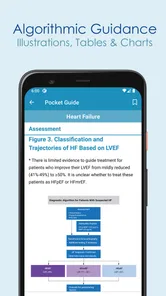
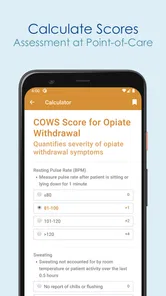
Analysis by Reviewed
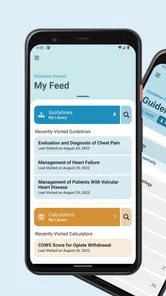
I approached Guideline Central (Legacy) as a practical medical reference rather than an app I would browse casually. Its purpose is straightforward: bring clinical guidelines, calculators, and related quick-reference material into a compact mobile format. That makes it potentially useful when I need a focused answer while studying, preparing for a discussion, or checking a familiar clinical topic away from a desk.
The app comes from Guideline Central, a developer focused on medical reference tools. It is free to install, carries an Everyone content rating, and has been available since May 31, 2013. Its current version is 6.1.1, with Android support starting at version 5.0. Those details matter because this is an older, established product rather than a new medical app trying to prove itself overnight.
My overall impression is mixed but useful. The concise format is the main attraction, especially for people who dislike digging through long documents. At the same time, a quick-reference app should not be confused with a complete clinical information system. I found its strongest role in rapid orientation, not in replacing professional judgment, institutional protocols, or a full reading of the original guideline.
How quickly the app gets me to a useful reference
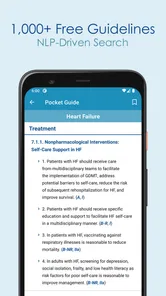
The design idea behind this app is speed through compression. Instead of treating every guideline as a long article, it presents medical information in a form intended for quick consultation. That approach can be valuable when I already know the subject I want and need a reminder of the relevant recommendation, threshold, or calculation pathway.
That speed expectation comes with an important condition: I have to know roughly what I am looking for. A concise reference is excellent when the question is narrow, but less helpful when I am still defining the clinical problem. Someone searching broadly for an explanation of symptoms may find a patient-oriented medical app easier to follow, while a student revising a defined topic may benefit more from this compact format.
I also see a practical advantage in having guidelines and calculators in the same general environment. In a real study session, I might begin with a recommendation and then need a calculation to understand how it applies to a case. Moving between those two kinds of reference is more efficient than keeping a document open in one place and a separate calculator or website in another.
Still, “quick” does not always mean instantly clear. Medical recommendations depend on context, definitions, exceptions, and patient characteristics. A short presentation can save time, but it can also make me want to verify the surrounding details before acting on a result. My advice is to use the concise view as a starting point: identify the relevant guidance, then read more deeply whenever the decision is complicated or high-stakes.
More From Our News Desk

 Gmail
GmailGmail in a Busy Inbox: Who Benefits Most?
From first account to crowded workday, Gmail earns its place through dependable search and flexible sorting—but its best fit depends on how much inbox maintenance you can tolerate.

 Prime Video
Switching to Prime Video: What Changes in Your Viewing Routine
Prime Video can make a compelling second home for streaming, but switching means learning a different catalog, rental layer, and route from browsing to playback.

 Universal TV Remote Control
Universal TV Remote Control Works Best as a Reliable Backup
A phone remote earns its place through quick setup and reliable habits. Here is how to get more from Universal TV Remote Control—and where its limits show.

 Weather - By Xiaomi
Weather by Xiaomi Review: Clear at a Glance, Less Clear Up Close
Xiaomi’s weather app makes everyday forecasts quick to scan, but its calm surface can leave useful details and recovery paths harder to find than they should be.

 X
XX Under Pressure: Can It Recover When Posting Goes Wrong?
A resilience-focused review of X, examining setup, mistaken posts, interruptions, weak connections, and the gaps that matter when recovery needs to be dependable.

 Clash of Clans
Clash of Clans Is Won Between the Battles
Its raids are quick; its community is a long-term project of coordination, teaching, rivalry, and shared responsibility—with all the friction that entails.
Latest News



What the compact format is good at
I think the app suits three kinds of moments particularly well. First, it can support revision when I want to refresh a topic without opening a large textbook. Second, it can help a clinician or trainee organize a conversation before checking a more complete source. Third, it can provide a handy reference during a teaching session, where the goal is to locate a framework rather than conduct a full literature review.
A useful workflow is to treat the app as a two-step tool. I would first search for the relevant guideline or calculator, note the key point, and then ask whether the case includes factors that could change the recommendation. That second question is easy to skip when an app feels convenient. In medicine, convenience should improve orientation, not encourage automatic decisions.
The app is less suitable for someone who wants extensive explanations in plain language. Its purpose is reference efficiency, so readers who need background physiology, detailed evidence discussion, or a patient handout may prefer a textbook, a professional database, or a dedicated education app. I would not choose it as my only resource for learning a subject from the beginning.
What happens during heavier use
The most demanding use case is not opening one reference and closing it. It is moving through several topics, checking a calculator, comparing recommendations, and returning to a previous section while studying or preparing for work. That is where the difference between a convenient reference and a complete workflow becomes clearer.
For light, focused use, the app’s concise purpose should be an advantage. I would expect a smaller reference experience to feel less burdensome than a full medical database, particularly when I only need a reminder. However, I would avoid assuming that every session will feel equally smooth on every device. Performance can depend on the phone, the operating system, available storage, and what else is running in the background.
Because the app supports Android 5.0 and later, it can reach devices that are not especially new. That broad compatibility is helpful for users who keep an older phone as a work or study device. The trade-off is that an older handset may offer less comfortable multitasking than a recent model. On a small screen, switching between a guideline and another reference can also feel more restrictive than it would on a tablet or desktop.
My practical recommendation is to use it in short, deliberate sessions rather than expecting it to replace a full desktop research workflow. Before a class, ward round, or study block, I would open the specific topics I expect to need and avoid relying on last-second exploration. That habit reduces the pressure on any reference app and makes the concise presentation work in its favor.
Calculators deserve extra care during heavy use. A calculator can make a numerical step easier, but it does not decide whether the input is appropriate or whether the resulting value applies to the person in front of me. I would double-check units, patient details, and interpretation before using any result in a clinical discussion. This is one of the most important trade-offs in the app: convenience increases speed, while responsibility for context remains with the user.
A realistic everyday scenario
Imagine I am preparing for a teaching session on a familiar medical topic. I do not need a complete textbook chapter; I need to refresh the main recommendation, review a related calculation, and identify which points deserve a deeper explanation. In that situation, I could use Guideline Central as a compact preparation layer, then consult a fuller source for evidence, exceptions, or local policy.
That workflow is more realistic than treating the app as a single answer machine. It gives me a fast way to structure my questions. If the case later becomes more complex, I would move to the institution’s approved resources or a comprehensive professional database. The app remains useful because it helped me identify what needed closer attention.
For a student, the same approach can turn the app into a revision checkpoint. After studying a topic in depth, I could use the concise reference to test whether I remember the main pathway. If I cannot interpret the short version without reopening a textbook, that is not necessarily a weakness; it may show that I need to strengthen the underlying knowledge rather than memorize isolated lines.
Reliability, trust, and knowing when to verify
The app has the advantage of being an established medical reference product, with over fifty thousand installs and an average rating of 3.5 from around four hundred ratings. Those figures suggest that it has found a real audience, but they also point to a measured rather than universally enthusiastic reception. I would interpret that as a reason to try it for my own workflow, not as proof that it will satisfy every medical user.
Reliability in a medical app has two meanings. The first is technical: does it open, respond, and let me return to the material I need? The second is clinical: can I trust the content for the decision I am making? Even if the app behaves perfectly, the second question still requires attention to the source, the date of the guidance, local practice, and the patient’s circumstances.
I would therefore avoid using a concise reference as the final authority for urgent or unusual decisions. A recommendation may depend on exclusions that are easy to miss in a summary. Local hospitals may also follow protocols that differ in wording or implementation. The safest workflow is to use the app to orient myself, then verify important decisions against the current approved source.
The app’s age is also worth considering in a practical way. It was released in 2013 and has reached version 6.1.1, showing continued version development over time. That history is reassuring in the sense that the product has not appeared and disappeared immediately, but it does not remove the need to check whether a particular guideline remains current for my setting. Medical knowledge changes, and an app’s existence alone cannot answer that question.
I would also pay attention to how clearly a recommendation is framed. If I find a calculator result or a short instruction, I would look for the population, condition, and assumptions behind it before applying it. This is a small habit, but it is a valuable one: the shorter the reference, the more deliberately I should confirm that I am reading the right section.
Stability and recovery in real use
For a reference app, recovery matters because interruptions are common. A call, message, low-memory event, or accidental navigation away from the app can break concentration. I would not build a critical clinical moment around the assumption that any mobile app will preserve every step perfectly. If I am working through an important calculation or preparing notes, I would record the relevant information in my approved workflow rather than relying on the app as permanent storage.
This is also why I prefer using the app before a demanding session instead of discovering its organization in the middle of one. A few minutes of familiarization can reveal whether the navigation matches the way I think about topics. If it does not, a browser search, textbook, or institutional database may be faster for that particular task.
In other words, the app’s reliability is best judged by fit. It can be dependable as a quick reference habit, but it should not become the only place where I keep clinical reasoning, patient-specific notes, or decisions that need an audit trail.
Device limits, cost, and who should use it
The free entry price makes experimentation easy. I can install the app without committing money immediately, which is useful for students and professionals who want to see whether the reference style suits them. There are in-app purchases ranging from $4.99 to $199.99 per item, so I would review the purchase screen carefully before unlocking anything and consider whether the added material matches my actual needs.
That pricing structure changes the decision for occasional users. If I only need a quick reference now and then, the free portion may be enough to judge the app’s usefulness. If my work depends on a particular specialty or collection, I would first confirm exactly what an optional purchase provides before paying. A high-priced item may make sense for a frequent professional user, but not for someone looking for general health information.
The Everyone rating makes the app broadly accessible from an age-classification perspective, but that should not be mistaken for suitability for every reader. Medical terminology can still be difficult, and a general audience may need simpler explanations than the app is designed to provide. I would recommend it more readily to medical students, trainees, clinicians, and serious learners than to someone seeking a diagnosis or basic reassurance.
On older Android hardware, the minimum operating-system support is a practical benefit. It means the app is not limited to the newest phones, which can matter when a user has a dedicated study device or an older work handset. The limitation is physical rather than merely technical: a small display and limited multitasking can make dense medical reference work tiring, even when the app itself is functional.
iOS users should make sure they are looking at the correct platform version before planning a workflow, while Android users with version 5.0 or newer meet the stated minimum requirement. In either case, I would avoid installing it immediately before an exam, presentation, or clinical shift without first testing the navigation and any material I expect to use.
My performance verdict after weighing the trade-offs
I see Guideline Central (Legacy) as a focused medical reference companion, not a universal replacement for textbooks, professional databases, or local clinical systems. Its strongest quality is the attempt to make guidelines and calculators easier to consult in a concise format. That can save time when I already understand the question and need a structured reminder.
Its limitations are equally important. Concision can leave less room for explanation, context, and exceptions. Optional purchases may affect how much of the resource is useful to a particular person. Older devices may be compatible but less comfortable for extended sessions. Most importantly, a mobile summary cannot take responsibility for clinical judgment, source verification, or patient-specific interpretation.
I would recommend trying it if you are a medical student, trainee, or professional who often needs compact reference material and is willing to verify important points elsewhere. I would skip it if you want a beginner-friendly health guide, a complete evidence database, or a tool that makes decisions for you. I would also choose an institution-approved resource first when local policy is central to the task.
For me, the best way to use it is as a fast first stop: locate the relevant guidance, use a calculator carefully, identify the questions that need deeper research, and then move to a fuller source when the situation demands it. That workflow respects both the app’s strengths and its boundaries. The real value is not replacing careful medical reasoning, but reducing the time needed to find the right starting point.
With a 3.5 average from around four hundred ratings, the app is not an automatic recommendation for everyone, but it is credible enough to test without an upfront cost. I would judge it by a specific need rather than by its install count or age. If its concise organization matches the way I study or prepare, it can earn a place beside—not instead of—my trusted medical resources.
Guideline Central (Legacy) Frequently Asked Questions
Is Guideline Central (Legacy) free to download, and could I be charged for content?
Guideline Central (Legacy) is free to download, but that does not necessarily mean every resource in the app is free to use. Some content may require an account, subscription, institutional access, or an individual purchase, and in-app purchases range from $4.99 to $199.99 per item. Check the terms for the specific guideline before relying on access, particularly if you need it for regular professional use.
What devices and operating systems can run Guideline Central (Legacy)?
The app is available for Android and iOS, and the Android version requires Android 5.0 or later. Since this is a legacy application, compatibility and performance can vary on newer devices, even when the operating system meets the minimum requirement. Before installing, check the app’s device compatibility and make sure your phone or tablet has enough available storage for a smooth experience.
What is Guideline Central (Legacy) used for?
Guideline Central (Legacy) is designed to help healthcare professionals access clinical practice guidelines and related medical reference content in a portable format. After reviewing the app, its main value is quick access to organized recommendations, summaries, and supporting information that can be useful during preparation, consultation, or point-of-care decision-making. It should support—not replace—professional judgment and official clinical resources.
Who can benefit from using Guideline Central (Legacy)?
The app is primarily intended for physicians, nurses, pharmacists, students, and other healthcare professionals who need convenient access to evidence-based guideline information. Medical educators and trainees may also find it useful for reviewing recommendations by specialty or topic. However, the usefulness of the available content can depend on the user’s profession, subscription status, and whether the relevant guideline is included in the legacy catalog.
Does Guideline Central (Legacy) require an account or subscription?
Access requirements may vary depending on the specific guideline, publisher, and version of the application. Some content may be available after creating an account, while other materials can require a paid subscription, institutional access, or an individual purchase. Before downloading, users should review the current store listing and in-app terms carefully, especially because this is a legacy application and access policies may differ from newer Guideline Central products.
Pros
- Quick access to clinical guidelines and medical reference content.
- Useful search tools help locate specific recommendations efficiently.
- Covers multiple specialties in one healthcare-focused application.
- Content is convenient for reviewing information while away from a computer.
- Can support point-of-care preparation and general clinical reference needs.
Cons
- Some guideline content may require a paid subscription or separate purchase.
- The legacy interface may feel dated compared with newer medical apps.
- Information should be verified against current official guideline updates.
- The app may be less useful for users outside healthcare professions.
- Large reference libraries can require downloads or internet access to browse fully.











