

Guidebook
- 755.00
- 3.5
- Installs
- 1.00M
- Price
- Free
Screenshots
Analysis by Reviewed
I decide whether an event app is worth keeping by asking a simple question: will it bring together information I would otherwise hunt for in several places? That is the most useful way to approach Guidebook. It is not a replacement for every travel tool on my phone, but when an event has a well-prepared guide, it can turn a crowded program into something easier to follow.
Start with the event, not the app
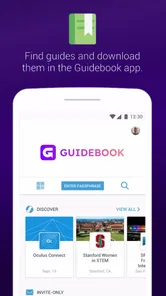
Before relying on Guidebook, I would search for the specific conference, festival, or gathering I plan to attend. The app’s usefulness depends heavily on whether that event has a guide and whether its organizers have kept the details current. Finding a guide is only the first check: I would look for the parts I actually need, such as the schedule, venue information, or event notices, rather than assuming that a listing alone makes it a complete companion.
This also helps set realistic expectations. Guidebook is most valuable when an organizer has assembled relevant information for attendees; it is less useful as a broad directory for spontaneous sightseeing or as a general planner for a whole trip. If the event’s own website already answers everything clearly, I may not need another place to check. If the program is complex or the venue is unfamiliar, consolidating details can be a meaningful convenience.
Guidebook is a free Travel & Local app from Guidebook Inc. It has a 3.9 average from around 4,100 ratings, with over a million installs, and it is rated for everyone. It first appeared on April 25, 2011; version 9.0.0 supports Android 6.0 and later. Those details make it an established option, but the practical test is still whether the event I care about has a complete guide.
Discovering Events Made Easy
First off, let’s chat about the discovery feature. You know how it can be a hassle trying to find out all the details of an event? Well, with this app, it’s as easy as pie. Guidebook lets you browse through a plethora of events happening around you or even globally. Whether you’re into tech conferences, music festivals, or art exhibitions, you’ll find something that piques your interest. The search feature is pretty intuitive, and it even allows you to filter events by your interests. It’s like having a personal event planner right in your pocket!
Finding a guide that is actually useful
For discovery, I would treat search as a starting point rather than a guarantee that every event nearby will appear with a useful amount of detail. If I already know the event name, searching that exact name is a more practical first move than browsing broad categories. If I’m exploring, I’d use the available filters to narrow the results, then check whether a guide has information that helps me make a decision: a schedule I can understand, a venue reference, or updates that matter on the day.
That distinction is important because an event listing and an attendee-ready guide are not the same thing. A listing can tell me that something exists, while the guide needs to answer questions I have before committing time: what activity might suit me, where I should go, and what may change. When those details are present, I can use the app to compare options within an event. When they are thin, I would move to the organizer’s official channels rather than spending time trying to make the app do more than its content allows.
More From Our News Desk

 Weather - By Xiaomi
Weather by Xiaomi Review: Clear at a Glance, Less Clear Up Close
Xiaomi’s weather app makes everyday forecasts quick to scan, but its calm surface can leave useful details and recovery paths harder to find than they should be.

 X
X Under Pressure: Can It Recover When Posting Goes Wrong?
A resilience-focused review of X, examining setup, mistaken posts, interruptions, weak connections, and the gaps that matter when recovery needs to be dependable.

 Clash of Clans
 Is Won Between the Battles
Its raids are quick; its community is a long-term project of coordination, teaching, rivalry, and shared responsibility—with all the friction that entails.

 Android Auto
 Makes the Case for Quieter Car Software
The car interface is no longer judged by how much it can do, but by how quietly it helps. Android Auto shows what drivers now expect—and what still gets in the way.

 MobiOffice: Word, Sheets, PDF
MobiOffice: Transforming Mobile Productivity with Seamless Integration
MobiOffice: Word, Sheets, PDF is redefining mobile productivity with a surprising blend of functionality and innovation.

 EA SPORTS FC Soccer Mobile 26
EA SPORTS FC™ Mobile Soccer: Redefining Mobile Sports Gaming
Dive into EA SPORTS FC™ Mobile Soccer, where immersive gameplay and strategic depth transform mobile sports gaming.
Latest News



Build a schedule with breathing room
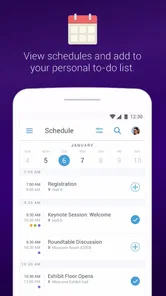
Once you’ve found an event you’re interested in, the next step is planning your schedule. This is where Guidebook really shines. You can customize your own schedule by adding the sessions or activities you want to attend. This feature is a lifesaver, especially when attending events with multiple tracks or stages. You won’t miss out on anything important because you’ll have everything organized in one place. Plus, there are push notifications to remind you so you’re always on top of your game.
A useful way to prepare is to build a draft schedule before you arrive, then leave open space between sessions rather than filling every slot. At a sprawling conference, a packed itinerary can look tidy on screen but be hard to follow once you account for walking, queues, or a session that runs long. I’d also keep the event’s official name handy when searching; that is often more reliable than guessing at a broad topic. The app’s schedule is most valuable as a personal shortlist, not as a promise that every plan will happen exactly on time.
There is a practical trade-off in saving lots of sessions: a personal schedule helps me remember what caught my eye, but it can also become a second, crowded version of the full program. I would use it to mark the sessions I genuinely want to prioritize, then keep one or two alternatives in mind for each time slot. That way, if a room is full or my plans shift, I have a useful next choice without needing to rebuild the whole day on the spot.
Maps, notices, and the on-site routine
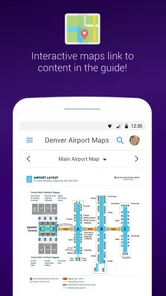
No more wandering aimlessly trying to find your way! The interactive maps feature is a standout. You can easily navigate through large venues, thanks to the detailed maps provided within the app. It’s especially helpful for first-timers who might not be familiar with the venue. Additionally, Guidebook offers real-time updates and announcements about the event, so you’re always in the loop.
Here’s a realistic use: I arrive at a multi-room event with only a short break before the next talk. I can check the map to orient myself, use the schedule to see what I chose, and look for event notices in the same place rather than switching between a printed program and several messages. I’d still glance at venue signs and organizer announcements, especially if a room changes; an app map is a helpful guide, not a substitute for paying attention on site. If mobile reception is unreliable, it is sensible to open the guide and the information I need before moving around.
A small habit that makes this workflow more dependable is to check the guide before leaving home and again when I reach the venue. The first check helps me spot obvious gaps in my plan; the later one gives me a chance to notice an announcement before I walk to the wrong room. I would also keep the venue’s name or a meeting point in mind, rather than assuming the map will solve every orientation problem. At a large gathering, signs and staff remain useful sources of direction.
Another cool aspect is the networking capabilities. You can connect with fellow attendees, share your experiences, and even set up meetings. It’s a fantastic way to make the most out of your time at any event.
I would treat networking as an optional extra, not the reason to choose the app. Some attendees are happy to meet new people through event tools; others would rather use the schedule and map and keep their social plans separate. If I wanted to meet someone specific, I would agree on a time and recognizable place directly, then use the event guide for orientation. That is a more reliable plan than assuming everyone will notice a message while moving between sessions.
When a different travel tool is a better fit
For a trip built around transport, hotels, restaurants, and directions between neighborhoods, I’d choose a conventional travel-planning or map app first. Those tools are designed for getting around a city; Guidebook’s appeal is the event-specific layer. Likewise, if an organizer relies on a website, printed program, or another dedicated app, that official source may be more complete than searching here. I wouldn’t install it expecting every local attraction or every event to have a detailed guide.
The distinction is less about which app is universally better and more about what I need at that moment. A general map is the sensible choice when I need to get from a station to a venue or find my way around a neighborhood. An organizer’s page may be better for official event information if that is where changes are posted. Guidebook makes more sense when the event guide itself brings together useful program and venue details that would otherwise be split across sources.
There is also a trade-off in keeping plans inside one event app: schedules, maps, and announcements are convenient together, but only while the guide is useful and up to date. I’d check for changes before leaving for the venue and avoid assuming a saved session guarantees a seat. If I’m attending with a friend, I’d agree on a meeting point in advance instead of relying entirely on messaging or networking features when the venue is busy.
Who benefits most, and who can skip it
I’d recommend it most to people attending a conference with parallel sessions, a festival spread across stages, or a large gathering where the organizer provides an active guide. It can also suit a first-time visitor who wants a venue map and a single place to review event details. Someone who goes to one small local event occasionally may find a printed schedule or the organizer’s page simpler, while a traveler seeking broad destination recommendations will probably prefer a general-purpose guide or map app.
It is also a good fit for someone who likes making a plan but does not want to print a full program or keep several browser tabs open. A visitor coordinating a busy day can save a short list of likely sessions, use the map to understand where they are, and revisit announcements without searching through a long email thread. On the other hand, a person who prefers to wander without a timetable may get little benefit from building a personalized schedule. The app can organize choices, but it does not make an overfull day feel less rushed.
If I were attending with a group, I would not assume everyone needs to use the same tool. One person can use the guide to check the program while the group agrees on a meeting point and a fallback activity. That keeps the app helpful without making it a single point of failure. It also works for mixed preferences: people who like detailed plans can shortlist sessions, while others can use the event’s visible signs and decide as they go.
What switching to it really involves
Trying Guidebook is a relatively low-commitment choice because the app is free, but switching your event routine still has a small cost: you need to find the right guide, decide which details to rely on, and remember to check it. I would not move every travel plan into an event app just because it is available. Instead, I’d use it for the event-specific pieces and leave transport, accommodation, and general directions in the tools I already trust for those tasks.
There is no need to make the app the only record of a busy day. If a session matters greatly, I would note its time and location in a way I can find quickly, and I would keep an eye on the organizer’s notices for changes. This is not because a digital schedule is inherently unreliable; it is because event plans can change and a personal shortlist is not the same as a reservation or guarantee of entry. Keeping that distinction clear prevents a convenient planner from creating false certainty.
For someone moving from paper, the main adjustment is deciding whether a phone-based schedule is easier to consult while walking around. For someone moving from a browser, it is whether having event material gathered in one app saves enough searching to justify opening another tool. I would test it with one event rather than reorganizing my whole travel routine. If the guide is complete and I check it naturally during the day, the change has paid off; if not, the organizer’s page may remain simpler.
Why You Should Consider It
In a nutshell, if you’re someone who regularly attends events or is planning to do so, Guidebook is a must-have app. It simplifies the entire process from discovery to attendance. You’ll save time, stay organized, and enhance your overall experience. I found it incredibly user-friendly, and it’s become an indispensable tool whenever I’m planning to attend an event.
So, what are you waiting for? Give Guidebook a try and see how it transforms your event-going experience. Trust me, once you start using it, you won’t want to go back to the old way of doing things. Happy exploring!
My recommendation
My recommendation is to install it when an event you plan to attend has a guide worth using, then judge it by how much friction it removes from that day. It is free, so trying it costs nothing, but the value depends on the quality of the particular event’s content and whether you prefer a digital schedule to paper or a browser tab. For event-focused planning, I’d keep it close; for ordinary sightseeing and everyday navigation, I’d reach for a tool built for those jobs instead.
Guidebook Frequently Asked Questions
Who is Guidebook intended for?
Guidebook is a Travel & Local app for people who want information about events and places in one hand-held guide. It can be useful to attendees looking up event details, organizers preparing a digital guide, or travelers browsing local information. Its focus is on bringing guide content together in an app rather than requiring users to keep separate materials at hand.
Is Guidebook available for my device?
Guidebook is available for Android and iOS devices, so users on either platform can access its guides. The Android version requires Android 6.0 or later. Before downloading, check that your device meets that requirement and has enough available space for the app and any guides you want to keep on it. This can help avoid installation or storage problems.
What is Guidebook and how does it work?
Guidebook is a user-friendly application designed to help users create and manage digital guides for events, conferences, or personal use. It allows users to customize their guides with schedules, maps, and multimedia content, which can be accessed on both Android and iOS devices. Users can easily share guides with attendees or friends, ensuring everyone has the information they need at their fingertips.
Is Guidebook free to use or does it require a subscription?
Guidebook is free to download. The app’s core purpose is to help users find guides to events and places, while guide creation and management needs can vary depending on the event or organization. Consider what you need from a guide before getting started, especially if you are organizing an event and expect particular features or services. The app is rated for Everyone.
Can I use Guidebook offline?
Yes, Guidebook supports offline access to guides. Once a guide is downloaded to your device, all its contents, including schedules, maps, and multimedia, can be accessed without an internet connection. This feature is particularly useful for events held in areas with limited connectivity or for international travelers who wish to avoid roaming charges.
Pros
- User-friendly interface.
- Comprehensive travel guides.
- Offline map access.
- Frequent updates.
- Customizable itineraries.
Cons
- Limited free content.
- Requires large storage.
- Occasional app crashes.
- Variable content quality.
- Ads in free version.











