

GuideAlong | GPS Audio Tours
- 1.18K
- 4.6
- Installs
- 100.00K
- Price
- Free

Screenshots

Analysis by Reviewed
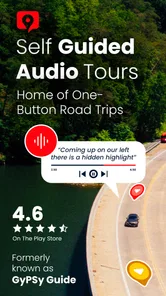
Road trips are usually planned around maps, but maps do not always tell you why a viewpoint matters, where a short detour is worth taking, or what you are looking at beyond the windshield. GuideAlong takes a different approach. It turns a drive into a narrated sightseeing experience, using audio guidance to add context while you follow a route. After spending time with it, my view is clear: it is most valuable when you want a self-guided tour without joining a group, but it works best when you prepare before pulling away.
This is a free Travel & Local app from Gypsy Guide LLC, aimed at road trips through destinations in the United States, Hawaii, and Canada. Its main idea is simple enough for anyone to understand: instead of constantly checking a screen or reading long travel articles, you listen while traveling. That sounds modest, but it changes the rhythm of a sightseeing day. You can keep your attention on the road and still learn about the landscape, history, and stops along the way.
How the audio-tour approach works on a real trip
The biggest strength is that the app sits between two familiar alternatives. A traditional guided bus tour gives you narration but takes away flexibility. A normal navigation app helps you reach a destination but rarely feels like a tour. GuideAlong aims to keep the freedom of driving yourself while adding commentary at useful moments.
That combination is particularly appealing on scenic routes. When a road passes a volcanic landscape, coastline, forest, canyon, or historic area, the experience can otherwise become a sequence of quick photo stops with little understanding of what you are seeing. Audio commentary gives those places a sense of continuity. I found the format more relaxing than trying to research every stop in advance, especially when the route itself was the main attraction rather than a single landmark.
The app’s usefulness depends on timing. A good audio guide should not demand constant interaction, and this is where the concept makes sense. You can listen as you drive, pause when you stop, and return your attention to the road. I would still treat the phone as a secondary tool: set things up before departure, mount it safely, and avoid handling it while moving. The app is there to support the journey, not become another distraction inside the car.
One practical advantage is the way it can help a mixed group. On a family trip, one person may want historical background, another may care about viewpoints, and someone else may simply want to know whether a stop is worth the time. A narrated route gives everyone a shared thread without requiring one passenger to act as the full-time tour guide. It also makes quieter stretches of road feel more purposeful.
There is a useful difference between listening to a general travel podcast and using a route-focused guide. A podcast may be interesting but disconnected from your exact position. GuideAlong is designed around the journey, so the information is intended to arrive when the surrounding scenery makes it relevant. That connection between sound and place is the feature that gives the app its identity.
More From Our News Desk

 Weather - By Xiaomi
Weather by Xiaomi Review: Clear at a Glance, Less Clear Up Close
Xiaomi’s weather app makes everyday forecasts quick to scan, but its calm surface can leave useful details and recovery paths harder to find than they should be.

 X
XX Under Pressure: Can It Recover When Posting Goes Wrong?
A resilience-focused review of X, examining setup, mistaken posts, interruptions, weak connections, and the gaps that matter when recovery needs to be dependable.

 Clash of Clans
Clash of Clans Is Won Between the Battles
Its raids are quick; its community is a long-term project of coordination, teaching, rivalry, and shared responsibility—with all the friction that entails.

 Android Auto
Android Auto Makes the Case for Quieter Car Software
The car interface is no longer judged by how much it can do, but by how quietly it helps. Android Auto shows what drivers now expect—and what still gets in the way.

 MobiOffice: Word, Sheets, PDF
MobiOffice: Transforming Mobile Productivity with Seamless Integration
MobiOffice: Word, Sheets, PDF is redefining mobile productivity with a surprising blend of functionality and innovation.

 EA SPORTS FC Soccer Mobile 26
EA SPORTS FC™ Mobile Soccer: Redefining Mobile Sports Gaming
Dive into EA SPORTS FC™ Mobile Soccer, where immersive gameplay and strategic depth transform mobile sports gaming.
Latest News



Why preparation matters more than it first appears
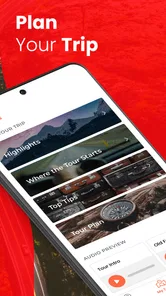
I would not install this in the parking lot five minutes before leaving and assume the whole experience will take care of itself. The smartest workflow is to choose the route while you still have time to think, review the planned stops, and decide which sections fit your day. Road trips often change because of weather, traffic, fatigue, or an unexpectedly appealing viewpoint. A guide is more useful when you know where it fits into your broader plan.
My best tip is to treat the narration as a flexible layer rather than a strict timetable. If you stop for lunch, skip a viewpoint, or travel in the opposite direction, the day should not feel ruined. Use the guide for context and ideas, then keep your own priorities in charge. This is an important trade-off: the app can enrich a route, but it cannot replace judgment about road conditions, opening hours, parking, or how much driving your group can comfortably handle.
Another practical habit is to test the audio setup before reaching the scenic section. Pair the phone with the car’s audio system if that is available, check the volume at ordinary road noise levels, and make sure everyone can hear without making the sound uncomfortably loud. If you are traveling with children, this small check can prevent repeated stops to adjust the phone. It also helps reveal whether your preferred setup makes it easy to pause without reaching toward the screen.
I also recommend planning around attention, not just distance. A long narrated drive can be enjoyable, but constant information is not always better. On a busy road, in heavy rain, or in an unfamiliar city, navigation and safe driving deserve priority. The strongest use of the app is on stretches where the driver can concentrate normally and passengers can absorb the story.
What makes it more useful than a map alone
A map is excellent at answering “where do I go next?” It is much less effective at answering “what should I notice here?” That distinction is where GuideAlong earns its place. It can turn a route into a sequence of connected observations instead of a list of pins.
For first-time visitors, that context can prevent a common travel mistake: rushing past a place because it looks ordinary from the road. A narrated explanation may encourage you to slow down, look toward a particular feature, or consider a short stop you would otherwise miss. The value is not only in facts; it is in directing curiosity.
It can also reduce the amount of planning needed for travelers who do not enjoy building detailed itineraries. Some people want to know every restaurant and trail in advance. Others would rather choose a broad destination and discover it as they go. This app is better suited to the second group, because the route provides structure without forcing a rigid schedule.
For repeat visitors, the benefit is different. Someone who has already seen the obvious attractions may use the commentary to notice relationships between places or to give a familiar drive a new angle. I would not expect every trip to feel completely different, but the audio format can make a well-known route feel less routine.
The meaningful limitations I noticed
The largest weakness is that this is not a universal replacement for navigation, trip planning, or local research. Its purpose is guided sightseeing, and that focus means you still need other information for practical decisions. If your main question is where to find the cheapest fuel, whether a restaurant is open right now, or how to avoid a sudden road closure, a standard navigation or local-search tool is the better choice.
The experience also depends on the route matching your plans. If you are taking frequent unplanned detours, driving only short fragments, or moving through an area without a suitable tour, the narration may feel less central. This is not a flaw in the audio concept so much as a reminder that it is strongest when the journey itself is the attraction.
Another limitation is the attention balance. Even well-timed commentary can become background noise if the day is already crowded with conversations, children, music, and navigation instructions. Some passengers may love continuous information, while others may prefer silence between stops. I would let the group decide when to pause rather than treating every segment as something that must be heard.
There is also a cost consideration that deserves a clear explanation. The app itself is free to install, while optional in-app purchases range from $0.99 to $159.99 per item. That wide range means the right question is not simply whether the download costs anything; it is whether the particular tour or collection you want fits your budget. I would check the purchase screen carefully before committing, especially if you are planning a larger trip with several routes.
The free entry point is helpful for trying the concept, but travelers should not assume that every useful destination experience is included without an additional purchase. For a single vacation, paying for a relevant guide may feel reasonable if it replaces a more expensive organized tour. For someone who takes frequent road trips and wants broad coverage, the total cost deserves more thought.
Who will get the most from it
I think this is a strong match for independent travelers who enjoy driving but do not want to spend evenings researching every scenic stop. It is also well suited to couples, families, and small groups who want commentary on their own schedule. The app gives those travelers a middle ground between a silent drive and a formal excursion.
It is especially useful when a destination is spread across a long route rather than concentrated in one walkable center. In that situation, a normal attraction guide may help once you arrive but offer little during the drive. GuideAlong makes the travel time part of the visit, which can make a full day feel more coherent.
People who learn better by listening may prefer it to reading signs or scrolling through articles. It can also be a good option for a passenger who wants to participate in planning without constantly holding a phone. One person can help choose stops before departure, then the whole car can listen as the route unfolds.
I would be more cautious recommending it to travelers who want spontaneous urban exploration, detailed live navigation, or a completely quiet drive. It is also not the first tool I would choose for someone who already has a carefully researched itinerary and prefers to interpret each place independently. In those cases, a map, local guidebook, or ordinary navigation app may be less intrusive and more appropriate.
Everyday scenario: making a long sightseeing day easier
Imagine a couple leaving their hotel early for a scenic drive. They know the destination but have not decided which overlooks deserve time. Before starting, they choose the relevant tour, connect the phone to the car, and agree that the passenger will handle pauses. As the road develops, the narration adds background and points their attention toward places they might otherwise pass.
They do not need to stop at every suggested location. They can skip one because the parking area is crowded, spend longer at another because the view is better than expected, and pause the audio for lunch. The guide remains useful because it supplies context without becoming a strict itinerary. By the end of the day, they have not only reached the destination; they have experienced the road as part of the trip.
That scenario also shows the app’s boundary. They still need to check road conditions, manage fuel, respect signs, and make sensible decisions about fatigue. The audio can improve the sightseeing experience, but it does not remove the ordinary responsibilities of a road trip.
Device fit, pricing, and who should try it first
The app is available for devices running iOS or Android, with a minimum operating-system requirement of 9. Its current version is 2.3.4.4234, and the age rating is Everyone, which fits the broad family-oriented nature of narrated travel. I like that the basic download is free because it lowers the risk of discovering that this style of touring is not for you.
Its public reception is encouraging: it holds a 4.6 average from around 1.6 thousand ratings, with roughly 1.2 thousand written reviews and over 100 thousand installs. Those figures suggest that the concept has found a real audience, though they should not replace your own judgment about the routes you plan to take.
My advice is to begin with the specific destination you already have in mind rather than browsing generally. The app makes the most sense when you can imagine using it on an actual drive. If the route aligns with your plans and the optional purchase feels fair for the amount of sightseeing time involved, it becomes much easier to judge its value.
My final verdict after using the guided-road-trip format
GuideAlong is best understood as a narrated companion for scenic driving, not as an all-purpose travel app. That focused identity is its greatest strength. It adds meaning to the road, supports independent schedules, and can make a self-guided trip feel more like a curated experience without the restrictions of a group tour.
I would recommend it to travelers who want stories and context while exploring the United States, Hawaii, or Canada by car, especially when the route is a major part of the holiday. I would skip it if I only needed turn-by-turn directions, live local information, or a completely unplanned city break. The optional purchase prices also mean I would compare the cost with the length and importance of my trip before buying.
Overall, the app succeeds because it solves a specific problem well: how to stay curious during a road trip without constantly researching from the passenger seat. With a little preparation and realistic expectations, it can turn empty driving time into part of the destination. That makes it a worthwhile free download to investigate, and a potentially excellent paid companion when the right route matches your plans.
GuideAlong | GPS Audio Tours Frequently Asked Questions
Can I preview a GuideAlong tour before buying it?
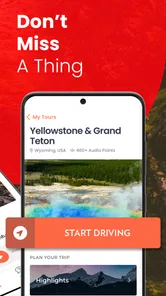
A preview can help you judge whether a tour’s narration and route suit your trip before making a purchase. Check the tour’s in-app description and any available sample content, then compare its coverage with your planned stops and driving direction. GuideAlong is free to download, while individual tour purchases may cost extra, so confirm the details before checkout.
What should I prepare before starting a GuideAlong road trip?
Download your chosen tour and any required map information before setting off, preferably while connected to Wi-Fi. Make sure your phone is charged, location access is enabled, and the app is ready to use before you begin driving. A quick test while parked can help you check that audio plays as expected and that the tour matches your route.
What is GuideAlong | GPS Audio Tours, and how does it work?
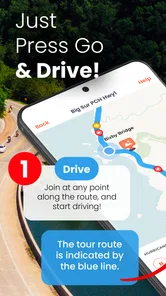
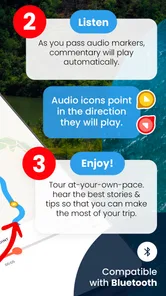
GuideAlong is a GPS-based audio tour app designed for scenic drives, national parks, and other travel destinations. After selecting and downloading a tour, the app uses your location to play commentary automatically as you approach points of interest. The narration can include local history, travel tips, stories, and directions, allowing you to explore at your own pace without following a fixed group or schedule.
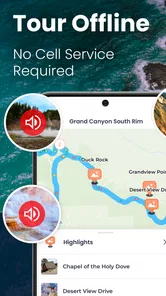
Does GuideAlong work without an internet connection?
Yes, GuideAlong tours are intended to be downloaded before you begin your trip, which is especially useful in national parks and rural areas with limited mobile coverage. Once the tour and required map information are stored on your device, GPS can generally trigger the audio offline. It is still important to download everything over Wi-Fi, keep your phone charged, and test the tour before leaving.
Which destinations and attractions are covered by GuideAlong?
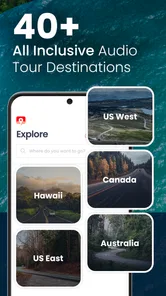
GuideAlong focuses on popular road-trip destinations, including national parks, scenic highways, and major sightseeing routes. Available tours can change over time, so the exact selection depends on the current app catalog and your region. Before purchasing, check the tour description, route coverage, starting points, and included attractions to confirm that it matches your planned itinerary and driving direction.
Pros
- Offline tour access works well in areas with weak or no mobile signal.
- GPS narration starts automatically as you approach marked points of interest.
- Tour commentary adds useful local history
- stories
- and sightseeing context.
- One purchase can be more convenient than booking an in-person guided tour.
- Routes are designed for self-paced travel
- allowing flexible stops and detours.
Cons
- Coverage is limited to supported destinations and specific tour routes.
- Audio may not trigger accurately if location permissions are restricted.
- Some tours require downloading large files before starting the drive.
- Driving while managing the app can be distracting without a passenger.
- Tour content may feel less personal than a live guide or local expert.











