Guide For Stardew
- 9.00
- 4.3
- Installs
- 1.00K
- Price
- $0.99

Screenshots
Analysis by Reviewed
I tend to reach for a game guide when a quick question threatens to turn a relaxed session into a long search. Guide For Stardew is a reference app for Stardew Valley, and its appeal is straightforward: it gathers guidance about farming, fishing, characters, and events in one place. I see it as a handy companion for players who enjoy planning but would rather not keep a separate browser search open beside the game.
When looking things up gets in the way
Connectivity matters most when a guide is something I want to check mid-session. The app is described as an offline wiki, which makes it sound suited to consulting reference material without relying on a live search, but I would still check that the pages I need are available before setting out with no connection. If you are comparing advice with current community discussions or looking up something outside the guide, those searches may still depend on your network.
That distinction shapes how I would use it: treat the guide as a prepared reference, not as a replacement for every online resource. For a quick reminder about a character or a seasonal plan, opening a dedicated guide can be less distracting than scanning search results. For edge cases, recent discoveries, or advice that depends on a particular game version, a community source may be more useful.
Useful in short mobile sessions
On a phone, the best use case is a brief check between in-game decisions. Imagine opening Stardew Valley during a commute or a lunch break, then pausing to confirm what you wanted to plant or which villager you hoped to meet. A focused reference can help you get back to playing instead of keeping several tabs open. I would also use it before a new season, when a little planning can prevent an in-game day from being spent hunting for basic reminders.
It is less compelling if you already know the game well and rarely need prompts, or if you prefer to discover everything without outside help. A guide can take some of the surprise out of finding things naturally. I would use it selectively: look up a question when I am stuck, then close it and let the rest of the session unfold on its own.
A practical way to use quick checks
For a short play session, I would decide on one thing to check before opening the guide: a crop choice, a character detail, or an upcoming event. That small limit keeps the phone from becoming a second activity competing with the game. If the answer leads to another question, I would note it for later rather than pausing repeatedly to research every possibility.
This approach is especially useful when I have only a few minutes and cannot afford to lose track of what I was doing in the game. A quick lookup can resolve a specific uncertainty, while a long planning session is better saved for when I actually want to organize a larger goal. The guide is most helpful when it reduces friction, not when it dictates every move.
More From Our News Desk

 Gmail
Gmail in a Busy Inbox: Who Benefits Most?
From first account to crowded workday, Gmail earns its place through dependable search and flexible sorting—but its best fit depends on how much inbox maintenance you can tolerate.

 Prime Video
Switching to Prime Video: What Changes in Your Viewing Routine
Prime Video can make a compelling second home for streaming, but switching means learning a different catalog, rental layer, and route from browsing to playback.

 Universal TV Remote Control
 Works Best as a Reliable Backup
A phone remote earns its place through quick setup and reliable habits. Here is how to get more from Universal TV Remote Control—and where its limits show.

 Weather - By Xiaomi
Weather by Xiaomi Review: Clear at a Glance, Less Clear Up Close
Xiaomi’s weather app makes everyday forecasts quick to scan, but its calm surface can leave useful details and recovery paths harder to find than they should be.

 X
X Under Pressure: Can It Recover When Posting Goes Wrong?
A resilience-focused review of X, examining setup, mistaken posts, interruptions, weak connections, and the gaps that matter when recovery needs to be dependable.

 Clash of Clans
 Is Won Between the Battles
Its raids are quick; its community is a long-term project of coordination, teaching, rivalry, and shared responsibility—with all the friction that entails.
Latest News



Your Ultimate Companion
If you’re anything like me, diving headfirst into a new game can be a bit overwhelming. That’s where the Guide For Stardew app comes into play. It’s like having a seasoned mentor right in your pocket, always ready to offer advice on everything from crop rotations to wooing the town’s eligible bachelors and bachelorettes.
Getting Started
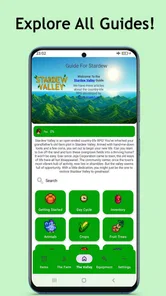
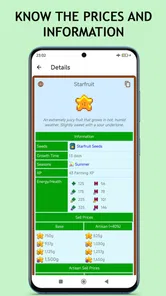
First off, the app provides a comprehensive breakdown of Stardew Valley's core elements. Whether you’re new to the game or a seasoned player, the app’s user-friendly interface makes it easy to find the information you need. From understanding the best seasons for planting specific crops to identifying the most profitable fish to catch, this guide has got you covered.
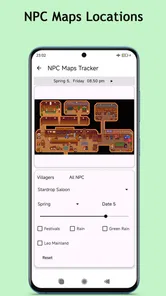
One of the features I absolutely love is the detailed calendar within the app. It’s like having a personal assistant that tracks all upcoming festivals and villager birthdays, ensuring you never miss an opportunity to boost your relationships or participate in fun events.
Mastering The Art of Farming
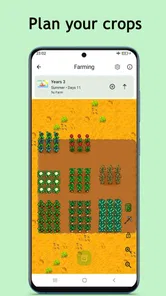
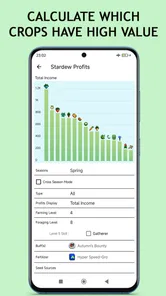
The farming tips in the guide are pure gold. The app provides insights into optimizing your farm layout, maximizing crop yields, and managing your resources efficiently. I found the section on seasonal crops particularly useful as it helps in planning ahead and making the most out of each season.
Building Relationships
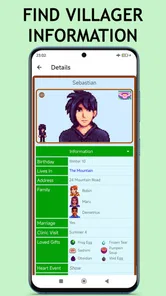
Let’s talk about one of my favorite aspects of Stardew Valley – building relationships with the townsfolk. The app’s character profiles are detailed and insightful, offering valuable tips on each character's likes and dislikes. It’s like having a cheat sheet for friendship! Whether you’re aiming to marry your favorite character or just want to be the town’s most beloved farmer, this guide is your best friend.
Planning without over-planning
A useful habit is to check one question at a time rather than trying to map out an entire season in advance. If you are deciding what to grow, compare the crop advice with the days remaining in your current season; if you are choosing a gift, check the character information before you spend time collecting items. This keeps the guide practical without turning a cozy game into a checklist. It also reduces the chance that a long planning session will spoil discoveries you would rather make on your own.
For newer players, the calendar and character information can answer recurring questions that are easy to forget between sessions. Experienced farmers may get more value from targeted checks—such as confirming a seasonal detail—than from reading broad explanations they already know. If you want live discussion, unusual troubleshooting, or multiple players’ opinions, a general web search or community forum remains the better fit; a focused reference is stronger when you know what you need to find.
Checking versions and recovering from a bad connection
The app is by WisnuN, costs $0.99, and is rated for Everyone. Its current version is 1.5.4, with a 4.3 average from around 95 ratings and over 1K installs. It was released on October 16, 2024, and supports devices running Android 7.1 or later. Those details make it a modest paid utility rather than a free, endlessly refreshed community resource, so I would decide whether its focused reference style suits the way I play before buying.
If a page or search does not appear when you need it, I would first retry after checking the connection, then return to the specific topic rather than assuming the whole guide is unavailable. For a session where network access is uncertain, looking up likely questions beforehand is a sensible fallback. That small bit of preparation matters more if you rely on the calendar or a particular character detail to shape your plans.
What a dedicated guide can—and cannot—replace
Compared with browsing the web, a dedicated guide can make familiar topics easier to consult without the noise of unrelated results. Compared with a wiki or forum, it may be less useful for niche questions and player-to-player discussion. I would not treat any guide as a substitute for checking whether advice matches the game version you are playing, especially when a detail affects a carefully planned day. Its strength is convenience for common reference tasks, not a guarantee that every unusual question has a definitive answer.
It is also worth thinking about how much you want to look things up. The calendar can help you remember events, but following every reminder can make play feel scheduled. I would use it as a safety net for details I genuinely care about, not as a rulebook for every decision. That balance keeps the practical help while leaving room for the pleasant surprises that make Stardew Valley rewarding.
Choosing the right reference for the question
The main alternative is not just another app; it is the general web, a wiki, or a player discussion. I would reach for a focused guide when I already know the topic and want a direct reminder without sorting through unrelated results. A community source makes more sense when a question is unusual, when advice needs discussion, or when I want to compare different approaches rather than settle a simple fact.
There is a useful trade-off here: convenience is valuable, but a compact guide may not offer the same range of perspectives as a large community. For example, a new player trying to decide how to organize a long-term plan might benefit from seeing several players explain their reasoning. Someone checking one character preference before choosing a gift has a narrower need, so the guide’s focused style is likely a better match.
Why You’ll Love It
What sets the Guide For Stardew apart is its attention to detail and the depth of information it provides. It’s not just a guide; it’s a companion that enhances your gaming experience by making sure you’re always a step ahead. Plus, the frequent updates keep the content fresh and relevant, which is a huge plus for dedicated players.
So, if you’re ready to take your Stardew Valley adventure to the next level, the Guide For Stardew is a must-have. It’s informative, user-friendly, and just downright fun to use. Trust me, once you try it, you’ll wonder how you ever managed without it. Happy farming!
Who benefits most, and who can skip it
I would recommend this kind of reference most to players who are still learning the rhythms of Stardew Valley, or to returning players who remember the broad strokes but forget particular seasonal details. It can also suit someone who enjoys setting a small goal before each session: check an event, plan a crop choice, then put the phone away and play. That is a more relaxed use than trying to optimize every decision.
On the other hand, players who prefer blind discovery may be happier without a guide close at hand. It can reveal answers before the game has a chance to surprise you, and the value drops if you rarely pause to consult reference material. I would also skip a paid guide if I mainly want current community discussion or a broad, constantly searchable knowledge base; those needs are better served by web resources.
Making the most of an uncertain connection
If I knew I might lose service during a session, I would check the details I expect to need while I still have a reliable connection. I would prioritize a seasonal plan or a specific character question, rather than trying to preload a whole playthrough’s worth of information. That is a practical way to avoid depending on a last-minute search while keeping the guide from taking over the session.
When something does not load as expected, I would avoid repeating the same search over and over. I would reopen the topic once, check connectivity, and then use what I already know or postpone the lookup. This is a sensible fallback rather than a guarantee of recovery: the app’s offline description is useful context, but my own test of the exact page I need is what matters before relying on it away from a connection.
My connectivity verdict
Overall, I would choose this app when I want a compact reference for familiar Stardew Valley questions, especially when I prefer not to juggle search tabs during a short play session. The offline framing is appealing, but I would verify the particular material I depend on before going somewhere with unreliable service. If you want fresh community answers or dislike using a paid guide, other reference options may suit you better. For players who value quick, focused reminders, the $0.99 price is a small but real decision; I would buy it for that convenience, not for a promise that it replaces every other source.
Guide For Stardew Frequently Asked Questions
Who develops Guide For Stardew, and what kind of app is it?
Guide For Stardew is a Books & Reference app developed by WisnuNug. It is a companion reference for Stardew Valley, rather than the game itself, so it is intended for looking up information and guidance while you play. The app’s store summary describes it as a complete, offline wiki for the valley, making it a practical option for players who want game-related material in one place.
What devices and age group is Guide For Stardew intended for?
Guide For Stardew is intended for Android devices running version 7.1 or later, and its content rating is Everyone. Before downloading, check that your device meets the minimum operating-system requirement. Since this is a reference app rather than a playable version of Stardew Valley, installing it provides access to guide material, not the farming game itself.
What is 'Guide for Stardew' and how does it enhance the gaming experience?
'Guide for Stardew' is a companion app designed to enhance your experience with the popular game, Stardew Valley, by providing detailed guides, tips, and walkthroughs. It offers comprehensive resources on farming, fishing, crafting, and more. Whether you are a new player or a seasoned farmer, this app helps you make the most of your in-game adventures by offering valuable insights and strategies.
Is 'Guide for Stardew' free to use, or are there any in-app purchases?
Guide For Stardew costs $0.99 to download. The published listing price is for the app itself; the earlier description of a free download and possible optional purchases should not be taken as a confirmed pricing model. Check the purchase details shown in your app store before installing so you know the cost presented for your account and region.
Does 'Guide for Stardew' work offline, or do I need an internet connection?
'Guide for Stardew' is designed to work both online and offline. Once you download the app, most of the content, including guides and tips, is accessible without an internet connection. This feature is particularly useful for gamers who want to access information while playing Stardew Valley in environments with limited internet connectivity.
Pros
- Comprehensive farming tips included
- Easy navigation for quick access
- Regularly updated content
- Offline access for guides
- Interactive community forums
Cons
- Contains ads within the app
- Limited free features
- No direct game integration
- Some guides are outdated
- Heavy on battery usage