

Greyhound: Buy Bus Tickets
- 12.59K
- 4.7
- Installs
- 1.00M
- Price
- Free

Screenshots


Analysis by Reviewed
I see Greyhound: Buy Bus Tickets as most useful when Greyhound is already a serious option for the trip, not as a magic answer to every travel-planning question. It is a free travel app from Greyhound Lines Inc, and its job is to make arranging and managing a Greyhound bus journey more straightforward. If I know my route and want to check the operator’s options without starting at a counter, that focus is a real advantage.
Choosing the right booking tool
Before I open a booking app, I ask what decision I still need to make. If I have settled on taking a Greyhound bus and need to find a suitable trip, this app has a clear purpose. If I am still weighing bus against rail, air, driving, or another carrier, I would begin with a wider comparison instead. That distinction matters: an operator’s own app can be convenient for acting on a decision, but it is not automatically the best place to decide which kind of travel fits.
I would start by comparing the full journey rather than looking only at the departure time or fare. For a bus trip, the length of the ride, the station’s location, and how I will get there or continue onward can matter as much as the ticket itself. I would also double-check the selected date and cities before paying; a quick search is convenient, but it does not replace making sure the itinerary fits the rest of my plans.
The app is aimed at everyday travelers as well as people who take familiar routes repeatedly. Its booking and trip-management tools can keep planning in one place, while the travel-history option may save effort when I need to search for a route I use again. I would still read the itinerary carefully before confirming, especially when a tight connection or a fixed arrival time makes a small schedule difference important.
Your Ticket to Easy Travel
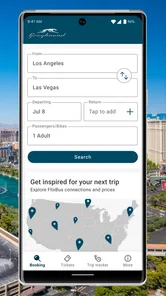
First off, let's talk about ease of use. The Greyhound: Buy Bus Tickets app is designed with the user in mind, sporting a straightforward interface that even your grandma could navigate with ease. The home screen greets you with a simple search bar where you can punch in your departure and arrival cities, along with your travel dates. I was pleasantly surprised at how quickly it pulled up a plethora of options. It's like having a travel agent in your pocket, minus the human interaction!
Where the app earns its place
The strongest case for using it is a direct one: when I already want to take Greyhound, I can search for the trip and keep the resulting booking close at hand instead of treating the operator’s app as one more general travel-planning destination. That makes it particularly practical for people who already know their departure and arrival cities, and for regular passengers who want a familiar starting point when arranging another journey.
It can also suit an occasional traveler. I do not need to turn a one-off trip into a new system or learn a complicated planning workflow; I can use the app for the immediate task and return to it if another Greyhound journey comes up later. The usefulness is less about having an app installed forever and more about reducing the number of steps between deciding to travel and having the trip information available.
More From Our News Desk

 Weather - By Xiaomi
Weather by Xiaomi Review: Clear at a Glance, Less Clear Up Close
Xiaomi’s weather app makes everyday forecasts quick to scan, but its calm surface can leave useful details and recovery paths harder to find than they should be.

 X
XX Under Pressure: Can It Recover When Posting Goes Wrong?
A resilience-focused review of X, examining setup, mistaken posts, interruptions, weak connections, and the gaps that matter when recovery needs to be dependable.

 Clash of Clans
Clash of Clans Is Won Between the Battles
Its raids are quick; its community is a long-term project of coordination, teaching, rivalry, and shared responsibility—with all the friction that entails.

 Android Auto
Android Auto Makes the Case for Quieter Car Software
The car interface is no longer judged by how much it can do, but by how quietly it helps. Android Auto shows what drivers now expect—and what still gets in the way.

 MobiOffice: Word, Sheets, PDF
MobiOffice: Transforming Mobile Productivity with Seamless Integration
MobiOffice: Word, Sheets, PDF is redefining mobile productivity with a surprising blend of functionality and innovation.

 EA SPORTS FC Soccer Mobile 26
EA SPORTS FC™ Mobile Soccer: Redefining Mobile Sports Gaming
Dive into EA SPORTS FC™ Mobile Soccer, where immersive gameplay and strategic depth transform mobile sports gaming.
Latest News



Features That Hit the Mark
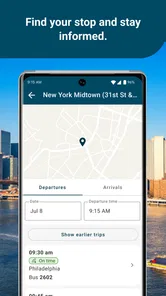
One of the standout features of this app is its real-time bus tracker. No more waiting at the station wondering if your bus is running late. The tracker updates you on the bus's location and estimated arrival time, which is a game-changer for anyone who's ever been stuck in transit limbo.
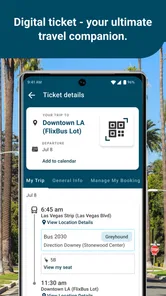
Another nifty feature is the ability to manage your bookings directly from the app. Whether you need to change your travel date, switch seats, or even cancel your trip, it's all just a few taps away. Plus, the app saves your travel history, making it a breeze to rebook frequent routes.
A more useful travel-day routine
A realistic use is booking a weekend visit after work: I can search the route and date, review the available options, then keep the booking accessible on my phone for the station. On travel day, the tracker gives me a way to check progress instead of relying only on guesswork. I would still leave a sensible buffer if someone is meeting me or I have another leg to catch, because an estimate is useful information, not a guarantee that every part of the day will run exactly to plan.
For a return trip, I would search both directions before committing to either one. That makes it easier to notice whether the departure times leave enough room for the reason I am traveling, rather than treating the outbound ride as the only decision. If I often take the same route, the saved history offers a convenient starting point; I would confirm the new date and details rather than assume a previous booking is automatically the right choice.
There is a small but important planning habit here: I would think through the station journey before I buy. A departure that looks convenient on screen may be less appealing if getting to the station is awkward, or if the arrival point leaves a long onward journey. Considering those pieces alongside the bus schedule helps me compare trips as door-to-door plans, not just as departure and arrival times.
Cost, convenience, and what to verify
For the budget-conscious traveler, this app is a godsend. It regularly offers exclusive discounts and promotions that aren't available if you book through traditional methods. I managed to snag a couple of deals myself, which made my wallet quite happy. Plus, the price comparison feature ensures you're getting the best bang for your buck.
But it's not just about the cost savings; it's about the convenience too. The ability to store your e-ticket on your phone means no more fumbling with paper tickets at the station. Just flash your phone, and you're good to go!
I would treat any apparent saving as one part of the decision rather than the whole answer. A lower fare only helps if the departure, arrival, and onward arrangements work for me. Before confirming, I would review the itinerary and the booking details together, then make sure I have a workable plan for reaching the station and continuing from it. That quick check is especially worthwhile when I am booking a return journey or coordinating with someone else.
How it compares with other ways to book
Compared with calling or arranging a ticket in person, an app-based booking flow is handy when I want to search on my own schedule and keep trip details close at hand. Compared with broader travel-search tools, Greyhound’s app is more focused: it makes the most sense when I am considering Greyhound, while a general transport or trip-planning option may be better when I want to weigh different operators and travel modes side by side. I would use both approaches when the route, arrival time, or total door-to-door effort matters more than sticking with one bus company.
That focus is also a trade-off. The app can help me organize a Greyhound booking, but it cannot make a bus the right choice for every destination or timetable. If I need flexibility across several carriers, want to compare a bus with rail or air, or have a connection that cannot tolerate delays, I would broaden the search before buying. For a straightforward Greyhound journey, keeping the booking and trip tools together is the more convenient path.
In other words, I would not expect this app to replace every tool I use to plan travel. A broad search service is more useful at the discovery stage, when I am comparing different ways to get somewhere. A carrier’s own app is more appealing once I know which operator I want to consider and want to keep that trip’s details together. For a trip where flexibility is the priority, checking more than one source first is the sensible move.
Small habits that make the trip smoother
I would keep the phone charged before heading to the station, since relying on an electronic ticket means the screen needs to be available when it is time to board. I would also check the booking details again after making a change, and use the tracker as a travel-day aid rather than as a reason to arrive at the last minute. These are simple steps, but they reduce the avoidable stress that can come from rushing through a station or overlooking a changed itinerary.
One practical question is whether the app suits someone who only travels once in a while. I think it can: occasional travelers can use the search and booking tools without needing to build a complicated travel routine, while regular passengers may get more value from having previous trips close by. If you prefer to plan on a laptop or want a single place to compare many providers, the app may be a companion to that process rather than a complete replacement.
Another useful question is what to do when plans change. The app’s booking-management tools make it possible to handle changes from the phone, which is convenient when I am away from a computer. I would still check the revised itinerary after making an adjustment, rather than assuming the original details remain accurate. That extra look is especially helpful when the change affects the date, seat, or timing of another part of the journey.
When a different option may suit you better
I would look elsewhere first if I had not chosen a travel mode, needed to compare several operators, or had a deadline that made a delay especially costly. A broader planning tool can help put different transport choices alongside one another, while a direct conversation or in-person booking may suit someone who prefers personal assistance. Neither alternative is automatically better for every traveler; the right choice depends on whether speed, a wide comparison, or hands-on help matters most.
The app is also a weaker fit for someone who wants every part of a complex trip managed in one place. If a journey involves multiple transport providers or a delicate chain of connections, I would map the whole route before booking individual legs. Greyhound’s tools are most compelling for the Greyhound portion, not as a substitute for checking how every piece of a complicated itinerary fits together.
Who should choose it
The app has a 4.7 average from around 105,000 ratings, and it has passed over a million installs. It is free, rated for everyone, and version 9.70.0 supports Android 6.0 and newer. Those details make it accessible to many Android users, though I would check that a device meets the minimum before downloading. For iPhone users, I would check the relevant store’s compatibility details before installing.
I would recommend it to people who have settled on Greyhound, especially if they value searching, booking, and keeping trip information on a phone. I would not make it my only planning tool for a complicated itinerary, a route where several transport types compete, or a trip with a very strict arrival deadline. In those cases, comparing alternatives first is the safer decision, even if I later return to Greyhound to book.
For someone deciding whether to install it, the practical question is whether they expect to book or manage a Greyhound trip on their phone. If so, its focused role is easy to understand, and the free price removes a purchase decision from the equation. If they only need to compare a wide mix of operators or prefer to keep all planning on a computer, they may be better served by a broader search approach and can use the app only when it becomes relevant.
Final Thoughts
All in all, the Greyhound: Buy Bus Tickets app is a must-have for anyone planning to travel by bus in the US. It's user-friendly, packed with useful features, and helps you save money along the way. Whether you're a seasoned traveler or just planning a quick getaway, this app has got you covered. So, next time you're planning a trip, give Greyhound a try. You might just find yourself enjoying the journey as much as the destination!
Greyhound: Buy Bus Tickets Frequently Asked Questions
Can I use the app to look for a route before deciding to book?
Yes. The app is designed to help you search for Greyhound journeys by entering departure and destination cities and a travel date, then reviewing the available routes. You can explore the options before choosing a journey and moving on to payment. This makes it useful for checking possible trips from your phone before you commit to a booking.
Who develops Greyhound: Buy Bus Tickets?
Greyhound: Buy Bus Tickets is developed by Greyhound Lines Inc. It is a travel app focused on booking Greyhound bus tickets from a mobile device, rather than a general-purpose travel planner. If you already use Greyhound services, the app offers a direct way to search journeys and manage ticket access on your phone.
What is the app’s current version, and when was it released?
The current version is 9.70.0, and the app was released on October 27, 2014. It is a free app in the Travel & Local category, with a straightforward focus on finding and booking Greyhound bus journeys. Checking that your device meets the operating system requirement before installing can help avoid compatibility issues.
Is Greyhound: Buy Bus Tickets free to download, and what devices can run it?
The app is free to download and is intended for booking Greyhound bus tickets from a mobile device. On Android, it requires Android 6.0 or later. It is also available for iOS, so travelers can use it on compatible Apple devices. Check your device’s operating system before installing to make sure it meets the requirements.
What is Greyhound: Buy Bus Tickets app?
Greyhound: Buy Bus Tickets is a mobile application designed to provide a convenient way for users to purchase bus tickets for Greyhound services directly from their smartphones. This app allows users to search for routes, compare prices, and book tickets without needing to visit a physical location or use a desktop computer. It is a Travel & Local app from Greyhound Lines Inc, with a store summary that describes booking bus tickets as easier through the app.
Pros
- User-friendly interface for booking.
- Wide network of routes available.
- Affordable ticket prices.
- Real-time bus tracking feature.
- Secure payment options.
Cons
- Limited customer support options.
- Occasional app crashes reported.
- No offline booking capability.
- Missing seat selection feature.
- Ads can be intrusive at times.











