

Grandstand - Events & Guides
- 5.00
- 3.9
- Installs
- 10.00K
- Price
- Free

Screenshots
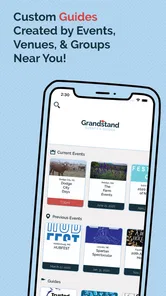
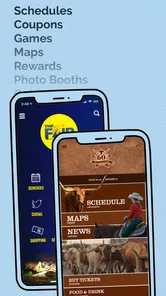
Analysis by Reviewed
I found Grandstand - Events & Guides most useful when I treated it as a practical event companion rather than a general discovery network. The app, made by Grandstand Apps, is designed to help me locate an event and then move from broad planning to the details that matter on the day: schedules, maps, vendors, food options, and related information. That focus gives it a clear purpose, especially when an event is large enough for a simple poster or social post to become difficult to use.
It is a free Events app for Android, suitable for everyone, and it runs on Android 6.0 or later. The current version is 4.0.9, while the app itself dates back to September 2017. That long presence gives the product a more established feel than a brand-new event directory, although the experience still depends heavily on whether the particular event I want is represented and how much information has been prepared for it.
My overall impression is positive but specific: this is best for people who already have an event in mind, or who are attending a listed event and want a more usable guide than a collection of screenshots. It is less convincing as a universal replacement for every calendar, ticketing service, venue website, or map app. The value appears after I choose the right event and use the information in a deliberate way.
How I use the app before and during an event
I use the guide as a flexible plan, not a checklist: before leaving, I note the few schedule items I care about and where they sit on the map, then revisit those sections as the day unfolds. That makes it easier to adapt if a stop takes longer than expected or the group changes its mind. Next, I look at the small checks that can prevent a hurried search when I arrive.
A simple starting routine prevents wasted time
My baseline workflow begins with searching for the event before I need anything urgently. I look for the event near me, open its guide, and scan the available sections rather than jumping straight into a single schedule item. This first pass tells me whether the guide is useful for my visit: I want to see practical information such as a timetable, a map, vendor details, and food choices in one place.
That initial check is important because event apps can feel excellent when they cover a full program and much less useful when only a small amount of information is available. I do not assume that finding an event name means every planning question is answered. Instead, I use the app to build a short mental plan: which activities interest me, where I may need to go, and when I should check the guide again.
For a realistic weekend example, imagine that I am going to a crowded local fair with a friend. Before leaving, I open the event guide and review the schedule first. I then inspect the map to understand where the food area and vendors sit in relation to the stages or other attractions. That small step changes how I plan the visit. Rather than wandering until I find lunch, I can decide where to start and leave room for movement between scheduled activities.
More From Our News Desk

 Gmail
GmailGmail in a Busy Inbox: Who Benefits Most?
From first account to crowded workday, Gmail earns its place through dependable search and flexible sorting—but its best fit depends on how much inbox maintenance you can tolerate.

 Prime Video
Switching to Prime Video: What Changes in Your Viewing Routine
Prime Video can make a compelling second home for streaming, but switching means learning a different catalog, rental layer, and route from browsing to playback.

 Universal TV Remote Control
Universal TV Remote Control Works Best as a Reliable Backup
A phone remote earns its place through quick setup and reliable habits. Here is how to get more from Universal TV Remote Control—and where its limits show.

 Weather - By Xiaomi
Weather by Xiaomi Review: Clear at a Glance, Less Clear Up Close
Xiaomi’s weather app makes everyday forecasts quick to scan, but its calm surface can leave useful details and recovery paths harder to find than they should be.

 X
XX Under Pressure: Can It Recover When Posting Goes Wrong?
A resilience-focused review of X, examining setup, mistaken posts, interruptions, weak connections, and the gaps that matter when recovery needs to be dependable.

 Clash of Clans
Clash of Clans Is Won Between the Battles
Its raids are quick; its community is a long-term project of coordination, teaching, rivalry, and shared responsibility—with all the friction that entails.
Latest News



Once I arrive, I use the schedule as a reference instead of trying to remember everything from home. I check the map when the next activity is in a different area, then return to the vendor or food information when I want a break. This repeated movement between sections is where the app makes sense: it gathers the pieces of an event that are often scattered across signs, printed programs, social posts, and separate web pages.
What the guide is good at combining
The strongest part of the experience is the relationship between the event schedule and the physical layout. A schedule by itself tells me what is happening, but not always how much time I need to reach it. A map by itself shows locations, but not which ones matter at a particular moment. Using both together lets me make more realistic choices, especially at an event with several activity areas.
The vendor and food sections add another useful layer. I would not use them as a guarantee that every stall or menu detail will remain unchanged, but they are valuable for deciding where to browse or eat. I also like that this information is presented as part of the event guide rather than forcing me to search for each vendor separately. That reduces the number of apps and browser tabs I need while I am already dealing with crowds and noise.
The practical advantage is not simply having more event information; it is having the information grouped around one visit. That distinction matters. A normal map app may help me find a venue, and a calendar may remind me of a time, but neither necessarily connects the schedule, event layout, food, and vendors in the same event-focused view.
Settings and preparation habits worth checking
I do not expect a complicated settings system here, and I would not install the app hoping to customize every part of an event experience. My useful preparation happens inside the event guide itself. I check the event identity carefully, review the schedule before traveling, and inspect the map while I still have time to think rather than waiting until I am standing in a busy entrance area.
I also recommend checking the guide more than once. Event information can be easier to understand after I know my priorities. On the first visit, I am looking for the general shape of the day. Later, I focus on the specific schedule items, locations, vendors, or food choices that affect my plans. This two-pass habit is more effective than trying to absorb every detail in a single session.
Another useful habit is to decide what I need the app to do for me. If I am attending alone, I may care most about timing and navigation between areas. If I am with children or a mixed group, food and vendor locations may be just as important as the headline activities. If I am browsing casually, I can use the event discovery side first and only study the guide after finding something that looks worthwhile.
Because the app is free, I can keep it available without making a financial commitment. That makes it reasonable to try before an event, but I still avoid treating it as my only source of critical information. For arrival instructions, admission requirements, accessibility arrangements, or last-minute changes, I would cross-check the organizer’s official communication when those details matter. Grandstand is a useful guide, not a substitute for every official notice.
Faster patterns for repeat visits
Experienced use is mostly about reducing repeated searching. When I attend an event more than once, I start with the schedule and map combination rather than exploring every section again. I identify the parts that changed my previous visit: a different activity time, a vendor I missed, or a food area that was farther away than expected. This turns the app into a planning tool instead of something I open only when I am already lost.
A second faster pattern is to create a loose route from the information already shown. I choose one starting point, select a nearby activity or vendor, and then plan the next move around the schedule. I do not try to create a rigid minute-by-minute itinerary because real events involve queues, conversations, and delays. The app works better for a flexible sequence of priorities than for a precise timetable that assumes everything runs perfectly.
I also separate “must see” items from “nice if nearby” items. The schedule helps with the first group, while the map, vendors, and food information support the second. If I miss an optional stop, the visit is still successful. This approach avoids one of the common problems with event planning apps: turning a leisure day into a stressful checklist.
For groups, I find it helpful to agree on a meeting point using the map before people split up. I would not assume that everyone in the group needs to follow the app continuously. One person can use the guide to confirm the next location while the others enjoy the event. That is a small but concrete workflow improvement, particularly when some companions are interested in different activities.
Where it compares well with ordinary alternatives
Compared with a printed program, the app is easier to consult when I need to move between schedule, map, vendors, and food information. A paper guide can be pleasant for a quick overview, but it is less convenient when I want to connect a time with a location. Grandstand’s event-centered structure is more useful for that decision-making process.
Compared with a general calendar, it provides much more context. A calendar entry can remind me that an event exists, but it usually does not help me decide where to go once I arrive. I would still use a calendar for personal reminders, especially if I have several commitments, while using Grandstand for the event itself.
Compared with a standard map application, the difference is even clearer. A map service is usually better for travel to the venue, nearby roads, and broad geographic orientation. Grandstand is more relevant after I start thinking about the event’s internal organization, including its schedule, vendors, food, and map. I see the two tools as complementary rather than direct substitutes.
Compared with a social media event page, Grandstand can be more practical during the visit because the information is arranged as a guide rather than a stream of announcements. Social platforms may be better for conversation and updates, but they can make it difficult to retrieve one specific schedule item or location. The trade-off is that the event app is only useful when its guide contains the information I need.
Limits that affect advanced use
The biggest limitation is coverage. An event guide app cannot help me if the event is not included, and even a listed event may not offer the same depth of material as another one. I therefore check the app early enough to change plans if the guide does not match my needs. This is especially important when I am relying on detailed scheduling or vendor information.
The second limitation is authority. I treat the displayed schedule, map, and listings as practical planning material, but I remain aware that event details can change. If timing is critical, I verify important points through the organizer’s current communication. That is not a criticism unique to Grandstand; it is a sensible rule for any event guide that sits between the visitor and the organizer.
I would also avoid expecting it to replace ticketing, transport planning, or personal organization tools. The app’s strength is the event guide itself. Someone who wants ticket purchases, a broad social feed, detailed travel directions, or a single calendar for every appointment may prefer a combination of other services. Installing Grandstand will not automatically simplify every part of a day out.
There is also a learning curve in deciding how much information to use. New users may open the app, see several event sections, and read them in no particular order. I get better results by giving each section a job: schedule for timing, map for movement, vendors for browsing, and food for breaks. That simple division is one of the most useful ways to avoid feeling overwhelmed.
Its public reception is modest rather than overwhelming, with an average of 3.9 from around fifteen ratings and five written reviews. The app has passed the ten-thousand-install mark, so it is not an obscure personal experiment, but those figures also suggest that I should judge it by whether it supports my event rather than by assuming it has universal coverage or a huge community behind it.
Who should install it, and who should skip it
I would recommend Grandstand to someone attending a fair, festival, or other organized event where schedules, maps, vendors, and food choices are important. It is particularly suitable for visitors who dislike carrying a printed program, who want to plan a route through a large venue, or who need to make quick decisions after arriving.
It is also a good fit for casual planners. I do not need to prepare an elaborate itinerary. I can simply find an event, check the main schedule, look at the map, and use the guide as questions come up. That low-pressure approach suits a day where I want structure without turning the whole visit into a project.
I would skip it as my main solution if I am looking for a universal event calendar, a ticket marketplace, a social community, or detailed turn-by-turn travel planning. I would also be cautious about depending on it alone for urgent changes or highly specific requirements. In those cases, the official organizer’s channels or a general-purpose travel and calendar setup may be better.
My verdict after building a repeatable routine
Grandstand - Events & Guides works best when I use it with a repeatable habit: find the event early, inspect the schedule, connect times to the map, and use vendor and food information to shape breaks. That workflow turns a basic event listing into something more useful on the ground. The app does not need to do everything to be valuable; it needs to make the event’s own information easier to use.
I appreciate that it is free and accessible to everyone, and the Android 6.0 requirement keeps it available to people using older devices. The current 4.0.9 release gives the app a current version identity, while its history since 2017 shows that it has been maintained as an event-focused product over time. Still, I would install it with realistic expectations about event coverage and the freshness of individual details.
My recommendation is straightforward: try it when you know you are attending an event that appears in its catalog, then spend a few minutes preparing a flexible plan instead of waiting until arrival. It is most valuable as a focused companion for navigating one event well, not as a replacement for every app involved in going out. Used that way, it can save time, reduce unnecessary wandering, and help me enjoy the schedule without constantly searching for basic information.
Grandstand - Events & Guides Frequently Asked Questions
Is Grandstand - Events & Guides available for my device?
Grandstand - Events & Guides is available for Android devices running Android 6.0 or later. It is an event-focused app from Grandstand Apps, intended to help people discover nearby activities and check practical event information. Before downloading, make sure your device meets the minimum Android requirement so the app can be installed and run as expected.
Who develops Grandstand, and is it widely used?
Grandstand - Events & Guides is developed by Grandstand Apps. It has more than 10,000 installs and an average rating of 3.9 from 15 ratings, giving prospective users a small but useful indication of its reach and reception. As with any event app, the most relevant question is whether its listings and guides cover the events and places you want to explore.
What is Grandstand - Events & Guides?
Grandstand - Events & Guides is an event-discovery application designed to help users find information about sports, entertainment, cultural activities, and other live experiences. The app typically brings event details, schedules, venue information, guides, and related updates together in one place, making it easier to plan attendance and keep track of activities that match your interests.
What kind of events and information can I find in Grandstand?
The available content may include event listings, dates and times, locations, venue guidance, schedules, descriptions, and practical information for attendees. Grandstand’s event guides can also bring together maps, vendor details, food information, and more. What appears can depend on your location and the events supported by the service, so the selection may vary by region and season.
Is Grandstand - Events & Guides free to download and use?
Grandstand is free to download. Some events or services you discover through it may still involve separate costs, such as tickets, reservations, transportation, food, or merchandise. Check the terms and price with the relevant event organizer or provider before making a purchase, since those charges are separate from downloading the app.
Pros
- Clear event information helps users plan visits with confidence.
- Useful guides make it easier to discover nearby activities and venues.
- Simple browsing experience keeps event details easy to find.
- Helpful updates can keep users informed about changes and announcements.
- Suitable for both regular attendees and occasional event visitors.
Cons
- Event coverage may vary considerably depending on your location.
- Some listings may lack detailed schedules
- pricing
- or accessibility information.
- Users may need another app to buy tickets or reserve a place.
- Notifications could become unnecessary if you follow only a few events.
- The usefulness of the app depends on how frequently local listings are updated.











