GPS Camera & Photo Timestamp
- 183.00
- 3.8
- Installs
- 10.00M
- Price
- Free
Screenshots

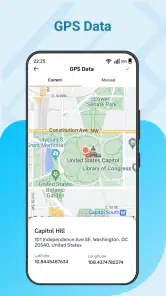
Analysis by Reviewed
Ever caught yourself in a situation where you took a stunning photo but later couldn't remember where exactly it was captured? Welcome to the world of GPS Camera & Photo Timestamp, an app designed to solve this exact problem. Let me take you through my experience with this fantastic app and why it might just become your new favorite travel companion.
What Does GPS Camera & Photo Timestamp Do?
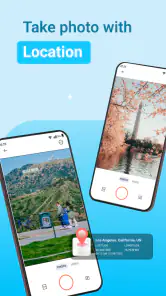
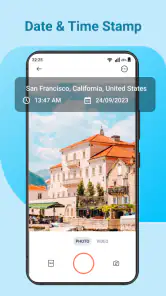
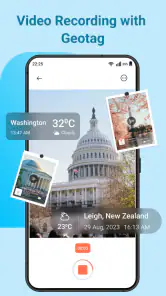
The GPS Camera & Photo Timestamp app is like having a personal assistant for your photos. It automatically stamps every picture you take with the precise location and date. No more sorting through your gallery trying to recall the place or occasion. It’s especially handy for travelers, bloggers, and anyone who wants to organize their memories more effectively.
Features That Stand Out
First off, the app is super easy to use. Once you open it, the interface is straightforward and user-friendly, making it accessible even for those who aren't tech-savvy. You just need to enable your phone’s GPS, and the app does the rest. It pins down your location with remarkable accuracy and adds a timestamp to every photo you snap.
What caught my attention is the customization options available. You can choose the format of the timestamp to suit your style, whether you prefer a simple date and time or a more detailed location tag. This flexibility is perfect for those who like a bit of personalization in their photos.
Using It in Real Life
Imagine being on a road trip, capturing breathtaking landscapes, and wanting to remember exactly where each photo was taken. This app shines in such scenarios. During my usage, I found it incredibly satisfying to have my photos tagged with locations. It’s like flipping through a digital map of my adventures. Plus, it’s a great conversation starter when sharing photos with friends and family.
For professional photographers or travel bloggers, this app is a game-changer. It helps keep track of shooting locations, making it easier to organize and document photo archives. It’s also educational, as it allows users to learn more about the places they visit just by looking at the tags.
Why You Should Try It
Beyond its practical uses, the app is lightweight and doesn’t hog your phone’s resources. It runs smoothly without any noticeable lag, which is always a plus. Moreover, the app respects user privacy, which is crucial in today's digital age. It doesn't share your location data without permission, ensuring that your information remains secure.
In conclusion, the GPS Camera & Photo Timestamp app is a must-have for anyone who loves taking photos and wants a little extra help in organizing them. Whether you're a casual snapper or a seasoned photographer, this app adds significant value to your photo-taking experience. So next time you’re out and about, give it a shot and watch how it transforms your photo library into a well-documented journey.
Pros
- Accurate GPS tagging for photos.
- Easy to use interface.
- Supports various timestamp formats.
- Customizable watermark options.
- Share photos directly from app.
Cons
- Limited editing features.
- Requires GPS for full functionality.
- Ads in the free version.
- Occasional crashes reported.
- Limited cloud storage integration.
- Category
- Photography
- Version
- 1.3.3











