gProjectViewer
- 23.00
- 2.0
- Installs
- 100.00K
- Price
- Free

Screenshots
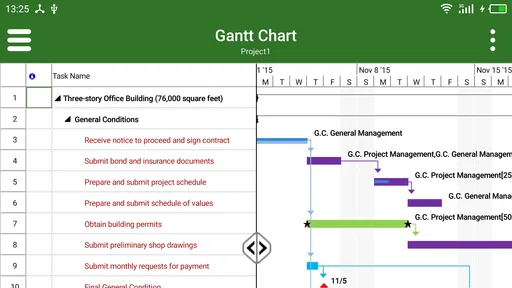
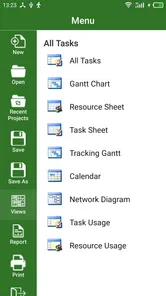
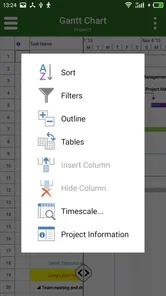
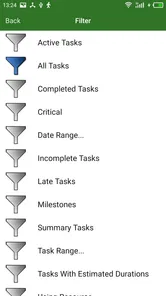
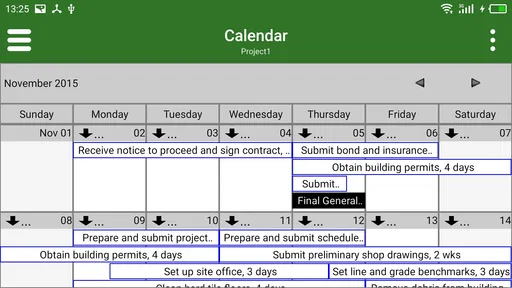
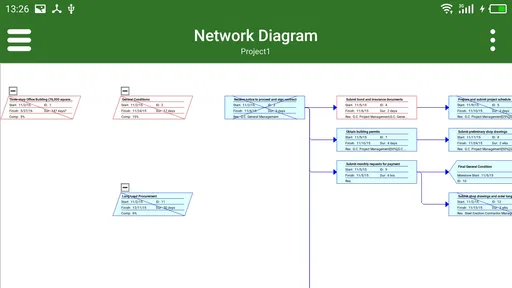
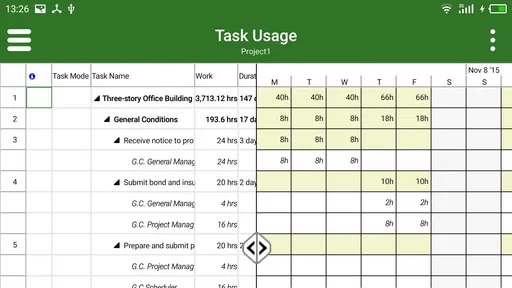
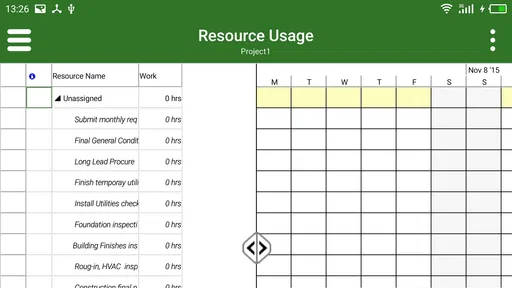
Analysis by Reviewed
When I need to open a Microsoft Project file without sitting at a desktop, I want a tool that gets me to the schedule quickly and does not pretend to be a complete project-management suite. That is the role I see for gProjectViewer. It is a free business app from Housatonic Software, built around viewing MPP files on Android rather than replacing Microsoft Project itself.
That narrow purpose is both its appeal and its biggest limitation. I would recommend it to someone who regularly receives project schedules and mainly needs to inspect dates, tasks, dependencies, or overall progress while away from a computer. I would not choose it as the main workspace for building a project plan, coordinating a team, or making frequent structural changes. The app has a modest average rating of 2.0 from around 458 ratings, so expectations should be realistic before installing it.
What the app is really useful for
The simplest way to understand this app is as a mobile window into MPP files. If a colleague sends me a Microsoft Project schedule and I only need to check what is happening next, a dedicated viewer can be more practical than searching for a full desktop replacement. I can use that kind of access during a meeting, on a site visit, or while answering a quick question away from my main computer.
A realistic example would be a contractor asking whether a delivery is expected before a particular installation task. I would open the relevant project file, locate the task sequence, and inspect the schedule instead of asking someone to export screenshots or send a separate spreadsheet. That saves time when the question is about reading the plan rather than editing it.
The app is listed as suitable for Everyone, which makes it approachable for general workplace use. It is also free to install, although optional in-app purchases range from $0.99 to $39.99 per item. I would therefore treat the free installation as a chance to test the workflow with a few real files, not as a promise that every useful capability is available without additional cost.
Reading a schedule is different from managing one
This distinction matters more than the store summary suggests. A viewer can be valuable when the source file is already prepared, but it will feel restrictive if I expect to create a complete plan from scratch. People who need calendars, resource assignments, baseline comparisons, detailed task editing, or team collaboration should compare this app with a full project-management service before committing to it.
For occasional reference, the focused design may be an advantage. I do not need to learn a large collaboration platform just to answer a scheduling question. For daily project control, however, a viewer can become a bottleneck because the authoritative file still lives elsewhere. I would use it as a companion to a desktop workflow, not assume it is a one-for-one replacement for Microsoft Project.
More From Our News Desk

Weather by Xiaomi Review: Clear at a Glance, Less Clear Up Close

X Under Pressure: Can It Recover When Posting Goes Wrong?

Clash of Clans Is Won Between the Battles

Android Auto Makes the Case for Quieter Car Software

MobiOffice: Transforming Mobile Productivity with Seamless Integration

EA SPORTS FC™ Mobile Soccer: Redefining Mobile Sports Gaming
Speed depends on the file, not just the phone
In normal use, the perceived speed of a viewer like this is closely tied to the MPP file being opened. A compact schedule should be easier to inspect than a large plan with many tasks, relationships, and layers of detail. That is a practical trade-off: the app may feel quick for checking a small project, while a complex schedule can make navigation feel less immediate even on a capable device.
I would avoid judging performance from the first screen alone. The more useful test is whether I can open a representative file, move to the section I need, and return to it later without losing my place. If the app handles that routine comfortably, it has done its job for viewing. If I spend more time waiting or searching than I would with a PDF export, the dedicated viewer loses some of its advantage.
There is also a workflow tip worth keeping in mind: keep a clearly named copy of the project file for mobile review. When several revisions exist, the main risk is not only opening slowly but also inspecting an outdated schedule. A simple naming habit, such as including the project phase or revision in the filename, makes mobile checking much safer.
Heavy schedules reveal the important trade-offs
Large project plans are where I would be most cautious. A file with thousands of tasks, numerous dependencies, or extensive resource information asks more of any mobile viewer than a short schedule does. Even if the device has enough storage and memory, the screen remains a constraint: dense timelines and long task lists are harder to understand on a phone than on a desktop monitor.
For that reason, I would use the app for targeted inspection during heavy-use moments rather than trying to explore an enormous plan casually. Before a meeting, I would identify the task names or date ranges I expect to discuss. That preparation reduces scrolling and helps me decide quickly whether the phone view is sufficient.
Another useful approach is to separate “look up” work from “analyze” work. Looking up a milestone, checking a predecessor, or confirming a sequence can suit a mobile viewer. Comparing several scenarios, reviewing a crowded resource plan, or deciding how to rework a delayed schedule is better handled on a larger screen with the original planning software.
This is one of the app’s less obvious trade-offs. Its value rises when the question is narrow and time-sensitive. Its value falls when the question requires broad visual context. A person checking one task during a site visit may find it genuinely helpful, while a project manager conducting a full weekly review may find a mobile screen too limiting.
Reliability means recovering gracefully
With a file-viewing app, reliability is not only about opening a document. I also care about what happens when I switch to another app, receive a call, rotate the device, or return after a short interruption. A good mobile workflow should let me resume the same inspection without having to reconstruct the entire path from the beginning.
I would test that before depending on the app in a meeting. Open a project file, move to a meaningful section, leave the app briefly, then return and repeat the action with another file. This small check tells me more about day-to-day confidence than a single successful launch. It also exposes whether my phone has enough available resources for the way I intend to use the viewer.
When a file does not behave as expected, I would first verify the file itself and the transfer process before blaming the application. An incomplete copy, an old revision, or a file stored in an awkward location can create confusion. Keeping the original untouched and working from a duplicate is sensible, especially when a project schedule is important.
I would also avoid making the app my only access route for urgent information. If a schedule is critical to a presentation or a site decision, having a fallback such as a previously exported document or access to the desktop source is prudent. That is not a criticism unique to this app; it is simply good practice when a mobile viewer sits between me and the original project file.
Android support and practical device limits
The current version is 23.3.1204 and requires Android 5.0 or later. That gives the app a broad potential device range, but minimum compatibility is not the same as an ideal experience. Older phones may be able to install it while still feeling less comfortable with complex schedules, multitasking, or long viewing sessions.
Screen size makes a noticeable difference. On a larger phone or tablet, timelines and columns should be easier to inspect than on a compact handset. I would especially favor a larger display if I regularly read task names, dates, and relationships together. A smaller device can still be useful for a quick confirmation, but it is less suitable for prolonged schedule analysis.
Resource demands are also relative to the project file. A simple MPP document should be a fairer test of everyday usability than a highly detailed master plan. I would keep other demanding apps closed during an important review on an older device, not because the viewer is proven to be unusually heavy, but because reducing background competition gives any document app a better chance of staying responsive.
The app’s age is another practical consideration. It was released on June 11, 2013, and the version number shows that it has continued to receive version changes, but I would still test it on the exact Android handset I plan to use. Long-established software can be familiar and focused, yet compatibility with newer device habits should be judged through actual use rather than assumed.
Where it fits beside common alternatives
The usual alternatives fall into three groups: Microsoft Project on a computer, a cloud project-management platform, or a simple export such as a PDF or spreadsheet. Each is better in a different situation. Desktop software is the stronger choice for editing and detailed planning. Cloud platforms are better for shared updates, comments, permissions, and live collaboration. Exports are often easier to send and may be more predictable for presentation.
gProjectViewer sits between those options. Compared with a PDF, an MPP viewer can preserve more of the project file’s structure for inspection, assuming the file opens and displays the information I need. Compared with a cloud service, it is more focused on the document itself and less suited to team communication. Compared with desktop Microsoft Project, it is more convenient for mobile reference but far less appropriate as a full planning environment.
That comparison suggests a clear decision rule. If my organization already works with MPP files and I need occasional mobile access, I would try this app first. If everyone edits the schedule collaboratively, I would look at a cloud-based system. If nobody needs to inspect the original structure and the goal is simply to share a readable snapshot, a carefully prepared export may be easier for everyone.
I would also consider the purchase model before rolling it out to a team. The app is free to download, but the listed in-app purchase range means some functions may involve separate costs. For one person, testing the exact workflow is straightforward. For a department, I would first confirm which capabilities are needed and whether the purchase arrangement fits the way the team handles project files.
Who should install it and who should skip it
I think it is a reasonable fit for consultants, supervisors, contractors, students, and office staff who receive Microsoft Project files but are not always near a computer. It is particularly useful for people who ask focused questions: What starts next? Which task follows this one? Is the milestone still in the expected part of the schedule? Those are mobile-friendly questions.
I would be more hesitant to recommend it to a project manager who spends most of the day changing schedules. If the job involves frequent editing, resource balancing, scenario planning, or collaboration, a viewer will likely feel too narrow. The same is true for teams that need a shared source of truth rather than a file passed from one person to another.
New users should also know that an MPP file is not automatically a universal document format. Before relying on the app, I would ask the person sending the file whether the mobile copy is current and whether the important information is visible in the intended view. That small conversation prevents the common mistake of assuming that opening a file guarantees that every planning detail will be equally easy to interpret on a phone.
My performance verdict
My view is that gProjectViewer makes the most sense as a focused, on-the-go reader for Microsoft Project files. Its perceived speed should be acceptable for straightforward schedules and quick lookups, while large or dense plans demand more patience and a larger display. I would not describe it as a complete project-management solution, because that would set the wrong expectation from the start.
The rating of 2.0 from around 458 ratings is a reason to approach the app carefully, not necessarily to dismiss the idea outright. The best test is personal and practical: install it on the device you actually use, open a few representative MPP files, interrupt and resume the session, and check whether the information you need is easy to reach. That process will reveal more than a generic promise of compatibility.
For me, the strongest case is a colleague who needs a schedule reference during travel, a site visit, or a short meeting. The weakest case is a team seeking a modern shared workspace for planning and communication. Because it is free to install, it is easy to evaluate, but the optional purchases and the app’s narrow purpose deserve attention before treating it as a standard business tool.
My recommendation is conditional but positive: use it as a mobile companion when the original MPP file is the source you need to inspect, and keep a desktop or collaborative alternative for serious planning work. If that boundary matches your needs, this small, specialized app can save you from carrying every schedule question back to the office.
gProjectViewer Frequently Asked Questions
What does gProjectViewer cost, and are there in-app purchases?
gProjectViewer is free to download, which makes it possible to try it without paying upfront. It also offers in-app purchases, with items priced from $0.99 to $39.99. Check the purchase details in the app before confirming anything, especially if you only need basic viewing. The app is listed for everyone, but purchase choices and their value will depend on the features you want to use.
Will gProjectViewer work on my Android device?
The Android version requires Android 5.0 or later, so check your device’s operating system before downloading. Meeting that minimum does not guarantee that every device will behave identically, but it gives you a practical first compatibility check. gProjectViewer is a business app from Housatonic Software, and its main purpose is to open Microsoft Project files for viewing.
What is gProjectViewer and what can I use it for?
gProjectViewer is designed for opening and reviewing project files, making it useful for users who need to inspect schedules, tasks, milestones, and related project information without necessarily using the full project-management software that created the files. It is mainly focused on viewing and understanding project data rather than replacing a complete planning, editing, or collaboration platform. Its stated focus is Microsoft Project (MPP) files, so it is most relevant if that is the format you need to inspect.
Which project file formats does gProjectViewer support?
Before downloading gProjectViewer, you should check whether it supports the specific file format used by your project-management application. Compatibility can vary depending on the version and platform, and some advanced elements may not appear exactly as they do in the original program. For the best results, test a copy of an important project file and review the developer’s current compatibility information. The app is presented as a viewer for Microsoft Project (MPP) files, so confirm that your files match this need before relying on it.
Can I edit project schedules in gProjectViewer?
gProjectViewer is primarily intended for viewing project information, so it should not be treated as a full replacement for an editing and planning application. You may be able to inspect schedules, task relationships, resources, and timelines, but creating major changes or managing a project collaboratively may require the original project software. Always confirm the available editing tools before relying on it for active project administration.
Pros
- Clear project overview with tasks
- milestones
- and key dates in one place.
- Useful for checking project progress while away from a desktop.
- Supports quick access to multiple project-related details.
- Simple interface makes basic project monitoring easy to understand.
- Helpful companion for teams already using compatible project software.
Cons
- Most useful features depend on access to a compatible project server.
- Not designed for creating or editing complex project plans on mobile.
- Large projects may feel difficult to navigate on a small screen.
- Requires accurate server settings and permissions to display project data.
- Its value is limited if your organization does not use supported systems.











