

Gordon Food Service Shows
- 5.00
- 4.2
- Installs
- 10.00K
- Price
- Free

Screenshots
Analysis by Reviewed
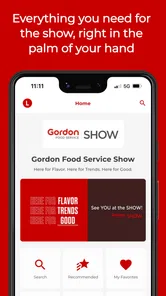
When I opened Gordon Food Service Shows, I found an event companion rather than a general-purpose food-service tool. Its job is to make a Gordon Food Service trade show easier to follow from a phone, and that narrow focus is also its main strength. I would not install it expecting recipes, ordering, inventory management, or a permanent business dashboard. I would install it when I am attending one of the company’s trade shows and want event information close at hand.
The app is developed by Gordon Food Service, Inc and is listed in the Events category. It is free to download, with an Everyone content rating, so the basic decision is straightforward: there is no purchase price standing between an attendee and the app. That does not automatically make it valuable, though. Its usefulness depends heavily on whether the event information inside matches the show I am attending and whether I prefer managing schedules and notes on my phone instead of using printed material or a browser.
How the app fits into a trade show visit
I see this app as a temporary working tool. A trade show can involve exhibitor areas, demonstrations, talks, meetings, product discovery, and a lot of movement between spaces. Even when an event is well organized, printed schedules are easy to fold away, lose, or forget to update. A mobile event app can put those details in one place, which is helpful when the day changes faster than expected.
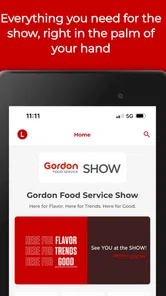
The important distinction is that Gordon Food Service Shows is not presented as a broad Gordon Food Service account app. The store summary positions it around enhancing the trade show experience, so I would judge it by event-day usefulness rather than by the number of long-term features it might offer. That makes the app relevant to attendees, exhibitors, food-service professionals, and anyone visiting a Gordon Food Service show, but much less relevant to someone who is simply curious about the company.
In practical terms, I would open it before leaving for the venue, check the event information available for my show, and use it as a reference point throughout the day. I would also keep another source of essential information nearby, such as the event’s official email or registration details. A companion app can make navigation and planning easier, but it should not become the only place where I keep information that I may need before the event loads or if my phone battery runs low.
What the free download really means
The app costs nothing to download, which is a clear advantage for an attendee who only needs it for a specific event. I do not have to treat it like a subscription decision or justify a recurring expense for a tool that may only matter during a short visit. That free access also makes it easier for a team to recommend the app to colleagues without asking everyone to approve a purchase.
Still, free access is not the same as guaranteed value. The app earns its place on my phone only if it saves time, reduces uncertainty, or helps me make better use of the show. If I already have a complete schedule in an email and do not need event updates, the extra download may add little. The strongest value appears when the app gathers useful event material into a form that is quicker to consult than scattered messages and paper handouts.
More From Our News Desk

 Gmail
GmailGmail in a Busy Inbox: Who Benefits Most?
From first account to crowded workday, Gmail earns its place through dependable search and flexible sorting—but its best fit depends on how much inbox maintenance you can tolerate.

 Prime Video
Switching to Prime Video: What Changes in Your Viewing Routine
Prime Video can make a compelling second home for streaming, but switching means learning a different catalog, rental layer, and route from browsing to playback.

 Universal TV Remote Control
Universal TV Remote Control Works Best as a Reliable Backup
A phone remote earns its place through quick setup and reliable habits. Here is how to get more from Universal TV Remote Control—and where its limits show.

 Weather - By Xiaomi
Weather by Xiaomi Review: Clear at a Glance, Less Clear Up Close
Xiaomi’s weather app makes everyday forecasts quick to scan, but its calm surface can leave useful details and recovery paths harder to find than they should be.

 X
XX Under Pressure: Can It Recover When Posting Goes Wrong?
A resilience-focused review of X, examining setup, mistaken posts, interruptions, weak connections, and the gaps that matter when recovery needs to be dependable.

 Clash of Clans
Clash of Clans Is Won Between the Battles
Its raids are quick; its community is a long-term project of coordination, teaching, rivalry, and shared responsibility—with all the friction that entails.
Latest News



I would also avoid confusing the free app with free attendance, free samples, or free services at the show. The app’s listed price tells me what it costs to obtain the software, not what the wider event experience may involve. That distinction matters when planning a visit. I would check registration and event details separately rather than assuming that installing the app covers every part of attending.
What I would use it for during the day
My first use would be planning. Before entering a busy exhibition space, I would look for the sessions, exhibitors, or activities that matter most to me and decide what cannot be missed. That simple step can prevent a common trade show problem: spending the first part of the day wandering and then discovering that an important presentation has already ended.
My second use would be quick reference. Instead of opening several emails or carrying a folded program, I could return to the app when I need to confirm where I should go next. This is especially useful for someone attending on behalf of a restaurant, school, healthcare operation, hospitality group, or other food-service business, where the visit may have a specific purpose rather than being casual browsing.
My third use would be keeping the visit focused. I would make a short priority list before arriving: one or two subjects to investigate, people or exhibitors to find, and sessions worth protecting time for. The app can support that workflow by keeping event-related information nearby, but I would still record detailed business notes in my normal notes app or notebook. A specialized event app is usually best at helping me decide where to go, not at replacing a full research system.
There is also a useful team scenario. If several coworkers attend the same show, each person can use the app as a shared reference while dividing responsibilities. One person might concentrate on equipment, another on ingredients, and another on educational sessions. The app does not need to become a collaboration platform for this to work; simply having a common event source can reduce confusion when everyone compares notes later.
A realistic visit from arrival to departure
Imagine I am attending a Gordon Food Service trade show with a short list of operational questions. Before I arrive, I open the app and identify the parts of the event most connected to those questions. At the venue, I check the schedule rather than relying on memory, then adjust my route when a conversation takes longer than expected. Between sessions, I use the app to decide whether I have time to visit another area or should head directly to the next activity.
At the end of the day, I would not expect the app alone to produce a polished purchasing report. I would review my handwritten or separate digital notes and use the event information as context. That division of labor is sensible: the event app helps me navigate the opportunity, while my own notes capture the decisions and follow-up tasks that matter after I leave.
This workflow also shows the main trade-off. The app can reduce friction during a concentrated event, but its value is tied to preparation. If I download it at the last minute, never check it before arriving, and do not know what I want from the show, it may feel like another screen rather than a useful assistant.
Where it compares well with usual alternatives
The usual alternatives are a printed program, event emails, a mobile browser page, or simply asking staff for directions. Each option has a place. Printed material works without a battery and can be faster when I already know the layout. Email is useful before the event because it keeps registration and logistics in one familiar inbox. A browser can be convenient if I do not want another app installed.
A dedicated event app has a different advantage: it gives the event a focused home on my phone. I do not have to search through unrelated messages or repeatedly enter a web address. If the show’s information is organized well, that focus can make a busy day feel more manageable. It also gives me a single place to revisit when I am moving between sessions and exhibit areas.
However, I would choose email or a browser over the app when I only need one piece of information, such as an arrival instruction or registration confirmation. I would also prefer printed material as a backup for a long day away from a charger. The best approach is not to treat the app as a total replacement for every other source. I would use it as the main event reference while keeping essential logistics available elsewhere.
Small workflow choices that improve the experience
One practical tip is to review the app before traveling, not while standing at the entrance. That gives me time to notice whether the event content is relevant to my visit and to create a simple plan. It also avoids wasting the first minutes of the show on setup and searching.
A second tip is to separate “must attend” items from “nice to see” items. Trade shows rarely go exactly to plan. A rigid schedule can make the day stressful, while a short priority list leaves room for useful conversations. I would use the app for the fixed commitments and keep flexible exploration around them.
A third tip is to treat the phone as a reference device rather than the only record of business decisions. If I discover a product or idea worth following up, I would immediately add the relevant detail to my normal notes workflow. That prevents the event app from becoming a temporary memory that disappears when the show is over.
A fourth tip is to prepare for connectivity and battery limits without assuming a problem will occur. I would charge the phone before leaving, keep important arrival details accessible, and avoid depending on a single screen for everything. This is not a criticism unique to Gordon Food Service Shows; it is a sensible habit for any app used in a crowded, full-day event environment.
Who is most likely to get value
The best fit is someone who is actually attending a Gordon Food Service trade show and wants a convenient event reference. That includes professionals who need to organize a limited amount of time, teams splitting up to cover different areas, and first-time attendees who would rather have event information presented in an app than assemble it from separate messages.
I also think it can help people who attend with a clear learning or sourcing goal. If I want to compare ideas, find relevant demonstrations, or make sure I reach particular parts of the show, a dedicated event companion can keep the visit purposeful. The free price makes trying it a low-risk choice when the event is relevant.
The audience is narrower than the developer’s broader food-service presence might suggest. A restaurant operator who wants ordering tools, a buyer looking for account management, or a job seeker researching the company should not assume this is the right app. Its value comes from the trade show context, not from being a general Gordon Food Service utility.
Where I noticed friction and limitations
The first limitation is relevance outside an event. Once the show is finished, I would expect my need for the app to drop sharply. That is not a flaw for a purpose-built event companion, but it does mean I would not keep it installed indefinitely unless I plan to attend another applicable event.
The second limitation is the dependence on the quality of the event content. A well-designed interface cannot compensate for missing, outdated, or poorly organized information. When I use an event app, I want confidence that the schedule and venue details are current. I would still verify critical arrangements through the event communications I receive.
The third limitation is that a mobile schedule can encourage overplanning. It is tempting to fill every minute with sessions and stops, but the most valuable trade show conversations may happen unexpectedly. I would use the app to protect priorities, not to eliminate flexibility.
There is also a practical learning curve. Even a focused app requires me to understand where its key information lives. If I am in a hurry, a printed map or a nearby staff member may be faster. That is why I would install and inspect it before the event rather than waiting until I need an answer immediately.
Compatibility and trust signals
The app is listed for Android devices running version seven or newer, which covers a wide range of phones while still making the operating-system requirement worth checking before a trip. I would verify compatibility on the device I plan to carry, especially if it is an older work phone. Discovering an installation problem on the morning of the show would defeat the convenience the app is supposed to provide.
Its current version is listed as 9.69.0, and the app was released on August 5, 2022. Those details suggest an established event-app product rather than something appearing for the first time immediately before a visit, although they do not by themselves guarantee that every event experience will be identical. I would still open the app ahead of time and look for the relevant show rather than relying only on its presence in the store.
The public response is encouraging but limited in scale: it carries a 4.2 average from around twenty ratings, alongside five written reviews. I read that as a useful positive signal, not as definitive proof for every attendee. The app has also passed ten thousand installs, which indicates that it has reached a real audience, but popularity alone cannot tell me whether its event information will match my particular needs.
My verdict on value
I would recommend downloading Gordon Food Service Shows when I have a confirmed reason to attend a Gordon Food Service trade show. Because the app is free, the financial risk is minimal, and the potential benefit is practical: less time searching through messages, a clearer plan for the day, and an easier way to keep event information nearby.
I would skip it if I am not attending a relevant show, if I only need permanent Gordon Food Service account tools, or if my event information is already simple enough to manage through email and a printed schedule. In those cases, another app would not necessarily be better; I may simply not need an event app at all.
My final view is that this is a focused utility, not an app I would recommend universally. Its free access makes trying it sensible for attendees, while its narrow purpose keeps expectations realistic. The real value is not the download itself, but the time and attention it can help me recover during a busy trade show. For the right visitor, that is enough to make it worthwhile; for everyone else, leaving it uninstalled is the more honest choice.
Gordon Food Service Shows has an average rating of 4.2, is available free of charge, and is rated for Everyone. I would approach it as a practical event companion from Gordon Food Service, Inc rather than as a general food-service application. Used with a little preparation and a backup for essential details, it can make a focused visit easier to organize without pretending to replace the rest of my work tools.
Gordon Food Service Shows Frequently Asked Questions
Is Gordon Food Service Shows available for my phone, and how much does it cost?
Gordon Food Service Shows is an event app from Gordon Food Service, Inc. It is free to download, so you can install it without paying for the app itself. It requires Android 7.0 or later on Android devices. The app is intended to enhance the Gordon Food Service trade show experience, making it most relevant if you plan to attend one of its events.
Who is Gordon Food Service Shows intended for?
The app is aimed at people attending Gordon Food Service events, especially customers and other visitors to its trade shows. It may be useful if you want to look over event information and organize what you plan to see while there. If you are not attending a Gordon Food Service event, the app may have limited relevance to your needs, since its purpose is to support that event experience.
What is the Gordon Food Service Shows app used for?
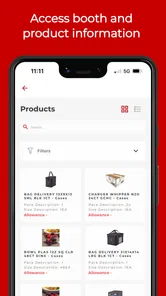
Gordon Food Service Shows is designed to support attendees and customers during Gordon Food Service events, including foodservice trade shows, product demonstrations, presentations, and supplier meetings. After installing it, users can typically browse event information, review schedules, discover exhibitors or products, and plan which sessions or booths they want to visit. Its usefulness depends on the specific show and the content made available by the organizers.
Do I need an account or registration to use Gordon Food Service Shows?
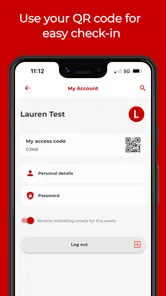
Some features may be available without signing in, such as viewing general event details, dates, locations, and exhibitor information. However, registration or an account may be required for personalized schedules, attendee networking, session reservations, recommendations, or access to show-specific materials. Before downloading, check the event instructions and the app’s sign-in requirements, since access can vary depending on the particular Gordon Food Service show.
Can Gordon Food Service Shows help me plan my visit?
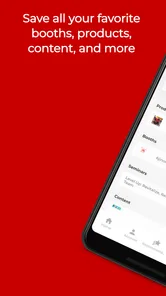
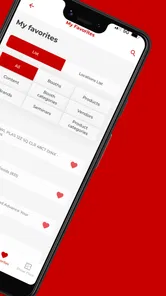
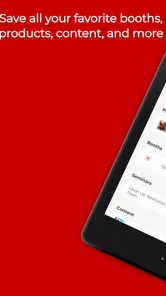
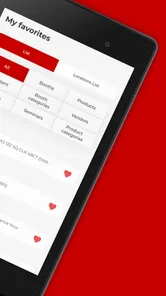
Yes, the app is intended to make event planning easier by bringing important show information into one place. Depending on the event, you may be able to view the agenda, explore exhibitors, save products or sessions, and create a personal itinerary. This can be especially helpful at larger shows where several demonstrations, meetings, and presentations take place at the same time.
Pros
- Quickly find upcoming Gordon Food Service events and show details.
- Useful for discovering new products
- suppliers
- and foodservice solutions.
- Event information is organized for easy browsing on mobile devices.
- Can help attendees plan visits
- meetings
- and product demonstrations.
- Convenient access to show-related updates while traveling or on-site.
Cons
- Its usefulness is limited outside Gordon Food Service events.
- Some content may require an account or event registration.
- Information may become outdated after a show has ended.
- The app may offer limited value for casual food shoppers.
- Performance and content can depend on internet connectivity.











