Golf Pad: Golf GPS & Scorecard
- 6.17K
- 4.5
- Installs
- 5.00M
- Price
- Free

Screenshots
Analysis by Reviewed
Golf Pad: Golf GPS & Scorecard is a comprehensive app designed for golf enthusiasts who want to elevate their game. With its intuitive design and user-friendly interface, this app provides a seamless experience on the course.
Getting Started with Golf Pad
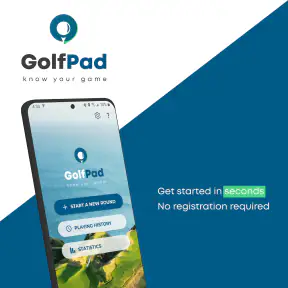
First off, downloading and setting up Golf Pad: Golf GPS & Scorecard is a breeze. Available for both Android and iOS, the app welcomes you with a straightforward onboarding process. You simply need to enter your basic details and you’re ready to tee off. The app offers a GPS rangefinder, scorecard, and shot tracker, all in one package, making it a versatile tool for both beginners and seasoned players.
Features that Stand Out
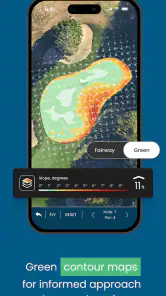
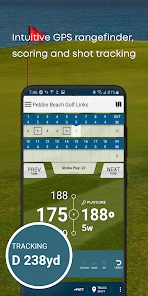
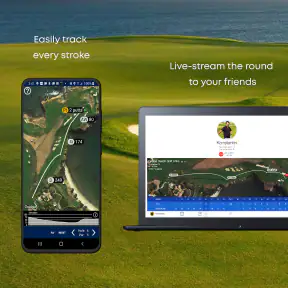
One of the standout features is the precise GPS rangefinder. As someone who’s always been skeptical about the accuracy of such apps, I was pleasantly surprised. It provides real-time distances to the front, back, and center of the green, which can really help in choosing the right club. Plus, the aerial view of each hole gives you a strategic advantage, almost like having a personal caddy.
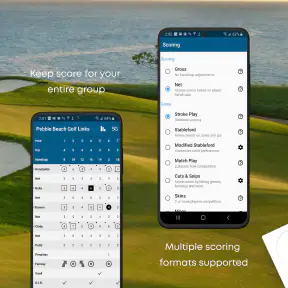
The scorecard feature is another highlight. It allows you to track your scores effortlessly, and with the ability to enter scores for your entire group, it becomes a social activity. I found this especially useful during friendly rounds with buddies, as it eliminates the hassle of maintaining a paper scorecard.
Keeping a Round Moving
In ordinary use, the main benefit is having distances and scorekeeping together rather than switching between a separate GPS tool and a paper card. I’d still check the hole layout before choosing a shot: a number is useful, but it cannot make the decision for you when trees, wind, or an awkward lie change the sensible play. Treating the rangefinder as a reference, not an instruction, keeps the app helpful without letting a screen take over the round.
A practical routine is to check the distance while approaching your ball, then enter the score when the group reaches the next tee or has a quiet moment. That reduces phone handling around other players’ shots and avoids turning every stroke into an interruption. If you want to track a whole group, agree on who is entering scores before the round begins; otherwise, several people may assume someone else has recorded them.
Enhancing Your Game
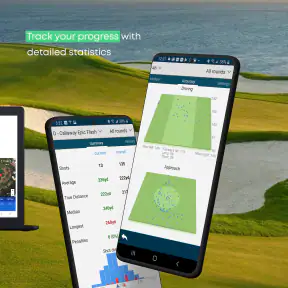
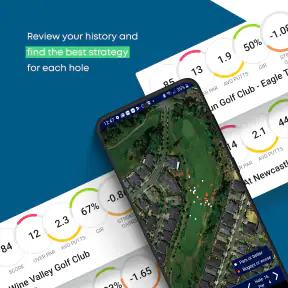
What I appreciate about Golf Pad: Golf GPS & Scorecard is its focus on improving your game. The shot tracking feature is a game-changer. You can log each shot, analyze your performance, and identify areas for improvement. It's like having a personal golf coach right in your pocket. The app also offers statistics and trends over time, which is invaluable for anyone serious about lowering their handicap.
More From Our News Desk

Weather by Xiaomi Review: Clear at a Glance, Less Clear Up Close

X Under Pressure: Can It Recover When Posting Goes Wrong?

Clash of Clans Is Won Between the Battles

Android Auto Makes the Case for Quieter Car Software

MobiOffice: Transforming Mobile Productivity with Seamless Integration

EA SPORTS FC™ Mobile Soccer: Redefining Mobile Sports Gaming
Shot tracking is most useful when you record consistently, not just when a round goes especially well or badly. For a newcomer, I’d start by noting a small set of details you actually plan to review, then add more only if the habit feels manageable. A complete record can reveal patterns that memory tends to blur, but frequent phone interaction can also slow play. There is a real trade-off between richer notes and staying present with your group.
After several rounds, use the statistics as prompts for practice rather than as a verdict on your ability. If a recurring weakness appears, bring that observation to the range or your next lesson. Players who only want a simple score total may find detailed tracking unnecessary; a pocket scorecard or a lighter scoring app can be the better fit if analysis is not part of their routine.
User Experience and Design
The design of the app is sleek and modern. Navigation is intuitive, with all key functions accessible within a few taps. The app’s developers clearly understand the importance of a clutter-free interface, allowing users to focus more on their game and less on fiddling with their phones. I also appreciated that the app runs smoothly without any noticeable lag, even when using the GPS feature extensively.
Any GPS-based round tool depends on a phone that can maintain a location signal, so I’d begin a round with enough battery for the entire time outdoors and avoid leaving other power-hungry tasks running if the phone is already low. A watch or dedicated golf GPS device may suit players who want to glance at a distance without taking a phone from a pocket. Conversely, a phone-first golfer may prefer having the scorecard and shot records together instead of carrying another device.
For a busy weekend round, the app’s combined roles can be convenient, but those same choices mean it is not a substitute for attentive play or a reliable paper backup when a phone is unavailable. If the app pauses or the GPS reading seems off, I’d first check that the phone still has location access and give it a moment to settle, then use course markers or ask a playing partner rather than delaying the group. That kind of practical fallback matters more than expecting any phone tool to be flawless in every setting.
Furthermore, the app provides a community feel with features that allow you to share your achievements and compete with friends. It’s not just about improving your game but also about building connections with fellow golf enthusiasts.
Golf Pad is a free sports app from Golf Pad GPS, with optional in-app purchases priced from $0.99 to $29.99 per item. It has an average rating of 4.5 from around 37,000 ratings, alongside roughly 6,200 written reviews, and has been installed over 5 million times. It is rated for Everyone, first released on June 21, 2011, and version 20.4.7 is the current release. Those figures suggest a well-established option, though they cannot tell you whether its workflow suits your own round; I’d judge that by whether you actually use the tracking and scoring tools.
Choosing the Right Fit
I’d recommend it most to golfers who want distances, group scoring, and a record they can learn from without juggling separate tools. It is also a reasonable starting point for someone curious about a handicap or their own patterns, provided they are willing to enter information regularly. In a typical weekend round with friends, one person can keep the group card while each player focuses on their shots, then review personal trends after play instead of trying to remember every detail later.
Compared with a basic scorecard app, Golf Pad offers a broader set of golf-specific tools; compared with a dedicated GPS unit, it keeps those tools on a phone but depends on that phone’s battery and screen. Someone who strongly prefers a watch, does not want to handle a phone on the course, or only needs a quick score total may be happier with another option. Likewise, players who rarely review statistics should not feel obliged to log every shot just because the feature exists.
Final Thoughts
In conclusion, Golf Pad: Golf GPS & Scorecard is more than just a digital scorecard. It’s a comprehensive tool that enhances your golfing experience. Whether you’re a beginner looking to understand the game better or an experienced player aiming to lower your handicap, this app offers something for everyone. With its accurate GPS, detailed shot tracking, and user-friendly interface, it’s a must-have for anyone serious about golf. So next time you hit the course, make sure Golf Pad is in your pocket.
My overall view is positive, with one qualification: the app is most worthwhile when its information changes how you prepare, score, or practise. I would try the basic routine first—check a distance, record the group’s scores, and review a few useful statistics—before deciding whether deeper tracking belongs in every round. If that feels natural, Golf Pad can become a handy companion; if the phone itself gets in the way, a simpler card or dedicated device is a better choice.
Making the Most of a Full Round
A useful way to test the app is to avoid turning the first round into a data project. I’d use the distance display and scorecard first, then decide after the round whether shot tracking would answer a question I genuinely have. For instance, if I often lose strokes around a particular part of the course, keeping relevant shot records may help me notice a pattern; logging every detail without a reason is more likely to become a chore.
There is also a small group-management benefit to deciding on a scoring routine in advance. If I’m playing with friends, I’d ask whether they want their scores entered and how they want the card handled before the first tee. That avoids repeatedly passing the phone around and makes the app less intrusive. A player who wants a private record can keep the focus on their own round, while the person maintaining a group card can minimize interruptions by entering scores at natural pauses.
What to Expect from GPS and Phone Performance
Golf Pad’s speed in practice is tied to the phone and its GPS reception, so I would not treat any single distance reading as infallible. A quick glance is convenient, but trees, buildings, or a phone that has not settled on its location can make a reading less useful. When the number conflicts with course markers or what I can see, I’d pause, check the surroundings, and use the best available reference rather than forcing a club choice from the screen.
Stability matters most over a long round, when the app is being used repeatedly for distances and scoring. I’d keep the phone accessible and check that the round remains active after interruptions, especially if I switch to another task or lock the screen. If the app has been left idle, reopening it and confirming the current hole and score is a sensible habit before relying on it again. That quick check can prevent a small pause from becoming a mistaken entry carried through the rest of the round.
Because GPS use and a bright screen can place demands on a phone, battery planning is part of using the app well. I’d start with a comfortably charged device, reduce unnecessary screen time, and avoid running unrelated tasks that I do not need during play. On a phone with limited battery life, or for someone who plays long rounds and wants constant access to distances, a dedicated GPS device or watch may be the more dependable everyday choice.
Learning from Statistics Without Overtracking
The most useful statistics are the ones that lead to a decision. After a few rounds, I’d look for a recurring issue and choose one practical adjustment to test, rather than trying to overhaul my game based on every number. A record can help separate a repeated tendency from a bad day, but it cannot explain every cause: course conditions, fatigue, and a difficult lie still matter. That is why I see the app’s analysis as a prompt for reflection, not a substitute for judgement or coaching.
For a casual golfer, the free starting point makes it easy to see whether the combination of rangefinder and scorekeeping fits their habits before spending on optional purchases. The in-app items range from $0.99 to $29.99 each, so I’d decide what I need first and avoid paying for tools I am unlikely to use. Someone who only wants to finish a round with a score can keep things simple; someone who enjoys reviewing progress may find the broader record more worthwhile.
Overall, my performance verdict is that Golf Pad makes the most sense for golfers who want one phone-based place for course distances, group scoring, and gradual game review. It can feel quick and convenient when the phone is ready and the golfer keeps interactions brief, but it still depends on location reception, battery, and a sensible scoring routine. I’d choose it for practical all-in-one use, and choose a simpler card, watch, or dedicated GPS unit if reducing phone handling is more important than combining those tools.
Golf Pad: Golf GPS & Scorecard Frequently Asked Questions
Can I use Golf Pad without an internet connection while playing?
Golf Pad is designed as an on-course golf GPS and scorecard app, so it is worth checking that your phone’s location services are enabled before you start a round. GPS positioning comes from your device, while availability of course information and other connected features can depend on how the app is set up. Preparing the app and your device before you reach the course can make it easier to focus on your game.
Can Golf Pad help me track a handicap and review my progress?
Handicap tools and playing statistics are part of Golf Pad’s golf-focused feature set, making it useful for more than simply recording a score. Tracking your rounds can help you look back at performance over time and notice areas you may want to work on. The value of those tools depends on consistently entering your scores and other round details, so they are most helpful when you make them part of your regular golfing routine.
Is Golf Pad: Golf GPS & Scorecard suitable for beginners?
Golf Pad can be useful for golfers who are still learning to keep score and judge distances on the course. Its GPS rangefinder and digital scorecard bring those tasks together in one app, while statistics and shot tracking can help users reflect on their play. The range of tools may also appeal to experienced golfers, so beginners can start with the essentials and explore more as needed.
What features does Golf Pad: Golf GPS & Scorecard offer?
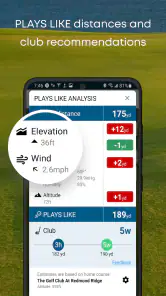
Golf Pad provides a comprehensive suite of features to enhance your golfing experience. It includes a GPS rangefinder, a digital scorecard, shot tracking, and detailed statistics. Additionally, it offers club recommendations and integrates with smartwatches for real-time information. The app supports multiple players and offers a premium version with advanced features.
Is Golf Pad: Golf GPS & Scorecard free to use?
Golf Pad is free to download and offers both free and premium options. The free version includes essential features such as the GPS rangefinder and digital scorecard, while paid options unlock additional features, including shot tracking, extended statistics, and smartwatch integration. In-app purchases range from $0.99 to $29.99 per item, so you can consider the available options and choose what suits your needs and budget.
Pros
- Easy to use interface for quick navigation
- Accurate GPS tracking for precise measurements
- Real-time scoring to track performance instantly
- Comprehensive course database with regular updates
- Compatible with smartwatches for hands-free use
Cons
- Battery consumption can be high during use
- Requires a stable internet connection for updates
- In-app purchases for premium features
- Limited offline functionality without pre-downloaded data
- User interface can be overwhelming for beginners
- Category
- Sports
- Version
- 20.4.7





