

Going: Find Flight Deals
- 192.00
- 4.6
- Installs
- 100.00K
- Price
- Free

Screenshots




Analysis by Reviewed
I installed Going: Find Flight Deals because searching for affordable airfare can easily become a second job. My usual approach involved checking several booking sites, changing dates repeatedly, and trying to remember which routes had looked reasonable earlier. Going takes a different role: it is less like a complete travel agency and more like a focused companion for discovering flight opportunities before I have committed to a destination or schedule.
That distinction matters. If I already know the exact flight I want, a standard airline or booking app may be the quicker place to finish the purchase. Going is more useful earlier in the process, when I am flexible enough to ask, “Where could I go for a sensible price?” rather than, “How do I buy this particular seat?” In my experience, that makes it especially interesting for spontaneous trips, weekend planning, and travelers who can adjust their dates.
How I use Going from the first idea to a realistic trip
The basic workflow is straightforward. I open the app, look for flight deals that fit my travel interests, and then decide whether an alert is worth acting on. The important habit is not to treat every attractive fare as an automatic bargain. A low ticket price can still be inconvenient if the airport is far away, the dates clash with work, or the total trip cost becomes high after accommodation and transport.
I found the app most helpful when I began with a loose plan. Instead of searching for one exact departure on one exact day, I considered several possible destinations and kept a short mental list of places I would genuinely enjoy. That gave the deal notifications context. A message about a cheap route was useful because I could quickly ask whether I would actually take the trip, not merely admire the number.
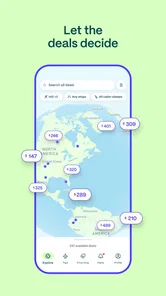
A realistic example is a person who has a long weekend available but has not chosen a city. With a conventional flight search, that person might enter a destination first and receive results for a narrow date range. Going is better suited to reversing that order: notice an appealing opportunity, check whether the dates work, and then build the rest of the trip around it. This is a small change in behavior, but it is the app’s central strength.
I also recommend keeping a simple decision rule before opening any deal alert. For me, that means knowing which airports are practical, how much flexibility I have, and whether I am willing to travel during less convenient periods. Without those boundaries, a stream of possibilities can create more browsing than saving. The app works best when it supports a travel plan instead of replacing one.
What the app is really good at
Going belongs in the Travel & Local category, and its focus is clearly flight discovery rather than full itinerary management. The developer, Going, has built the experience around finding cheaper domestic and international travel possibilities. I would describe it as a deal-awareness tool: it helps me notice opportunities that I might not have found through a normal destination-first search.
More From Our News Desk

 Weather - By Xiaomi
Weather by Xiaomi Review: Clear at a Glance, Less Clear Up Close
Xiaomi’s weather app makes everyday forecasts quick to scan, but its calm surface can leave useful details and recovery paths harder to find than they should be.

 X
XX Under Pressure: Can It Recover When Posting Goes Wrong?
A resilience-focused review of X, examining setup, mistaken posts, interruptions, weak connections, and the gaps that matter when recovery needs to be dependable.

 Clash of Clans
Clash of Clans Is Won Between the Battles
Its raids are quick; its community is a long-term project of coordination, teaching, rivalry, and shared responsibility—with all the friction that entails.

 Android Auto
Android Auto Makes the Case for Quieter Car Software
The car interface is no longer judged by how much it can do, but by how quietly it helps. Android Auto shows what drivers now expect—and what still gets in the way.

 MobiOffice: Word, Sheets, PDF
MobiOffice: Transforming Mobile Productivity with Seamless Integration
MobiOffice: Word, Sheets, PDF is redefining mobile productivity with a surprising blend of functionality and innovation.

 EA SPORTS FC Soccer Mobile 26
EA SPORTS FC™ Mobile Soccer: Redefining Mobile Sports Gaming
Dive into EA SPORTS FC™ Mobile Soccer, where immersive gameplay and strategic depth transform mobile sports gaming.
Latest News



That makes it valuable for flexible travelers, students, remote workers, couples comparing several getaway ideas, and anyone who enjoys planning around a good fare. It is less compelling for someone who must leave from a particular airport at a fixed hour, needs a specific airline, or has no tolerance for inconvenient dates. In those cases, a direct airline app or a broad flight comparison service usually gives more control at the exact moment of booking.
One useful mindset is to separate discovery from verification. I use Going to notice a route, then examine the dates, airport details, baggage situation, and final booking conditions before making a decision elsewhere. This prevents the common mistake of treating an alert as the whole purchase process. The app can point me toward an opportunity, but I still need to confirm whether it fits my real trip.
The free price is another reason it is easy to try. Going is listed as free, although in-app purchases range from $24 to $199 per item. That means I can explore the basic experience without treating the first download as a financial commitment. If I later consider a paid option, I would judge it by how often I travel and how much value I get from relevant opportunities, rather than assuming an upgrade automatically makes every search better.
Settings and habits worth checking before relying on alerts
My first recommendation is to make the app’s travel preferences reflect reality, not fantasy. If I say I am open to every destination but would only realistically use one nearby airport, the resulting possibilities become noisy. A smaller, honest set of preferences is more useful than maximum coverage. I would review the chosen departure area, destination interests, and flexibility whenever my circumstances change.
It is also worth deciding how you want to react to notifications. An alert is most useful when it leads to a quick decision, so I keep a basic checklist ready: can I travel on those dates, is the airport manageable, and would the destination still be appealing if the fare were merely good rather than extraordinary? This turns a notification into a repeatable workflow instead of an interruption that disappears into a crowded inbox.
I would not enable every possible travel signal simply because it sounds helpful. Too many alerts can make genuinely relevant deals harder to notice. Experienced use is usually quieter: choose the routes or regions that match your life, then review the preferences after a few weeks. If the alerts repeatedly show places you would not visit, the problem may be the setup rather than the app itself.
Another practical setting-related habit is to keep personal constraints outside the app in a note or calendar. I record blackout dates, passport or visa reminders, and the maximum total budget I am comfortable with. Going can help surface airfare, but a separate reminder prevents me from accepting a deal that fails for a non-price reason. This is especially important for international travel, where the ticket is only one part of preparation.
The app is suitable for Everyone, and it is available for devices running Android 7.0 or later. That broad compatibility makes it accessible on older Android phones, though I still prefer using it on a device where notifications are reliable. If the operating system is current enough but background notifications are restricted by the phone, the experience may feel less useful even when the app itself is working properly.
Faster patterns for people who check deals regularly
The quickest workflow I found was to stop treating each alert as a fresh research project. I keep a short list of destinations I would accept, a second list of places I would visit only at an exceptional price, and a clear idea of which airports I can reach without turning the trip into a logistical headache. When a deal appears, I can classify it immediately instead of starting from zero.
A second pattern is to compare the fare with the whole trip, not with an imaginary full-price ticket. I estimate lodging, local transport, baggage, meals, and the cost of getting to the departure airport. A flight that looks excellent in isolation may be less attractive than a slightly higher fare to a more convenient airport. Going helps with the first part of that comparison, but the final judgment remains mine.
I also found it useful to create a “decision window.” When an alert arrives, I give myself a short period to verify dates and practical details. If I cannot make the trip work after that check, I move on rather than repeatedly reopening the same possibility. This keeps the app from encouraging endless hypothetical planning and makes it easier to recognize the deals that genuinely fit.
For travelers who take several trips each year, a monthly review can be more effective than constant browsing. I look at the destinations I am still interested in, remove ideas that no longer make sense, and check whether my calendar has changed. This simple reset keeps the app aligned with my actual plans. It is a more sustainable habit than reacting emotionally to every low fare.
There is also a useful distinction between discovery and urgency. A deal may be worth investigating quickly, but that does not mean I should skip ordinary travel checks. I verify the departure and return dates, airport names, connection details where relevant, and the route’s fit with my schedule. Treating speed as a reason to be organized, rather than careless, is one of the best ways to use a deal-focused app.
Where Going has limits
The biggest limitation is that flexibility is not optional. The more fixed my destination, dates, airport, and airline preferences become, the less naturally the app fits my needs. Going can still be useful for inspiration, but it is not the tool I would choose as the sole method for a tightly constrained business trip or a family journey with several non-negotiable requirements.
It also does not remove the need for comparison. I still want to check the airline’s own conditions and the complete cost before paying. Baggage rules, seat selection, connection practicality, and change terms can affect the value of a fare. A deal alert is a starting signal, not a guarantee that the cheapest-looking option is the best option for my situation.
Another trade-off is attention. The app’s appeal comes from presenting possibilities I might not have searched for myself, but that same quality can tempt me into trips I had not budgeted for. I would skip it if I am trying to reduce travel spending completely or if notifications make me feel pressured to book. A traditional search tool is better when I already have a clear destination and want to compare every available option calmly.
The paid in-app purchase range also deserves a thoughtful approach. Free access makes experimentation easy, but I would not pay simply because a premium-looking travel workflow feels more serious. The right question is whether the additional value matches my travel frequency and flexibility. Someone who rarely flies may be perfectly satisfied with occasional manual searches, while a frequent flexible traveler may find more benefit in a dedicated deal routine.
Going has a 4.6 average from around 849 ratings, with about 192 written reviews, and it has passed 100K installs. Those figures suggest a meaningful user base and a generally positive reception, but they do not replace personal fit. A traveler with strict requirements can still find the app inconvenient, while a flexible traveler may appreciate it immediately. I would read the overall response as encouragement to test it, not as a reason to ignore its limitations.
My verdict after building a repeatable routine
Going is at its best when I use it before the destination is fully decided. It gives structure to the enjoyable but often inefficient habit of looking for affordable flights, and it can expose possibilities that a narrow search would never show. The experience feels more purposeful when I combine sensible preferences, restrained notifications, and a quick verification checklist.
The current version is 4.20.1, and the app was released on March 8, 2024. I appreciate that the core proposition is easy to understand: find worthwhile flight opportunities, then decide whether they fit my life. I do not see it as a replacement for airline apps, booking sites, calendars, or budget planning. I see it as the discovery layer that comes before those tools.
My strongest recommendation is for travelers who can move their dates, consider several destinations, and enjoy planning around value. My weaker recommendation is for people with fixed schedules, strict airport requirements, or a need to manage a complex booking from one place. For them, a conventional flight comparison service or the airline’s own app may be more efficient.
After using it, I would keep Going installed, but I would use it deliberately rather than constantly. Set realistic preferences, keep a short travel wish list, check the total trip cost, and confirm the details before booking. Used that way, Going becomes a practical shortcut for discovering trips, not a substitute for making careful travel decisions.
In the end, I recommend giving it a try if the idea of choosing a destination from a good airfare sounds exciting. If the idea sounds stressful, restrictive, or financially distracting, you will probably get more from a direct search tool. For flexible travelers, however, Going offers a useful change in perspective: instead of asking what a chosen trip will cost, I can first ask which worthwhile trips are realistically within reach.
Going: Find Flight Deals Frequently Asked Questions
What should I check before installing Going: Find Flight Deals?
Going: Find Flight Deals is a Travel & Local app from Going for discovering cheaper domestic and international flights. It is rated for Everyone, and the app is free to download, with optional in-app purchases. Before installing, consider whether you are comfortable receiving flight alerts and following them to an airline or travel agency to book. The app is most helpful when you are open to acting on deals as they appear.
Which devices can run Going: Find Flight Deals?
Going is available for Android devices running version 7.0 or later. The app’s current version is 4.20.1, so checking that your device meets the operating-system requirement before downloading can help avoid compatibility issues. Going is also available on iOS; make sure your device supports the version offered in its app store before installing.
What is Going: Find Flight Deals, and how does it work?
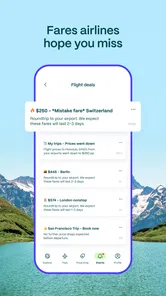
Going: Find Flight Deals is a travel app that helps users discover unusually cheap airfare and mistake fares. After choosing your departure airports or region, the app sends deal alerts when it finds suitable prices. It is not a booking platform in the traditional sense; instead, it usually redirects you to an airline or travel agency to complete the reservation. The service is most useful for flexible travelers who can act quickly when a deal appears.
Is Going: Find Flight Deals free to use?
Going offers a free membership, but some of its more advanced deal alerts and travel features may require a paid subscription, depending on the plan available in your region. Free members generally receive a more limited selection or delayed access, while premium tiers can provide earlier notifications and a broader range of deals. Before subscribing, check the current pricing, renewal terms, and exactly which airports, destinations, and alert types are included. Optional in-app purchases are available, so review the plan details before committing.
Can I book flights directly through the Going app?
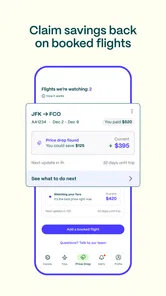
Going primarily functions as a flight-deal discovery and alert service rather than a complete airline booking system. When you find an attractive fare, the app normally provides information about the dates, route, airline, and estimated savings, then directs you to an airline website or booking partner. You should review baggage rules, seat fees, cancellation policies, and the final price on the booking page before paying, because those details can vary significantly.
Pros
- Compares fares from multiple airlines and booking providers in one search.
- Flexible date tools help identify cheaper travel days quickly.
- Useful filters for stops
- airlines
- baggage
- and departure times.
- Fare alerts can notify you when prices change for selected routes.
- Clean interface makes browsing destinations and flight options straightforward.
Cons
- Some results redirect to external sites to complete the booking.
- Displayed prices may change before checkout due to live fare updates.
- Budget fares may exclude baggage
- seat selection
- or other extras.
- Flight availability and deal quality can vary significantly by route.
- Frequent alerts may feel excessive if many routes are being monitored.











